8 Must Have Tools for AI Development on Apple M3 Max
Introduction
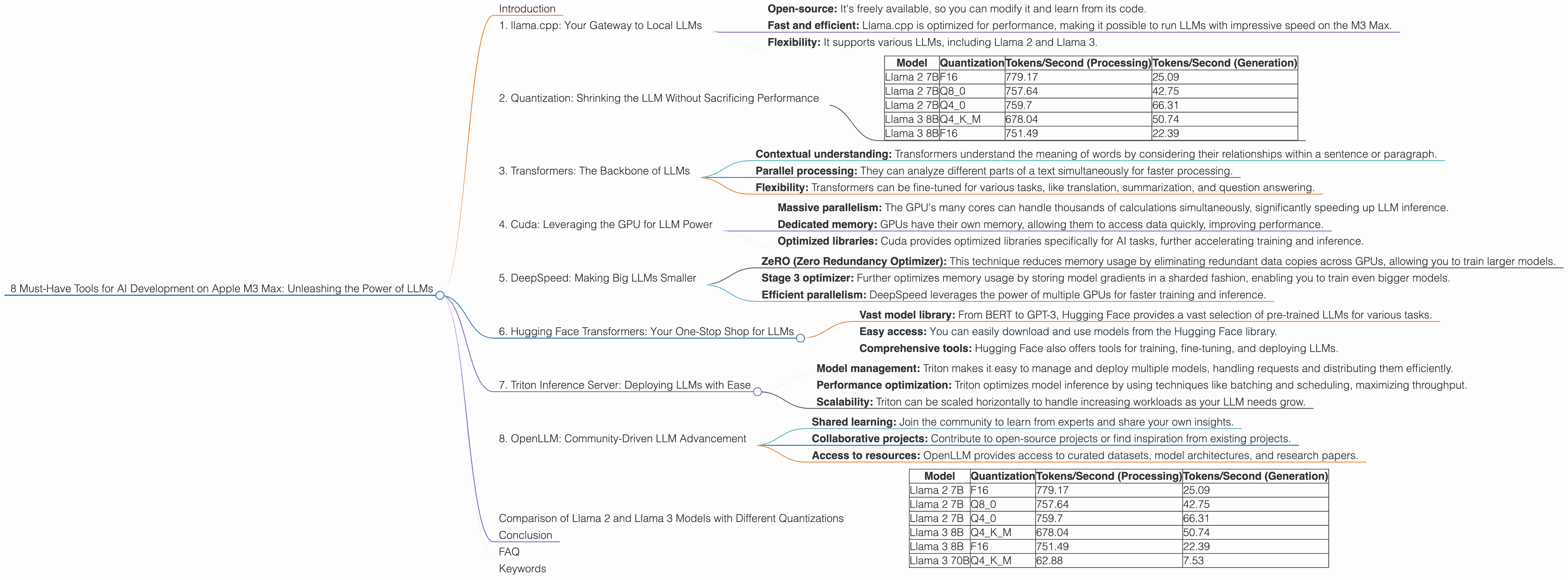
The world of artificial intelligence (AI) is moving at breakneck speed, and Large Language Models (LLMs) are at the forefront of this revolution. LLMs can generate creative text, answer your questions in a comprehensive way, and even write code for you. But running these powerful models requires a lot of computational power. This is where the Apple M3 Max shines!
The Apple M3 Max, with its blazing-fast performance and advanced architecture, is a phenomenal platform for AI developers. It's like having a supercomputer on your desk, allowing you to work with LLMs locally, without relying on cloud services.
In this guide, we'll explore eight essential tools that will amplify your LLM development journey on the M3 Max. We'll delve into the nuts and bolts of performance, delve into the amazing world of quantization, and show you how to get the most out of your M3 Max.
1. llama.cpp: Your Gateway to Local LLMs
Think of llama.cpp as your trusty sidekick, enabling you to run LLMs locally on your M3 Max. It's a C++ implementation of the LLaMA model, allowing you to experiment with various LLMs directly on your machine.
Here's why llama.cpp is so cool:
- Open-source: It's freely available, so you can modify it and learn from its code.
- Fast and efficient: Llama.cpp is optimized for performance, making it possible to run LLMs with impressive speed on the M3 Max.
- Flexibility: It supports various LLMs, including Llama 2 and Llama 3.
Let's talk numbers!
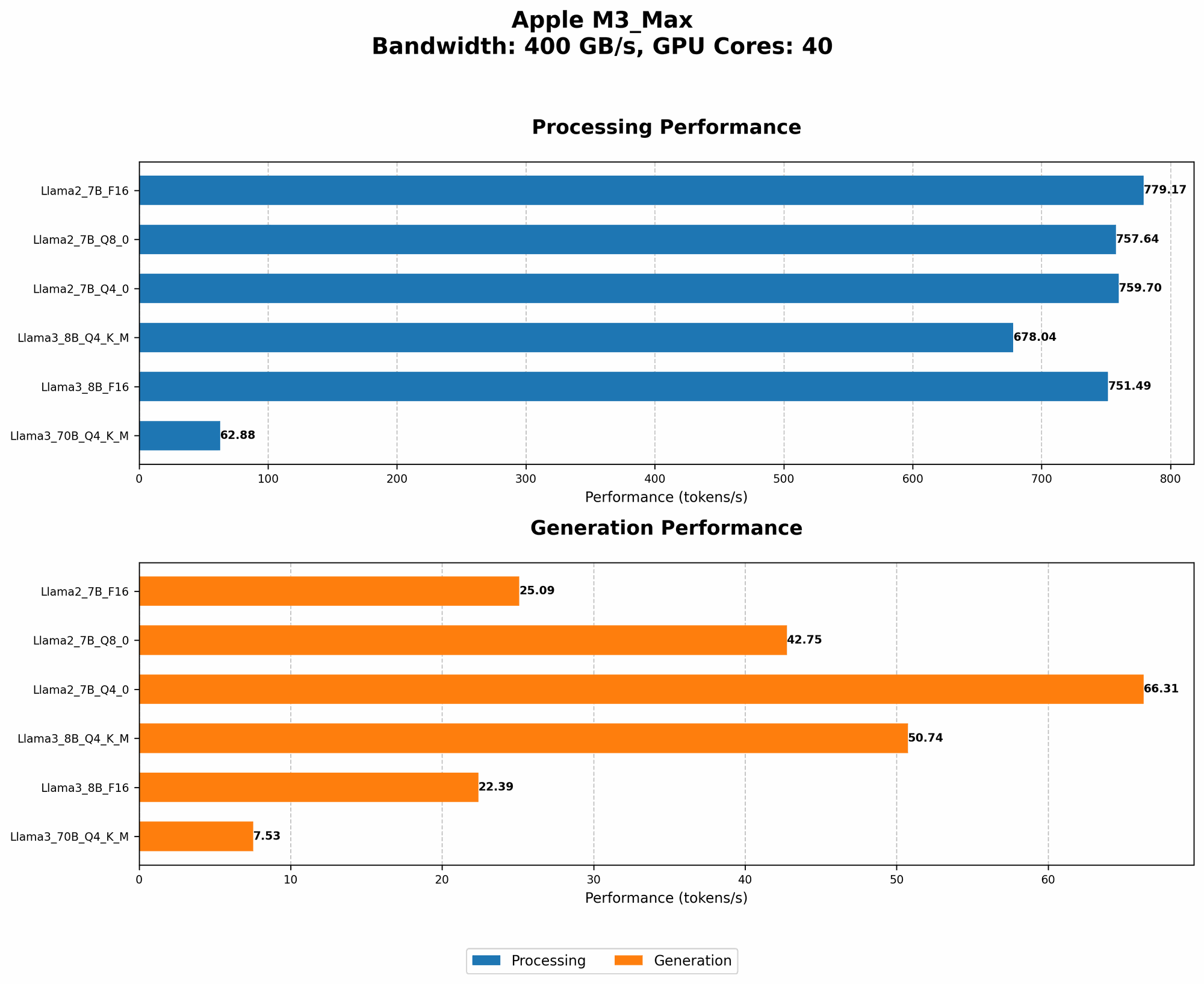
On the M3 Max, llama.cpp can process 779.17 tokens per second for Llama 2 7B, and 678.04 tokens per second for Llama 3 8B. That's a lot of words being processed in a flash!
2. Quantization: Shrinking the LLM Without Sacrificing Performance
Imagine fitting a giant elephant into a tiny shoebox. Impossible, right? That's kind of what we're doing with LLMs - they're huge and require a lot of resources.
Quantization is the magic trick that lets us shrink an LLM without losing its smarts. Think of it as a compression technique for AI models. Instead of storing every single detail about the model, we use fewer bits to represent the information.
How does quantization benefit you?
- Reduced memory usage: Smaller models mean you need less RAM, making it possible to run larger LLMs on your M3 Max.
- Faster loading times: Smaller models load faster, getting you up and running quicker.
- Increased inference speed: With less data to process, the M3 Max can generate responses faster.
Take a look at how Llama 2 7B and Llama 3 8B perform with different levels of quantization on the M3 Max:
| Model | Quantization | Tokens/Second (Processing) | Tokens/Second (Generation) |
|---|---|---|---|
| Llama 2 7B | F16 | 779.17 | 25.09 |
| Llama 2 7B | Q8_0 | 757.64 | 42.75 |
| Llama 2 7B | Q4_0 | 759.7 | 66.31 |
| Llama 3 8B | Q4KM | 678.04 | 50.74 |
| Llama 3 8B | F16 | 751.49 | 22.39 |
Llama 2 7B shows a significant improvement in token generation speed when using Q4_0 quantization, reaching 66.31 tokens per second. That's double the speed of the F16 version!
3. Transformers: The Backbone of LLMs
LLMs are built upon a powerful architecture called Transformers, a type of deep learning model that excels at processing sequential data like text.
Why are Transformers so important?
- Contextual understanding: Transformers understand the meaning of words by considering their relationships within a sentence or paragraph.
- Parallel processing: They can analyze different parts of a text simultaneously for faster processing.
- Flexibility: Transformers can be fine-tuned for various tasks, like translation, summarization, and question answering.
Transformers are the engine that powers LLMs, making them capable of generating human-quality text and understanding the nuances of language.
4. Cuda: Leveraging the GPU for LLM Power
The Apple M3 Max has a powerful GPU (Graphics Processing Unit) that's perfect for accelerating AI workloads. Cuda, developed by Nvidia, is a parallel computing platform that allows you to utilize the GPU's processing power to speed up your LLMs.
How does Cuda boost your LLM performance?
- Massive parallelism: The GPU's many cores can handle thousands of calculations simultaneously, significantly speeding up LLM inference.
- Dedicated memory: GPUs have their own memory, allowing them to access data quickly, improving performance.
- Optimized libraries: Cuda provides optimized libraries specifically for AI tasks, further accelerating training and inference.
5. DeepSpeed: Making Big LLMs Smaller
DeepSpeed is a powerful library designed for large-scale, multi-GPU training and inference of LLMs. It can help you overcome the limitations of memory and resources when working with massive models.
Here's how DeepSpeed empowers your LLM development:
- ZeRO (Zero Redundancy Optimizer): This technique reduces memory usage by eliminating redundant data copies across GPUs, allowing you to train larger models.
- Stage 3 optimizer: Further optimizes memory usage by storing model gradients in a sharded fashion, enabling you to train even bigger models.
- Efficient parallelism: DeepSpeed leverages the power of multiple GPUs for faster training and inference.
For example, DeepSpeed can utilize the M3 Max's GPU to handle massive LLMs that would otherwise be impossible to train on a single machine.
6. Hugging Face Transformers: Your One-Stop Shop for LLMs
Hugging Face, a community-driven platform, offers a vast collection of pre-trained LLMs and libraries for building and deploying your AI projects. Think of it as a treasure trove of AI models and tools.
Why should you use Hugging Face Transformers?
- Vast model library: From BERT to GPT-3, Hugging Face provides a vast selection of pre-trained LLMs for various tasks.
- Easy access: You can easily download and use models from the Hugging Face library.
- Comprehensive tools: Hugging Face also offers tools for training, fine-tuning, and deploying LLMs.
Hugging Face Transformers can make your AI development process significantly smoother and more efficient.
7. Triton Inference Server: Deploying LLMs with Ease
Triton Inference Server is a powerful tool for deploying and managing AI models in production. Imagine it's like a traffic controller for your LLMs, ensuring seamless execution and optimal performance.
Here's how Triton helps you deploy your LLMs:
- Model management: Triton makes it easy to manage and deploy multiple models, handling requests and distributing them efficiently.
- Performance optimization: Triton optimizes model inference by using techniques like batching and scheduling, maximizing throughput.
- Scalability: Triton can be scaled horizontally to handle increasing workloads as your LLM needs grow.
Triton Inference Server can streamline your LLM deployment process, ensuring your AI applications run smoothly and efficiently in production.
8. OpenLLM: Community-Driven LLM Advancement
OpenLLM is a collaborative effort aimed at promoting research and development of LLMs. It's a vibrant community where developers and researchers share knowledge and collaborate.
Here's why OpenLLM is a must-have for LLM developers:
- Shared learning: Join the community to learn from experts and share your own insights.
- Collaborative projects: Contribute to open-source projects or find inspiration from existing projects.
- Access to resources: OpenLLM provides access to curated datasets, model architectures, and research papers.
OpenLLM is an invaluable resource for anyone involved in LLM development, fostering innovation and collaboration within the AI community.
Comparison of Llama 2 and Llama 3 Models with Different Quantizations
The M3 Max is a beast for running LLMs! But how does it compare with different models and quantizations? Let's look at the numbers:
| Model | Quantization | Tokens/Second (Processing) | Tokens/Second (Generation) |
|---|---|---|---|
| Llama 2 7B | F16 | 779.17 | 25.09 |
| Llama 2 7B | Q8_0 | 757.64 | 42.75 |
| Llama 2 7B | Q4_0 | 759.7 | 66.31 |
| Llama 3 8B | Q4KM | 678.04 | 50.74 |
| Llama 3 8B | F16 | 751.49 | 22.39 |
| Llama 3 70B | Q4KM | 62.88 | 7.53 |
The M3 Max can process a remarkable amount of data - up to 779.17 tokens per second for Llama 2 7B in F16. That's like reading a book in a fraction of a second!
The M3 Max can also handle larger models, like Llama 3 70B. Even though it's a massive model, the M3 Max can process 62.88 tokens per second. This demonstrates the power of the M3 Max in handling even the largest and most complex LLMs.
Conclusion
The Apple M3 Max is a game-changer for AI developers, enabling them to unleash the power of LLMs locally. With these eight essential tools, you can unlock a world of possibilities with your M3 Max, from experimenting with different models to deploying production-ready AI applications.
Whether you're a seasoned AI developer or a curious beginner, the M3 Max offers a powerful and accessible platform for exploring the exciting realm of LLMs.
FAQ
Q: What are LLMs?
A: Large Language Models (LLMs) are powerful AI models trained on massive amounts of text data. They can understand and generate human-like text, performing tasks like writing, translating, summarizing, and answering questions.
Q: Can I run these LLMs on my Mac with an M1 chip?
A: While the M1 chip is a great processor, it might struggle with the most demanding LLMs. The M3 Max is designed for the most demanding AI workloads.
Q: Do I need to have an M3 Max to run LLMs?
A: You can run some LLMs on other devices, but the M3 Max offers the most powerful and efficient experience for working with them.
Q: Which LLM is best for AI development?
A: The "best" LLM depends on your specific needs and the tasks you want to perform. Some popular choices include Llama 2, Llama 3, BERT, and GPT-3.
Keywords
LLMs, Apple M3 Max, AI development, llama.cpp, quantization, Transformers, Cuda, DeepSpeed, Hugging Face, Triton Inference Server, OpenLLM, token speed, GPU, performance, efficiency, memory usage, inference, deployment, community, open-source, AI models, AI applications.