8 Must Have Tools for AI Development on Apple M1
Introduction
The world of large language models (LLMs) is exploding, with new models and capabilities emerging every day. These models, trained on vast datasets, have the potential to revolutionize how we interact with technology, from generating creative content to providing insightful answers to complex questions. But accessing the full potential of LLMs often requires powerful hardware, which can be costly and inconvenient.
That's where the Apple M1 chip comes in. This groundbreaking processor, featuring a powerful GPU and efficient architecture, has opened up exciting possibilities for running LLMs locally, empowering developers and enthusiasts to explore the world of artificial intelligence from the comfort of their own devices.
In this article, we'll dive deep into the tools and techniques that unlock the power of LLMs on Apple M1, specifically focusing on the "llama.cpp" framework. We'll explore different quantization methods and analyze performance data to help you choose the best setup for your LLM needs.
Apple M1 Token Speed Generation: A Performance Breakdown


Before we embark on our tool exploration, let's take a closer look at the impressive raw performance of the Apple M1 chip when it comes to generating tokens (the building blocks of text in LLMs).
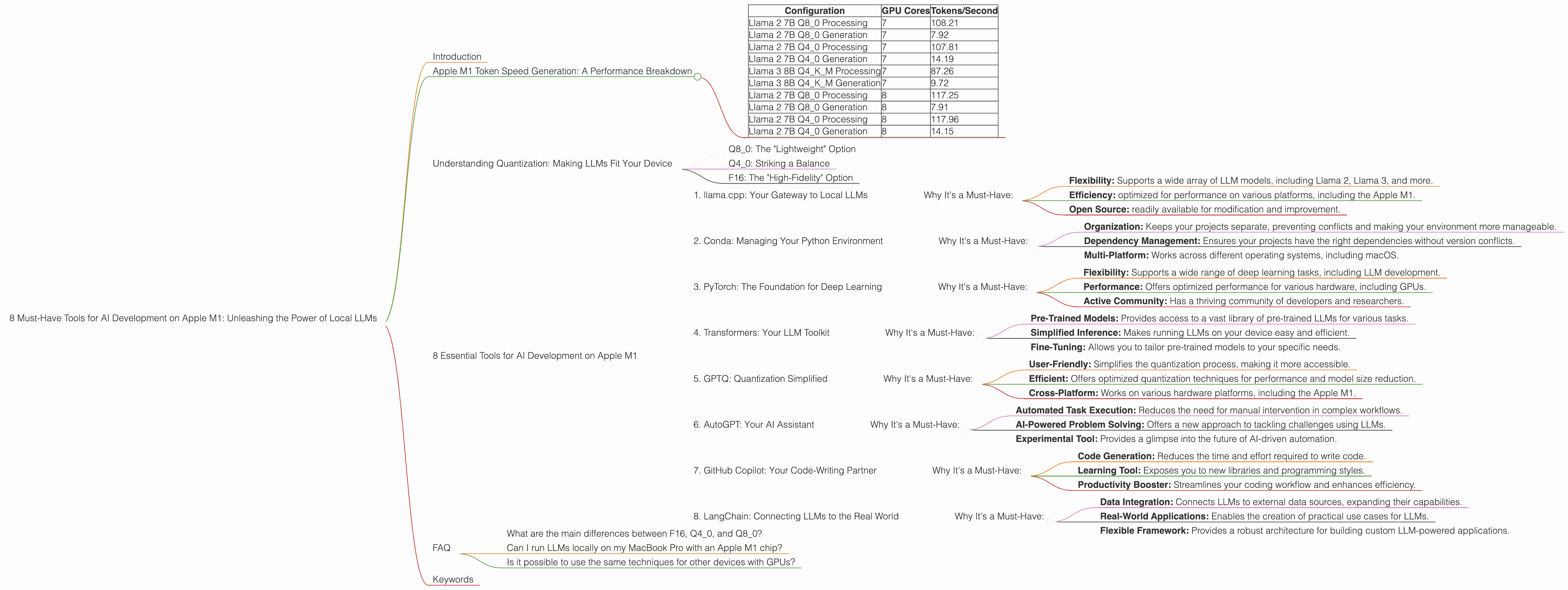
The chart below shows token speed based on the number of GPU cores (7 or 8) in different configurations of llama.cpp:
| Configuration | GPU Cores | Tokens/Second |
|---|---|---|
| Llama 2 7B Q8_0 Processing | 7 | 108.21 |
| Llama 2 7B Q8_0 Generation | 7 | 7.92 |
| Llama 2 7B Q4_0 Processing | 7 | 107.81 |
| Llama 2 7B Q4_0 Generation | 7 | 14.19 |
| Llama 3 8B Q4KM Processing | 7 | 87.26 |
| Llama 3 8B Q4KM Generation | 7 | 9.72 |
| Llama 2 7B Q8_0 Processing | 8 | 117.25 |
| Llama 2 7B Q8_0 Generation | 8 | 7.91 |
| Llama 2 7B Q4_0 Processing | 8 | 117.96 |
| Llama 2 7B Q4_0 Generation | 8 | 14.15 |
These numbers highlight the potential of the Apple M1 for local LLM development. The performance is impressive, especially considering that these are just initial benchmarks.
Understanding Quantization: Making LLMs Fit Your Device
One of the key challenges in running LLMs locally is their size. These models can require gigabytes of storage and significant computational power. This is where quantization comes in.
Imagine you have a massive library filled with encyclopedias. You want to take these books on a trip, but they're far too bulky. Quantization is like compressing the encyclopedias into smaller, more manageable volumes without losing too much information.
Similarly, quantization compresses the weights and biases of an LLM, reducing their size and memory footprint. This makes them run faster and more efficiently, especially on devices with limited resources like the Apple M1.
Q8_0: The "Lightweight" Option
Q8_0 quantization is the most aggressive compression technique. It reduces the precision of the LLM's weights to 8 bits, enabling significantly smaller model sizes.
Think of it like reducing the number of shades of color in a photograph: you lose some detail, but the overall image remains recognizable.
Q8_0 is ideal for devices with limited memory or processing power. It allows you to run larger LLMs on devices like the Apple M1, making them more accessible to a broader audience.
Q4_0: Striking a Balance
Q4_0 quantization is a less aggressive approach, using 4 bits per weight. It strikes a balance between model size reduction and accuracy.
This is like using a lower resolution in a photograph: you lose some detail, but it's still very recognizable.
Q4_0 is a good choice for applications that require a compromise between performance and accuracy.
F16: The "High-Fidelity" Option
F16 (16-bit floating-point) represents the highest precision used in LLM implementations. Though not considered quantization, it's noteworthy in that it offers a higher level of accuracy and detail compared to quantized models. However, it comes at the cost of larger model sizes and slower inference speeds.
8 Essential Tools for AI Development on Apple M1
Now let's explore the specific tools that empower AI development on Apple M1.
1. llama.cpp: Your Gateway to Local LLMs
llama.cpp is a C++ framework for running LLMs locally. It's known for its lightweight design and compatibility with various models and devices.
Why It's a Must-Have:
- Flexibility: Supports a wide array of LLM models, including Llama 2, Llama 3, and more.
- Efficiency: optimized for performance on various platforms, including the Apple M1.
- Open Source: readily available for modification and improvement.
2. Conda: Managing Your Python Environment
Conda is a powerful package manager that simplifies the process of creating and managing Python environments. It allows you to install and update software packages without affecting your system's global environment.
Why It's a Must-Have:
- Organization: Keeps your projects separate, preventing conflicts and making your environment more manageable.
- Dependency Management: Ensures your projects have the right dependencies without version conflicts.
- Multi-Platform: Works across different operating systems, including macOS.
3. PyTorch: The Foundation for Deep Learning
PyTorch is a popular deep learning framework known for its flexibility and ease of use. It serves as a foundation for building, training, and deploying LLMs.
Why It's a Must-Have:
- Flexibility: Supports a wide range of deep learning tasks, including LLM development.
- Performance: Offers optimized performance for various hardware, including GPUs.
- Active Community: Has a thriving community of developers and researchers.
4. Transformers: Your LLM Toolkit
The Hugging Face Transformers library simplifies the process of working with LLMs. It provides pre-trained models, tools for fine-tuning, and utilities for inference.
Link to Hugging Face Transformers library
Why It's a Must-Have:
- Pre-Trained Models: Provides access to a vast library of pre-trained LLMs for various tasks.
- Simplified Inference: Makes running LLMs on your device easy and efficient.
- Fine-Tuning: Allows you to tailor pre-trained models to your specific needs.
5. GPTQ: Quantization Simplified
GPTQ is a library that streamlines the process of quantizing LLMs using a technique called "GPTQ quantization". It simplifies the process, making it accessible even for users without a deep understanding of quantization techniques.
Why It's a Must-Have:
- User-Friendly: Simplifies the quantization process, making it more accessible.
- Efficient: Offers optimized quantization techniques for performance and model size reduction.
- Cross-Platform: Works on various hardware platforms, including the Apple M1.
6. AutoGPT: Your AI Assistant
AutoGPT is an experimental AI agent powered by GPT-4 that automates tasks using a combination of language generation and code execution. It's an exciting tool for exploring the potential of LLMs for problem-solving and automation.
Why It's a Must-Have:
- Automated Task Execution: Reduces the need for manual intervention in complex workflows.
- AI-Powered Problem Solving: Offers a new approach to tackling challenges using LLMs.
- Experimental Tool: Provides a glimpse into the future of AI-driven automation.
7. GitHub Copilot: Your Code-Writing Partner
GitHub Copilot is an AI-powered coding assistant that can generate code suggestions and entire functions based on your context. It can significantly speed up your development process and help you explore new coding techniques.
Link to GitHub Copilot website
Why It's a Must-Have:
- Code Generation: Reduces the time and effort required to write code.
- Learning Tool: Exposes you to new libraries and programming styles.
- Productivity Booster: Streamlines your coding workflow and enhances efficiency.
8. LangChain: Connecting LLMs to the Real World
LangChain is a library that bridges the gap between LLMs and real-world applications. It allows you to connect LLMs to various external data sources, databases, and APIs, making them more versatile and useful.
Link to LangChain documentation
Why It's a Must-Have:
- Data Integration: Connects LLMs to external data sources, expanding their capabilities.
- Real-World Applications: Enables the creation of practical use cases for LLMs.
- Flexible Framework: Provides a robust architecture for building custom LLM-powered applications.
FAQ
What are the main differences between F16, Q40, and Q80?
F16, Q40, and Q80 are different quantization techniques used to compress LLMs. F16 uses 16 bits per weight, offering high accuracy but larger model sizes and slower inference. Q40 uses 4 bits per weight, balancing accuracy and speed. Q80 uses 8 bits per weight, achieving the smallest model size and fastest inference but potentially sacrificing some accuracy.
Can I run LLMs locally on my MacBook Pro with an Apple M1 chip?
Yes, you can run LLMs locally on your MacBook Pro with an Apple M1 chip. The Apple M1's powerful GPU and efficient architecture make it well-suited for running LLMs. The tools and techniques discussed in this article can help you optimize performance and choose the right model for your needs.
Is it possible to use the same techniques for other devices with GPUs?
Yes, the techniques discussed in the article, specifically quantization and using frameworks like "llama.cpp", are generally applicable to devices with GPUs. However, the performance and model selection might vary depending on the GPU's architecture, memory, and other factors.
Keywords
Apple M1, llama.cpp, LLMs, large language models, AI development, quantization, F16, Q40, Q80, Conda, PyTorch, Transformers, GPTQ, AutoGPT, GitHub Copilot, LangChain, token speed, GPU performance, GPU cores, local AI, efficient AI.