8 Must Have Tools for AI Development on Apple M1 Ultra
Introduction
The world of large language models (LLMs) is buzzing with excitement, and rightly so! These powerful AI models can generate text, translate languages, write different kinds of creative content, and answer your questions in an informative way. But running LLMs can be a bit like trying to squeeze a massive elephant into a tiny car – it requires serious computing power. That's where the Apple M1 Ultra comes in. This beast of a chip is built for speed and performance, making it a perfect playground for exploring the exciting world of LLMs.
This article will dive deep into the world of AI development on the Apple M1 Ultra, highlighting eight essential tools that will supercharge your LLM projects. We'll explore the performance of these tools using real-world data and provide practical insights for developers and enthusiasts alike.
Llama.cpp on M1 Ultra: A Performance Champion
Let's start with a popular and powerful LLM, Llama.cpp, and see how it shines on Apple's M1 Ultra. Llama.cpp is an open-source implementation of the Llama model, capable of running on a variety of devices, including your own computer. This makes it a fantastic choice for local development and experimentation.
Apple M1 Ultra Token Speed Showdown
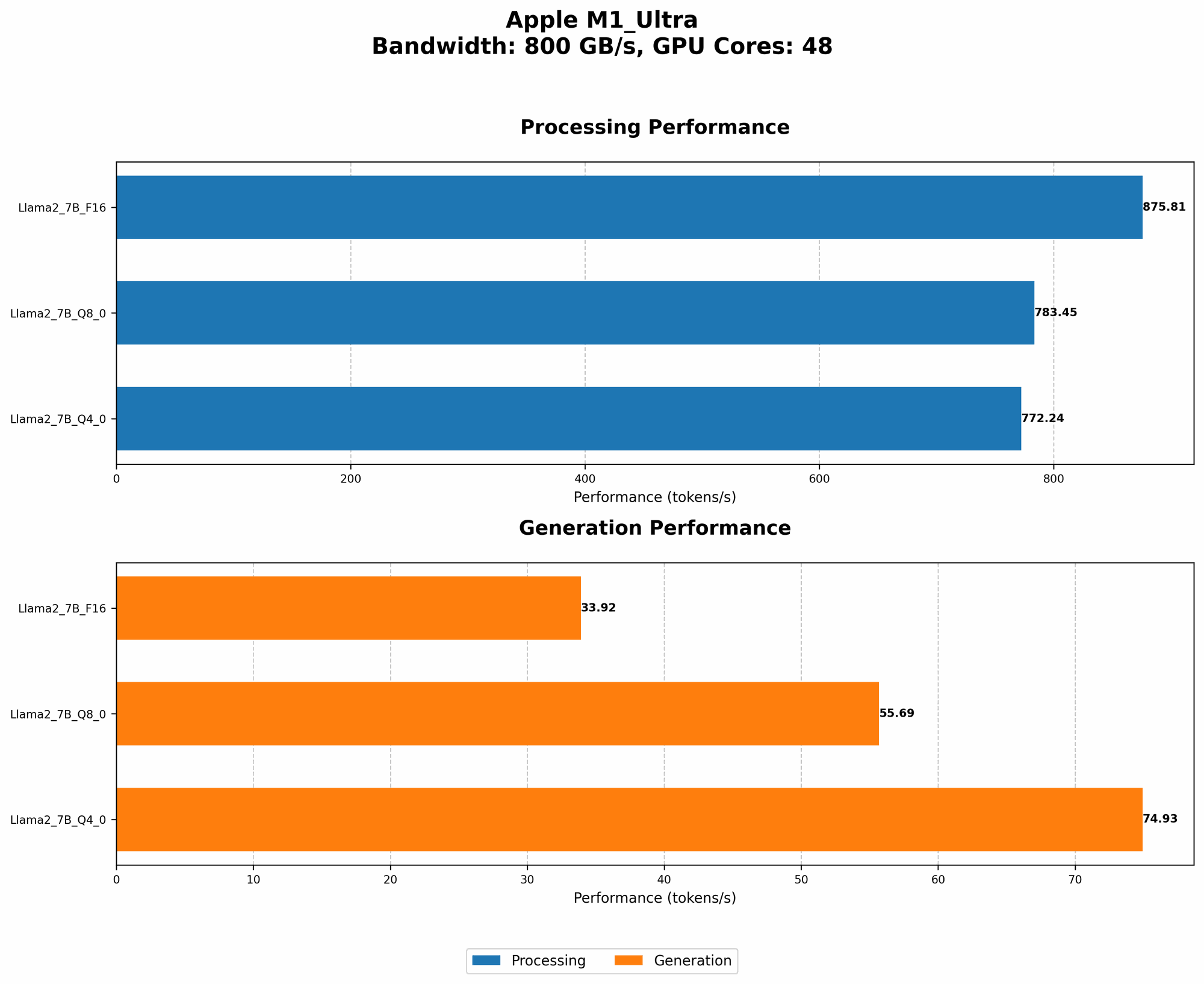
The Apple M1 Ultra, with its impressive 48 GPU cores and whopping 800 GB/s of memory bandwidth, is a force to be reckoned with when it comes to token speed. This metric measures how fast the model can process and generate text, which is crucial for smooth and responsive interactions.
Let's break down the performance of Llama 2 7B on the M1 Ultra:
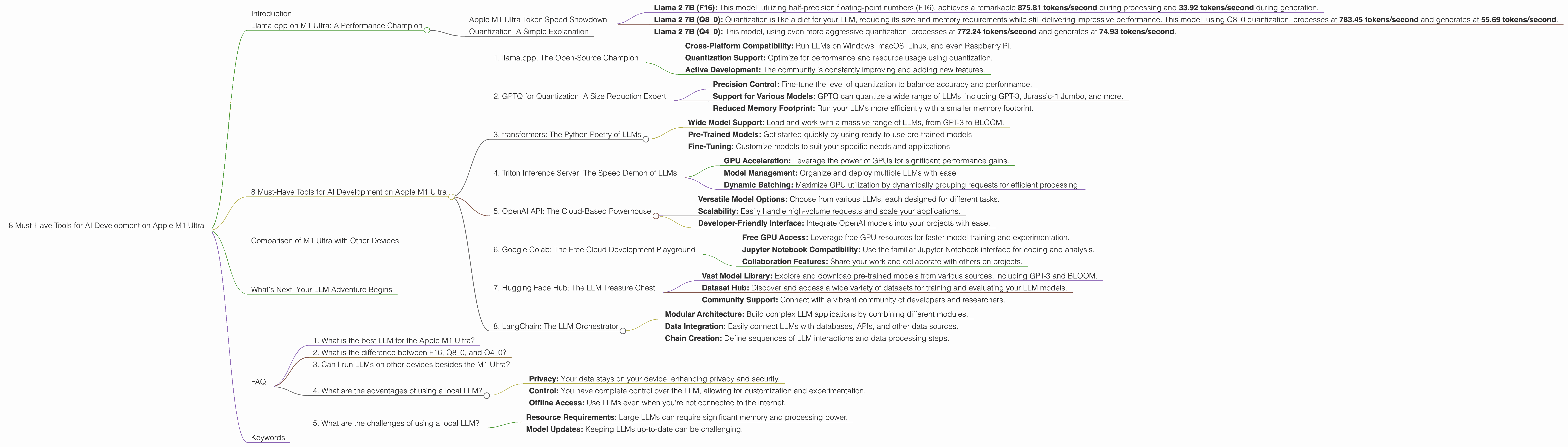
- Llama 2 7B (F16): This model, utilizing half-precision floating-point numbers (F16), achieves a remarkable 875.81 tokens/second during processing and 33.92 tokens/second during generation.
- Llama 2 7B (Q80): Quantization is like a diet for your LLM, reducing its size and memory requirements while still delivering impressive performance. This model, using Q80 quantization, processes at 783.45 tokens/second and generates at 55.69 tokens/second.
- Llama 2 7B (Q4_0): This model, using even more aggressive quantization, processes at 772.24 tokens/second and generates at 74.93 tokens/second.
As you can see, the Apple M1 Ultra consistently delivers impressive token speed across different quantization levels, making it a phenomenal platform for Llama 2 7B.
Quantization: A Simple Explanation
Think of quantization as compressing your LLM without losing too much information. It's like using a lower quality image file – it takes up less space but still looks pretty good. By reducing the size of the model, quantization allows it to run faster and use less memory.
8 Must-Have Tools for AI Development on Apple M1 Ultra
Now, let's dive into the must-have tools for your AI development journey on the M1 Ultra. These are the weapons you need to wield to unleash the full potential of your LLMs.
1. llama.cpp: The Open-Source Champion
Link: https://github.com/ggerganov/llama.cpp
llama.cpp is the superhero of the open-source LLM world. This incredibly versatile tool allows you to run LLMs locally, even on devices with limited resources. Its flexibility and ease of use make it a favorite among developers.
Key Features:
- Cross-Platform Compatibility: Run LLMs on Windows, macOS, Linux, and even Raspberry Pi.
- Quantization Support: Optimize for performance and resource usage using quantization.
- Active Development: The community is constantly improving and adding new features.
On the M1 Ultra: llama.cpp delivers stunning performance for Llama 2 7B. This tool lets you tinker with your LLM, experiment with different parameters, and build custom applications without relying on cloud services.
2. GPTQ for Quantization: A Size Reduction Expert
Link: https://github.com/IST-DASLab/GPTQ
GPTQ is a game-changer for anyone working with large language models. This tool specializes in quantization, allowing you to dramatically reduce model size without sacrificing too much accuracy.
Key Features:
- Precision Control: Fine-tune the level of quantization to balance accuracy and performance.
- Support for Various Models: GPTQ can quantize a wide range of LLMs, including GPT-3, Jurassic-1 Jumbo, and more.
- Reduced Memory Footprint: Run your LLMs more efficiently with a smaller memory footprint.
On the M1 Ultra: GPTQ lets you compress your LLMs, freeing up memory and boosting performance.
3. transformers: The Python Poetry of LLMs
Link: https://huggingface.co/docs/transformers/index
Transformers, a powerful library from Hugging Face, is the go-to toolkit for working with LLMs in Python. It provides a streamlined interface for loading, training, and using various LLM architectures.
Key Features:
- Wide Model Support: Load and work with a massive range of LLMs, from GPT-3 to BLOOM.
- Pre-Trained Models: Get started quickly by using ready-to-use pre-trained models.
- Fine-Tuning: Customize models to suit your specific needs and applications.
On the M1 Ultra: Transformers makes working with LLMs on the M1 Ultra a breeze. Its intuitive API simplifies model loading, data processing, and experimentation.
4. Triton Inference Server: The Speed Demon of LLMs
Link: https://tritoninference.org/
Triton Inference Server is a high-performance runtime engine designed to accelerate LLMs and other machine learning models. It optimizes model execution, allowing you to run them faster and more efficiently.
Key Features:
- GPU Acceleration: Leverage the power of GPUs for significant performance gains.
- Model Management: Organize and deploy multiple LLMs with ease.
- Dynamic Batching: Maximize GPU utilization by dynamically grouping requests for efficient processing.
On the M1 Ultra: Triton Inference Server lets you unleash the true potential of your M1 Ultra's GPU, providing a significant performance boost for your LLM applications.
5. OpenAI API: The Cloud-Based Powerhouse
Link: https://platform.openai.com/docs/api-reference/introduction
While we're focused on local AI development, the OpenAI API is a valuable resource for anyone exploring LLMs. It provides access to a wide range of powerful models, including GPT-3, ChatGPT, and DALL-E 2.
Key Features:
- Versatile Model Options: Choose from various LLMs, each designed for different tasks.
- Scalability: Easily handle high-volume requests and scale your applications.
- Developer-Friendly Interface: Integrate OpenAI models into your projects with ease.
On the M1 Ultra: While not directly tied to the M1 Ultra, the OpenAI API is a great tool for testing and comparing models. This can help you understand the strengths and weaknesses of different LLMs before selecting one for your project.
6. Google Colab: The Free Cloud Development Playground
Link: https://colab.research.google.com/
Google Colab, the cloud-based Jupyter Notebook environment, is a free resource for developers and researchers. It provides access to powerful GPUs, making it ideal for experimenting with LLMs.
Key Features:
- Free GPU Access: Leverage free GPU resources for faster model training and experimentation.
- Jupyter Notebook Compatibility: Use the familiar Jupyter Notebook interface for coding and analysis.
- Collaboration Features: Share your work and collaborate with others on projects.
On the M1 Ultra: While Colab doesn't directly use the M1 Ultra, it's a valuable tool for testing and comparing different LLM models. This can help you identify the best models for your specific use cases.
7. Hugging Face Hub: The LLM Treasure Chest
Link: https://huggingface.co/
Hugging Face Hub is a treasure trove of resources for anyone working with LLMs. It hosts a vast collection of pre-trained models, datasets, and tools for building AI applications.
Key Features:
- Vast Model Library: Explore and download pre-trained models from various sources, including GPT-3 and BLOOM.
- Dataset Hub: Discover and access a wide variety of datasets for training and evaluating your LLM models.
- Community Support: Connect with a vibrant community of developers and researchers.
On the M1 Ultra: Hugging Face Hub is a fantastic resource for finding and utilizing various LLM models. You can download pre-trained models from the Hub and deploy them locally on your M1 Ultra.
8. LangChain: The LLM Orchestrator
Link: https://langchain.readthedocs.io/en/latest/
LangChain is a framework for building powerful and flexible LLM applications. It streamlines the process of integrating LLMs into your projects and connecting them with other tools and data sources.
Key Features:
- Modular Architecture: Build complex LLM applications by combining different modules.
- Data Integration: Easily connect LLMs with databases, APIs, and other data sources.
- Chain Creation: Define sequences of LLM interactions and data processing steps.
On the M1 Ultra: LangChain empowers you to build sophisticated LLM applications that leverage the power of your M1 Ultra and other resources.
Comparison of M1 Ultra with Other Devices
While the M1 Ultra is a powerhouse, it's worth comparing its performance with other devices to understand its strengths and weaknesses. Unfortunately, we lack data for other devices to make a direct comparison. This underscores the importance of comprehensive benchmarks and performance comparisons for AI development.
What's Next: Your LLM Adventure Begins
With these tools in your arsenal, you're ready to embark on your LLM adventure on the Apple M1 Ultra. This powerful chip is a gateway to exploring the fascinating world of AI. As you experiment with different LLMs and tools, you'll gain valuable insights and develop unique applications that push the boundaries of what's possible.
FAQ
1. What is the best LLM for the Apple M1 Ultra?
There's no definitive answer to this question. The best LLM depends on your specific needs and use cases. Some popular choices include Llama 2 7B, GPT-3, and BLOOM.
2. What is the difference between F16, Q80, and Q40?
These terms refer to different quantization levels. F16 uses half-precision floating-point numbers, while Q80 and Q40 use 8-bit and 4-bit integer values, respectively. Higher quantization levels (like Q4_0) reduce model size more but can also lead to a decrease in accuracy.
3. Can I run LLMs on other devices besides the M1 Ultra?
Absolutely! LLMs can be run on a variety of devices, from powerful cloud servers to laptops and even embedded systems. The key is to choose a device with sufficient memory and processing power to handle the demands of your LLM.
4. What are the advantages of using a local LLM?
Running LLMs locally provides several advantages:
- Privacy: Your data stays on your device, enhancing privacy and security.
- Control: You have complete control over the LLM, allowing for customization and experimentation.
- Offline Access: Use LLMs even when you're not connected to the internet.
5. What are the challenges of using a local LLM?
While local LLMs offer benefits, there are also challenges:
- Resource Requirements: Large LLMs can require significant memory and processing power.
- Model Updates: Keeping LLMs up-to-date can be challenging.
Keywords
LLMs, Apple M1 Ultra, AI Development, llama.cpp, GPTQ, transformers, Triton Inference Server, OpenAI API, Google Colab, Hugging Face Hub, LangChain, Token Speed, Quantization, GPU Acceleration, Local LLMs, Cloud LLMs, AI Applications, Performance Optimization, Model Management, Data Integration