8 Must Have Tools for AI Development on Apple M1 Pro
Introduction
Imagine having a powerful AI assistant right on your Apple M1 Pro device. This is now a reality thanks to the rise of Local Large Language Models (LLMs)! These models can process text, generate creative content, and even translate languages right on your computer, without sending data to the cloud and sacrificing your privacy. But choosing the right tools for your AI development journey on M1 Pro can be like navigating a jungle of options.
This article will guide you through the 8 essential tools that will turn your M1 Pro into an AI powerhouse. We'll explore how these tools interact with different LLM models, focusing on the performance of the popular Llama 2 family. Get ready to unlock the potential of AI on your Apple M1 Pro and join the exciting world of local AI development!
Apple M1 Pro: A Powerful Platform for Local AI
The Apple M1 Pro chip is a game changer for AI enthusiasts. Its powerful graphics processing unit (GPU) and unified memory architecture make it a formidable platform for running LLM models locally. This means you can enjoy the benefits of AI without relying on cloud services, giving you better control, privacy, and speed. Let's dive into the tools that will help you harness this power.
1. llama.cpp: The Open-Source LLM Powerhouse
llama.cpp is the Swiss Army knife of AI development. This open-source project allows you to run LLM models locally on your M1 Pro without sacrificing performance. One of the biggest advantages of llama.cpp is its versatility. It supports different LLM models, including Llama 2, and can be customized for various tasks, from text generation to translation.
How powerful is llama.cpp on M1 Pro?
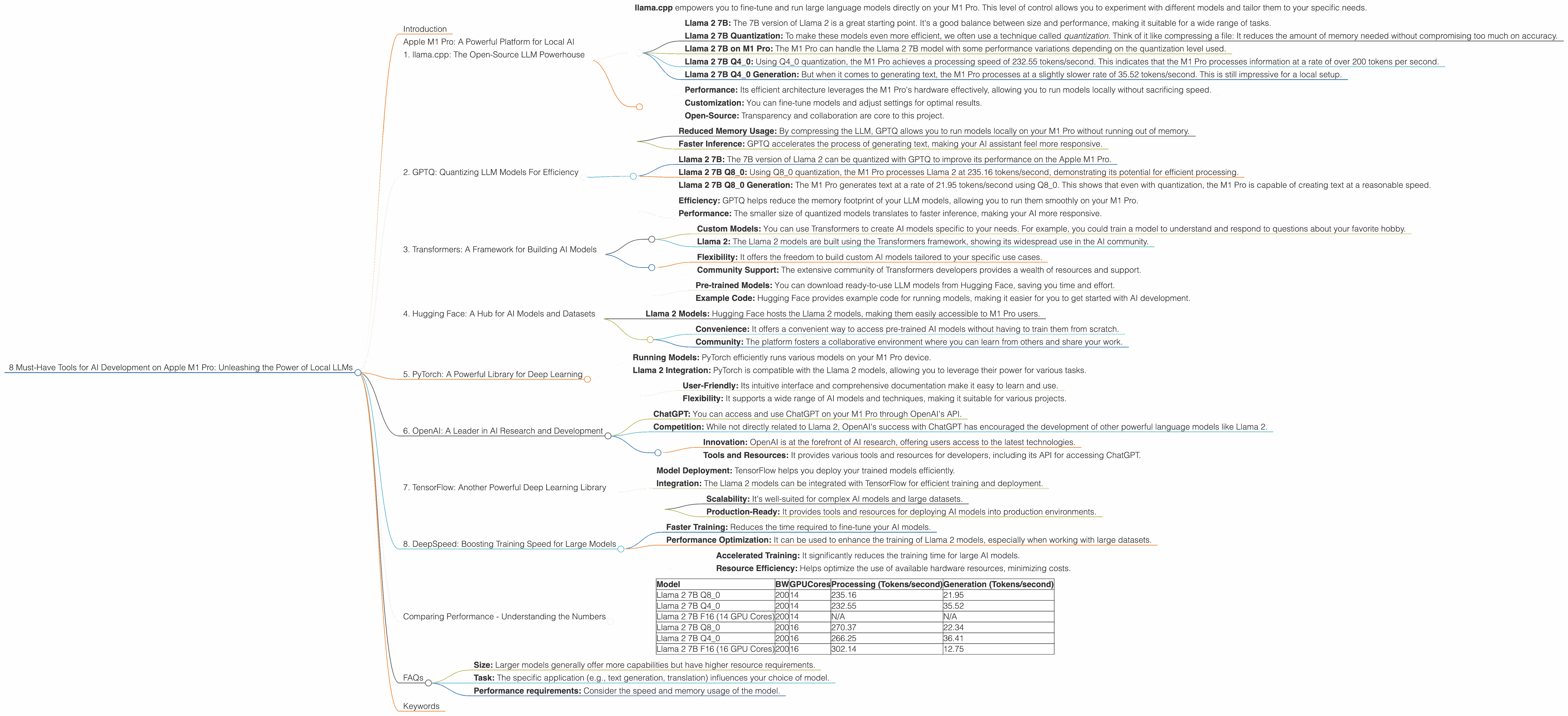
- llama.cpp empowers you to fine-tune and run large language models directly on your M1 Pro. This level of control allows you to experiment with different models and tailor them to your specific needs.
Let's look at Llama 2 on the M1 Pro:
- Llama 2 7B: The 7B version of Llama 2 is a great starting point. It's a good balance between size and performance, making it suitable for a wide range of tasks.
- Llama 2 7B Quantization: To make these models even more efficient, we often use a technique called quantization. Think of it like compressing a file: It reduces the amount of memory needed without compromising too much on accuracy.
- Llama 2 7B on M1 Pro: The M1 Pro can handle the Llama 2 7B model with some performance variations depending on the quantization level used.
- Llama 2 7B Q40: Using Q40 quantization, the M1 Pro achieves a processing speed of 232.55 tokens/second. This indicates that the M1 Pro processes information at a rate of over 200 tokens per second.
- Llama 2 7B Q4_0 Generation: But when it comes to generating text, the M1 Pro processes at a slightly slower rate of 35.52 tokens/second. This is still impressive for a local setup.
Why choose llama.cpp?
- Performance: Its efficient architecture leverages the M1 Pro's hardware effectively, allowing you to run models locally without sacrificing speed.
- Customization: You can fine-tune models and adjust settings for optimal results.
- Open-Source: Transparency and collaboration are core to this project.
2. GPTQ: Quantizing LLM Models For Efficiency
GPTQ (Generalized Quantized Training) is a powerful tool that helps you squeeze the most out of your M1 Pro. It's like a magic wand for Large Language Models. Imagine you have a massive dataset, like a giant library of books. GPTQ takes this data and compresses it. This process allows you to run your models more efficiently without sacrificing too much accuracy. It's a bit like getting a smaller, more affordable version of your favorite book - still packed with the same exciting content!
How GPTQ Helps You on M1 Pro:
- Reduced Memory Usage: By compressing the LLM, GPTQ allows you to run models locally on your M1 Pro without running out of memory.
- Faster Inference: GPTQ accelerates the process of generating text, making your AI assistant feel more responsive.
GPTQ in Action with Llama 2 on M1 Pro:
- Llama 2 7B: The 7B version of Llama 2 can be quantized with GPTQ to improve its performance on the Apple M1 Pro.
- Llama 2 7B Q80: Using Q80 quantization, the M1 Pro processes Llama 2 at 235.16 tokens/second, demonstrating its potential for efficient processing.
- Llama 2 7B Q80 Generation: The M1 Pro generates text at a rate of 21.95 tokens/second using Q80. This shows that even with quantization, the M1 Pro is capable of creating text at a reasonable speed.
Why Choose GPTQ?
- Efficiency: GPTQ helps reduce the memory footprint of your LLM models, allowing you to run them smoothly on your M1 Pro.
- Performance: The smaller size of quantized models translates to faster inference, making your AI more responsive.
3. Transformers: A Framework for Building AI Models
Transformers is a powerful tool that helps you develop custom AI models, like building your own train of thought. Imagine having a set of building blocks for creating AI models. Transformers are like those building blocks - reusable components that you can piece together to create your own custom AI solutions.
Transformers in Action on M1 Pro:
- Custom Models: You can use Transformers to create AI models specific to your needs. For example, you could train a model to understand and respond to questions about your favorite hobby.
- Llama 2: The Llama 2 models are built using the Transformers framework, showing its widespread use in the AI community.
Why Choose Transformers?
- Flexibility: It offers the freedom to build custom AI models tailored to your specific use cases.
- Community Support: The extensive community of Transformers developers provides a wealth of resources and support.
4. Hugging Face: A Hub for AI Models and Datasets
Hugging Face is a community-driven platform where you can find pre-trained models, datasets, and tools for AI development. Imagine a bustling marketplace where you can browse through thousands of pre-built AI models, ready to use for your projects. Hugging Face is like that marketplace, offering a treasure trove of tools for AI enthusiasts.
Hugging Face's Value for M1 Pro Users:
- Pre-trained Models: You can download ready-to-use LLM models from Hugging Face, saving you time and effort.
- Example Code: Hugging Face provides example code for running models, making it easier for you to get started with AI development.
Hugging Face and Llama 2 on M1 Pro:
- Llama 2 Models: Hugging Face hosts the Llama 2 models, making them easily accessible to M1 Pro users.
Why Choose Hugging Face?
- Convenience: It offers a convenient way to access pre-trained AI models without having to train them from scratch.
- Community: The platform fosters a collaborative environment where you can learn from others and share your work.
5. PyTorch: A Powerful Library for Deep Learning
PyTorch is a popular library for deep learning. Think of it as a toolkit for building and training complex AI models. With its user-friendly interface, it makes building intricate AI models on your M1 Pro a breeze.
PyTorch's Role in Local AI Development:
- Running Models: PyTorch efficiently runs various models on your M1 Pro device.
PyTorch and Llama 2 on M1 Pro:
- Llama 2 Integration: PyTorch is compatible with the Llama 2 models, allowing you to leverage their power for various tasks.
Why Choose PyTorch?
- User-Friendly: Its intuitive interface and comprehensive documentation make it easy to learn and use.
- Flexibility: It supports a wide range of AI models and techniques, making it suitable for various projects.
6. OpenAI: A Leader in AI Research and Development
OpenAI is one of the leading organizations in AI research and development. It's like a research lab where cutting-edge AI technologies like ChatGPT are created.
OpenAI's Benefits for M1 Pro Users:
- ChatGPT: You can access and use ChatGPT on your M1 Pro through OpenAI's API.
OpenAI and Llama 2 on M1 Pro:
- Competition: While not directly related to Llama 2, OpenAI's success with ChatGPT has encouraged the development of other powerful language models like Llama 2.
Why Choose OpenAI?
- Innovation: OpenAI is at the forefront of AI research, offering users access to the latest technologies.
- Tools and Resources: It provides various tools and resources for developers, including its API for accessing ChatGPT.
7. TensorFlow: Another Powerful Deep Learning Library
TensorFlow is a highly regarded deep learning library. Imagine having a powerful engine designed specifically for AI. TensorFlow is like that engine, providing the computational muscle needed to train and run complex AI models.
TensorFlow for M1 Pro Users:
- Model Deployment: TensorFlow helps you deploy your trained models efficiently.
TensorFlow and Llama 2 on M1 Pro:
- Integration: The Llama 2 models can be integrated with TensorFlow for efficient training and deployment.
Why Choose TensorFlow?
- Scalability: It's well-suited for complex AI models and large datasets.
- Production-Ready: It provides tools and resources for deploying AI models into production environments.
8. DeepSpeed: Boosting Training Speed for Large Models
DeepSpeed is a performance optimization library that accelerates the process of training large models. Imagine having a turbocharger for your AI engine. DeepSpeed is like that turbocharger, boosting the speed of AI development.
DeepSpeed's Value for M1 Pro Users:
- Faster Training: Reduces the time required to fine-tune your AI models.
DeepSpeed and Llama 2 on the M1 Pro:
- Performance Optimization: It can be used to enhance the training of Llama 2 models, especially when working with large datasets.
Why Choose DeepSpeed?
- Accelerated Training: It significantly reduces the training time for large AI models.
- Resource Efficiency: Helps optimize the use of available hardware resources, minimizing costs.
Comparing Performance - Understanding the Numbers
We've talked about various tools for AI development, but how do they perform on the M1 Pro? Let's dive into some data to understand the capabilities of your Apple M1 Pro.
- Baseline: The raw performance of your M1 Pro provides a starting point. The M1 Pro, with its 14 or 16 GPU cores, is designed for graphics-intensive tasks.
- Llama 2: We're focusing on Llama 2, a popular LLM family, for our comparison.
- Quantization: We'll look at how different levels of quantization impact performance.
Table 1: Llama 2 Performance on M1 Pro
| Model | BW | GPUCores | Processing (Tokens/second) | Generation (Tokens/second) |
|---|---|---|---|---|
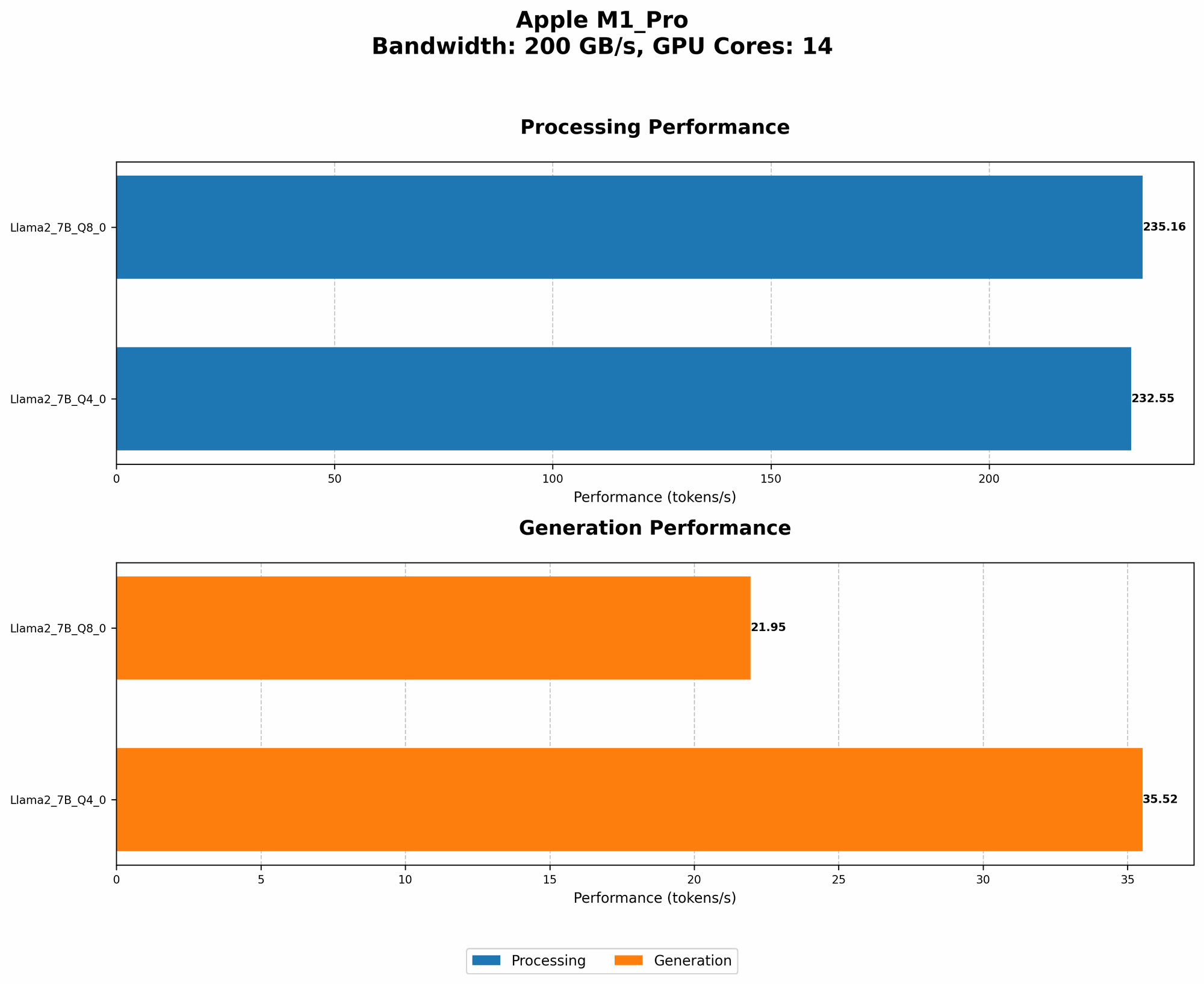
| Llama 2 7B Q8_0 | 200 | 14 | 235.16 | 21.95 |
| Llama 2 7B Q4_0 | 200 | 14 | 232.55 | 35.52 |
| Llama 2 7B F16 (14 GPU Cores) | 200 | 14 | N/A | N/A |
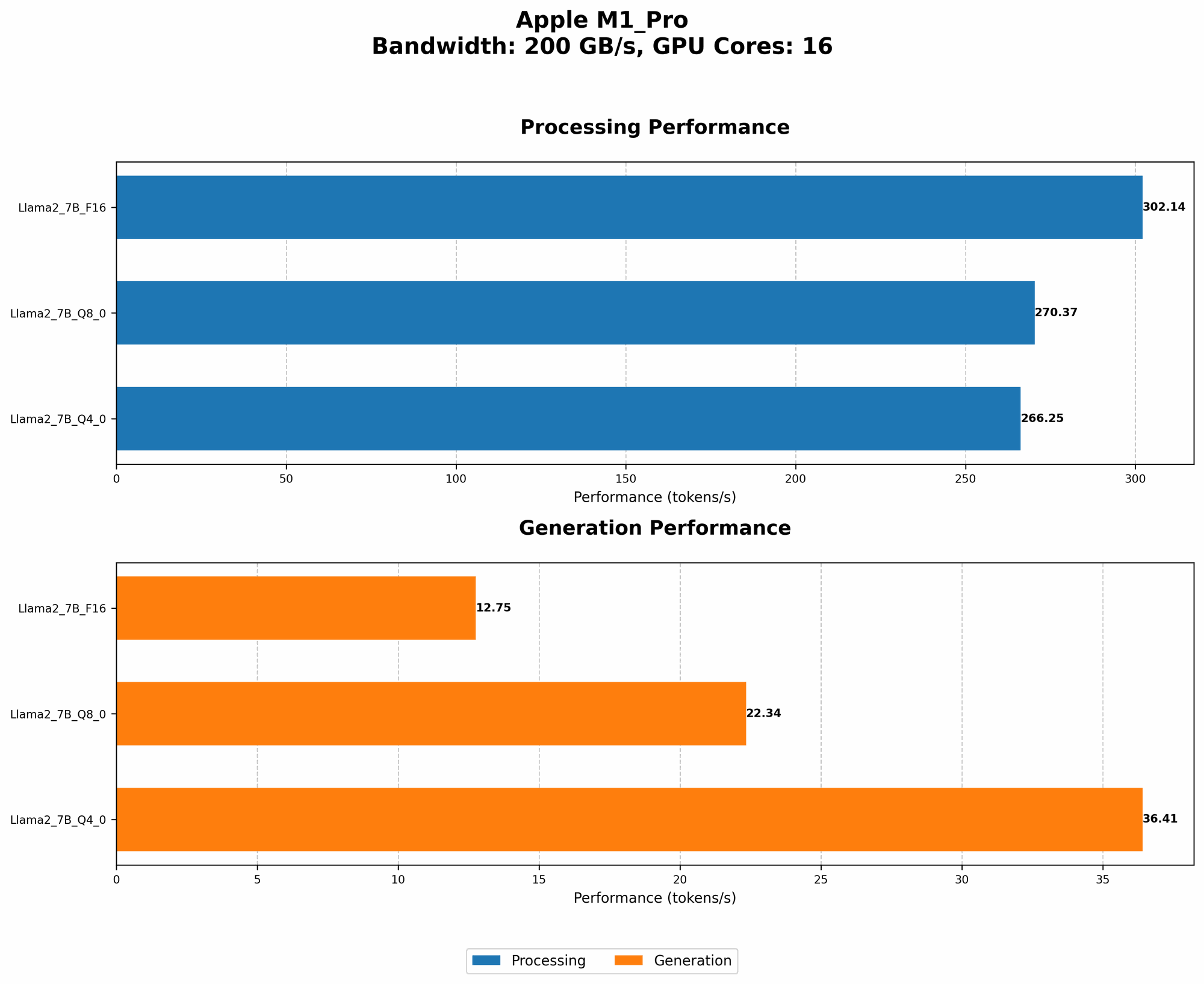
| Llama 2 7B Q8_0 | 200 | 16 | 270.37 | 22.34 |
| Llama 2 7B Q4_0 | 200 | 16 | 266.25 | 36.41 |
| Llama 2 7B F16 (16 GPU Cores) | 200 | 16 | 302.14 | 12.75 |
Key Insights:
- Quantization: Reducing the precision of the model (quantization) impacts processing and generation speeds. While it helps with memory consumption, it also affects the quality of output.
- GPU Cores: As we increase the number of GPU cores on the M1 Pro, the performance of Llama 2 models improves.
- Processing vs. Generation: The M1 Pro is generally faster for generating text than for processing it.
FAQs
Q: What are LLMs, and why are they so popular?
A: LLMs are like powerful AI brains that can understand and generate human-like text. Their ability to process vast amounts of information and translate languages has made them incredibly popular in various applications from chatbots to content creation tools.
Q: What are the limitations of running LLMs locally on M1 Pro?
A: While the M1 Pro is a powerful device, running large LLMs locally can be demanding. For very large models, you might need to adjust settings or consider using a more specialized device.
Q: How do I choose the right LLM for my needs?
A: Consider the following factors: * Size: Larger models generally offer more capabilities but have higher resource requirements. * Task: The specific application (e.g., text generation, translation) influences your choice of model. * Performance requirements: Consider the speed and memory usage of the model.
Q: Is it safe to run LLMs locally?
A: Running LLMs locally gives you more control over your data. However, it's essential to use trusted sources for models and to be mindful of potential security risks.
Keywords
LLM, Llama 2, Apple M1 Pro, AI Development, Local AI, Quantization, GPTQ, Transformers, Hugging Face, PyTorch, TensorFlow, DeepSpeed, Token Generation, GPU Cores, Processing Speed, Generation Speed, OpenAI, ChatGPT, AI Tools, AI Assistant, AI Engine, Deep Learning, Model Training, Model Deployment.