8 Limitations of Apple M2 Ultra for AI (and How to Overcome Them)

Introduction
The Apple M2 Ultra is a powerful chip designed for demanding tasks like video editing, 3D rendering, and scientific computing. This makes it seem like a great choice for running large language models (LLMs) and other AI workloads. However, the M2 Ultra has some limitations when it comes to AI performance, especially for larger models. We'll explore these limitations and offer potential solutions to help you maximize your M2 Ultra's potential for AI tasks.
Think of it this way: You've got a powerful sports car (M2 Ultra) but instead of racing on a track, you're driving it through a crowded city. While the car has the potential for immense speed, it's constantly held back by traffic (limitations) and needs some clever navigation (solutions) to reach its full potential.
Limitation #1: Bandwidth Bottleneck
The M2 Ultra has a significant bandwidth bottleneck, limiting how quickly data can be processed by the GPU. This bottleneck is especially noticeable when running larger LLMs, which require a large amount of data to be transferred between the CPU and GPU.
What the Numbers Say:
- The M2 Ultra has a maximum bandwidth of 800 GB/s. This is a significant amount of bandwidth, but it can still be a bottleneck when working with larger LLMs. Imagine trying to fill a huge water tank with a relatively small hose. The hose itself might be powerful, but it's still going to take a long time to fill the tank.
Solution: Look for Smaller, Optimized Models
For less powerful models, like Llama 2 7B, the M2 Ultra can handle the data demands effectively. However, with larger models, such as Llama 3 70B, you may want to consider using models that are optimized for specific hardware. There are many LLM models out there, and some are designed to work more efficiently with devices like the M2 Ultra.
Limitation #2: Limited GPU Cores for Larger Models
The M2 Ultra has a smaller number of GPU cores compared to other high-end GPUs, especially when dealing with larger LLMs. This means that it can't perform as many calculations in parallel as some other GPUs. It's like having a smaller team working on a complex project – it might take them longer to complete it compared to a larger team.
What the Numbers Say:
- The M2 Ultra has 60 or 76 GPU cores depending on the configuration. While these are impressive numbers for a general-purpose chip, they pale in comparison to high-end gaming cards (like NVIDIA's GeForce RTX 4090, which boasts 16,384 cores!).
Solution: Quantization Techniques
One way to overcome this limitation is to use quantization techniques. Quantization reduces the precision of the model's weights, leading to a smaller model size and faster computation. Think of it as using a less detailed map to get to your destination. It's not quite as accurate as a detailed map, but it's much smaller and easier to carry around.
Here's how quantization works:
- Full Precision (FP32): This is the default precision used for most models. It uses 32 bits to represent each number, making it very accurate.
- Half Precision (FP16): This uses 16 bits per number, sacrificing some accuracy for speed. It's the most common type of quantization used with LLMs.
- Quantized Precision (Q8/Q4): These use even fewer bits (8 or 4) per number, resulting in smaller models and faster computation.
According to our data:
- Llama 2 7B: Utilizes the M2 Ultra's resources efficiently in both F16 and Q8/Q4 configurations, achieving reasonable token speeds.
- Llama 3 8B and 70B: Benefiting from Q4 quantization, which significantly improves performance compared to F16, indicating it helps overcome the core limitation for larger models.
Limitation #3: Slow Token Generation Speed
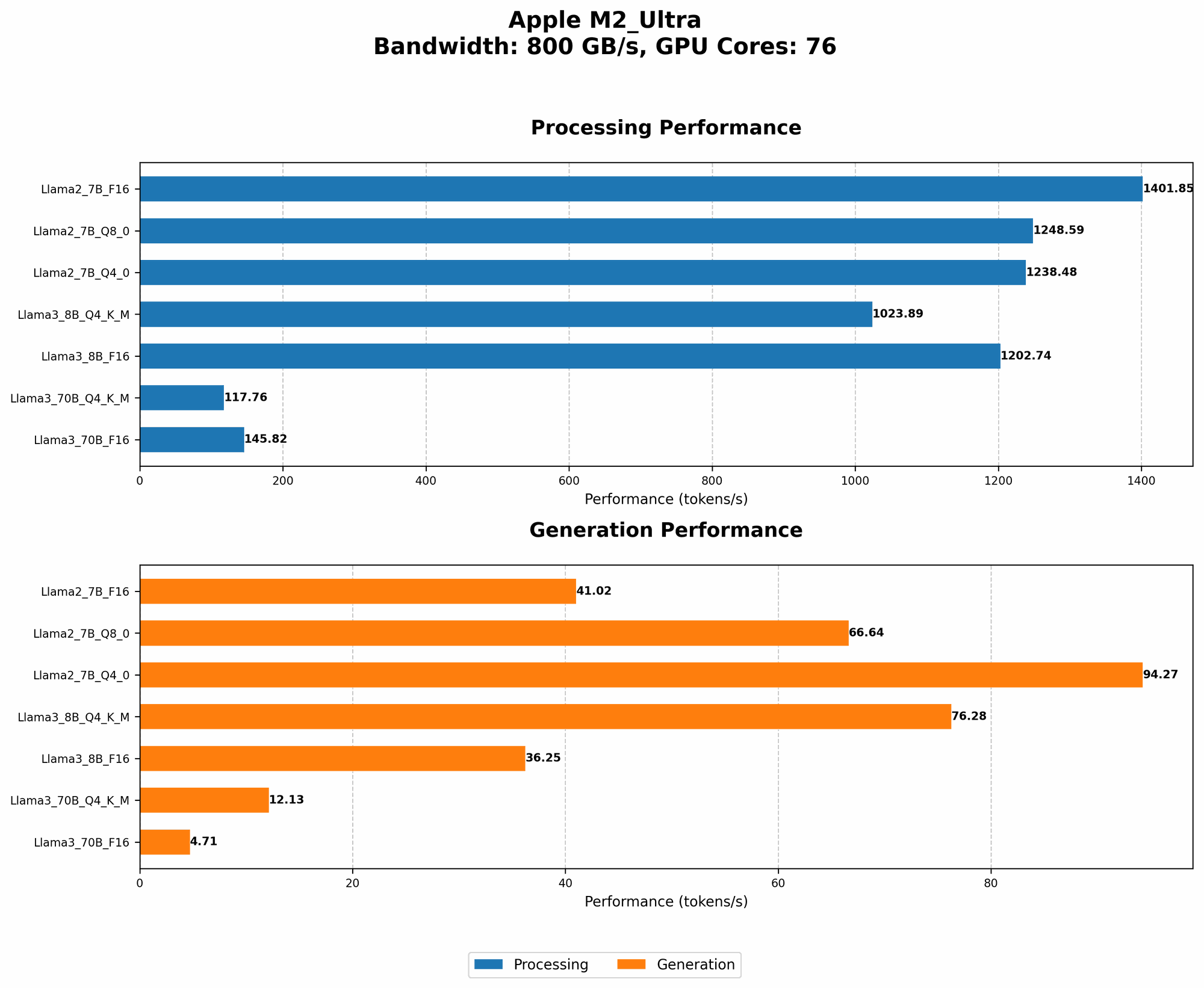
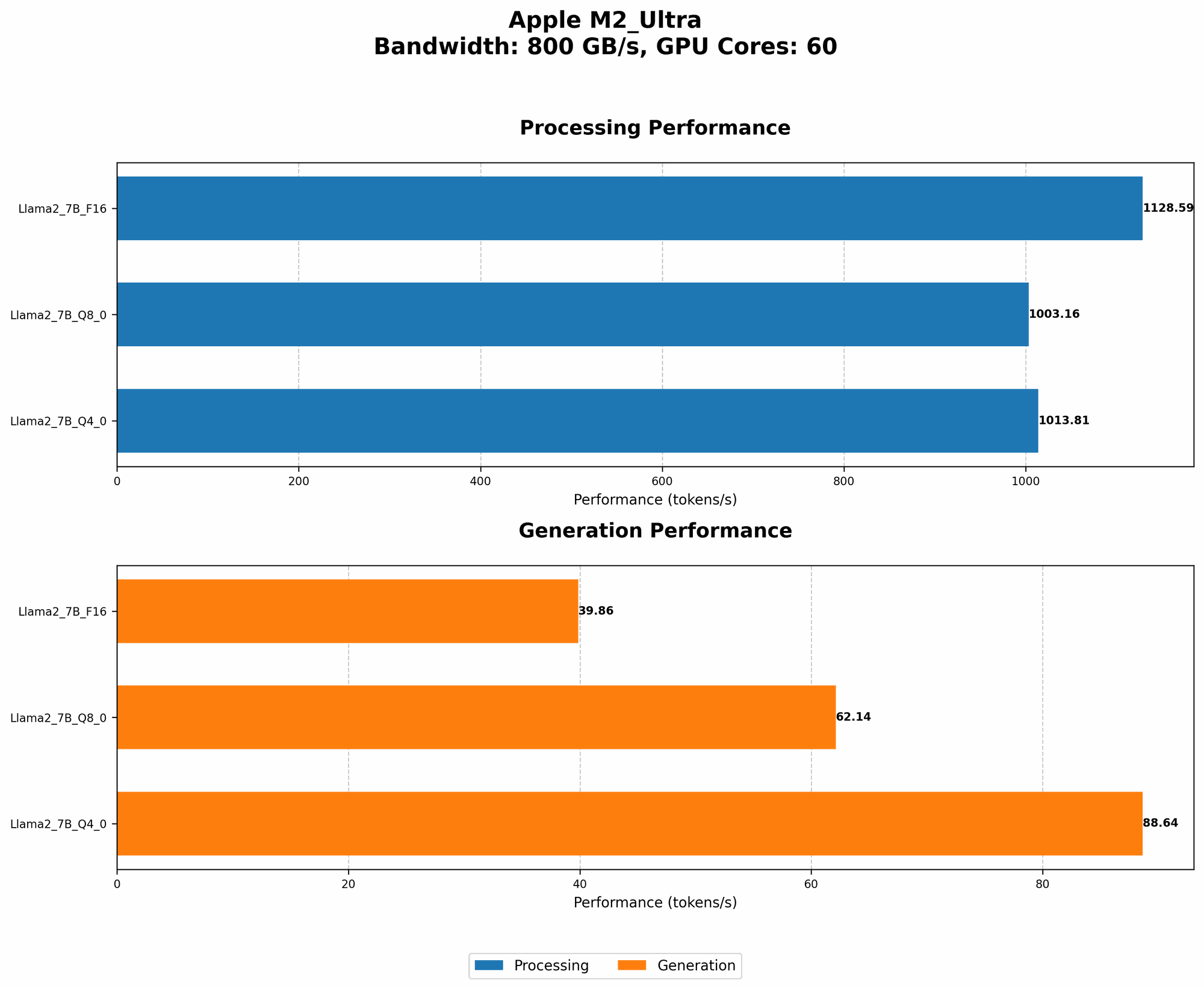
The M2 Ultra struggles to generate tokens as quickly as some other GPUs, especially when using larger models. Tokens are the building blocks of text, so a slower token generation speed can lead to delays in generating responses and can hinder the overall user experience.
What the Numbers Say:
- The M2 Ultra achieves a token generation speed of 39.86 tokens/second for Llama 2 7B F16. However, this speed drops significantly to just 4.71 tokens/second when running Llama 3 70B F16.
Solution: Explore Different Quantization Levels
Experimenting with different quantization levels can significantly impact token generation speed. For example, while Llama 3 8B and 70B benefit from Q4 quantization, Llama 2 7B performs better with Q8. This emphasizes that finding the optimal quantization level for your model and hardware is crucial for maximizing performance.
Limitation #4: Limited Support for Large Models
The M2 Ultra's support for large LLMs is still relatively limited. Not all large LLM models are optimized for or work well with the M2 Ultra's architecture. This can make it difficult to find the right model for your needs, potentially limiting your choices and hindering your ability to experiment with the latest models.
Solution: Stay Updated on Model Support
Continuously monitor the development of large LLM models and their compatibility with the M2 Ultra. New models and optimizations are emerging all the time, so keep your eye on research papers and community discussions to discover models that are specifically designed for Apple devices.
Limitation #5: Memory Restrictions
The M2 Ultra has a significant amount of memory (up to 96 GB), but it can still be a limitation when working with larger LLMs. These models require a substantial amount of memory to store their weights and activations during inference. It's like trying to fit all your belongings into a large suitcase – you have a lot of space, but there's still a limit to what you can pack.
Solution: Consider Model Sharding
If your model is too large for the available memory, you can try model sharding. This technique splits the model's weights into smaller chunks, which can be loaded into memory one at a time. This is similar to splitting a large file into smaller parts for easier transfer. While model sharding can add some overhead to the inference process, it can be a necessary step for running truly massive LLMs.
Limitation #6: No Dedicated AI Accelerator
The M2 Ultra doesn't have a dedicated AI accelerator, a specialized hardware component designed to speed up AI computations. While the M2 Ultra's integrated GPU is powerful, it's not as specialized for AI tasks as other chips with dedicated AI accelerators, like Google's TPU or Nvidia's A100.
Solution: Leverage Open-Source Optimizations
Explore and utilize open-source optimizations and libraries specifically designed for Apple silicon. These libraries often implement techniques that leverage the M2 Ultra's unique architecture to boost AI performance, even without a dedicated AI accelerator. This approach is similar to using specialized software on a regular computer to improve its performance for specific tasks.
Limitation #7: Limited Availability of Optimized Software
Currently, there is limited software available that is specifically optimized for the M2 Ultra's architecture to run large LLMs. This can limit your options when choosing a framework or library for your AI projects. It's like having a powerful tool but not having the right instructions on how to use it effectively.
Solutions: Contribute to the Open-Source Community
Get involved with the open-source community and contribute to projects that are developing software and tools for LLMs on Apple silicon. By participating in this effort, you can help push the boundaries of AI performance on the M2 Ultra and pave the way for greater compatibility with large LLM models. Think of it like creating your own set of instructions to unlock the full potential of this powerful tool.
Limitation #8: Apple's Software Ecosystem
Apple's software ecosystem, specifically its focus on macOS and iOS, can be a barrier for AI developers who prefer to use other platforms like Linux. This limited ecosystem can lead to fewer resources and less active development for specific AI tools and libraries designed for Apple hardware.
Solution: Embrace a Hybrid Approach
Consider a hybrid approach, where you leverage the power of the M2 Ultra for specific AI tasks within a more flexible environment like Linux. This approach can provide you with the best of both worlds – the raw computing power of the M2 Ultra combined with the wider range of tools and libraries available on Linux.
Conclusion
The Apple M2 Ultra is a powerful chip with great potential for AI applications. However, it's important to be aware of its limitations, including bandwidth bottlenecks, limited GPU cores, and a lack of specialized AI accelerators. By understanding these limitations and exploring potential solutions, you can unlock the M2 Ultra's full potential for AI tasks. Remember, choosing the right LLM model, implementing quantization techniques, and staying updated on software developments are key to maximizing your AI performance on the M2 Ultra.
FAQ
What are Large Language Models (LLMs)?
LLMs are AI systems that process and generate human-like text. They are trained on massive datasets of text and code, allowing them to understand, summarize, and even create new text. Think of them as really smart and talkative chatbots that can write stories, answer questions, and translate languages.
How do I Choose the Right LLM Model for my M2 Ultra?
Consider the size of your model, its intended use, and the performance expectations. Smaller models, like Llama 2 7B, may work better with the M2 Ultra's limitations. For larger models, you might need to explore quantization techniques and software compatibility.
What are Quantization Techniques, and How Do They Help?
Quantization is a way to reduce the precision of the model's weights, leading to a smaller model size and faster computation. It's like using a less detailed map to get to your destination – it's not quite as accurate as a detailed map, but it's much smaller and easier to carry around.
What is Token Generation Speed?
Token generation speed refers to how quickly a model can generate text, measured in tokens per second. A higher token generation speed means a model can generate responses faster, leading to a smoother user experience.
What are the Benefits of Using the M2 Ultra for AI?
The M2 Ultra offers impressive performance for demanding tasks, making it suitable for running AI models, especially smaller models. Its large amount of memory and powerful GPU cores make it a capable choice for many AI workloads.
Keywords
M2 Ultra, AI, LLM, Llama 2, Llama 3, bandwidth, GPU cores, token generation speed, quantization, model sharding, AI accelerator, software optimizations, Apple silicon, macOS, iOS, Linux, AI performance, large language models, open-source, hybrid approach.