8 Key Factors to Consider When Choosing Between NVIDIA 4090 24GB and NVIDIA A100 SXM 80GB for AI
Introduction
The world of AI is exploding, and large language models (LLMs) are at the heart of this revolution. These powerful models can generate text, translate languages, write different kinds of creative content, and answer your questions in an informative way. But running these models locally can be a challenge. You need a powerful device with a lot of RAM and processing power to handle the massive computational demands of LLMs.
That's where powerful GPUs like the NVIDIA 4090 24GB and the NVIDIA A100 80GB come in. These graphics cards are designed for high-performance computing and can significantly speed up the processing of LLMs. But with so many options available, how do you choose the right GPU for your needs?
This article will delve into the nuances of these two GPU titans, exploring their strengths and weaknesses in tackling LLM workloads like the popular Llama 3 model. We'll analyze their performance, discuss factors like memory, power consumption, and cost, and offer practical recommendations for various user profiles. Buckle up, because we're about to dive into the wild world of GPU-powered AI!
Performance Analysis: NVIDIA GeForce RTX 4090 24GB vs. NVIDIA A100 80GB
Comparison of NVIDIA 4090 24GB and NVIDIA A100 80GB for Llama 3 8B
Let's start by comparing the basic performance of these two GPUs in running Llama 3 8B, one of the popular open-source LLMs.
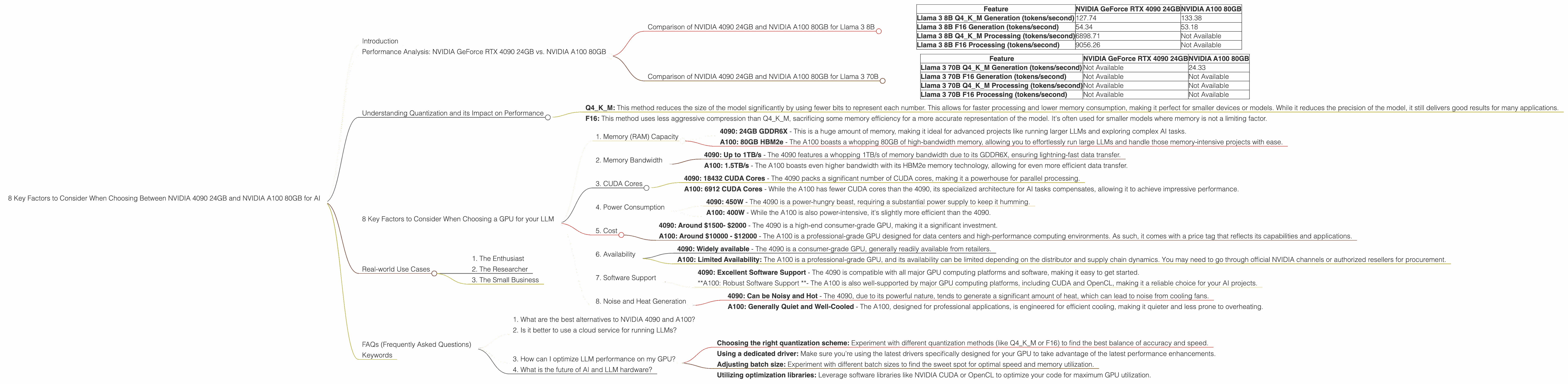
| Feature | NVIDIA GeForce RTX 4090 24GB | NVIDIA A100 80GB |
|---|---|---|
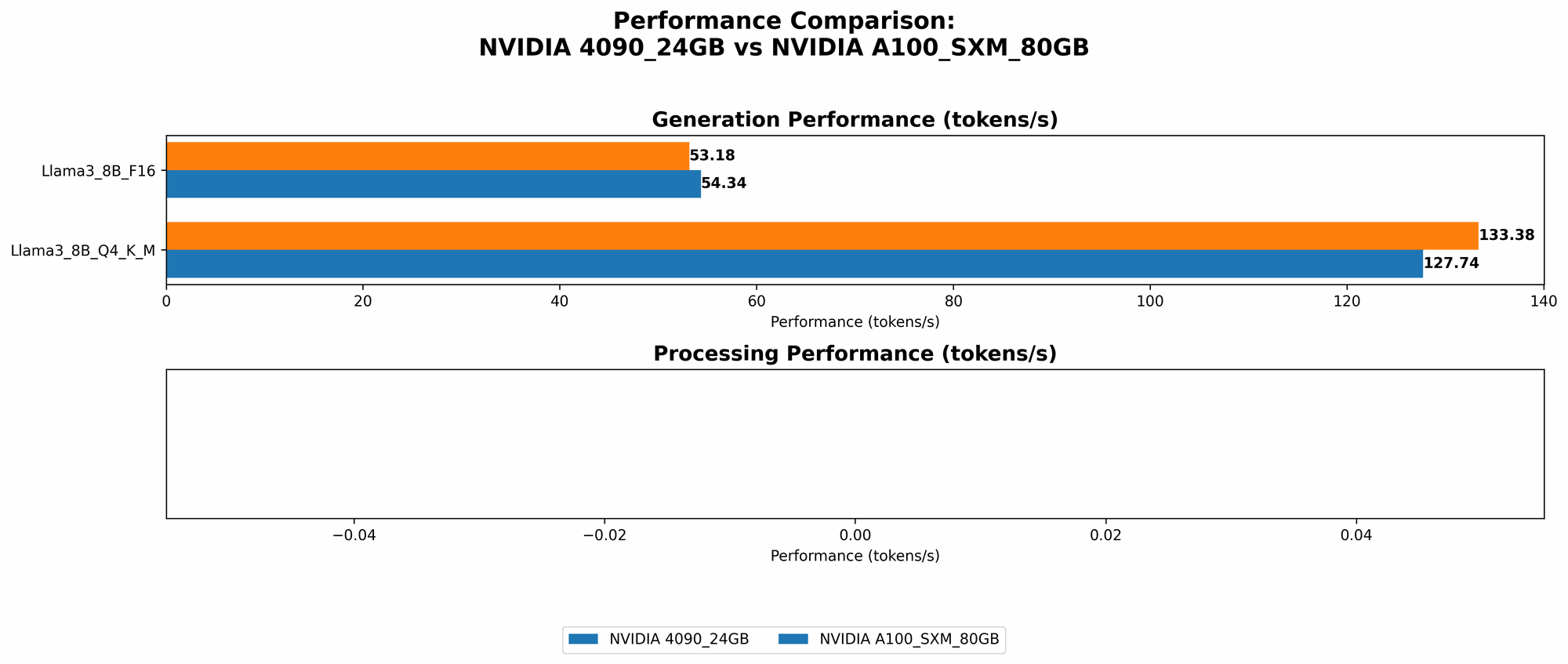
| Llama 3 8B Q4KM Generation (tokens/second) | 127.74 | 133.38 |
| Llama 3 8B F16 Generation (tokens/second) | 54.34 | 53.18 |
| Llama 3 8B Q4KM Processing (tokens/second) | 6898.71 | Not Available |
| Llama 3 8B F16 Processing (tokens/second) | 9056.26 | Not Available |
Key takeaways:
- Slight edge for A100 in Q4KM Generation: The A100 edges out the 4090 in terms of token generation speed when using the Q4KM quantization scheme (roughly a 4% advantage).
- 4090 Dominates in F16 Generation: However, the 4090 outperforms the A100 in the F16 quantization scenario for generation speed (about 2% faster).
- 4090 excels in Processing Speed: The 4090 significantly outperforms the A100 in processing speed, both in Q4KM and F16 modes. This can be attributed to the 4090's more advanced architecture optimized for AI tasks, particularly in the context of the Llama 3 model.
Comparison of NVIDIA 4090 24GB and NVIDIA A100 80GB for Llama 3 70B
| Feature | NVIDIA GeForce RTX 4090 24GB | NVIDIA A100 80GB |
|---|---|---|
| Llama 3 70B Q4KM Generation (tokens/second) | Not Available | 24.33 |
| Llama 3 70B F16 Generation (tokens/second) | Not Available | Not Available |
| Llama 3 70B Q4KM Processing (tokens/second) | Not Available | Not Available |
| Llama 3 70B F16 Processing (tokens/second) | Not Available | Not Available |
Key takeaways:
- A100 excels in 70B Q4KM Generation: The A100's superior memory capacity and specialized architecture make it a much better choice for running the larger Llama 3 70B model, especially when using the Q4KM quantization method.
- Data is Limited: Unfortunately, data for the 4090 with the 70B model is not available and we cannot make a direct comparison for other quantizations or processing speeds.
Understanding Quantization and its Impact on Performance
Before we delve deeper into specific use cases, it's important to understand the role of quantization in LLM performance.
Think of a model as a massive dictionary, with each word represented by a number. Quantization is like using a smaller dictionary with fewer words but still conveying the same meaning - compressing the model to fit in your device's memory. However, this compression can impact accuracy and speed.
Q4KM: This method reduces the size of the model significantly by using fewer bits to represent each number. This allows for faster processing and lower memory consumption, making it perfect for smaller devices or models. While it reduces the precision of the model, it still delivers good results for many applications.
F16: This method uses less aggressive compression than Q4KM, sacrificing some memory efficiency for a more accurate representation of the model. It's often used for smaller models where memory is not a limiting factor.
8 Key Factors to Consider When Choosing a GPU for your LLM
Now that we've established a baseline for performance, let's dive into the 8 key factors that typically influence your choice:
1. Memory (RAM) Capacity
The amount of memory (RAM) available on your GPU is crucial, especially when working with large LLMs. LLMs require significantly more memory than traditional applications, and the higher the memory capacity, the larger the model you can run on your device.
- 4090: 24GB GDDR6X - This is a huge amount of memory, making it ideal for advanced projects like running larger LLMs and exploring complex AI tasks.
- A100: 80GB HBM2e - The A100 boasts a whopping 80GB of high-bandwidth memory, allowing you to effortlessly run large LLMs and handle those memory-intensive projects with ease.
Recommendation: If you’re planning to work with large LLM models (Like Llama 70B), the A100’s 80GB of HBM2e memory is the clear winner. For smaller models, or if cost is a significant factor, the 4090's 24GB GDDR6X could be a solid option.
2. Memory Bandwidth
Memory bandwidth is the speed at which data can be transferred between the GPU and its memory. Higher bandwidth means faster data transfer, leading to improved performance.
- 4090: Up to 1TB/s - The 4090 features a whopping 1TB/s of memory bandwidth due to its GDDR6X, ensuring lightning-fast data transfer.
- A100: 1.5TB/s - The A100 boasts even higher bandwidth with its HBM2e memory technology, allowing for even more efficient data transfer.
Recommendation: The A100 has the advantage in memory bandwidth, which can be crucial for specific demanding tasks like running those larger LLMs. The 4090 still boasts impressive bandwidth for most projects.
3. CUDA Cores
CUDA cores are the processing units on a GPU responsible for parallel computation. More CUDA cores mean more parallel processing power, which is essential for efficient LLM operation.
- 4090: 18432 CUDA Cores - The 4090 packs a significant number of CUDA cores, making it a powerhouse for parallel processing.
- A100: 6912 CUDA Cores - While the A100 has fewer CUDA cores than the 4090, its specialized architecture for AI tasks compensates, allowing it to achieve impressive performance.
Recommendation: The A100's specialized architecture and optimized AI capabilities, coupled with its HBM2e memory, allow it to achieve highly competitive performance, even with fewer CUDA cores.
4. Power Consumption
Power consumption is a crucial factor to consider, especially for home users or those with limited power budgets. Higher power consumption can lead to higher operating costs and potentially require beefier power supplies.
- 4090: 450W - The 4090 is a power-hungry beast, requiring a substantial power supply to keep it humming.
- A100: 400W - While the A100 is also power-intensive, it's slightly more efficient than the 4090.
Recommendation: If you're on a tight power budget, the A100 is slightly more energy-efficient, which may translate into lower electricity costs in the long run. The 4090 may require a more powerful power supply and more efficient cooling.
5. Cost
Cost is always a significant deciding factor. GPUs can be quite expensive, but the pricing can vary drastically depending on the model and its specifications.
- 4090: Around $1500- $2000 - The 4090 is a high-end consumer-grade GPU, making it a significant investment.
- A100: Around $10000 - $12000 - The A100 is a professional-grade GPU designed for data centers and high-performance computing environments. As such, it comes with a price tag that reflects its capabilities and applications.
Recommendation: The 4090 offers an accessible solution for those looking to experiment with LLMs on a budget. The A100, due to its high price tag, is better suited for companies or researchers with significant financial resources and demanding workloads.
6. Availability
Availability can be a significant factor, especially for those who require a GPU quickly.
- 4090: Widely available - The 4090 is a consumer-grade GPU, generally readily available from retailers.
- A100: Limited Availability: The A100 is a professional-grade GPU, and its availability can be limited depending on the distributor and supply chain dynamics. You may need to go through official NVIDIA channels or authorized resellers for procurement.
Recommendation: If you need a GPU ASAP, the 4090 is likely the more accessible choice due to its widespread availability. If you’re willing to wait, you can explore options for securing an A100 through authorized channels.
7. Software Support
The ease of setting up and running LLMs on your GPU depends on software support.
- 4090: Excellent Software Support - The 4090 is compatible with all major GPU computing platforms and software, making it easy to get started.
- *A100: Robust Software Support *- The A100 is also well-supported by major GPU computing platforms, including CUDA and OpenCL, making it a reliable choice for your AI projects.
Recommendation: Both GPUs are well-supported by industry-standard software, ensuring a smooth experience for developers.
8. Noise and Heat Generation
Noise and heat generation can be crucial considerations when choosing a GPU.
- 4090: Can be Noisy and Hot - The 4090, due to its powerful nature, tends to generate a significant amount of heat, which can lead to noise from cooling fans.
- A100: Generally Quiet and Well-Cooled - The A100, designed for professional applications, is engineered for efficient cooling, making it quieter and less prone to overheating.
Recommendation: If you’re sensitive to noise, the A100 might be a more comfortable option as its optimized cooling performance is designed for quiet operation. The 4090 may require additional cooling solutions or careful placement.
Real-world Use Cases
Let's consider some real-world scenarios where these GPUs might shine:
1. The Enthusiast
Imagine a developer passionate about experimenting with different LLM models and pushing the limits of AI. They want the fastest possible performance and are not afraid to invest in a powerful GPU.
Recommendation: In this case, the 4090 is an excellent choice. It offers the best performance for smaller LLM models, and its affordability makes it a tempting option for enthusiasts.
2. The Researcher
A research team is working on a cutting-edge project that requires running massive LLMs like Llama 70B. Accuracy is paramount, and they need the raw power to handle the immense compute requirements.
Recommendation: The A100 is the obvious choice for this scenario due to its superior memory capacity, which allows it to handle the large model sizes.
3. The Small Business
A small business wants to implement AI in their operations, possibly for automated customer support or content generation. They need a cost-effective solution that can handle moderate workloads.
Recommendation: The 4090 is a suitable choice for this use case as it offers a good balance of performance and affordability. It can handle most smaller AI projects while staying within a budget.
FAQs (Frequently Asked Questions)
Here are some common queries related to LLMs and GPUs:
1. What are the best alternatives to NVIDIA 4090 and A100?
Other powerful GPUs for running LLMs include the AMD MI250X (optimized for AI workloads), the NVIDIA A100 40GB (a slightly less expensive version of the A100), and the NVIDIA A40 (another professional-grade GPU). However, their performance and suitability for specific tasks may vary depending on your needs.
2. Is it better to use a cloud service for running LLMs?
Cloud services offer a convenient and scalable option for running LLMs. They provide access to powerful GPUs and infrastructure without the need for local hardware investment. However, cloud services can be expensive for continuous use, and you might experience performance variations due to network latency.
3. How can I optimize LLM performance on my GPU?
You can optimize LLM performance by:
- Choosing the right quantization scheme: Experiment with different quantization methods (like Q4KM or F16) to find the best balance of accuracy and speed.
- Using a dedicated driver: Make sure you’re using the latest drivers specifically designed for your GPU to take advantage of the latest performance enhancements.
- Adjusting batch size: Experiment with different batch sizes to find the sweet spot for optimal speed and memory utilization.
- Utilizing optimization libraries: Leverage software libraries like NVIDIA CUDA or OpenCL to optimize your code for maximum GPU utilization.
4. What is the future of AI and LLM hardware?
AI and LLM hardware are constantly evolving. Expect to see even more powerful GPUs, specialized AI hardware, and improved software tools specifically designed to accelerate AI workloads in the coming years.
Keywords
GPU, NVIDIA 4090, NVIDIA A100, AI, LLM, Llama 3, quantizations, Q4KM, F16, memory, bandwidth, CUDA cores, power consumption, cost, availability, software support, noise, heat, use cases, GPU performance, real-world scenarios, FAQs, cloud services, optimization, AI hardware.