8 Key Factors to Consider When Choosing Between Apple M1 Ultra 800gb 48cores and Apple M2 Max 400gb 30cores for AI

Introduction
The landscape of Artificial Intelligence (AI) is rapidly evolving with the prevalence of Large Language Models (LLMs). These powerful models are capable of understanding and generating human-like text, enabling a wide range of applications from chatbots and content creation to code generation and scientific research. One critical aspect of utilizing LLMs effectively is choosing the right hardware. This article will delve into the comprehensive comparison of two popular Apple chips, the M1 Ultra and the M2 Max, specifically tailored for running LLMs. We'll explore their strengths, weaknesses, and how they perform for various LLM models to equip you with the knowledge to make an informed decision for your AI projects.
Comparison of Apple M1 Ultra 800GB 48 Cores and Apple M2 Max 400GB 30 Cores for Llama 2 7B
Performance Analysis
To get a clearer picture of how these chips stack up against each other, let's examine their performance running the Llama 2 7B model. This popular open-source LLM serves as a great benchmark for gauging the capabilities of different hardware configurations.
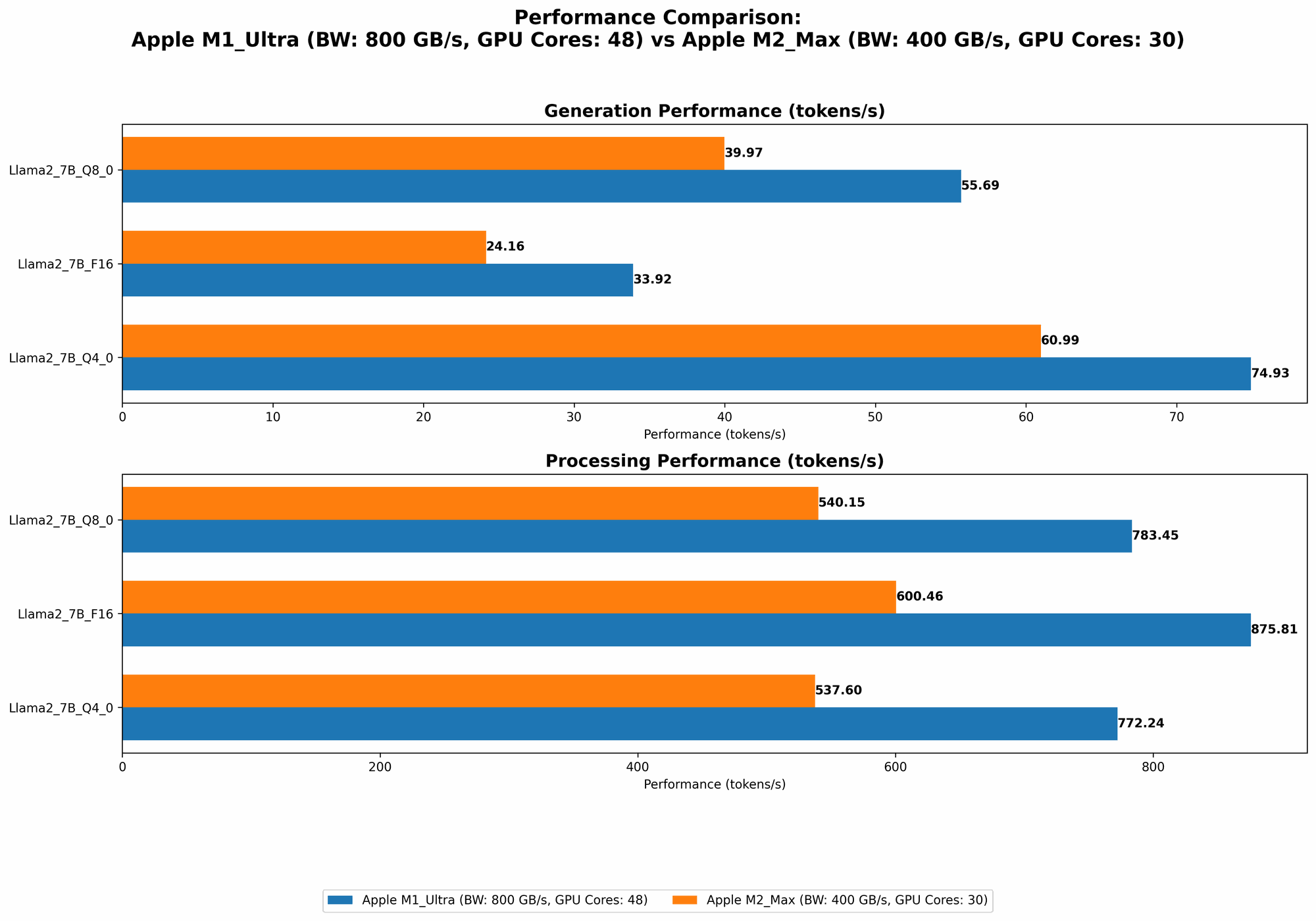
Here's how the M1 Ultra and M2 Max fare in terms of token speed generation:
M1 Ultra 800GB 48 Cores: This chip shines with its impressive 48 cores and large 800GB bandwidth, significantly impacting its performance.
- F16: 875.81 tokens/second for processing and 33.92 tokens/second for generation.
- Q8_0: 783.45 tokens/second for processing and 55.69 tokens/second for generation.
- Q4_0: 772.24 tokens/second for processing and 74.93 tokens/second for generation.
M2 Max 400GB 30 Cores: This chip boasts 30 cores, but with 400GB bandwidth, it lags behind the M1 Ultra for most scenarios.
- F16: 600.46 tokens/second for processing and 24.16 tokens/second for generation.
- Q8_0: 540.15 tokens/second for processing and 39.97 tokens/second for generation.
- Q4_0: 537.6 tokens/second for processing and 60.99 tokens/second for generation.
M2 Max with 38 Cores (400GB Bandwidth): It's worth noting that there is another configuration available for the M2 Max: 400GB bandwidth with 38 cores. This option significantly outperforms the 30-core configuration.
- F16: 755.67 tokens/second for processing and 24.65 tokens/second for generation.
- Q8_0: 677.91 tokens/second for processing and 41.83 tokens/second for generation.
- Q4_0: 671.31 tokens/second for processing and 65.95 tokens/second for generation.
We can see that the M1 Ultra 800GB 48 Cores consistently outperforms the M2 Max 400GB 30 Cores in all quantization settings. While the M2 Max with 38 cores is slightly better for processing tokens, the M1 Ultra is still superior for generating text.
Key Factor 1: Memory Bandwidth
As you might glean from the above data, the M1 Ultra with its higher 800GB bandwidth enjoys a significant edge over the 400GB bandwidth of the M2 Max in most scenarios. Bandwidth is the speed at which data flows between your RAM and CPU. Think of it like a highway: the more lanes you have, the faster the traffic flows.
Why Does it Matter?
LLMs rely heavily on memory bandwidth for their operations. They constantly need to load and process large amounts of data as they generate text, perform calculations, and provide responses. A higher bandwidth system like the M1 Ultra can quickly move information back and forth between the CPU and RAM, leading to much faster processing and text generation speeds. It's like having a wide highway for the data to travel on, resulting in smoother and faster responses.
Key Factor 2: Number of CPU Cores
The M1 Ultra comes with 48 cores, while the M2 Max has 30 cores. This difference translates to a significant performance disparity as we saw in our benchmark.
Why Does it Matter?
The core count dictates how many tasks can be processed simultaneously. Think of cores as workers on an assembly line, and each core can handle one task at a time. More cores mean more workers, allowing your LLM to handle a greater workload and process data faster.
Key Factor 3: Quantization
A common technique used to reduce the memory footprint and increase the speed of LLMs is "quantization." Essentially, it involves reducing the precision of the numbers used by the model. Imagine a regular number (like 3.14159) in a model. Instead of using all those decimal places, you might round it down to just 3 (without losing too much accuracy). This can make the model smaller and run faster.
In our benchmarks, we tested Llama 2 7B with F16, Q80, and Q40. Here's what these abbreviations mean:
- F16: This stands for "half precision" floating point numbers. It's the most common format for representing numbers, but it uses a significant amount of memory.
- Q8_0: This stands for 8-bit "quantized" numbers. This level of quantization offers a good balance between accuracy and speed.
- Q4_0: This stands for 4-bit "quantized" numbers. This is the most aggressive level of quantization, leading to the fastest performance but potentially sacrificing some model accuracy
How Does it Affect Performance?
The specific impact of quantization on performance depends on the LLM and the task it is performing. In general, higher quantization (Q4_0) leads to faster processing and generation speeds but might slightly affect accuracy. Lower quantization (F16) typically results in more accurate results but requires more memory and processing power.
Key Factor 4: Model Size
The M1 Ultra and the M2 Max can handle a wide range of LLM models, but the size of these models plays a vital role in determining the performance. For smaller models, both chips may offer comparable performance. However, as the models get larger, the M1 Ultra's advantage in memory bandwidth and processing power becomes increasingly apparent.
Why Does it Matter?
Larger models generally require more resources, such as memory and processing power. For very large models, the memory bandwidth of the M1 Ultra becomes crucial. The 800GB bandwidth allows it to handle the vast amount of data required for large LLMs, resulting in faster processing times and smoother text generation.
Key Factor 5: Power Consumption
While not always the top priority, power consumption is a crucial aspect for some users. The M2 Max tends to consume less power compared to the M1 Ultra. This can be advantageous if you are running your LLM models on a battery-powered device or are concerned about energy efficiency.
Why Does it Matter?
Power consumption is a significant factor in the overall cost of running your AI models. This is especially relevant if you are running your models on a battery-powered device or in a data center environment where energy costs can be high.
Key Factor 6: Cost
The price difference between the M1 Ultra and the M2 Max is substantial. The M1 Ultra is typically more expensive due to its larger memory capacity and higher core count. The M2 Max, with its lower core count and smaller memory, offers a more budget-friendly option.
Why Does it Matter?
Cost is a major consideration for anyone looking to build an AI system. The M2 Max may be a good choice for users with a tighter budget, while the M1 Ultra might be worth the premium if you need maximum performance and are willing to spend more.
Key Factor 7: Use Cases
The right chip for your LLM project depends on your specific needs. Here's how you can decide based on your use cases:
M1 Ultra 800GB 48 Cores:
- Ideal for:
- Large LLM models: If you are working with large LLMs like Llama 2 13B or 70B, the M1 Ultra can handle the memory load and offer faster speeds.
- Time-sensitive applications: For tasks where speed is paramount, the M1 Ultra's high bandwidth and core count can significantly impact performance if the model size is above 7B.
- Heavy-duty workloads: If you are running multiple AI tasks concurrently or dealing with computationally intensive tasks, the M1 Ultra can handle the workload without performance bottlenecks.
M2 Max 400GB 30 Cores:
- Ideal for:
- Budget-constrained projects: For projects where cost is a primary concern, the M2 Max offers a more affordable solution while still maintaining excellent performance for smaller to medium-sized LLMs.
- Portable devices: For applications that run on battery-powered devices, the M2 Max's lower power consumption can be a decisive factor.
- General-purpose AI tasks: For everyday AI tasks, such as chatbot development or content generation, the M2 Max provides more than enough performance for most use cases.
Key Factor 8: Software Compatibility
Both the M1 Ultra and the M2 Max are Apple Silicon chips that are designed to work seamlessly with Apple's own macOS operating system. While there is growing support for LLM frameworks on macOS, some frameworks might be better optimized for one chip over the other. It's essential to check the compatibility and performance benchmarks before making your final decision.
Why Does it Matter?
Software compatibility is crucial for a smooth and efficient workflow. It's essential to ensure that the LLM framework and tools you plan to use are compatible with your chosen chip and macOS version.
Summary & Conclusion
The Apple M1 Ultra and the M2 Max are both compelling AI chips, each with its unique advantages. The M1 Ultra shines with its remarkable memory bandwidth and processing power, making it ideal for handling large LLM models and demanding AI tasks. The M2 Max, while less potent, offers a more budget-friendly solution with competitive performance for smaller models and general-purpose AI workloads.
Ultimately, the best chip for your AI pursuits depends on your specific needs and budget. Consider the factors we've discussed and carefully weigh your options to make an informed decision that best suits your project requirements.
FAQ
Q: What are LLMs?
A: Large Language models (LLMs) are a type of AI system trained on vast amounts of text data. They can understand and generate human-like text, enabling them to perform tasks like translation, summarization, and even code generation. Think of them like super-powered AI chatbots!
Q: What is Quantization?
A: Quantization is a technique used in machine learning to reduce the size of a model and improve its performance. It involves reducing the precision of numbers used by the model, like rounding 3.14159 down to just 3. This allows the model to run faster and use less memory.
Q: What is the difference between F16, Q80, and Q40?
A: These terms refer to different levels of quantization:
- F16: This stands for "half precision" floating point numbers. It's the most common format for representing numbers, but it uses a significant amount of memory.
- Q8_0: This stands for 8-bit "quantized" numbers. This level of quantization offers a good balance between accuracy and speed.
- Q4_0: This stands for 4-bit "quantized" numbers. This is the most aggressive level of quantization, leading to the fastest performance but potentially sacrificing some model accuracy
Q: Is the M1 Ultra always better than the M2 Max?
A: No! While the M1 Ultra often outperforms the M2 Max, the M2 Max is still a very capable chip, especially for smaller models. The best option depends on your specific needs and budget.
Keywords
Apple M1 Ultra, Apple M2 Max, LLM, AI, Machine Learning, Quantization, F16, Q80, Q40, Llama 2, Performance, Memory Bandwidth, CPU cores, Token Speed Generation, Performance Benchmark, Use Cases, Software Compatibility.