8 Cost Saving Strategies When Building an AI Lab with NVIDIA RTX 5000 Ada 32GB

Introduction
Building an AI lab is a big deal, and choosing the right hardware can make or break your project. Especially when working with large language models (LLMs) like Llama, you need a powerful GPU that can handle the heavy lifting. The NVIDIA RTX 5000 Ada 32GB is often a popular choice, known for its performance and affordability. But you can save even more money by understanding the different tricks and strategies for optimizing your AI lab built around the RTX 5000 Ada 32GB. This article explores eight cost-saving strategies that will help you build a powerful and efficient AI lab without breaking the bank.
Cost-Saving Strategies for Building an AI Lab with NVIDIA RTX 5000 Ada 32GB
1. Quantization: Smaller Models, Bigger Savings
Think of quantization as a diet for your LLM. Instead of using a whole lot of fancy numbers (32-bit floating-point), we slim down our models by using smaller numbers (like 4-bit integers or 16-bit floating-point). This makes the model smaller and faster, saving you money on both storage and computational cost.
Imagine if you were ordering a pizza. Ordering a whole large pizza (32-bit floating-point) is great, but it's expensive and you might not be able to eat it all. Ordering a smaller pizza (4-bit integer) is more affordable and just as delicious, especially if you're just looking for a quick bite (faster inference).
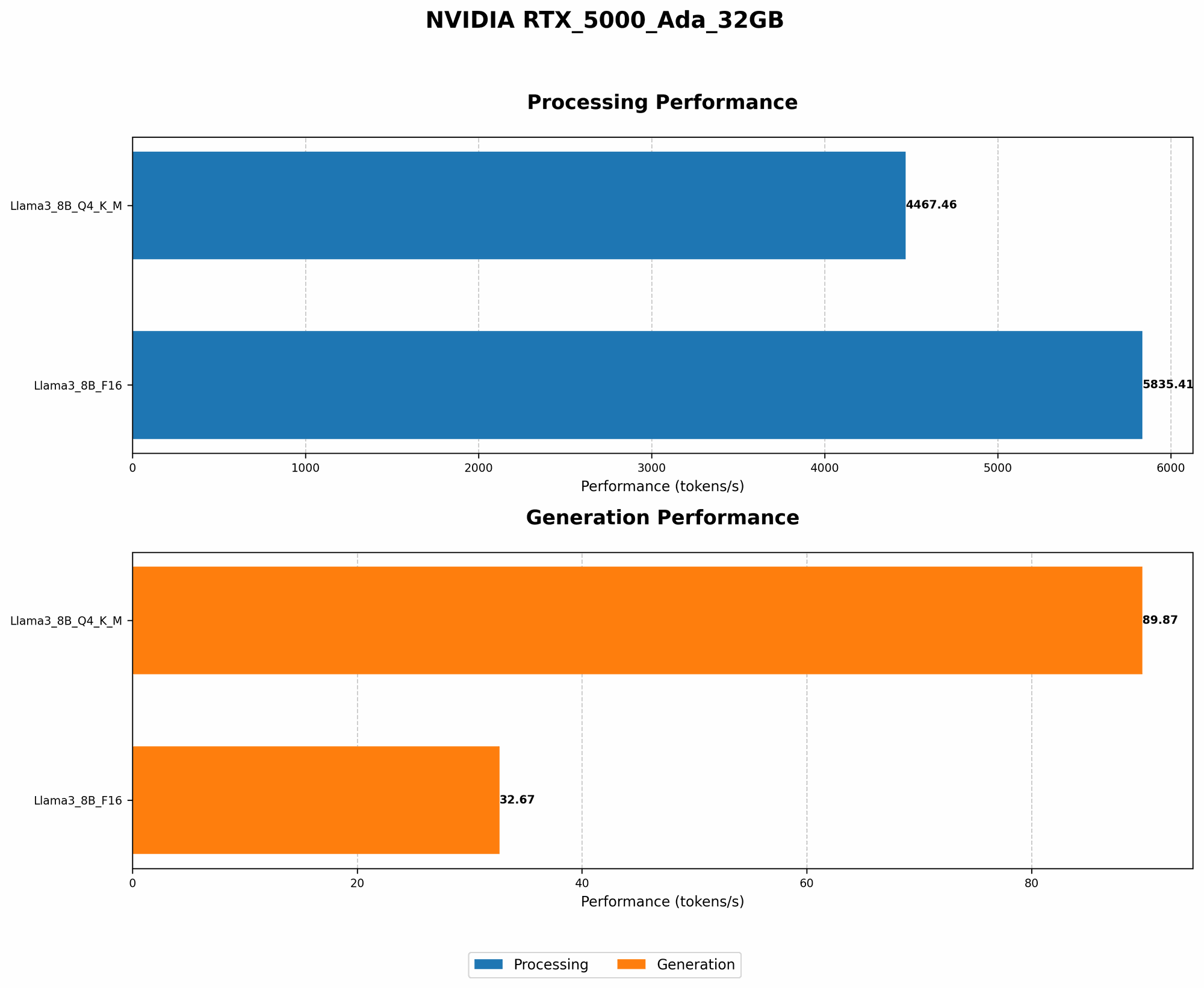
With the RTX 5000 Ada 32GB, you can see a significant performance boost when working with quantized models. For example, the Llama 3 8B model with Q4 quantization for key, value, and matrix operations achieved an impressive 89.87 tokens per second on the RTX 5000 Ada 32GB, compared to 32.67 tokens per second for the F16 version of the model. This means that you get almost 3 times faster inference with the quantized model, without sacrificing accuracy.
2. Fine-Tuning: Tailor Your Model for Specific Tasks
Fine-tuning is like taking your LLM to a tailor and getting a custom fit. You start with a pre-trained model, which is like a basic suit, and then you adjust it to fit your specific needs, like adding a unique button or changing the length of the sleeves. This can significantly improve your model's performance on a specific task, potentially making it more efficient and using less resources.
Imagine you're trying to build a chatbot that can understand and respond to complex queries. You could use a pre-trained model as a starting point, but it's likely to struggle with certain questions. Fine-tuning the model on a dataset of relevant conversations can make it better at understanding and responding to specific queries, without requiring a larger or more complex model.
3. Leverage Caching: Keep Things Warm
Ever thought about using a warm-up routine for your LLM before a big inference task? Caching is like that warm-up, it helps you speed up the process by storing frequently used data in memory for faster access. This can be a big time-saver if you're running the same model repeatedly, or if you're working with a large dataset.
Imagine you’re going on a hike. You can start by walking slowly (cold start) to get your blood flowing and muscles ready for the climb. Or, you can do some warm-up exercises (like caching) before you start hiking. This will get you going faster and make the hike much more enjoyable and efficient.
4. Batching: Feed Your Model in Chunks
Have you ever tried to eat an entire pizza in one go? It's probably not the best idea. Batching is like dividing your pizza into smaller slices, making it easier to consume. Instead of feeding your model with individual sentences, you can feed it with groups of sentences, or batches. This helps your model process information more efficiently and reduces the overhead associated with each individual request.
Think about it like this. Imagine you're ordering a pizza for your family. You can order a whole pizza (individual requests) and have everyone take a slice at a time. Or, you can order several smaller pizzas (batches), which is cheaper and more efficient.
5. Use a Dedicated Server: Avoid Sharing Resources
Sharing is caring, but not when it comes to your AI lab. You want your RTX 5000 Ada 32GB to focus on your models, not be bogged down by other tasks. A dedicated server provides a dedicated environment where your AI workloads can run without interference from other applications. You will have more control over the resources and ensure that your models receive the processing power they need.
This is like having a private gym membership. You can work out without distractions and have access to all the needed equipment. On the other hand, a shared gym membership requires you to be a bit more patient and share the equipment.
6. Experiment with Different Optimizers: Fine-Tune Your Training Process
Optimizers are like GPS systems for your LLM training process. They guide the model to find the best possible solution, but different optimizers have different strengths and weaknesses. Experimenting with different optimizers can help you find the right one for your task and save you time and resources in the long run.
Imagine you're trying to get to a new restaurant. You can use Google Maps (Adam optimizer), but you can also try Waze (SGD optimizer) or even ask for directions (RMSProp optimizer). You can choose the one that gives you the best route in the shortest time.
7. Consider the Power of the Cloud: Leverage Scalability and Flexibility
The cloud is like having a giant data center at your fingertips, providing you with access to massive amounts of computing power on demand. This can be a game-changer for your AI lab, especially if you need to scale up your operations quickly or experiment with large models.
Imagine you're hosting a party, but you don't have enough chairs to seat everyone. You can either buy more chairs (on-premises infrastructure) or rent some from a rental company (cloud services). The cloud offers you the flexibility and scalability to meet your needs without having to invest in expensive hardware.
8. Start Small: Experiment with Smaller Models Before Jumping into the Deep End
Building an AI lab is a marathon, not a sprint. Don't feel the need to jump into the deep end with the largest models right away. Starting with smaller models allows you to experiment and learn the ropes without breaking the bank. You can then gradually increase the size of your models as your needs evolve.
Think of it like building a house. You start with a small foundation and then add more rooms as you need them. You don't build a mansion overnight!
Comparison of Llama 3 8B Performance on RTX 5000 Ada 32GB
| Model Type | Tokens/Second |
|---|---|
| Llama 3 8B Q4 K, V, M | 89.87 |
| Llama 3 8B F16 | 32.67 |
Table 1: Token Speed Comparison
The table shows the token speed of different Llama 3 8B models with and without quantization running on the RTX 5000 Ada 32GB. As you can see, the Q4 model significantly outperforms the F16 model, showcasing the power of model efficiency.
FAQ
Q: What is Q4 Quantization? A: Q4 quantization is a method of reducing the size of a model by using smaller numbers. Instead of using 32-bit floating-point numbers, it uses 4-bit integers to represent model parameters. It's like using a smaller vocabulary to express the same ideas. This leads to a smaller model file size and faster inference speeds.
Q: What is F16? A: F16 stands for 16-bit floating-point format. It is a smaller representation of numbers compared to 32-bit floating-point, which is commonly used in traditional AI models. F16 can help reduce memory usage and improve inference speed, but it might also result in some loss of precision.
Q: What is a "token"? A: A token is a basic unit of text in language models. It can be a word, punctuation mark, or even a special character like a newline. Think of it like a Lego block. Each token contributes to the overall meaning of the text.
Q: How does caching affect performance? A: Caching stores frequently used data in memory, so it can be accessed quickly when needed. It's like having a quick reference guide handy. This reduces the need for your model to read data from slow storage devices, resulting in faster inference speeds.
Keywords
NVIDIA RTX 5000 Ada 32GB, AI Lab, LLM, Llama 3 8B, Quantization, Q4, F16, Token Speed, Caching, Cost-Saving Strategies, Fine-tuning, Batching, Dedicated Server, Optimizers, Cloud Computing, Experimentation, Inference Speed, Performance Optimization, Efficiency, Model Size.