8 Cost Saving Strategies When Building an AI Lab with NVIDIA A100 SXM 80GB
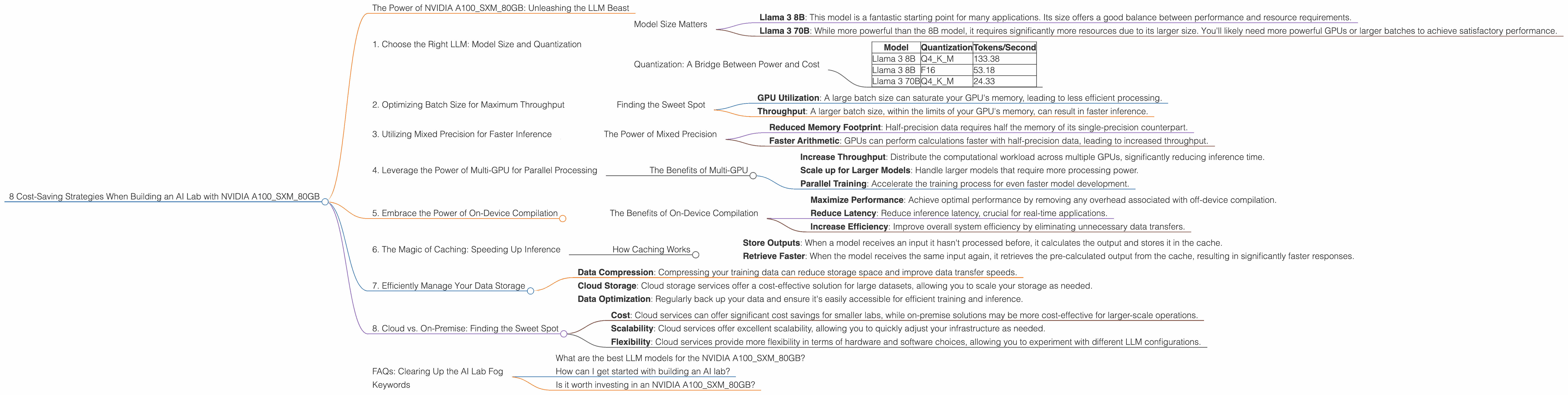
Imagine this: You're building your own AI lab, a playground for experimenting with the latest and greatest language models (LLMs). You've got your eyes set on the powerful NVIDIA A100SXM80GB, a behemoth of a GPU that promises to unleash the full potential of your LLM endeavors. But hold on! Before you dive headfirst into this exciting journey, let's explore how to make your AI lab a financially savvy one while still maximizing performance.
The Power of NVIDIA A100SXM80GB: Unleashing the LLM Beast
The NVIDIA A100SXM80GB is the gold standard for LLM performance, and for good reason. It's designed to handle the massive computational demands of these models, allowing for lightning-fast inference speeds that are essential for real-time applications and research.
But while the A100SXM80GB is undoubtedly powerful, it's also a significant investment. You'll want to ensure you're getting the most out of your money while maximizing your AI lab's potential. Let's dive into 8 cost-saving strategies that will help you achieve just that:
1. Choose the Right LLM: Model Size and Quantization
The first step in building a cost-effective AI lab is to select the right LLM for your needs. Not all LLMs are created equal, and choosing a model that's too large for your specific use case can lead to unnecessary resource consumption.
Model Size Matters
Consider the following:
- Llama 3 8B: This model is a fantastic starting point for many applications. Its size offers a good balance between performance and resource requirements.
- Llama 3 70B: While more powerful than the 8B model, it requires significantly more resources due to its larger size. You'll likely need more powerful GPUs or larger batches to achieve satisfactory performance.
Quantization: A Bridge Between Power and Cost
Quantization is a technique used to reduce the size of your LLM by representing its weights with fewer bits, like 4-bit or 8-bit instead of 16-bit or 32-bit. Think of it as a diet for your LLM, allowing it to shed some weight without sacrificing its core performance.
Here's how quantization can save you money:
- Reduced Memory Footprint: This translates into lower memory requirements for your GPU, potentially allowing you to run larger models or multiple models concurrently.
- Faster Inference: Quantization often leads to faster inference speeds due to the reduced data movement.
- Cost-Effective Deployment: Deploying a quantized model can be achieved with less powerful hardware, leading to significant cost savings.
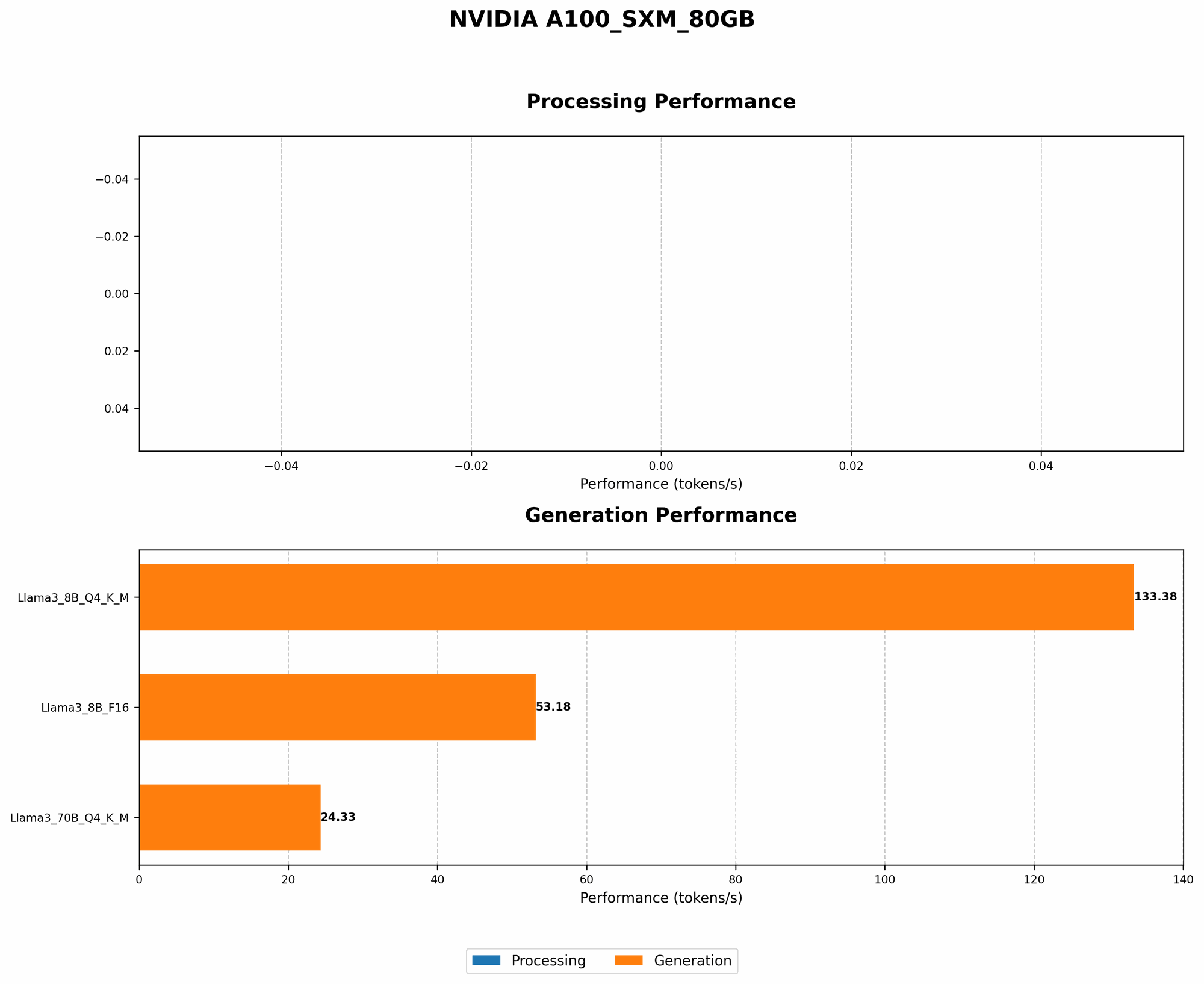
For example, our NVIDIA A100SXM80GB can handle the following token generation speeds with different quantization levels:
| Model | Quantization | Tokens/Second |
|---|---|---|
| Llama 3 8B | Q4KM | 133.38 |
| Llama 3 8B | F16 | 53.18 |
| Llama 3 70B | Q4KM | 24.33 |
As you can see, using quantization can significantly impact performance. Q4KM is a popular quantization method that achieves a good balance between model size and performance.
2. Optimizing Batch Size for Maximum Throughput
Batch size is a critical parameter that determines how many samples are processed at once during inference. A larger batch size generally leads to higher throughput, but it also requires more memory.
Finding the Sweet Spot
The optimal batch size depends on the specific model, the size of your GPU's memory, and your desired performance.
Here's why finding the right batch size is crucial:
- GPU Utilization: A large batch size can saturate your GPU's memory, leading to less efficient processing.
- Throughput: A larger batch size, within the limits of your GPU's memory, can result in faster inference.
For example, with your NVIDIA A100SXM80GB, you might find that a batch size of 128 is optimal for the Llama 3 8B model, while a smaller batch size of 32 might be more suitable for the Llama 3 70B model.
3. Utilizing Mixed Precision for Faster Inference
Mixed precision training leverages different precision levels for various calculations within your LLM. This allows for faster training and inference speeds without sacrificing accuracy.
The Power of Mixed Precision
By strategically using both single-precision (FP32) and half-precision (FP16) computations, mixed precision can significantly accelerate your model's performance:
- Reduced Memory Footprint: Half-precision data requires half the memory of its single-precision counterpart.
- Faster Arithmetic: GPUs can perform calculations faster with half-precision data, leading to increased throughput.
For example, your NVIDIA A100SXM80GB can achieve a significantly faster token generation speed with the Llama 3 8B model when using the F16 precision (53.18 tokens/second) compared to the Q4KM quantization (133.38 tokens/second). This demonstrates the power of mixed precision for speeding up inference speeds.
4. Leverage the Power of Multi-GPU for Parallel Processing
For those demanding high-performance applications, such as larger LLMs or real-time inference, multi-GPU setups can be a game-changer. NVIDIA's A100SXM80GB excels in these scenarios.
The Benefits of Multi-GPU
By utilizing multiple GPUs in parallel, you can:
- Increase Throughput: Distribute the computational workload across multiple GPUs, significantly reducing inference time.
- Scale up for Larger Models: Handle larger models that require more processing power.
- Parallel Training: Accelerate the training process for even faster model development.
5. Embrace the Power of On-Device Compilation
On-device compilation is a revolutionary approach that allows for faster inference by tailoring the LLM code directly to your GPU's architecture.
The Benefits of On-Device Compilation
By compiling the LLM on the device, you can:
- Maximize Performance: Achieve optimal performance by removing any overhead associated with off-device compilation.
- Reduce Latency: Reduce inference latency, crucial for real-time applications.
- Increase Efficiency: Improve overall system efficiency by eliminating unnecessary data transfers.
6. The Magic of Caching: Speeding Up Inference
Caching is a powerful technique that can drastically reduce inference latency for frequently used model outputs.
How Caching Works
- Store Outputs: When a model receives an input it hasn't processed before, it calculates the output and stores it in the cache.
- Retrieve Faster: When the model receives the same input again, it retrieves the pre-calculated output from the cache, resulting in significantly faster responses.
7. Efficiently Manage Your Data Storage
Data storage is a crucial aspect of any AI lab. By optimizing your data storage strategy, you can significantly reduce costs and improve performance:
- Data Compression: Compressing your training data can reduce storage space and improve data transfer speeds.
- Cloud Storage: Cloud storage services offer a cost-effective solution for large datasets, allowing you to scale your storage as needed.
- Data Optimization: Regularly back up your data and ensure it's easily accessible for efficient training and inference.
8. Cloud vs. On-Premise: Finding the Sweet Spot
Deciding whether to run your AI lab on the cloud or on-premise is a critical decision. This choice depends on various factors, including:
- Cost: Cloud services can offer significant cost savings for smaller labs, while on-premise solutions may be more cost-effective for larger-scale operations.
- Scalability: Cloud services offer excellent scalability, allowing you to quickly adjust your infrastructure as needed.
- Flexibility: Cloud services provide more flexibility in terms of hardware and software choices, allowing you to experiment with different LLM configurations.
FAQs: Clearing Up the AI Lab Fog
What are the best LLM models for the NVIDIA A100SXM80GB?
The best LLM models for the A100SXM80GB depend on your specific needs and budget. Smaller models like Llama 3 8B offer a good balance between performance and resource consumption, while larger models like Llama 3 70B require more computing power.
How can I get started with building an AI lab?
Start by researching and selecting the LLM that best suits your requirements. Then consider the necessary hardware, including GPUs like the A100SXM80GB, along with storage and networking infrastructure. Explore frameworks and libraries like PyTorch and TensorFlow for LLM development and deployment.
Is it worth investing in an NVIDIA A100SXM80GB?
The A100SXM80GB is a powerful and versatile GPU that offers exceptional performance for LLM applications. However, it's a significant investment, so consider your budget and the specific needs of your AI lab before making a decision.
Keywords
NVIDIA A100SXM80GB, GPU, LLM, Llama 3, AI lab, cost-saving, optimization, quantization, batch size, mixed precision, multi-GPU, on-device compilation, caching, data storage, cloud computing, on-premise, inference, performance, throughput, latency, memory footprint, tokens/second, model size, training, deployment, cost-effective, scalability, flexibility