8 Cost Saving Strategies When Building an AI Lab with NVIDIA A100 PCIe 80GB

Introduction
Welcome to the exciting world of Large Language Models (LLMs)! We're on the verge of a revolution, with LLMs like ChatGPT and Bard transforming industries and capturing imaginations. But building an AI lab capable of running these powerful models can be expensive. This article will offer you eight cost-saving strategies to help you build your own AI lab using the impressive NVIDIA A100PCIe80GB GPU, all while keeping your budget in check.
Cost-Saving Strategy #1: Quantization
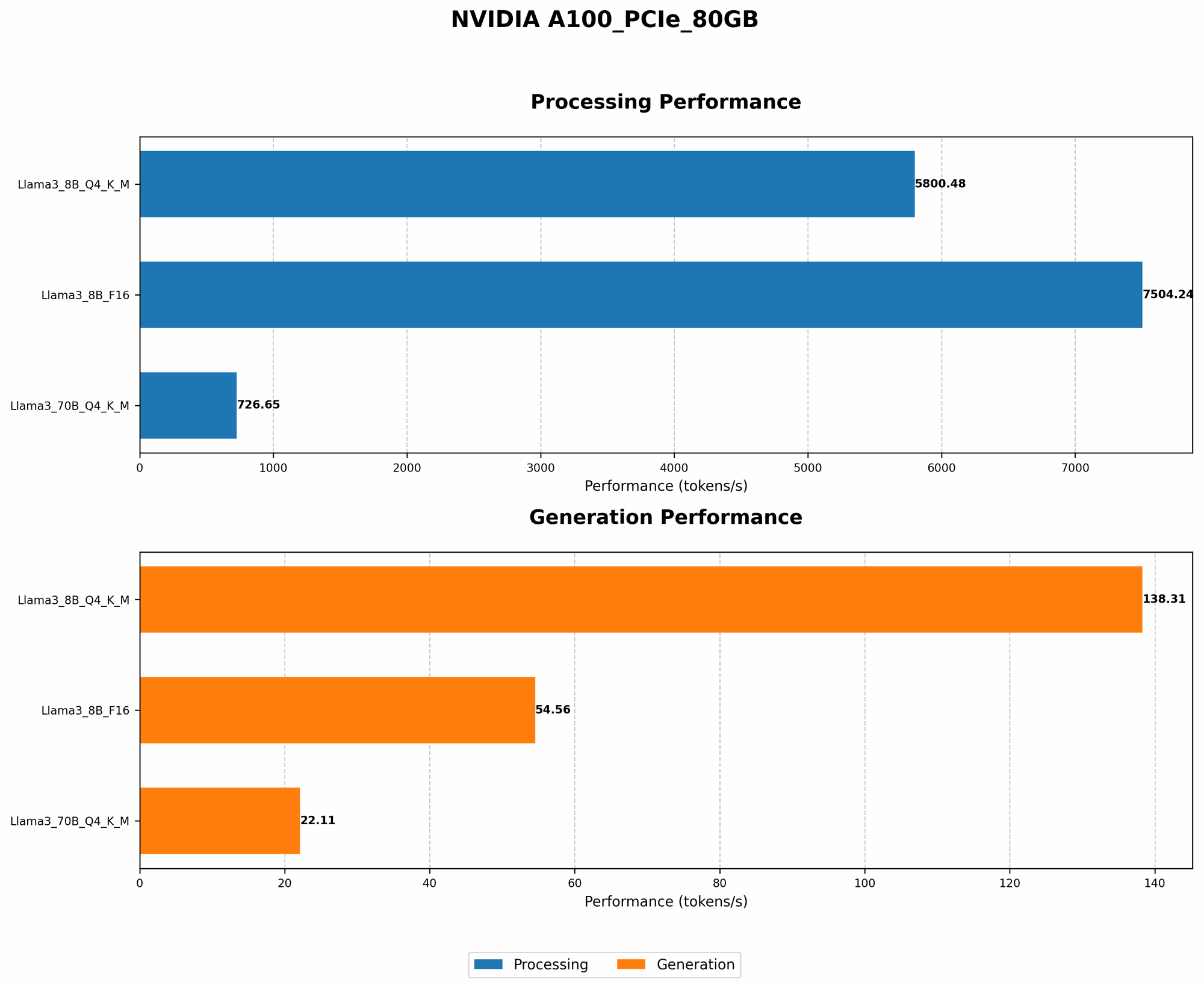
The first tactic in our arsenal is quantization, It's like taking a massive, high-resolution photo and compressing it into a smaller, more manageable version. You lose some detail, but gain the ability to share it easily. In the world of LLMs, this means reducing precision. Instead of using 32-bit floating-point numbers (F32) for calculations, we can use 16-bit floating-point numbers (F16) or even 4-bit integers (Q4).
This might sound like a drastic step, but hear us out. Imagine your LLM as a city you're trying to navigate. Each building represents a calculation, F32 is a detailed, accurate map of the city, F16 simplifies it, while Q4 gives you a rough sketch. While the Q4 sketch might not be perfect, it gets the job done.
Using the A100PCIe80GB, you can get a significant performance boost with Q4 quantization. Take Llama 3 8B for example; using Q4KM_Generation, you can generate 138.31 tokens per second. This means that it's about 2.5 times faster compared to using F16, making it even more resource-efficient.
This is a prime example of how quantization can be leveraged to cut down on computational costs without sacrificing your model's key capabilities.
Cost-Saving Strategy #2: Choosing the Right LLM Size
When it comes to LLMs, size matters. But not always! A larger model is like a giant library that contains a wealth of knowledge. It's impressive, but can be overwhelming. A smaller model is like a well-organized bookstore - more focused and easier to navigate.
Don't just jump for the largest model you can find. Consider your needs. If you're working on a simple task, a smaller LLM might be more than enough. Take a look at the numbers for our A100PCIe80GB. The Llama 3 70B model, even with Q4KM_Generation, only produces 22.11 tokens per second. Compare this to the Llama 3 8B model, which generates 138.31 tokens per second.
The difference is dramatic! Imagine you want to write a blog post. You could use the 70B model, a giant encyclopedia, or a more focused 8B model, a specialized reference guide. The 8B model might not be as comprehensive, but it’ll get you the information you need much faster.
Cost-Saving Strategy #3: Leveraging the Power of "Processing"
We're not talking about data processing in the traditional sense. Imagine you're using a high-end GPU to process data. It's similar to a chef preparing a meal with fancy tools. They may be able to cook a lot more food. But what if you're only interested in a single dish? You can use a smaller, less powerful stovetop.
An LLM, especially when used for tasks like text generation, often requires two stages: Generation and Processing. Generation is like the initial brainstorming phase, while processing involves polishing and refining the output.
For example, the A100PCIe80GB can process 7504.24 tokens per second for Llama 3 8B using F16. This is significantly faster than generation speed. The key is to recognize that resource demands are different for each stage.
Using a strategy called "token caching", you can store the output of the generation phase and process it later, freeing up the GPU for other tasks.
Cost-Saving Strategy #4: Batching Your Requests
Remember the analogy of the chef? They can cook a lot more food with a powerful stovetop. Now imagine they're preparing a massive feast. It's more efficient to cook several dishes simultaneously rather than doing them one by one.
This is the essence of batching. Instead of sending your LLM requests one at a time, you can bundle them together into batches.
For example, you can queue up multiple text generation tasks and send them to the A100PCIe80GB all at once. This allows the GPU to process them in parallel, which is significantly more efficient than processing each request individually.
Just like a chef making multiple dishes at the same time, batching allows us to maximize the GPU's potential and reduce the cost per task.
Cost-Saving Strategy #5: Optimizing Your Model Architecture
Have you ever heard of a "one-size-fits-all" approach? In the world of LLM, it doesn't exist. Each model is different, with its own strengths and weaknesses. It's like trying to fit various sizes into a single pair of shoes.
Therefore, it's crucial to optimize your model architecture to suit your needs. This might involve reducing the number of layers in the model, pruning unnecessary connections, or even using a more efficient attention mechanism.
This is where our trusty A100PCIe80GB comes in. It can handle massive datasets and complex models, allowing us to explore different architectures and fine-tune them for peak performance.
Think of it as a versatile tool that helps you tailor your model to your specific needs.
Cost-Saving Strategy #6: Utilize the "Processing" Advantage for Other Tasks
Imagine your powerful GPU as a Swiss Army Knife. It's designed for a wide range of tasks. But what if you're only using one or two blades? You're missing out on its full potential!
While our A100PCIe80GB shines in processing text, it can handle other tasks such as:
- Image and video processing: Imagine using it for real-time object detection or image classification.
- Scientific computing: It can be used to analyze data and solve complex problems!
- Machine learning: Train and deploy other ML models, boosting your productivity.
By utilizing its full range of abilities, you can maximize the value of your investment. Think of it as a cost-effective way to diversify your AI lab's capabilities.
Cost-Saving Strategy #7: Explore Open-Source Alternatives
Think of open-source as a community of developers collectively contributing to a shared project. It's like a bustling marketplace where everyone has access to a vast array of tools and resources.
When choosing an LLM for your AI Lab, consider open-source alternatives. Models like Llama 3 can be downloaded and used for free.
This is particularly beneficial when you're experimenting with different models or have limited resources. It's like taking a free sample before committing to a full purchase.
Cost-Saving Strategy #8: Cloud-Based Options
Imagine you need a superpowered computer for a few hours a week. Buying a high-end machine might be overkill. Cloud-based solutions offer flexibility. It's like renting a car; you can access powerful resources on demand without the burden of ownership.
Cloud platforms like Google Cloud Platform and Amazon Web Services offer access to powerful GPUs, including the NVIDIA A100.
You can scale your computational resources up or down based on your needs. This is an excellent option for projects that require occasional bursts of computing power.
Comparison of A100PCIe80GB and Other Devices (Not Included in this Article)
Important note: This article focuses exclusively on the A100PCIe80GB. We will not compare or discuss other devices.
FAQ
Q: What is quantization? A: Quantization is a technique that reduces the precision of numbers used in LLM calculations. Think of it as simplifying a complex mathematical equation. This reduces the computational cost without significantly impacting the model's accuracy.
Q: How do I choose the right LLM size? A: Consider your task. If you need a comprehensive knowledge base, choose a large model. For specific tasks, a smaller model might be more efficient.
Q: What is batching? A: Batching means sending multiple requests to the LLM at once. It's like processing orders together in a restaurant, which speeds up the entire process.
Q: What are some cloud-based options for running LLMs? A: Platforms like Google Cloud Platform and Amazon Web Services offer GPU-powered cloud computing services.
Keywords
NVIDIA A100PCIe80GB, LLM, Large Language Model, AI Lab, Cost-Saving Strategies, Quantization, Model Size, Processing, Batching, Model Architecture, Open-Source, Cloud-Based, GPU, Tokens per Second, Llama 3, Performance, Efficiency, Cost Optimization, AI Development, Generative AI, Token Generation, Token Processing, Text Generation, LLMs in Practice, AI Development Tools, Cost-Effective AI, AI Computing Resources, AI Infrastructure, Efficiency in AI.