8 Cost Saving Strategies When Building an AI Lab with NVIDIA 4080 16GB

Introduction
The world of AI is booming, and with it comes a surge of interest in running Large Language Models (LLMs) locally. You want to play with your favorite chatbots, but renting cloud GPU time can get pricey. The NVIDIA GeForce RTX 4080 16GB shines as a great option for running LLMs on your own hardware, but even with this powerful GPU, keeping costs down is crucial. We'll dive into eight strategies to maximize your AI lab's efficiency and avoid hitting your bank account too hard.
Understanding Your Options: Quantization and Float Precision
Before we jump into cost-saving strategies, let's quickly understand the different ways LLMs can run on your 4080_16GB.
- Quantization: This is like compressing the LLM model: you reduce the size and complexity, making it lighter and faster. Think of it as using a smaller, more compact language dictionary instead of a massive tome. This also reduces the memory required to load the model on your GPU. We'll talk about different levels of quantization, like Q4KM, which indicate the number of bits used to represent values.
- Float Precision: LLMs can use different levels of precision for calculations. F16 is half precision, F32 is single precision, and F64 is double precision. Lower precision means faster processing but sometimes a slight reduction in accuracy.
1: Choose the Right LLM
The first step to saving money is picking the right LLM for your needs. Some LLMs are optimized for smaller GPUs, while others need more horsepower. LLMs come in different sizes, often measured in billions of parameters (7B, 8B, 13B, 65B, etc.).
Smaller models are generally cheaper to run. For example, Llama 3 8B can be a great starting point, but it's worth researching the latest releases and seeing what works best for your specific tasks.
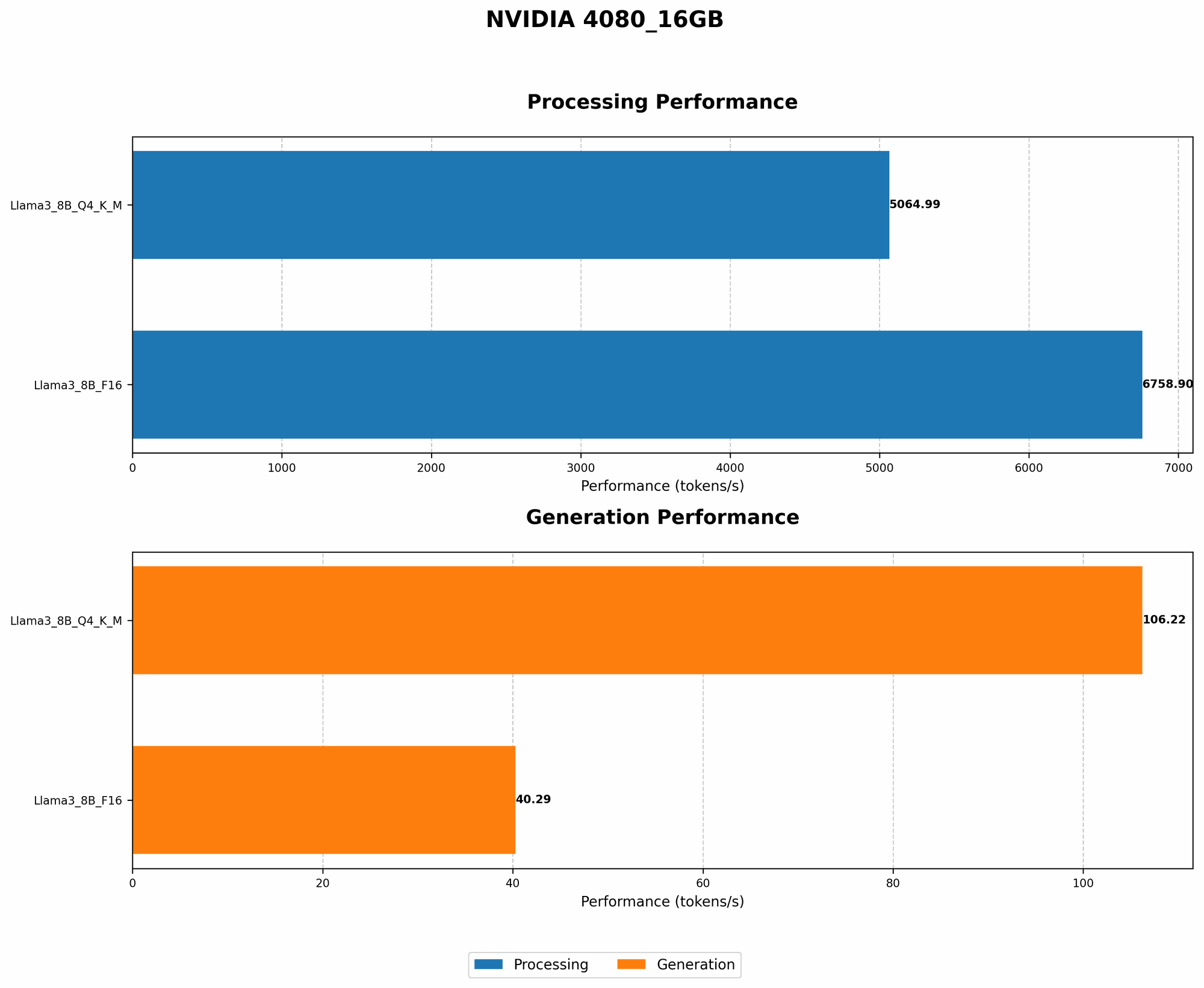
Table: Performance on NVIDIA 4080_16GB
| Model | Token Generation (Tokens/second) | Processing (Tokens/second) |
|---|---|---|
| Llama 3 8B Q4KM | 106.22 | 5064.99 |
| Llama 3 8B F16 | 40.29 | 6758.9 |
| Llama 3 70B Q4KM | N/A | N/A |
| Llama 3 70B F16 | N/A | N/A |
Note: The 70B models are not currently supported on this GPU due to memory limitations. You would likely need a higher-end GPU like a 4090 for those models.
2: Leverage Quantization for Speed and Memory
Quantization is your secret weapon for boosting speed and saving on memory usage. It's like a diet for your LLM, making it smaller and more efficient!
Table: Performance on NVIDIA 4080_16GB
| Model | Token Generation (Tokens/second) | Processing (Tokens/second) |
|---|---|---|
| Llama 3 8B Q4KM | 106.22 | 5064.99 |
| Llama 3 8B F16 | 40.29 | 6758.9 |
The numbers speak for themselves: Llama 3 8B with Q4KM quantization, which uses 4 bits to represent each value, achieves over twice the token generation speed compared to F16 (half-precision). It's also more memory-efficient, allowing you to run larger models on your 4080_16GB.
Imagine it like this: Think of your 408016GB as a bus. F16 passengers are bigger and take up more space. With Q4K_M quantization, you're essentially compressing the passengers, allowing you to fit more on the bus (more tokens processed!).
3: Batch Processing: Supercharge Your Speed
Batch Processing is another sneaky way to save money. Instead of sending requests one at a time, you group them together in batches. This is like sending a whole train of passengers instead of individual cars, resulting in a much more efficient use of the GPU.
The impact is significant. Imagine generating a batch of 100 tokens at once instead of 100 individual requests. You can see why this strategy is a powerhouse for speeding up your LLM and saving you time and money in the long run.
4: Fine-Tuning: Tailor Your Model for Your Needs
Fine-tuning is like giving your LLM a specialized education. This involves taking a pre-trained LLM and training it on a specific dataset to improve its performance on a narrow task.
Imagine you want your LLM to be a master of poetry. You wouldn't just give it a general textbook; you'd feed it a library of poems!
Fine-tuning can improve your LLM's accuracy and efficiency by focusing its knowledge base. This can lead to better results and potentially lower costs compared to using a general-purpose model.
5: Explore Specialized Tools and Libraries
There's a whole ecosystem of tools and libraries designed to make running LLMs on your 4080_16GB more efficient.
- llama.cpp: This popular open-source framework is specifically optimized for running LLMs on local devices. It offers various optimizations, including quantization, and is a great starting point.
- GPU Benchmarks on LLM Inference: This repository offers valuable benchmarks for different LLMs and GPU configurations, helping you choose the optimal setup for your needs.
6: Optimize Your Code:
Just like a well-tuned engine, smooth code can save you valuable computing resources.
- Use a Profiler: Analyze your code to identify bottlenecks and areas for optimization. Tools like NVIDIA Nsight Systems can help you pinpoint performance issues.
- Minimize Memory Overhead: Streamline your code to minimize memory usage and reduce the strain on your GPU.
- Utilize Caching: Store frequently accessed data in cache for quick retrieval, cutting down on redundant calculations.
7: Prioritize Performance:
Remember, the 4080_16GB is a powerful beast. While it can handle big models, it's designed for high-performance tasks. So, focus on strategies that squeeze every drop of performance from your GPU.
- Use a Fast CPU: The speed of your CPU can significantly impact your LLM's performance. A fast CPU can handle pre-processing tasks and data transfer to the GPU more efficiently, keeping your GPU running smoothly.
- Efficient Data Loading: Choose the optimal data loading method to avoid unnecessary delays. Techniques like memory-mapped files or optimized data transfer libraries can help.
8: Don't Forget the Power Supply
This might sound obvious, but ensure your power supply can handle the demands of your 4080_16GB. Running an LLM can be power-hungry, and inadequate power can lead to instability and performance issues.
FAQ:
1. What's the best LLM for my NVIDIA 4080_16GB?
It depends on your specific use case. Llama 3 8B is a great starting point, but other models might suit you better. For example, if you're focused on code generation, you might want to try a model specialized in that area.
2. How much RAM do I need for my 4080_16GB to run LLMs efficiently?
The amount of RAM you need depends on the LLM size and the tasks you perform. 16GB of RAM is typically a good starting point, but you might need more for larger models or complex applications.
3. What's the difference between token generation and processing?
Token generation refers to the speed at which the LLM produces new text, while processing refers to the speed at which it handles data. Both are important for overall performance.
Keywords:
NVIDIA 408016GB, LLM, Large Language Model, Llama 3, Quantization, Float Precision, Q4K_M, F16, Token Generation, Processing, Cost-Saving Strategies, Performance, GPU, AI Lab, Batch Processing, Fine-Tuning, Tools, Libraries, Optimization, Power Supply, RAM.