8 Advanced Techniques to Squeeze Every Ounce of Performance from NVIDIA L40S 48GB
Introduction
The world of large language models (LLMs) is exploding, with these powerful AI systems capable of generating human-like text, translating languages, writing different kinds of creative content, and answering your questions in an informative way. But running LLMs locally, on your own machine, can be a challenge. You need a powerful GPU, like NVIDIA's L40S_48GB, to handle the massive computational demands of these models.
In this article, we'll explore eight techniques that can help you get the most out of your L40S_48GB for running LLMs. These techniques cover everything from choosing the right model to optimizing your code and leveraging the power of quantization. By mastering these techniques, you can unlock the full potential of your GPU and experience the speed and flexibility of local LLM deployment.
Choosing the Right LLM Model
The first step in squeezing every ounce of performance from your L40S_48GB is selecting the right LLM model. LLMs come in various sizes, from a few billion parameters to hundreds of billions. Choosing the right model for your needs involves balancing model complexity, performance, and your hardware resources.
Understanding Model Size and Complexity
Think of a model as a recipe. A simple recipe with a few ingredients is easy to prepare and doesn't require a fancy kitchen. Similarly, a smaller LLM with fewer parameters is faster to run and less demanding on your GPU. However, they may not be as sophisticated and produce less impressive results.
Larger models are like complex recipes with multiple ingredients. They require more processing power and a powerful kitchen (your GPU) to handle the heavier workload. But they can produce more elaborate and nuanced outputs.
The Trade-Off Between Size and Speed
Think of it like this: if you want to bake a simple cake, a basic oven might be enough. But if you're attempting a complex multi-tiered masterpiece, you'll need a professional-grade oven that can handle the heat and complexity.
The same principle applies to LLMs. Smaller models are like basic ovens: faster and less demanding, but limited in their capabilities. Larger models are like high-end ovens: capable of producing incredible results but needing powerful hardware to function properly.
Focusing on the Right LLM for Your NVIDIA L40S_48GB
For our L40S_48GB, we'll focus on Llama3 models, which are known for their performance and versatility. Here's a quick overview of the models we'll be exploring:
- Llama3 8B: A relatively small model, but still capable of generating impressive text.
- Llama3 70B: A much larger model, capable of handling more complex tasks and producing more nuanced outputs.
We'll test both models with different quantization techniques and explore the performance difference.
The Power of Quantization
Imagine your LLM is like a large recipe book. If you only need a specific section, you wouldn't carry the entire book around. Instead, you'd just bring the relevant page.
Quantization works in a similar way. Instead of storing the model's parameters in full precision (usually 32-bit floating-point numbers), quantization reduces the precision, often to 16-bit or even 8-bit. This allows for faster processing and less memory usage.
Understanding Quantization Levels
Quantization can further be divided into different levels:
- Q4KM: This technique quantizes the model's weights (K) and activations (M) to 4-bits. It offers a significant reduction in memory usage and processing time.
- F16: This approach uses 16-bit floating-point numbers. While not as drastic as Q4KM, it still offers a considerable performance improvement compared to full-precision 32-bit representations.
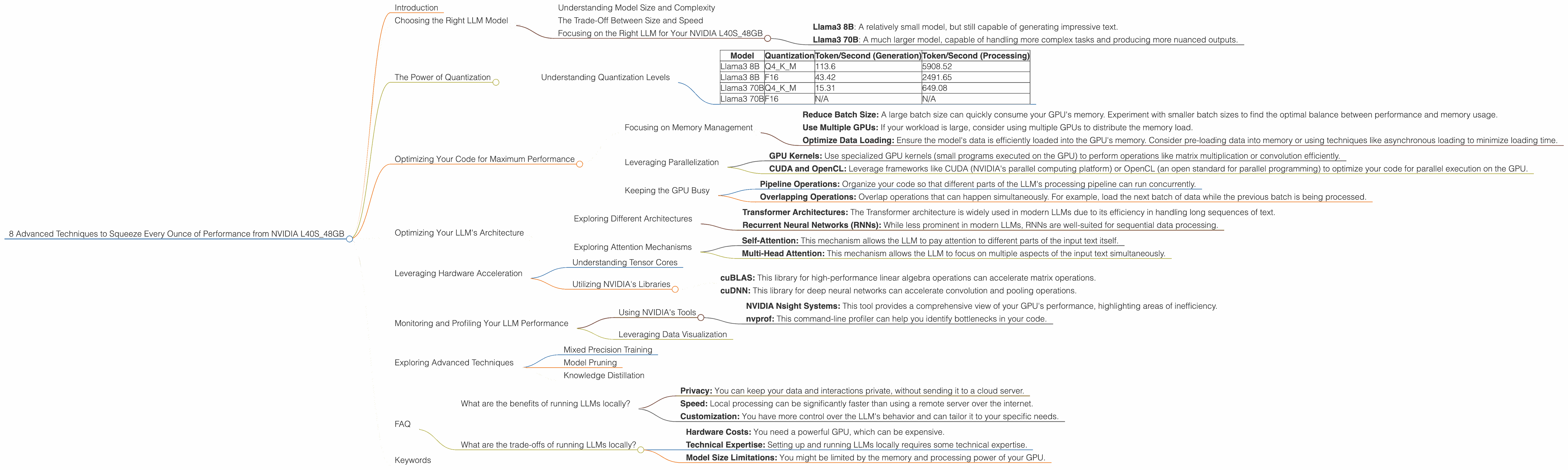
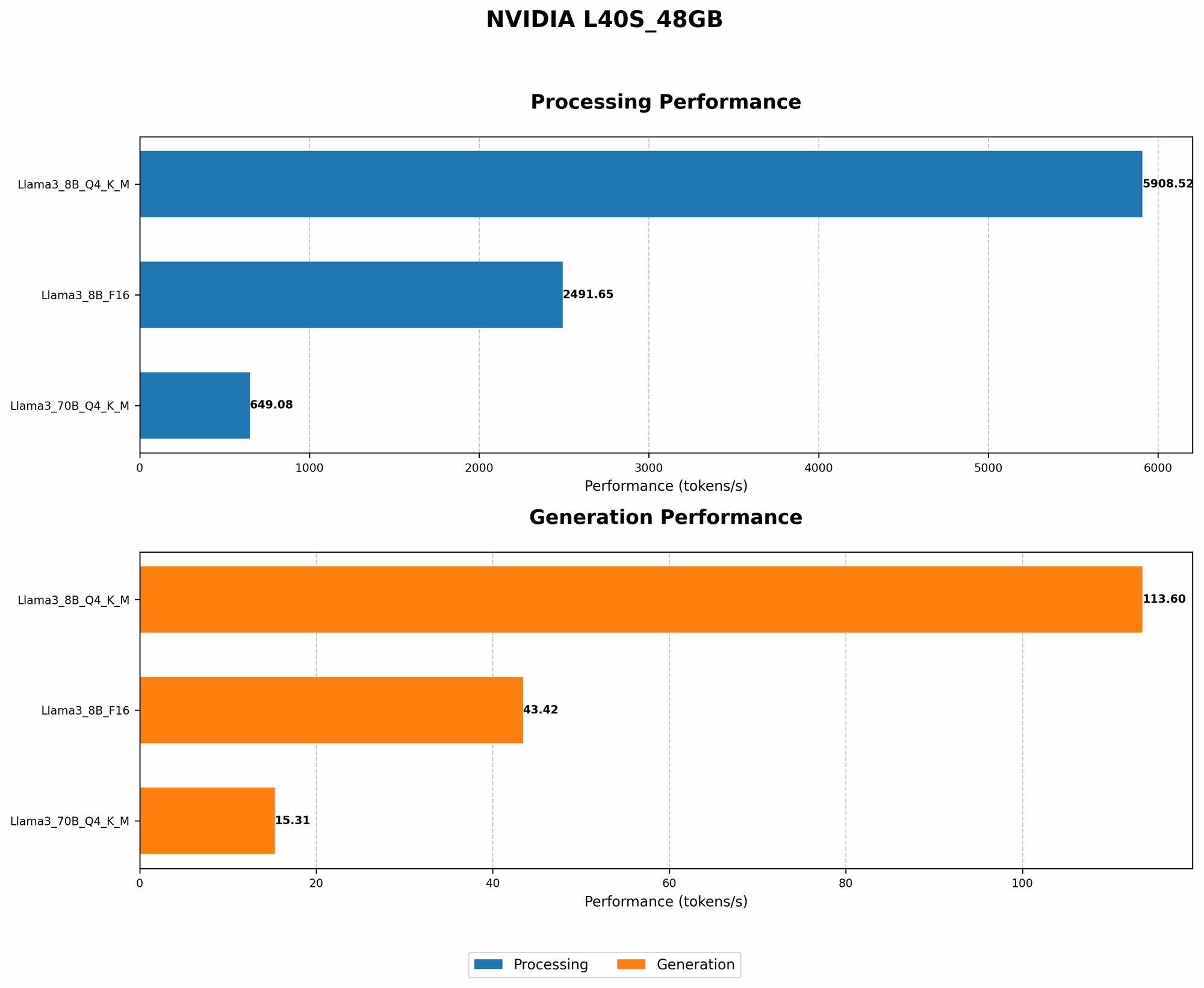
Here's a table summarizing the performance of Llama3 models on the L40S_48GB with different quantization techniques:
| Model | Quantization | Token/Second (Generation) | Token/Second (Processing) |
|---|---|---|---|
| Llama3 8B | Q4KM | 113.6 | 5908.52 |
| Llama3 8B | F16 | 43.42 | 2491.65 |
| Llama3 70B | Q4KM | 15.31 | 649.08 |
| Llama3 70B | F16 | N/A | N/A |
Table 1: Performance Comparison of Llama3 models on L40S_48GB with Different Quantization Techniques
Note: The F16 performance for Llama3 70B is not available. It is likely because it is a very large model, and it might be challenging to run in F16 on the L40S_48GB due to memory limitations.
Key Takeaways:
- Q4KM quantization generally achieves significantly faster performance than F16, especially for the Llama3 8B model.
- The performance difference between the two quantization techniques becomes more pronounced as the model size increases.
- Q4KM quantization is a powerful technique to improve the speed of your LLM, especially when dealing with large models.
Optimizing Your Code for Maximum Performance
Once you've chosen the right model and quantization method, you need to optimize your code to maximize your GPU's performance. This involves understanding the different parts of your code and identifying areas for improvement.
Focusing on Memory Management
Memory management is crucial for achieving optimal performance. You need to ensure that your GPU has enough memory to store the model's parameters and activations. If the GPU runs out of memory, it will slow down or even crash.
Strategies to Improve Memory Management:
- Reduce Batch Size: A large batch size can quickly consume your GPU's memory. Experiment with smaller batch sizes to find the optimal balance between performance and memory usage.
- Use Multiple GPUs: If your workload is large, consider using multiple GPUs to distribute the memory load.
- Optimize Data Loading: Ensure the model's data is efficiently loaded into the GPU's memory. Consider pre-loading data into memory or using techniques like asynchronous loading to minimize loading time.
Leveraging Parallelization
Modern GPUs are designed for parallel processing, allowing them to perform multiple operations simultaneously. Utilizing this capability is essential for achieving maximum performance.
Techniques for Parallel Processing:
- GPU Kernels: Use specialized GPU kernels (small programs executed on the GPU) to perform operations like matrix multiplication or convolution efficiently.
- CUDA and OpenCL: Leverage frameworks like CUDA (NVIDIA's parallel computing platform) or OpenCL (an open standard for parallel programming) to optimize your code for parallel execution on the GPU.
Keeping the GPU Busy
Imagine a worker who spends most of their time waiting for instructions. This is inefficient! The same principle applies to your GPU. You want to keep it busy processing data, not waiting for instructions or data.
Strategies for Keeping the GPU Active:
- Pipeline Operations: Organize your code so that different parts of the LLM's processing pipeline can run concurrently.
- Overlapping Operations: Overlap operations that can happen simultaneously. For example, load the next batch of data while the previous batch is being processed.
Optimizing Your LLM's Architecture
LLMs are complex networks with many interconnected layers. Optimizing the architecture of your chosen model is crucial for achieving top performance.
Exploring Different Architectures
Different LLM architectures have varying degrees of efficiency. Consider the following:
- Transformer Architectures: The Transformer architecture is widely used in modern LLMs due to its efficiency in handling long sequences of text.
- Recurrent Neural Networks (RNNs): While less prominent in modern LLMs, RNNs are well-suited for sequential data processing.
Exploring Attention Mechanisms
LLMs rely on attention mechanisms to focus on specific parts of the input text. The type of attention mechanism used can significantly impact performance.
Common Attention Mechanisms:
- Self-Attention: This mechanism allows the LLM to pay attention to different parts of the input text itself.
- Multi-Head Attention: This mechanism allows the LLM to focus on multiple aspects of the input text simultaneously.
Leveraging Hardware Acceleration
The L40S_48GB offers a variety of hardware features that can accelerate LLM performance.
Understanding Tensor Cores
Tensor cores are specialized hardware units on NVIDIA GPUs designed for high-performance matrix multiplications. These operations are fundamental to many LLM computations. By leveraging tensor cores, you can significantly accelerate your LLM inference.
Utilizing NVIDIA's Libraries
NVIDIA developed a suite of libraries optimized for GPU acceleration. These libraries can significantly boost LLM performance.
- cuBLAS: This library for high-performance linear algebra operations can accelerate matrix operations.
- cuDNN: This library for deep neural networks can accelerate convolution and pooling operations.
Monitoring and Profiling Your LLM Performance
To truly optimize your performance, you need to monitor and profile your LLM's execution. This allows you to identify bottlenecks and areas for improvement.
Using NVIDIA's Tools
- NVIDIA Nsight Systems: This tool provides a comprehensive view of your GPU's performance, highlighting areas of inefficiency.
- nvprof: This command-line profiler can help you identify bottlenecks in your code.
Leveraging Data Visualization
Visualizing your LLM's performance data can provide valuable insights. Tools like TensorBoard can help you create interactive visualizations of your GPU utilization, memory consumption, and other metrics.
Exploring Advanced Techniques
For those seeking to push the boundaries of LLM performance, there are several advanced techniques you can explore:
Mixed Precision Training
This technique mixes different precision levels (e.g., 16-bit and 32-bit) during training to achieve a compromise between speed and accuracy.
Model Pruning
This technique removes less important connections in the model to reduce its size and increase efficiency.
Knowledge Distillation
This technique allows you to train smaller, faster models to mimic the behavior of larger, more complex models.
FAQ
What are the benefits of running LLMs locally?
- Privacy: You can keep your data and interactions private, without sending it to a cloud server.
- Speed: Local processing can be significantly faster than using a remote server over the internet.
- Customization: You have more control over the LLM's behavior and can tailor it to your specific needs.
What are the trade-offs of running LLMs locally?
- Hardware Costs: You need a powerful GPU, which can be expensive.
- Technical Expertise: Setting up and running LLMs locally requires some technical expertise.
- Model Size Limitations: You might be limited by the memory and processing power of your GPU.
Keywords
LLMs, large language models, NVIDIA, L40S48GB, GPU, performance, optimization, quantization, Q4K_M, F16, Llama3, 8B, 70B, CUDA, OpenCL, tensor cores, memory management, batch size, profiling, monitoring, mixed precision training, model pruning, knowledge distillation.