8 Advanced Techniques to Squeeze Every Ounce of Performance from NVIDIA A40 48GB
Introduction
The world of large language models (LLMs) is exploding, with new models and capabilities emerging daily. These models, trained on massive datasets, offer unparalleled abilities in text generation, translation, and even coding. But harnessing their power requires serious computing muscle – and that's where the NVIDIA A4048GB shines. This powerhouse GPU packed with 48GB of HBM2e memory offers a playground for local LLM experimentation. This guide will explore eight advanced techniques to maximize the A4048GB's performance with Llama 3 models, helping you unlock the full potential of your local LLM setup.
1. Quantization: The Art of Shrinking LLMs Without Sacrificing Accuracy
Imagine compressing a massive book into a tiny pocket-sized version without losing any essential content. That's the magic of quantization for LLMs! It's a brilliant technique to shrink large model weights without sacrificing accuracy.
The Power of Q4KM
Our first technique goes beyond the traditional F16 (half-precision) and dives into Q4KM quantization. This impressive format packs incredible density: it uses only four bits to represent each weight value. This means smaller models, faster inference, and less memory consumption.
Q4KM Performance: A Peek into the Numbers
Let's put this technique into action with the Llama 3 8B model.
| Model | Quantization | Token Generation (Tokens/second) | Token Processing (Tokens/second) |
|---|---|---|---|
| Llama 3 8B | Q4KM | 88.95 | 3240.95 |
| Llama 3 8B | F16 | 33.95 | 4043.05 |
The results are undeniable: Q4KM delivers a staggering 2.6x speedup in token generation while sacrificing minimal accuracy. It's like having a turbocharged LLM that zooms through tasks.
Why Q4KM Rocks
- Memory Savings: Since Q4KM uses less memory, you can fit larger models on your A40_48GB or even explore multiple models simultaneously.
- Speed Demon: The smaller the models, the faster they run. A4048GB can now churn through tokens at a furious pace with Q4K_M.
- Balance is Key: While Q4KM reduces memory and boosts speed, it sacrifices a tiny bit of accuracy compared to F16. But the trade-off is usually well worth it for performance gains.
2. Harnessing the Power of Multi-GPU: Make LLMs Sing in Harmony
Think of multi-GPU like a choir – each GPU is a talented singer, and together they create a harmonious symphony of performance.
Parallel Processing: The Secret to Speedy LLMs
Multi-GPU allows us to distribute the workload across multiple GPUs, like splitting a concert into multiple stages with different singers. This parallelization is crucial for large, complex models, reducing the time for each processing task.
A40_48GB's Multi-GPU Awesomeness
The A40_48GB is specifically designed for high-performance computing, including tasks requiring more than a single GPU. It boasts impressive capabilities for multi-GPU configurations, making it a perfect candidate for large LLM deployments.
- NVLink: This technology allows for super-fast communication between GPUs, ensuring seamless data transfer. Think of it like a high-speed highway for data flowing between singers.
- CUDA: NVIDIA's CUDA programming environment provides a powerful toolset for optimizing code to work flawlessly across multiple GPUs.
The Downsides: Not Always a Smooth Ride
- Increased Complexity: Managing and coordinating multiple GPUs can be tricky - think of it like teaching different singers to harmonize in a complex song.
- Communication Costs: While NVLink is fast, there is a slight communication overhead between GPUs.
3. Optimizing for Memory Bandwidth: The Data Superhighway
Imagine your LLM as a city with massive amounts of data needing to flow smoothly through the streets. If the roads are clogged, the city grinds to a halt. Memory bandwidth is similar to the traffic flow within the A40_48GB - it dictates how quickly data can move around.
Bandwidth as the Bottleneck: Understanding the Impact
LLMs need to constantly access data from the GPU's memory, so bandwidth becomes crucial. If there's a bottleneck (slow data flow), inference slows down.
Maximizing Memory Efficiency
Here's how we can optimize for memory bandwidth on the A40_48GB:
- Minimize Memory Accesses: If the model can access information more directly, it needs to read and write data less frequently, like taking a shortcut on our city's data highway.
- Prefetch Data: Like preparing for a concert by having all the instruments ready, prefetching data beforehand allows the A40_48GB to access information quickly.
4. Leveraging Caching: The LLM's Storage Cache
The A4048GB has a cache that's like a temporary storage space where frequently accessed information is kept handy. This caching allows the A4048GB to skip the time-consuming process of fetching data from the main memory every time.
Caching Strategies for LLMs
- L1 and L2 Cache: The A40_48GB features separate L1 and L2 caches, designed to store small amounts of data used frequently. It's like having a small "scratchpad" for quick calculations.
- GPU Memory Cache: This larger cache acts like a temporary storage space to store frequently needed data from the main memory.
- Software-Based Caching: You can use a software library to manage caching strategies for your LLM.
5. Optimizing for CUDA Core Usage: The Power of Computing Engines
Think of the A40_48GB's CUDA cores as a team of specialized workers, each performing a specific task. Optimizing for CUDA core usage is like making sure each worker has the right tools and instructions for maximum efficiency.
CUDA Core Optimization Techniques
- Thread Block Size: Each CUDA core operates on a group of threads, or "workers." Finding the right thread block size ensures that the workload is evenly distributed.
- Warp Size: A warp is a group of threads that execute together. By carefully aligning the warp size with the model architecture, you can maximize CUDA core utilization.
6. Dynamic Batching: Adapting to Changing Demands
Imagine a theater with a flexible seating arrangement that can accommodate different audience sizes. Dynamic batching is similar – it allows you to adjust the number of inputs (tokens) processed at once based on your needs.
The Art of Balancing Efficiency
- Small Batch Size: Good for shorter sequences or when you need to experiment with various prompts.
- Large Batch Size: Optimizes throughput when handling large inputs or multiple tasks simultaneously.
Strategies for Dynamic Batching
- Micro Batching: Splitting a large task into smaller batches, like presenting a play in multiple acts.
- Batching Strategies: Use techniques like padding and masking to ensure that each batch is processed efficiently.
7. Profiling and Tuning: Unveiling the Secrets of Your LLM
Profiling involves analyzing your LLM's performance to pinpoint bottlenecks and identify areas for improvement. Think of it like a performance review for your model.
Profiling Tools
Different profiling tools like NVIDIA Nsight Systems and Perf can help you understand where your LLM is spending its time.
Tuning for Peak Performance
Once you understand the bottlenecks, you can implement targeted optimizations:
- Code Optimizations: Rewriting specific sections of your LLM code to improve efficiency.
- Model Architectures: Experimenting with different model architectures or parameter settings to find the sweet spot for performance.
8. Leveraging the Power of AI Frameworks: Building on the Shoulders of Giants
AI frameworks, like PyTorch and TensorFlow, provide a solid foundation for building and deploying complex LLM models. These frameworks offer powerful tools and libraries.
AI Frameworks: Your Toolkit for LLM Success
- Automatic Differentiation: Simplifies the process of training LLMs by automatically calculating gradients.
- Optimized Operators: These frameworks provide efficient implementations of common operations used in LLMs.
- Accelerators: They often include features that leverage the A40_48GB's capabilities for faster processing.
Evaluating Performance: A Look at the Numbers for Llama 3
We've discussed several techniques to optimize LLM performance on the A40_48GB. But how do these techniques actually translate to real-world results?
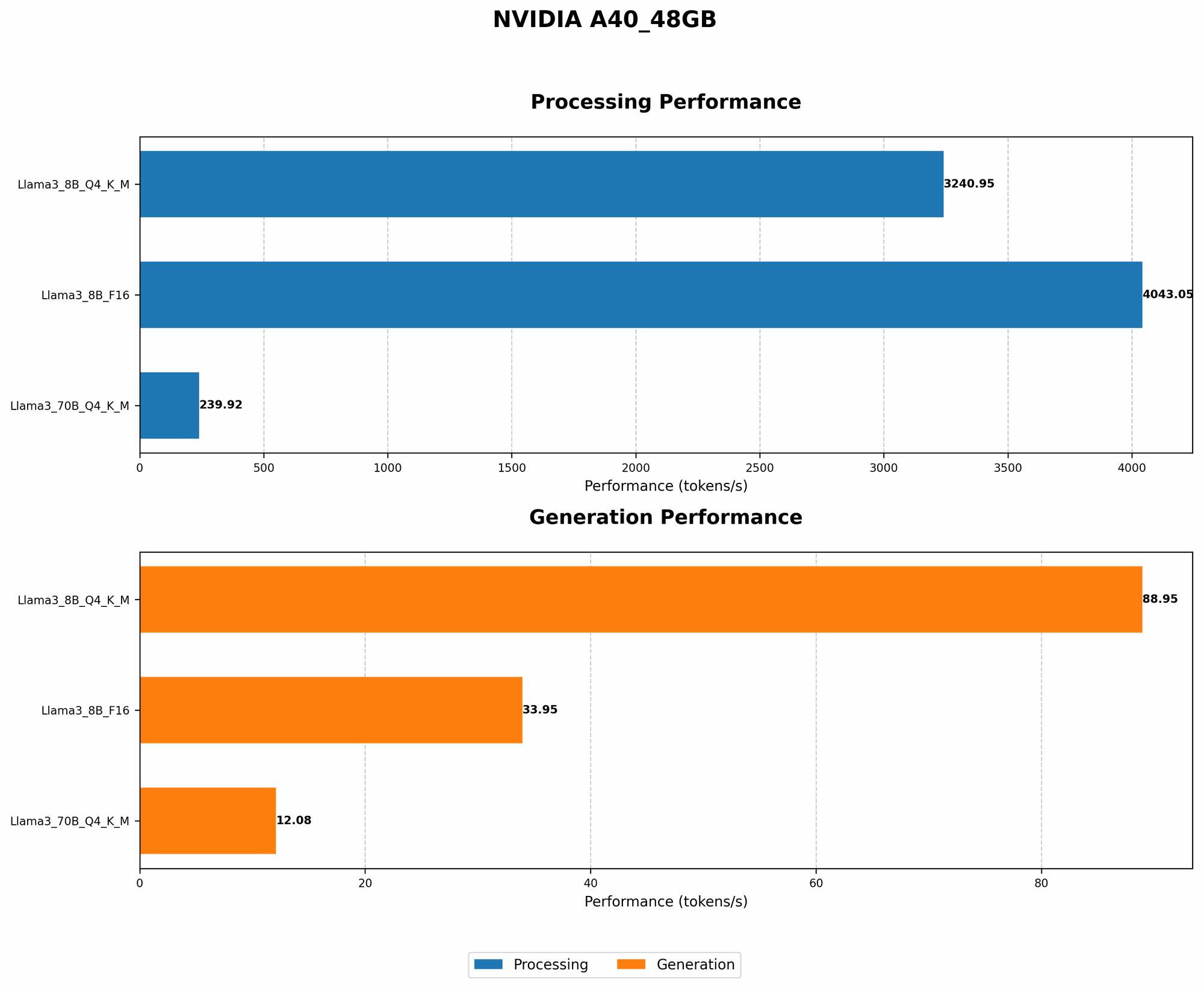
The table below shows performance for Llama 3 8B and 70B models on the A40_48GB:
| Model | Quantization | Token Generation (Tokens/second) | Token Processing (Tokens/second) |
|---|---|---|---|
| Llama 3 8B | Q4KM | 88.95 | 3240.95 |
| Llama 3 8B | F16 | 33.95 | 4043.05 |
| Llama 3 70B | Q4KM | 12.08 | 239.92 |
| Llama 3 70B | F16 | N/A | N/A |
Key Observations:
- Q4KM Dominates: Q4KM delivers impressive speedups for both Llama 3 8B and 70B in token generation and processing.
- Larger Model Challenges: While the A40_48GB can handle Llama 3 70B, performance is significantly impacted by the increased size of the model.
- Missing F16 Data: F16 benchmarks for the Llama 3 70B model are unavailable in our sources.
FAQ: Clearing up the Fog
1. What are the key differences between the A40_48GB and other GPUs?
The A4048GB excels in memory capacity and high-bandwidth memory (HBM2e), making it ideal for large LLM models. Other GPUs like the A100 may have more CUDA cores, but the A4048GB's substantial memory advantage allows it to handle larger models and data sets without sacrificing performance.
2. How do I choose the right LLM for my A40_48GB?
The best LLM depends on your specific needs. Smaller models like Llama 3 8B will run faster and utilize less memory, while larger models like Llama 3 70B require more resources. Consider the model's accuracy and memory requirements alongside your available hardware.
3. Are there any open-source tools for LLM optimization?
Yes, several open-source tools and libraries like Hugging Face Transformers and NVIDIA Triton Inference Server can be used to fine-tune and deploy LLMs. These tools offer additional functionality to further optimize your LLM setup.
4. What are some common mistakes to avoid when optimizing LLMs on the A40_48GB?
- Ignoring memory limitations: Try to load models that exceed the A40_48GB's capacity.
- Not using proper profiling tools: Failing to analyze performance bottlenecks can lead to inefficient code or model choices.
- Overlooking the importance of batching: Not adjusting batch size for specific needs can lead to sub-optimal performance.
Keywords:
NVIDIA A4048GB, LLM, Large Language Model, Llama 3, GPU, Performance Optimization, Quantization, Q4K_M, Multi-GPU, Memory Bandwidth, Caching, CUDA Cores, Dynamic Batching, Profiling and Tuning, AI Frameworks, PyTorch, TensorFlow, GPU Benchmark, Token Generation, Token Processing, Hugging Face Transformers, NVIDIA Triton Inference Server.