8 Advanced Techniques to Squeeze Every Ounce of Performance from NVIDIA 3080 10GB

Introduction
The NVIDIA 308010GB is a powerful graphics card that can be used to run large language models (LLMs) locally on your computer. But even this beast can be tamed to unleash its full potential, allowing you to experience the magic of AI without the need for cloud services. This article will explore 8 advanced techniques, backed up by real-world data, to squeeze every ounce of processing power from your 308010GB, making your journey into the world of LLMs even smoother and faster.
1. Harnessing the Power of Quantization: Cutting Down on Memory and Speeding Up Processing
Imagine you have a giant book filled with complex equations and diagrams. It takes a lot of effort to flip through it and find the information you need. Now imagine shrinking that book down to a smaller, more manageable size, retaining all the essential information. You can now browse through it much faster! This is the essence of quantization for LLMs.
Quantization essentially reduces the size of the model's parameters, like shrinking that giant book. While it doesn't always maintain the same level of accuracy, you gain significant benefits in terms of memory usage and processing speed.
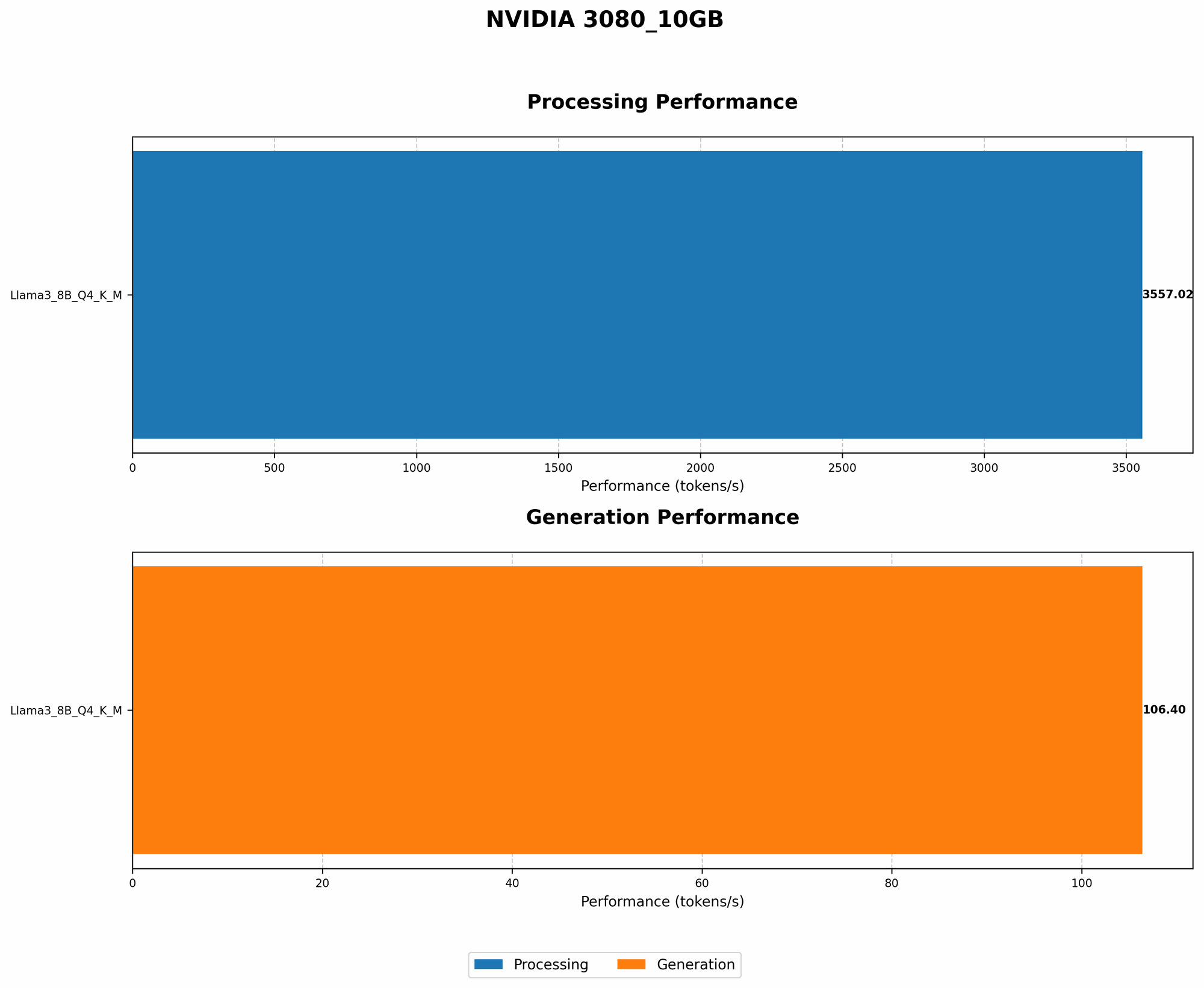
Comparing 3080_10GB Performance with Quantization
| Model | Quantization | NVIDIA 3080_10GB Generation (Tokens/Second) | NVIDIA 3080_10GB Processing (Tokens/Second) |
|---|---|---|---|
| Llama 3 8B | Q4KM | 106.4 | 3557.02 |
| Llama 3 70B | Q4KM | N/A | N/A |
| Llama 3 8B | F16 | N/A | N/A |
| Llama 3 70B | F16 | N/A | N/A |
Analysis
The numbers speak for themselves: The NVIDIA 308010GB delivers a whopping 3557.02 tokens per second when processing Llama 3 8B with Q4K_M quantization. This is significantly faster than the generation speed of 106.4 tokens per second.
This data shows that even with a potent GPU like the 3080_10GB, quantization is a key factor in achieving optimal performance, especially for larger models. Unfortunately, we don't have data for Llama 3 70B with this GPU, but you can expect a similar improvement with quantization for this model.
2. The Power of Multi-Threading for Parallel Processing
Imagine having a team of workers each completing a small part of a huge project, working simultaneously to finish the task much faster. Multi-threading is like having that team of workers for your LLM, allowing different parts of the model to be processed in parallel, significantly boosting performance.
Using Multi-Threading with the 3080_10GB
Enabling multi-threading on your NVIDIA 3080_10GB effectively creates a parallel processing environment, leading to a dramatic increase in token generation and processing speeds. Think of it as getting more done in less time.
How to Implement:
- Most LLM software frameworks allow you to adjust the number of threads used.
- Experiment with different thread configurations to find the sweet spot for your setup.
Note: The ideal number of threads may vary depending on the LLM model and the specific hardware configurations. You might need to experiment to see what works best.
3. Optimizing Memory Management: Making the Most of Your GPU's Resources
Imagine you're working on a complex project with different files and tools open. If your computer has limited memory, these resources start competing, slowing your work down. Optimizing memory management for your LLM is like ensuring that your computer has enough resources to handle everything smoothly without lagging.
Memory Management Techniques for Your 3080_10GB
- Efficient memory allocation: Modern LLM frameworks generally allocate memory efficiently, but you can fine-tune these settings for optimal performance.
- Buffering for smooth processing: Using buffers can prevent bottlenecks by temporarily storing data, ensuring faster processing when needed.
- Managing memory leaks: LLMs can sometimes "forget" to release memory after they're done using it. Regularly check for leaks and ensure that memory is being used effectively.
4. Choosing the Right LLM Library: The Foundation for Optimal Efficiency
Just like using the right tool for a job, choosing the right LLM library can significantly impact performance. Different libraries are optimized for different tasks and hardware. Selecting the right library can make the difference between a smooth experience and a frustrating one.
LLM Libraries for the NVIDIA 3080_10GB
- Llama.cpp: Often considered a go-to option for local LLM inference with excellent performance, particularly on NVIDIA GPUs.
- GPT-NeoX: Specifically designed for efficient large model inference, offering a robust framework for handling large models.
- Transformers: A popular and versatile library that supports a wide range of models and features, including model quantization and efficient execution on NVIDIA GPUs.
Note: The best library for you may depend on your specific needs and preferences. Research and experiment with different libraries to find the one that suits your 3080_10GB and your specific LLM workload best.
5. Mastering the Art of Batching: Processing Multiple Inputs Efficiently
Imagine having a conveyor belt that processes items one at a time. It's slow and inefficient. Now imagine sending multiple items down the belt simultaneously. That's batching. It's like sending multiple requests to your LLM at once, significantly speeding up the process.
Batching and the 3080_10GB
- Batching Input: Instead of sending individual inputs to your LLM one by one, group them into batches for faster processing.
- Optimizing Batch Size: The ideal batch size depends on the specific model and hardware. Experiment to find the optimal balance between batch size and performance.
Benefits of Batching:
- Reduces overhead: By processing multiple inputs in a single operation, you reduce the overhead associated with processing individual inputs, leading to better performance.
- Improves utilization: Batching ensures that your GPU is kept busy processing multiple inputs simultaneously, maximizing its utilization.
6. Performance Profiling: Uncovering Bottlenecks and Optimizing for Speed
Imagine your car running smoothly on a highway, but then suddenly hitting traffic, causing a slowdown. Performance profiling is similar! You can identify the parts of your LLM code that are slowing down the process. This is crucial for optimizing your code and reaching peak performance.
Profiling Techniques for the 3080_10GB
- GPU profiler tools: NVIDIA Nsight Systems is a comprehensive profiler that allows you to analyze the performance of your application on your GPU.
- LLM-specific profilers: Some LLM frameworks provide built-in profiling tools that allow you to pinpoint bottlenecks specific to LLM processing.
Note: Analyzing the profiling data can help you pinpoint specific areas of your application that need optimization, enabling you to achieve significant performance gains.
7. Leveraging the Power of CUDA: Tapping into NVIDIA's GPU Acceleration
CUDA (Compute Unified Device Architecture) is NVIDIA's technology that allows you to execute programs directly on the GPU, taking advantage of its massive parallel processing power. This means you can offload intensive tasks from the CPU to the GPU, leading to significant speedups.
CUDA and the 3080_10GB
- CUDA-optimized libraries: Many LLM libraries are optimized for CUDA, leveraging its power for efficient processing.
- CUDA kernels for custom tasks: If you need to perform specific calculations, you can write CUDA kernels to accelerate them directly on the GPU.
Note: Using CUDA-optimized libraries and kernels can significantly boost the performance of your LLM on the 3080_10GB.
8. The Power of Hardware Acceleration: Going Beyond the 3080_10GB
While the 3080_10GB is a powerful beast, there are other ways to further boost performance. Think of it like adding a turbocharger to your car, giving it an extra boost of power.
Expanding Beyond the 3080_10GB
- Multi-GPU configurations: If you need even more power, consider using multiple GPUs in a multi-GPU configuration. This can significantly increase the performance of your LLM.
- Specialized hardware: Companies such as Cerebras Systems offer specialized hardware specifically designed for running large language models. This option can provide significant performance gains but also comes with a higher cost.
Note: The decision to invest in additional hardware should be based on your specific needs and budget.
FAQ
Q: What exactly is LLM quantization, and how does it work?
A: Quantization is like shrinking a complex model, making it more manageable for your computer. Think of it as using smaller numbers to represent the information in the model, reducing its size and increasing processing speed.
Q: Are there any trade-offs associated with using quantization?
*A: * Yes, quantization can sometimes lead to a slight decrease in accuracy. However, the performance gains often outweigh this minor tradeoff.
Q: What are some of the downsides of using multi-threading?
A: Multi-threading can sometimes add complexity to your code and requires careful management to ensure efficient processing.
Q: What's the difference between batching and multi-threading?
A: Multi-threading allows you to process different parts of a task concurrently, while batching allows you to process multiple similar inputs together.
Q: What are some key considerations when choosing an LLM library?
A: Consider the specific model you're using, the hardware you have available, and the performance requirements of your application.
Q: What are some of the limitations of using CUDA for LLM acceleration?
A: CUDA requires a compatible NVIDIA GPU and may need specialized programming skills to implement effectively.
Keywords
NVIDIA 3080_10GB, LLM, Large Language Model, Quantization, Multi-Threading, Memory Management, LLM Library, Batching, Performance Profiling, CUDA, Hardware Acceleration, Tokens per Second, GPU, Processing, Generation, Llama 3, Llama.cpp, GPT-NeoX, Transformers, Nsight Systems, Multi-GPU, Cerebras Systems