7 Tricks to Avoid Out of Memory Errors on NVIDIA A100 SXM 80GB
Introduction
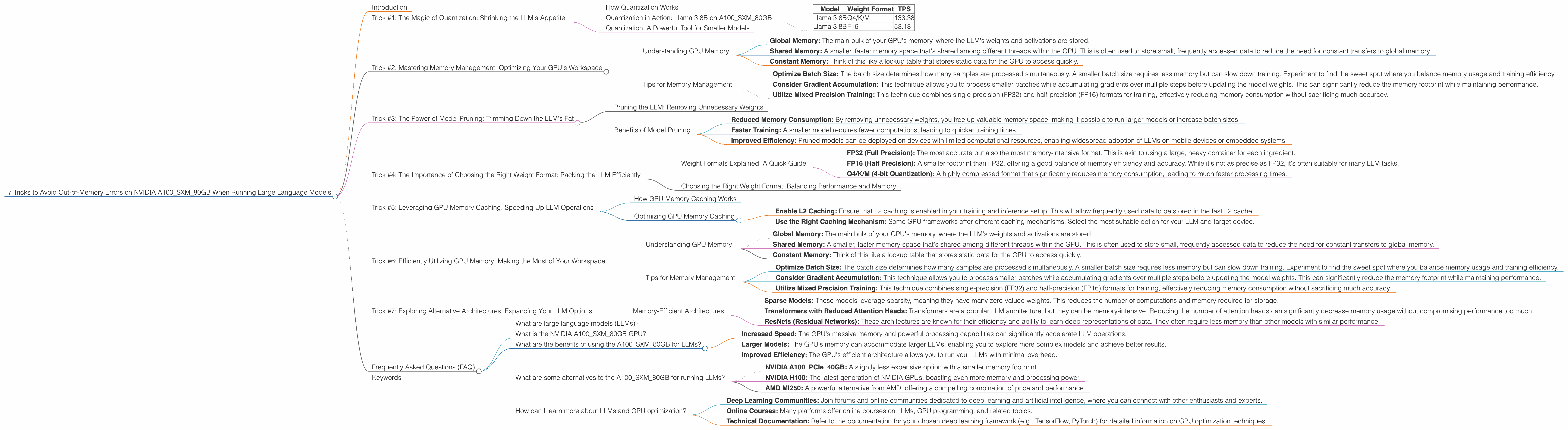
Have you ever encountered the dreaded "Out of Memory" error while running a large language model (LLM) on your powerful NVIDIA A100SXM80GB GPU? It's a common problem that can be incredibly frustrating, especially when you're eager to unleash the power of these cutting-edge models. But fear not, fellow AI enthusiasts! This comprehensive guide will equip you with 7 essential tricks to conquer out-of-memory issues and unlock the full potential of your A100SXM80GB for LLM experimentation. We'll delve into the world of quantization, weight formats, and GPU memory management, providing you with the knowledge and tools to smoothly navigate the realm of large language model training and inference.
Imagine an LLM as a hungry giant with a massive appetite for data. You're the chef, trying to feed it enough information to produce insightful text, translate languages, or even create compelling narratives. The A100SXM80GB is your kitchen, a powerful space with 80 gigabytes of memory – that's a lot of ingredients! But what if you try to cram too much into the kitchen? That's when the dreaded "Out of Memory” error pops up, reminding you that even the most powerful GPU can be overwhelmed.
Let's dive into the world of LLMs and A100SXM80GBs, ensuring you have the skills to avoid those nasty out-of-memory errors and unlock the full potential of your powerful hardware.
Trick #1: The Magic of Quantization: Shrinking the LLM's Appetite
Quantization is like putting your LLM on a diet – it helps you shrink the size of the model without sacrificing too much performance! Think of it as changing the recipe, using fewer "ingredients" (numbers) without affecting the final dish's quality. In the world of LLMs, these "ingredients" are the model's weights – a vast array of numbers that store the LLM's knowledge.
How Quantization Works
Quantization essentially reduces the precision of the model's weights. Instead of using 32 bits to represent each weight, you can opt for 16 bits or even 8 bits, thereby significantly reducing the memory footprint. This is like replacing a detailed recipe with a simplified one, using fewer precise measurements. While you might lose some accuracy, the model still delivers excellent performance, especially for tasks like text generation or translation.
Quantization in Action: Llama 3 8B on A100SXM80GB
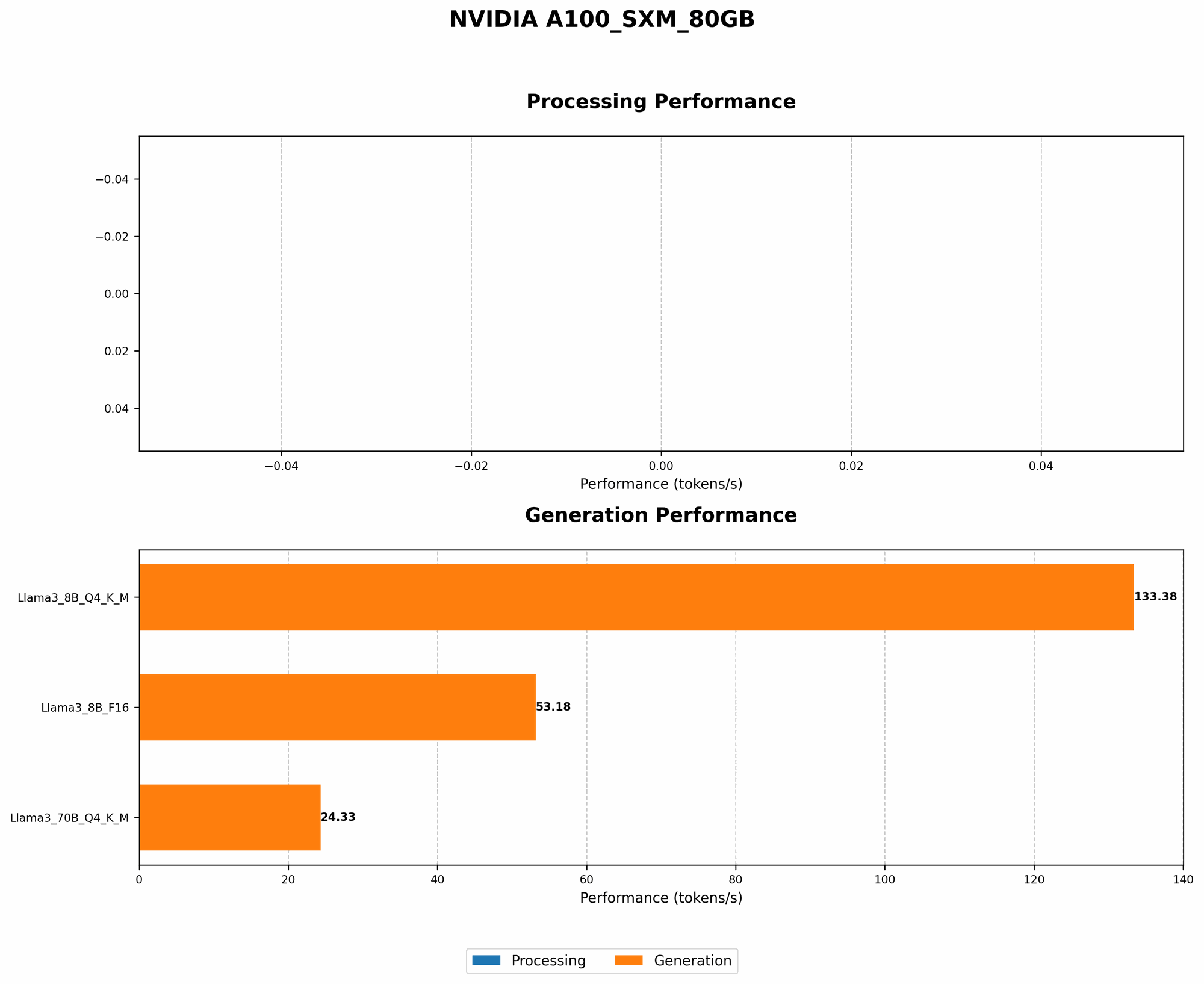
By quantizing Llama 3 8B to Q4/K/M format, we see a significant jump in tokens per second (TPS) on the A100SXM80GB. Here's a table to showcase this:
| Model | Weight Format | TPS |
|---|---|---|
| Llama 3 8B | Q4/K/M | 133.38 |
| Llama 3 8B | F16 | 53.18 |
As you can see, the Q4/K/M quantized model delivers over twice the speed compared to the F16 format, illustrating the power of quantization for improving LLM performance on the A100SXM80GB.
Quantization: A Powerful Tool for Smaller Models
Quantization is particularly beneficial for smaller models like Llama 3 8B, allowing you to fit them into the memory of your A100SXM80GB more easily. Even on smaller devices, quantization can be a game-changer, freeing up space and allowing you to experiment with larger models that were previously inaccessible.
Trick #2: Mastering Memory Management: Optimizing Your GPU's Workspace
Think of your GPU's memory as a well-organized workspace. To avoid "out-of-memory" errors, you need to allocate space wisely and manage your resources effectively. This involves understanding the different types of memory used by LLMs and optimizing their usage.
Understanding GPU Memory
Your A100SXM80GB has a vast amount of memory, but it's not a single monolithic space. It's divided into different sections:
- Global Memory: The main bulk of your GPU's memory, where the LLM's weights and activations are stored.
- Shared Memory: A smaller, faster memory space that's shared among different threads within the GPU. This is often used to store small, frequently accessed data to reduce the need for constant transfers to global memory.
- Constant Memory: Think of this like a lookup table that stores static data for the GPU to access quickly.
By strategically using these different memory spaces, you can optimize your LLM's memory footprint and avoid "out-of-memory" errors.
Tips for Memory Management
- Optimize Batch Size: The batch size determines how many samples are processed simultaneously. A smaller batch size requires less memory but can slow down training. Experiment to find the sweet spot where you balance memory usage and training efficiency.
- Consider Gradient Accumulation: This technique allows you to process smaller batches while accumulating gradients over multiple steps before updating the model weights. This can significantly reduce the memory footprint while maintaining performance.
- Utilize Mixed Precision Training: This technique combines single-precision (FP32) and half-precision (FP16) formats for training, effectively reducing memory consumption without sacrificing much accuracy.
Trick #3: The Power of Model Pruning: Trimming Down the LLM's Fat
Model pruning is like a meticulous chef getting rid of unnecessary ingredients, leaving only the essentials. It's the art of removing redundant weights from the model, effectively reducing its size without compromising performance.
Pruning the LLM: Removing Unnecessary Weights
Think of it like removing a few spices from a recipe that don't significantly impact the final dish's flavor. Similarly, you can prune the LLM's connections – the weights – that contribute minimally to the model's overall performance. This process involves identifying and removing these insignificant connections, effectively shrinking the model's size.
Benefits of Model Pruning
- Reduced Memory Consumption: By removing unnecessary weights, you free up valuable memory space, making it possible to run larger models or increase batch sizes.
- Faster Training: A smaller model requires fewer computations, leading to quicker training times.
- Improved Efficiency: Pruned models can be deployed on devices with limited computational resources, enabling widespread adoption of LLMs on mobile devices or embedded systems.
Trick #4: The Importance of Choosing the Right Weight Format: Packing the LLM Efficiently
Choosing the right weight format is like selecting the perfect container for storing your ingredients. You want something that's both efficient and safe. In the context of LLMs, the weight format significantly impacts the model's memory consumption.
Weight Formats Explained: A Quick Guide
- FP32 (Full Precision): The most accurate but also the most memory-intensive format. This is akin to using a large, heavy container for each ingredient.
- FP16 (Half Precision): A smaller footprint than FP32, offering a good balance of memory efficiency and accuracy. While it's not as precise as FP32, it's often suitable for many LLM tasks.
- Q4/K/M (4-bit Quantization): A highly compressed format that significantly reduces memory consumption, leading to much faster processing times.
Choosing the Right Weight Format: Balancing Performance and Memory
For the A100SXM80GB, you can experiment with different weight formats depending on your model and desired level of accuracy. For example, if you're running a smaller model like Llama 3 8B, you can explore the Q4/K/M format for maximum speed and efficiency. However, if you're working with a massive model and require high accuracy, FP16 might be the better choice, striking a balance between memory usage and performance.
Trick #5: Leveraging GPU Memory Caching: Speeding Up LLM Operations
GPU memory caching is like having a dedicated "shopping cart" for your frequently used ingredients. By storing frequently accessed data closer to the GPU, you can significantly reduce the time required to retrieve information, boosting the LLM's speed and performance.
How GPU Memory Caching Works
When the GPU processes an LLM, it constantly accesses the model's weights and activations stored in the global memory. This process can be time-consuming, especially when dealing with large models. GPU memory caching helps by storing frequently accessed data in a smaller, faster memory space, the L2 cache. This allows the GPU to access the data much faster, significantly improving the model's inference speed.
Optimizing GPU Memory Caching
- Enable L2 Caching: Ensure that L2 caching is enabled in your training and inference setup. This will allow frequently used data to be stored in the fast L2 cache.
- Use the Right Caching Mechanism: Some GPU frameworks offer different caching mechanisms. Select the most suitable option for your LLM and target device.
Trick #6: Efficiently Utilizing GPU Memory: Making the Most of Your Workspace
Think of your A100SXM80GB's memory as a well-organized workspace. To avoid "out-of-memory" errors, you need to allocate space wisely and manage your resources effectively. This involves understanding the different types of memory used by LLMs and optimizing their usage.
Understanding GPU Memory
Your A100SXM80GB has a vast amount of memory, but it's not a single monolithic space. It's divided into different sections:
- Global Memory: The main bulk of your GPU's memory, where the LLM's weights and activations are stored.
- Shared Memory: A smaller, faster memory space that's shared among different threads within the GPU. This is often used to store small, frequently accessed data to reduce the need for constant transfers to global memory.
- Constant Memory: Think of this like a lookup table that stores static data for the GPU to access quickly.
By strategically using these different memory spaces, you can optimize your LLM's memory footprint and avoid "out-of-memory" errors.
Tips for Memory Management
- Optimize Batch Size: The batch size determines how many samples are processed simultaneously. A smaller batch size requires less memory but can slow down training. Experiment to find the sweet spot where you balance memory usage and training efficiency.
- Consider Gradient Accumulation: This technique allows you to process smaller batches while accumulating gradients over multiple steps before updating the model weights. This can significantly reduce the memory footprint while maintaining performance.
- Utilize Mixed Precision Training: This technique combines single-precision (FP32) and half-precision (FP16) formats for training, effectively reducing memory consumption without sacrificing much accuracy.
Trick #7: Exploring Alternative Architectures: Expanding Your LLM Options
Sometimes, the best solution is to change your recipe entirely. Instead of struggling to fit a large model into your A100SXM80GB's memory, you can explore alternative architectures that are inherently more memory efficient.
Memory-Efficient Architectures
- Sparse Models: These models leverage sparsity, meaning they have many zero-valued weights. This reduces the number of computations and memory required for storage.
- Transformers with Reduced Attention Heads: Transformers are a popular LLM architecture, but they can be memory-intensive. Reducing the number of attention heads can significantly decrease memory usage without compromising performance too much.
- ResNets (Residual Networks): These architectures are known for their efficiency and ability to learn deep representations of data. They often require less memory than other models with similar performance.
Frequently Asked Questions (FAQ)
What are large language models (LLMs)?
LLMs are powerful artificial intelligence models trained on massive datasets of text and code. They can understand and generate human-like language, enabling tasks like text summarization, translation, and even creative writing.
What is the NVIDIA A100SXM80GB GPU?
The A100SXM80GB is a powerful GPU designed for high-performance computing tasks, including deep learning and artificial intelligence. It is known for its massive 80GB of memory, making it ideal for running large language models.
What are the benefits of using the A100SXM80GB for LLMs?
The A100SXM80GB offers several benefits for LLM training and inference, including:
- Increased Speed: The GPU's massive memory and powerful processing capabilities can significantly accelerate LLM operations.
- Larger Models: The GPU's memory can accommodate larger LLMs, enabling you to explore more complex models and achieve better results.
- Improved Efficiency: The GPU's efficient architecture allows you to run your LLMs with minimal overhead.
What are some alternatives to the A100SXM80GB for running LLMs?
If the A100SXM80GB is out of reach, there are other powerful GPUs to consider:
- NVIDIA A100PCIe40GB: A slightly less expensive option with a smaller memory footprint.
- NVIDIA H100: The latest generation of NVIDIA GPUs, boasting even more memory and processing power.
- AMD MI250: A powerful alternative from AMD, offering a compelling combination of price and performance.
How can I learn more about LLMs and GPU optimization?
There are many resources available online to expand your knowledge of LLMs and GPU optimization:
- Deep Learning Communities: Join forums and online communities dedicated to deep learning and artificial intelligence, where you can connect with other enthusiasts and experts.
- Online Courses: Many platforms offer online courses on LLMs, GPU programming, and related topics.
- Technical Documentation: Refer to the documentation for your chosen deep learning framework (e.g., TensorFlow, PyTorch) for detailed information on GPU optimization techniques.
Keywords
LLMs, large language models, NVIDIA A100SXM80GB, GPU, out-of-memory error, memory management, quantization, weight format, model pruning, memory caching, alternative architectures, deep learning, AI, artificial intelligence, performance, efficiency, speed, optimization, training, inference