7 Tricks to Avoid Out of Memory Errors on NVIDIA 3080 10GB

Introduction
Running large language models (LLMs) locally on your NVIDIA 3080 10GB can be an exciting adventure, especially if you're a developer eager to explore the possibilities of these powerful AI models. However, the thrill can quickly turn into frustration when you encounter the dreaded "out-of-memory" error. This error usually signifies that your model is too large for your GPU's memory. This article will guide you through seven effective tricks to overcome this challenge and unleash the full potential of your 3080 10GB for running LLMs.
Understanding the Memory Challenge
Imagine your GPU's memory as a giant hard drive, but much, much faster. LLMs are like massive digital libraries, with each word, phrase, and sentence represented by a "token." As your LLM gets bigger, its library grows, demanding more and more memory space. Your 3080 10GB, while powerful, has its limits. If you try to load an LLM that's too big, the memory fills up, and you're left with an error message that reads "Error: Out of memory."
Trick #1: Quantization: Make Your LLM Smaller and Faster
Quantization is like compressing your LLM without losing too much information. Think of it as storing information in a smaller suitcase. Instead of using full-precision numbers (like 32-bit floating-point numbers), we can use smaller, 4-bit numbers to represent the same information. This shrinks the memory footprint of your LLM significantly, allowing you to fit a larger model on your 3080 10GB.
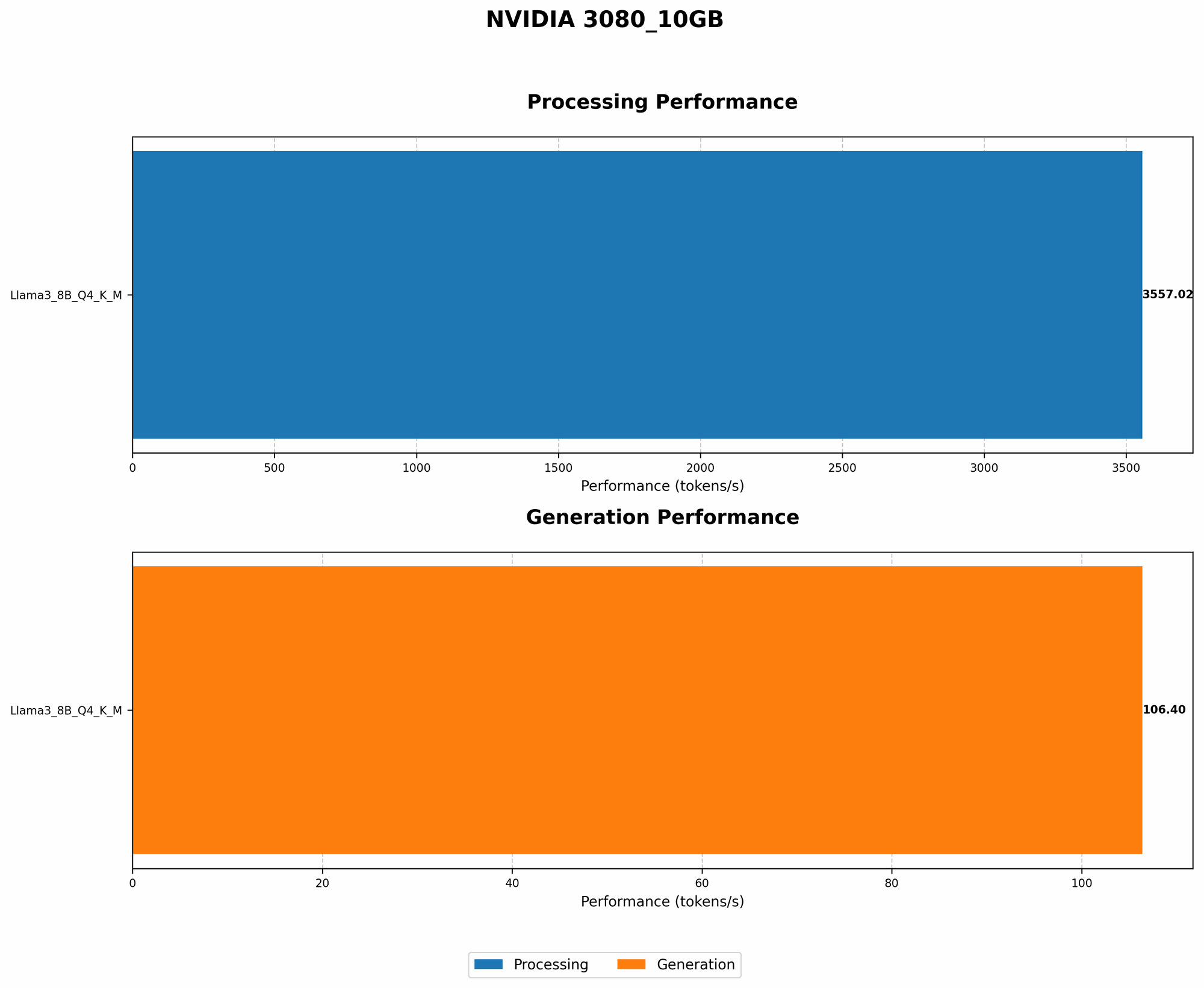
For example, the Llama 3 8B model with 4-bit quantization can fit on the NVIDIA 3080 10GB. With this technique, you can achieve faster processing and generation speeds.
Comparison: Llama 3 8B on NVIDIA 3080 10GB
| Model | Quantization | Memory Consumption | Tokens/Second (Generation) | Tokens/Second (Processing) |
|---|---|---|---|---|
| Llama 3 8B | Q4 K_M | Fits | 106.4 | 3557.02 |
| Llama 3 8B | F16 | Doesn't fit | null | null |
Trick #2: Lowering the Batch Size: Smaller Bites, Faster Processing
Have you ever tried to eat an entire pizza in one sitting? Probably not a good idea. The same concept applies to processing LLM data. A batch size defines how much text data is processed at once. Reducing the batch size allows you to break down the workload into smaller, more manageable chunks. This effectively reduces the memory pressure on your GPU, enabling the model to run smoothly.
For example, if your batch size is too large and your model generates errors, you can try lowering the batch size to 16, 8, or even 4.
Trick #3: Model Pruning: Cutting Out Unnecessary Information
Imagine cleaning out your attic. You're likely to find tons of things you don't need anymore! Model pruning is similar to a virtual attic cleaning for your LLM. It involves removing unnecessary or redundant connections (also known as "weights") within the model. This process helps streamline the model's architecture without sacrificing too much accuracy, resulting in a more compact and memory-efficient model.
Trick #4: GPU Memory Management: Optimizing Your Memory Usage
Just like managing your personal finances, you need to optimize your memory usage. By carefully managing your GPU's memory, you can ensure that your LLM has the necessary resources to run smoothly. Here are some key steps:
- Use a low-level memory allocator: Instead of relying on the default memory management system, consider using a low-level memory allocator like "jemalloc" or "tcmalloc." These specialized allocators are designed to optimize memory allocation and reduce fragmentation, potentially freeing up valuable memory space on your 3080 10GB.
- Avoid memory leaks: These sneaky memory leaks can silently erode your available memory, slowing down your LLM and even leading to crashes. Make sure your code is free of memory leaks by using tools such as Valgrind or AddressSanitizer to spot and address these issues.
Trick #5: Hardware Upgrade: More Memory, More Power
If you've tried all the tricks above and your 3080 10GB still struggles to handle your desired LLM, it might be time to consider an upgrade. Newer GPUs, like the GeForce RTX 4090, offer significantly more memory, allowing you to run even larger LLMs without breaking a sweat.
Trick #6: Optimize Your Code: Streamlining Your LLM Execution
Writing efficient code is like building a well-designed car engine. It makes your LLM run smoothly and with minimal resource consumption. Here are some tips to optimize your Python code for LLM execution:
- Utilize GPU libraries: Nvidia's CUDA library provides powerful tools for parallel processing on GPUs. By leveraging CUDA, you can significantly accelerate your LLM's calculations.
- Profile your code: Use profiling tools to identify bottlenecks in your code. Bottlenecks are sections of your code that slow down the entire execution. By optimizing these bottlenecks, you can optimize your LLM's performance.
Trick #7: Cloud-based Solutions: Offloading the Load
If you're working with extremely large LLMs that simply exceed the capabilities of your 3080 10GB, consider cloud-based solutions. Platforms like Google Colab, AWS SageMaker, or Azure Machine Learning provide powerful GPUs and infrastructure to handle even the most demanding LLM tasks.
FAQ
What are the best LLMs to run on the NVIDIA 3080 10GB?
The best LLMs for your 3080 10GB will depend on your specific needs and the memory consumption of the model. Due to the limitations of the 3080 10GB, you'll likely be restricted to smaller models like Llama 2 7B and Llama 3 8B.
Are there alternative solutions to running LLMs locally?
Yes, cloud-based solutions like Google Colab, AWS SageMaker, and Azure Machine Learning offer powerful GPUs and infrastructure for running LLMs, especially larger models. These platforms also provide a convenient interface for managing and deploying your models.
Is it possible to use a different GPU with a 3080 10GB?
While running multiple GPUs simultaneously can be possible, it's not recommended for most users.
Keywords
Nvidia 3080 10GB, LLM, Out-of-Memory Error, Quantization, Batch Size, Model Pruning, GPU Memory Management, Code Optimization, Cloud-based Solutions, Llama 3 8B, Llama 2 7B, LLMs on Local Machine, GPU Memory Usage.