7 Tips to Maximize Llama3 70B Performance on NVIDIA A100 SXM 80GB

Introduction
The world of large language models (LLMs) is rapidly evolving, with new models and advancements emerging constantly. One of the most exciting developments is the emergence of local LLMs. These are LLMs that can run on your own hardware, offering greater control, privacy, and efficiency compared to cloud-based models. However, getting the most out of local LLMs requires understanding their performance characteristics and optimizing them for your specific hardware.
This article dives deep into the performance of the Llama3 70B model on the powerful NVIDIA A100SXM80GB GPU. We'll explore token generation speed, compare it to other Llama3 models, and provide practical tips for maximizing your Llama3 70B experience. Prepare to unlock the full potential of this remarkable model!
Performance Analysis: Token Generation Speed Benchmarks
Token Generation Speed Benchmarks: Llama3 70B on A100SXM80GB
The token generation speed, or throughput, represents the number of tokens a model can process per second. Think of it like how many words a person can read per minute—the higher the number, the faster the model. Let's see how Llama3 70B fares on the A100SXM80GB:
| Model | Token Generation Speed (tokens/second) |
|---|---|
| Llama3 70B (Q4KM) | 24.33 |
The Q4KM notation indicates the model is running with 4-bit quantization using the K and M methods. Quantization is like compressing the model, reducing its size and memory footprint while preserving most of its functionality. Think of it like using a smaller, faster version of the model.
Note: The A100SXM80GB benchmark data currently lacks information on the performance of Llama3 70B with the F16 precision. We'll revisit this in future updates.
Performance Analysis: Model and Device Comparison
Comparing Llama3 70B to Other Llama3 Models on A100SXM80GB
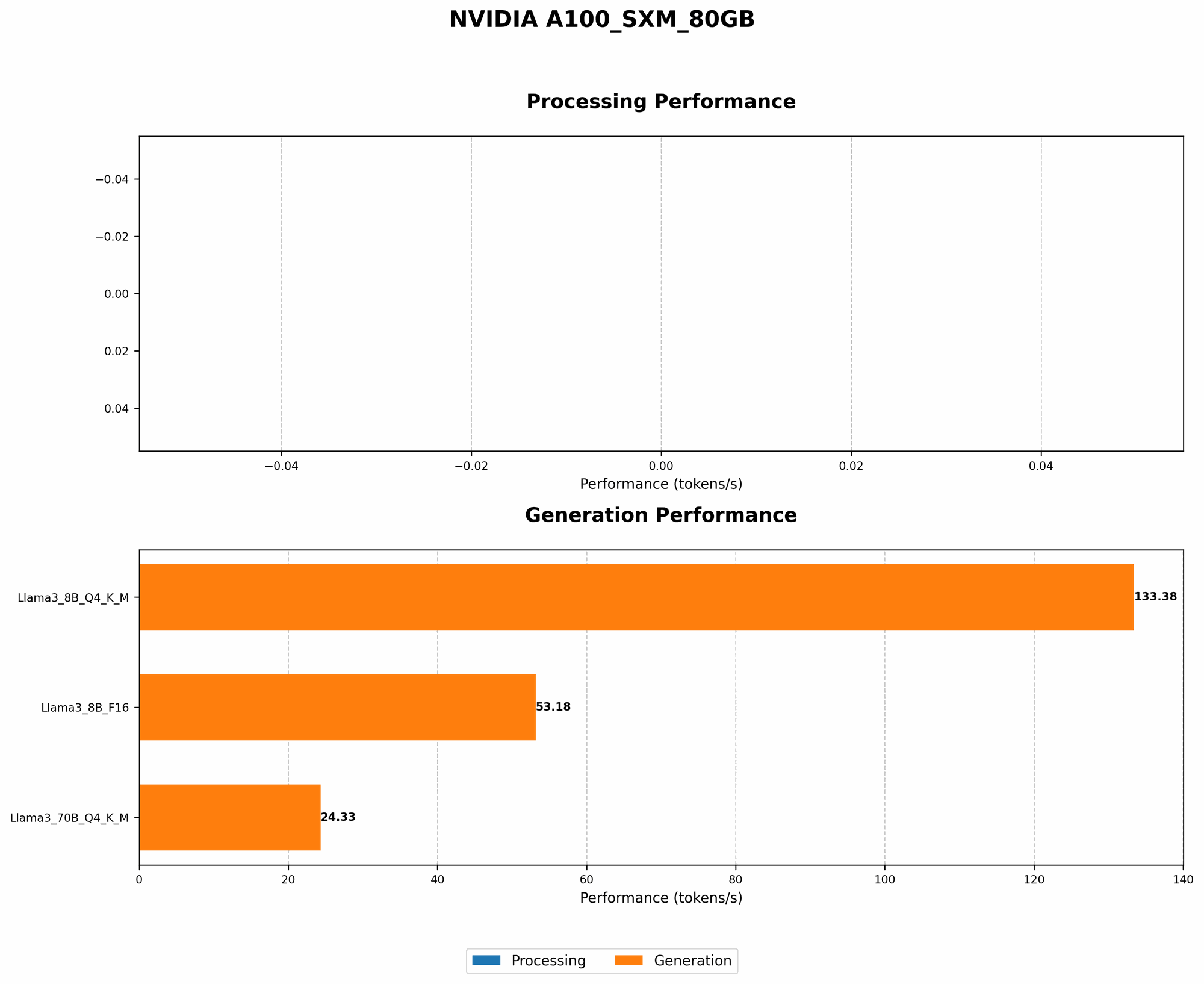
Let's compare the token generation speed of Llama3 70B (Q4KM) to other Llama3 models on the A100SXM80GB:
| Model | Token Generation Speed (tokens/second) |
|---|---|
| Llama3 8B (Q4KM) | 133.38 |
| Llama3 8B (F16) | 53.18 |
| Llama3 70B (Q4KM) | 24.33 |
Observation: The smaller Llama3 8B model shows significantly higher token generation speed compared to the larger Llama3 70B. This is expected, as smaller models generally require less processing power. However, Llama3 70B still achieves a respectable throughput, considering its significantly larger size.
Practical Recommendations: Use Cases and Workarounds
1. When Llama3 70B Shines: Text Generation and Creative Tasks
Despite the lower token generation speed, Llama3 70B remains a formidable tool for tasks that require a higher level of language understanding and creativity. Consider using Llama3 70B for:
- Creative writing: Unleash its ability to generate stories, poems, and scripts.
- Summarization: Condense lengthy texts into concise summaries.
- Translation: Translate between languages with a higher degree of accuracy.
- Dialogue generation: Create realistic and engaging dialogue for chatbots and virtual assistants.
2. Optimizing for Speed: Quantization and Model Pruning
If speed is paramount, consider these options:
- Quantization: We've already seen how Q4KM quantization significantly improves performance. Experiment with other quantization methods, like Q8 or INT8, to find the best balance between accuracy and speed.
- Model Pruning: Remove unnecessary connections in the model's neural network to reduce its size and improve speed. This requires careful optimization to avoid compromising accuracy. It's a bit like removing extra branches from a tree to make it grow faster—you need to be careful not to damage the tree itself!
3. Leveraging GPU Power: Batch Processing and Parallelism
Take advantage of the A100SXM80GB's parallel processing capabilities:
- Batch Processing: Instead of sending one request at a time, process multiple requests concurrently. This can significantly increase overall throughput.
- Multi-GPU Training: If you have multiple A100s, consider distributing the training process across them for faster results.
4. Harnessing Memory Efficiency: Dynamic Batching and Gradient Accumulation
For larger models, memory usage can become a bottleneck. These techniques can help:
- Dynamic Batching: Adjust the batch size during training to optimize for the available memory.
- Gradient Accumulation: Calculate gradients over multiple mini-batches before updating the model's weights. This reduces the memory footprint and allows you to train with larger batch sizes.
5. Choosing the Right Framework: Hugging Face Transformers and More
Select a framework optimized for efficient LLM execution:
- Hugging Face Transformers: A popular framework for training and deploying LLMs. Its efficient implementation of Transformers, the underlying architecture of many LLMs, can significantly speed up your models.
- Other frameworks: Explore frameworks like DeepSpeed and NVIDIA Triton Inference Server for additional optimizations.
6. Taking Advantage of Caching: Reduce Redundant Computations
Use caching to store frequently accessed data:
- Model caching: Avoid recomputing the entire model at every request by caching its intermediate results.
- Token caching: Cache previously generated tokens to avoid unnecessary computations. It's like having a phrasebook for common phrases—no need to translate the same phrase multiple times!
7. Hardware Considerations: Choosing the Best GPU for the Job
While the A100SXM80GB is a powerhouse, selecting the right GPU for your needs is crucial:
- Memory Bandwidth: Choose a GPU with sufficient memory bandwidth to handle the memory-intensive operations involved in LLM training and inference. Think of it like choosing a highway with enough lanes for all the data to flow smoothly!
- GPU Cores: Consider the number of GPU cores for parallel processing. More cores generally mean greater parallelism and faster execution.
FAQ
Q: What is quantization, and why is it important?
A: Quantization is a technique for reducing the size of LLMs by representing their weights and activations with fewer bits. Think of it like reducing the number of colors in an image—it makes the image smaller but preserves most of the essential details. This can significantly improve model loading time and reduce memory footprint.
Q: What are the trade-offs of using a smaller model like Llama3 8B versus a larger model like Llama3 70B?
A: Smaller models like Llama3 8B tend to be faster but may have less accuracy and capability compared to larger models like Llama3 70B. It's a balance between speed, accuracy, and complexity. Choose the model that best suits your specific needs.
Q: Can I use a local LLM on a standard laptop or desktop computer?
A: Yes! While you may not get the same performance as a dedicated GPU, you can run LLMs on consumer-grade hardware. However, some models, like Llama3 70B, may require significant memory and processing power. Experiment with smaller models or consider utilizing cloud-based solutions if necessary.
Keywords
Llama3, A100SXM80GB, NVIDIA, GPU, LLM, Large Language Model, token generation speed, quantization, model pruning, batch processing, parallelism, Hugging Face Transformers, caching, memory bandwidth, GPU cores, local LLMs, performance optimization.