7 Tips to Maximize Llama3 70B Performance on NVIDIA A100 PCIe 80GB

Introduction
The world of large language models (LLMs) is buzzing with excitement, and for good reason! These powerful AI systems are revolutionizing how we interact with technology, from generating creative text to translating languages and even writing code. Among the leading contenders in this space is Meta's Llama3, a family of LLMs known for their impressive capabilities.
But unleashing the full potential of these LLMs requires a powerful hardware foundation. This is where the NVIDIA A100PCIe80GB GPU comes in, a beast of a card designed to handle the demanding computations required for LLM inference. This guide dives deep into optimizing Llama3 70B performance on this specific GPU, providing practical tips and revealing hidden insights for developers.
Let's embark on this journey to squeeze every ounce of performance from your Llama3 70B model! But before we dive into the nitty-gritty, let's clarify some key terms:
- LLM: Large Language Model - a type of AI that can understand and generate human-like text.
- Llama3: A family of LLMs developed by Meta, known for their impressive capabilities.
- NVIDIA A100PCIe80GB: A powerful GPU specifically designed for high-performance computing tasks such as AI and machine learning.
- Quantization: A technique to compress the size of a model, making it faster and more efficient.
Token Generation Speed Benchmarks: A100PCIe80GB and Llama3 70B
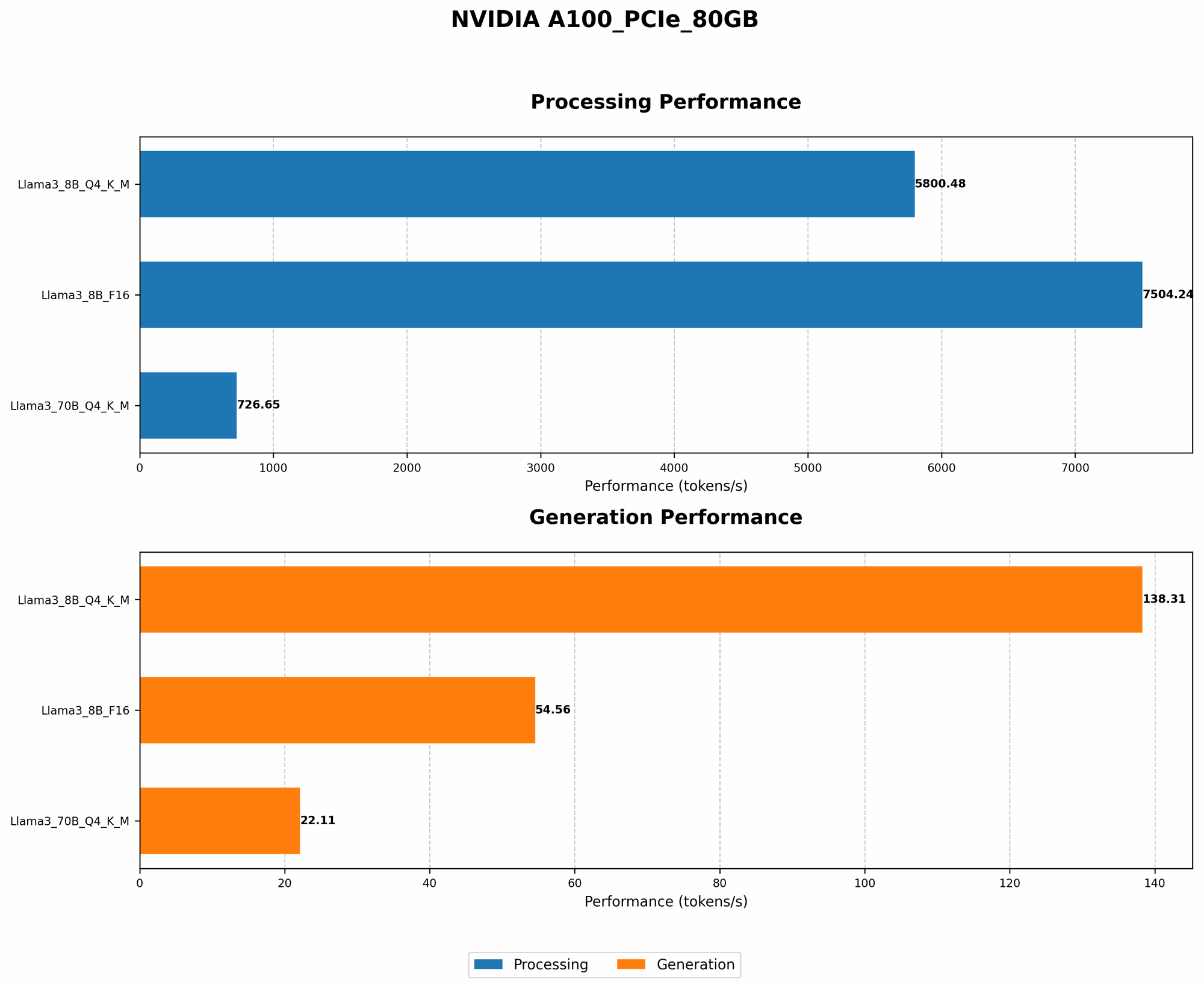
The name of the game in LLM performance is token generation speed. The faster your model can generate text, the quicker you can get work done. Consider this: imagine generating a 1000-word document. A slower model might take several minutes, while a faster model could churn it out in seconds! Let's see how the A100PCIe80GB performs with Llama3 70B:
| Configuration | Tokens per Second |
|---|---|
| Llama370BQ4KM_Generation | 22.11 |
| Llama370BF16_Generation | (Not Available) |
As you can see, the A100PCIe80GB delivers a robust token generation speed of 22.11 tokens per second with Llama3 70B using Q4KM quantization. However, F16 quantization data is unavailable for Llama3 70B.
Here's a quick explanation of the configurations:
- Q4KM quantization: A technique that reduces the size of the model significantly by compressing the weights. This allows the model to run faster, but may result in a slight drop in accuracy.
- F16 quantization: Another technique that reduces the precision of the model, but potentially offers performance gains. This data is unavailable for Llama3 70B.
Performance Analysis: Model and Device Comparison
To get a better understanding of Llama3 70B performance on the A100PCIe80GB, let's compare it to other combinations available:
| Configuration | Tokens per Second |
|---|---|
| Llama38BQ4KM_Generation | 138.31 |
| Llama38BF16_Generation | 54.56 |
| Llama370BQ4KM_Generation | 22.11 |
Key Observations:
- Smaller model, faster speeds: As expected, the smaller 8B model exhibits significantly faster token generation speeds compared to the larger 70B model.
- Quantization matters: The difference in token generation speed between Q4KM and F16 quantization is substantial for the 8B model. This suggests that quantization strategies can significantly impact performance.
Practical Recommendations: Use Cases and Workarounds
Now that we've benchmarked various configurations, let's explore practical recommendations for maximizing Llama3 70B performance on the A100PCIe80GB:
1. Embrace Quantization: As evident from the benchmarks, quantization is your best friend when it comes to squeezing performance from LLMs. Q4KM quantization is highly effective for the A100PCIe80GB and Llama3 70B combo, delivering significant speed gains. While F16 quantization data is unavailable for Llama3 70B, exploring it could potentially yield further performance improvements.
2. Consider Smaller Models: If you prioritize blazing-fast speed, consider using a smaller model like Llama3 8B. This model offers significantly faster token generation speeds, even with F16 quantization. If your use case doesn't demand the additional complexity of the 70B model, the 8B model might be a better fit.
3. Batch Inference: Divide and Conquer: For large-scale tasks, batch inference can come to your rescue. This technique involves splitting the input text into smaller batches and processing them in parallel. This can lead to significant performance improvements, especially for models like Llama3 70B.
4. Optimize Your Code: Don't underestimate the power of well-optimized code. Use efficient programming techniques, leverage libraries like PyTorch or TensorFlow, and minimize redundant computations. A few tweaks can make a huge difference.
5. Utilize Caching: Caching can be a game-changer, especially when generating text iteratively. By caching frequently used values, you can avoid redundant calculations, leading to faster execution times.
6. Experiment with Other Techniques: The world of LLM optimization is constantly evolving. Techniques like gradient accumulation and mixed precision training can further boost performance. Experimenting with these techniques can lead to surprising and rewarding outcomes.
7. Monitor Your Hardware: Keep an eye on your hardware utilization. Make sure your GPU is loaded efficiently, and that other system resources aren't bottleneck. Efficient hardware utilization is crucial for peak performance.
FAQ: Demystifying LLMs and Devices
Q: What is quantization?
A: Quantization is a technique that simplifies a model's weights by reducing precision. Imagine you're trying to describe a color using only a few shades. You could say "red," "green," or "blue," which are like quantized values. This reduction in precision makes the model smaller and faster, but may result in a slight decrease in accuracy.
Q: How does batch inference work?
A: Batch inference is like dividing a large task into smaller, manageable pieces. Imagine baking a cake. Instead of making it all at once, you could bake each layer separately, then assemble them later. Similarly, batch inference splits the input text into smaller batches, processes them individually, then combines the results to generate the final output.
Q: What are the main benefits of the NVIDIA A100PCIe80GB for LLMs?
A: The A100PCIe80GB offers a powerful combination of memory capacity (80GB) and computational prowess, making it ideal for handling the demanding computations required for large language models. Its specialized hardware optimizations speed up LLM inference, allowing you to generate text more quickly and efficiently.
Keywords
Llama3 70B, NVIDIA A100PCIe80GB, LLM performance, token generation speed, quantization, batch inference, practical recommendations, use cases, GPU, model optimization, AI, machine learning, deep learning.