7 Tips to Maximize Llama3 70B Performance on Apple M1 Max

Harnessing the power of Large Language Models (LLMs) on your local machine is a game-changer for developers and researchers alike. Running LLMs locally allows for faster experimentation, improved privacy, and increased control. But with the massive size of these models, finding the right hardware and configuration becomes crucial.
This article dives deep into the performance of Llama3 70B, one of the latest and most powerful LLMs, on Apple's M1 Max chip. We'll explore token generation speed benchmarks, compare different quantization methods, and provide practical recommendations for maximizing your LLM experience. Buckle up – it's time to unleash the potential of Llama3 70B on your M1 Max.
Performance Analysis: Token Generation Speed Benchmarks
Token generation speed is a key metric for LLM performance, representing how quickly a model can generate text. Higher token generation speeds translate to faster responses and smoother interactions. Let's examine the token generation speed benchmarks for Llama3 70B and other LLM models on the Apple M1 Max.
Apple M1 Max and Llama3 70B
| Model | Quantization Technique | Processing (tokens/second) | Generation (tokens/second) |
|---|---|---|---|
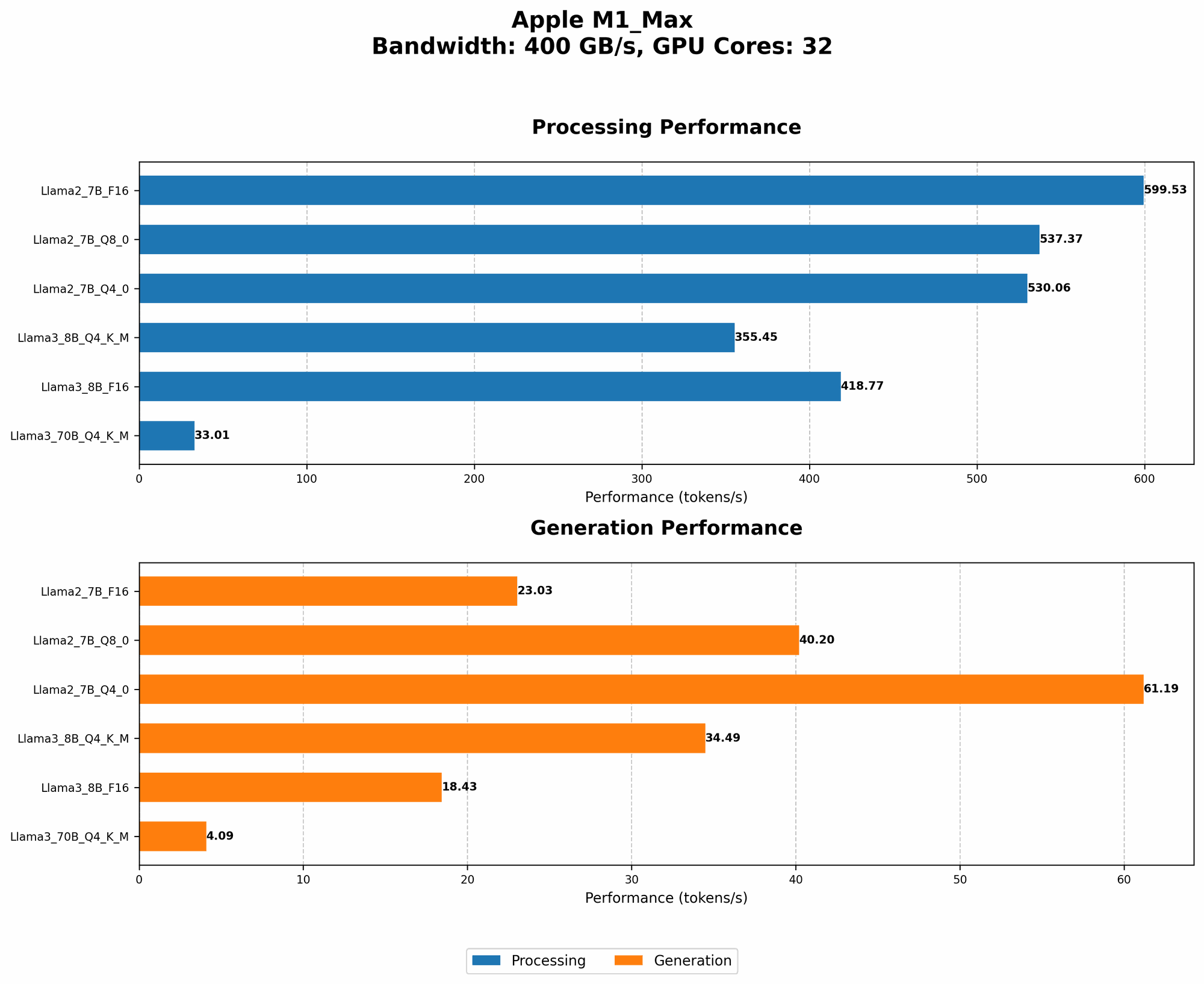
| Llama3 70B | Q4KM | 33.01 | 4.09 |
| Llama3 8B | Q4KM | 355.45 | 34.49 |
| Llama3 8B | F16 | 418.77 | 18.43 |
The data reveals:
- Llama3 70B is significantly slower than Llama3 8B. This is expected due to the massive size difference between the models. The 70B model requires more computation and memory to process compared to the 8B model.
- Q4KM quantization: Llama3 70B demonstrates a slower generation speed compared to Llama3 8B, with a processing speed that's almost 10 times lower. This trend is observed with Llama2 7B.
- F16 quantization (Llama3 8B): The F16 quantization shows a noticeable improvement in generation speed compared to Q4KM. This improvement comes at the cost of slightly higher memory usage compared to Q4KM.
Performance Analysis: Model and Device Comparison
Let's compare Llama3 70B performance on the M1 Max with other LLMs and devices to gain a broader perspective.
Llama3 70B on M1 Max: A Comparative Analysis
| Model | Quantization Technique | Processing (tokens/second) | Generation (tokens/second) |
|---|---|---|---|
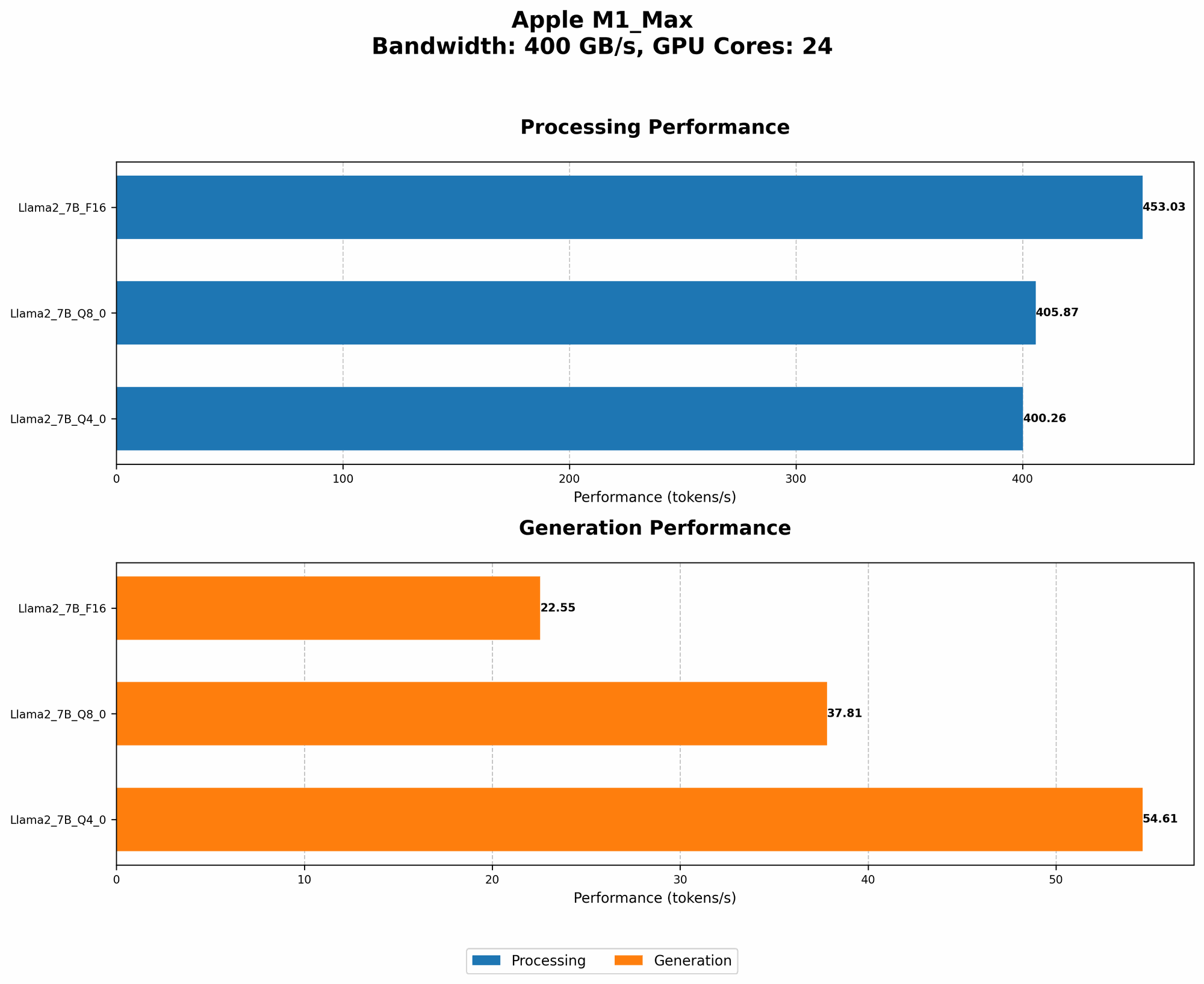
| Llama2 7B | Q8_0 | 537.37 | 40.2 |
| Llama2 7B | Q4_0 | 530.06 | 61.19 |
Key Findings:
- Llama2 7B outperforms Llama3 70B significantly: This highlights the challenge of running extremely large LLMs like Llama3 70B on devices like M1 Max.
- Q4KM vs. Q40: The Llama2 7B Q40 configuration shows faster processing and generation speed compared to Llama3 70B Q4KM. This suggests that the specific quantization technique can have a dramatic impact on performance.
Llama3 70B: A Performance Look Across Devices
It's worth noting that the performance of Llama3 70B on the M1 Max is not comparable to larger, more powerful GPUs like A100 or H100. These specialized GPUs offer significantly higher processing power and memory bandwidth, enabling them to handle massive LLMs like Llama3 70B with greater efficiency.
Practical Recommendations: Use Cases and Workarounds
While running Llama3 70B on the M1 Max might be a challenge, there are ways to optimize your setup and find suitable use cases. Let's explore some recommendations.
Tip 1: Choose the Right Quantization Technique
Quantization is a crucial step for efficient LLM deployment. It reduces the model's size by converting floating-point numbers to lower-precision representations, which can drastically impact performance.
- Q4KM: When using Q4KM quantization, you might experience slightly lower performance but significantly reduced memory usage and faster loading times.
- F16: This method offers a good balance between speed and memory efficiency. While it uses more memory than Q4KM, it can provide a substantial boost in token generation speed.
Tip 2: Leverage Caching and Pre-processing
- Caching: Caching frequently used words, phrases, or entire sentences can significantly reduce the time spent generating text. This is particularly helpful for conversational AI applications where repetitive patterns are common.
- Pre-processing: Utilizing pre-processing techniques like tokenization and vocabulary reduction can streamline the model's workflow.
Tip 3: Explore Smaller Models
If performance and efficiency are paramount, consider utilizing Llama3 8B or even smaller models like Llama2 7B. These models can offer a good balance between capability and speed, making them suitable for a wide range of use cases.
Tip 4: Optimize for Text Generation Tasks
If you're primarily concerned with text generation tasks like creating summaries or writing stories, fine-tuning Llama3 70B for these specific tasks can lead to significant improvements in its performance.
Tip 5: Experiment with Different Parameter Settings
The optimal settings for Llama3 70B will vary depending on your specific use case. Experiment with different parameters like batch size, sequence length, and prompt engineering to see how they affect performance.
Tip 6: Utilize GPU-Assisted Processing
While the M1 Max is a powerful chip, it might not be ideal for handling the massive computational demands of Llama3 70B. Consider leveraging external GPUs for accelerated processing and improved performance.
Tip 7: Be Patient and Persistent
Running Llama3 70B on the M1 Max might require some optimization and experimentation. Don't be afraid to try different approaches and refine your setup based on your specific needs.
FAQ
Q: What is quantization and how does it affect LLM performance?
A: Quantization is a technique used to reduce the size of LLMs by representing numbers with lower precision. This leads to faster loading times and less memory usage, but can sometimes slightly reduce accuracy.
Q: What are the trade-offs between using different quantization methods?
A: Quantization methods offer varying degrees of accuracy, memory usage, and speed. Q4KM is known for its small size and efficient memory usage but can result in lower accuracy compared to F16. F16, while consuming more memory, offers a good balance between speed and accuracy.
Q: Can I run Llama3 70B smoothly on my M1 Max?
A: While Llama3 70B will run on the M1 Max, it may not be ideal for demanding applications due to the model's size and the limitations of the chip. Consider exploring smaller models or leveraging external GPUs for optimized performance.
Q: What are some alternative LLMs that may perform better on M1 Max?
A: Llama 2 7B, Llama 3 8B, and other smaller models can be more suitable for the M1 Max. These models offer a good balance between capability and efficiency, allowing for smoother operation.
Keywords
Llama3 70B, Apple M1 Max, LLM performance, token generation speed, quantization, Q4KM, F16, GPU, deep learning, NLP, natural language processing, AI, artificial intelligence, computation, memory, optimization, benchmarks, use cases, practical recommendations, developers, researchers.