7 Tips to Maximize Llama2 7B Performance on Apple M3 Pro
Introduction
The world of large language models (LLMs) is exploding, with new advancements happening every day. One popular LLM is Llama2 7B, known for its impressive text generation capabilities. But how can you unleash the full potential of this model on your Apple M3Pro device? This article will explore the intricacies of running Llama2 7B on the M3Pro, diving into performance benchmarks, practical optimization strategies, and tips to make the most of your hardware.
Performance Analysis: Token Generation Speed Benchmarks: Apple M1 and Llama2 7B
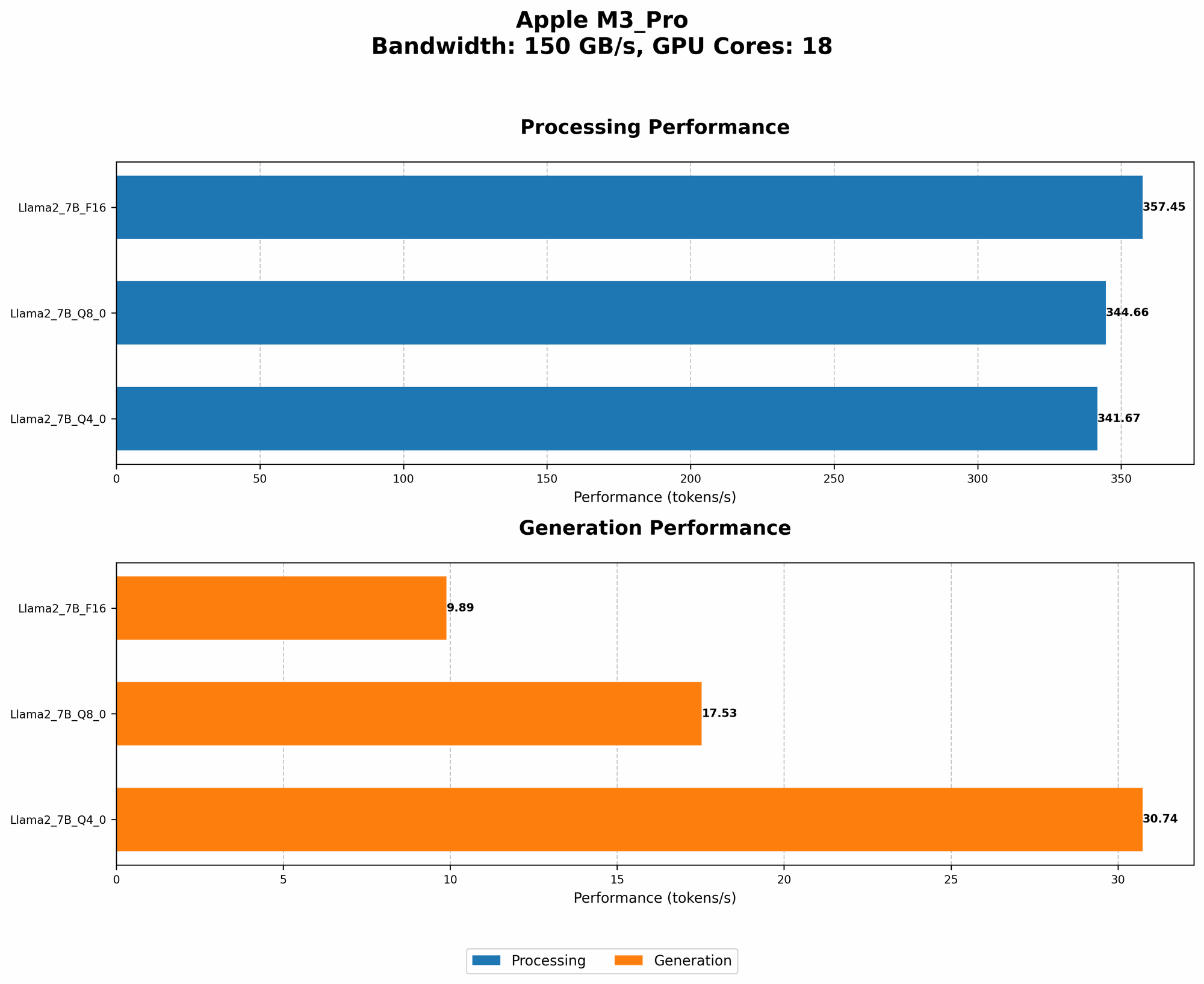
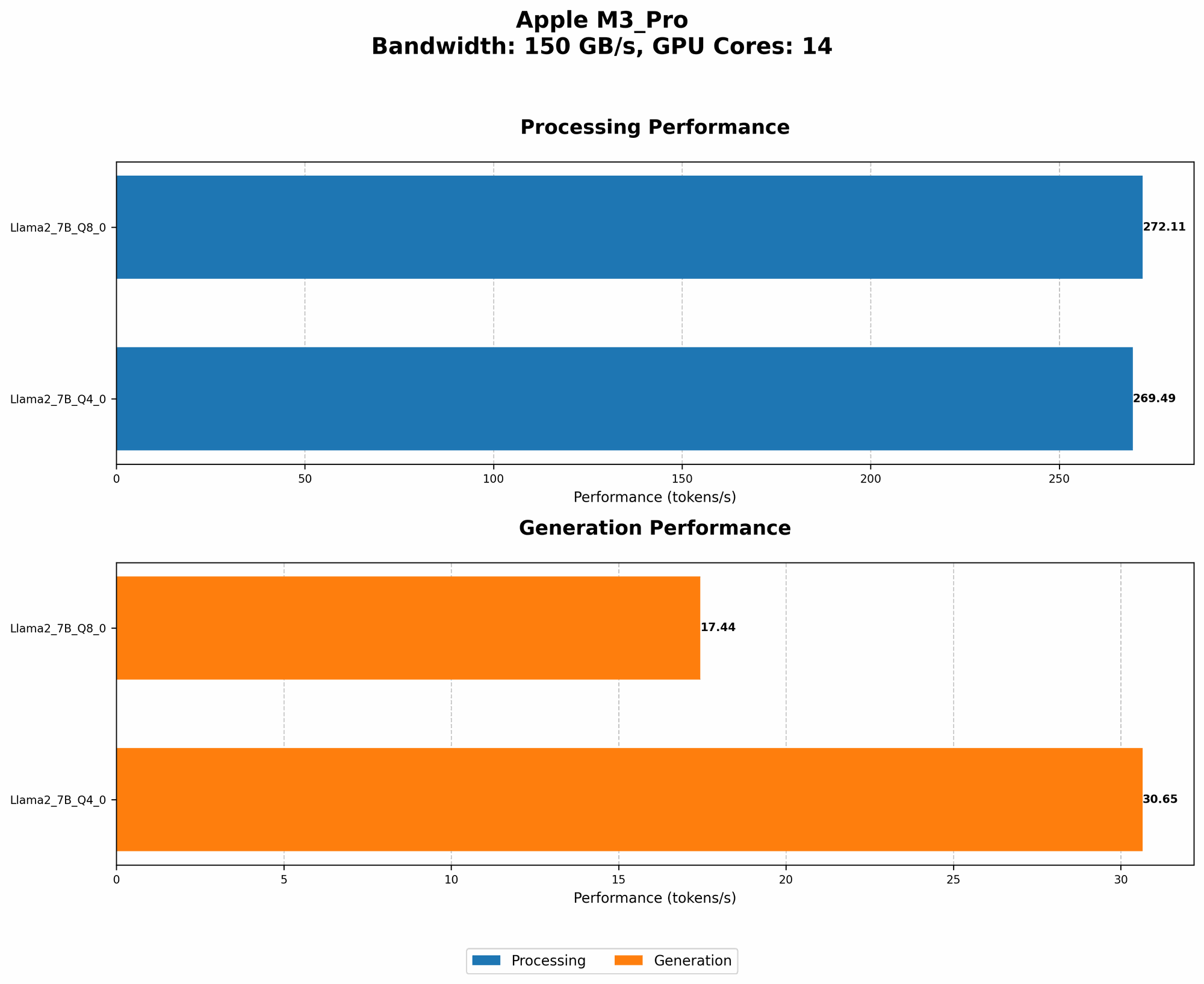
Token generation speed is crucial for a smooth and enjoyable LLM experience. It's the rate at which the model can process text and generate new outputs. Here's a look at Llama2 7B performance on the Apple M3_Pro:
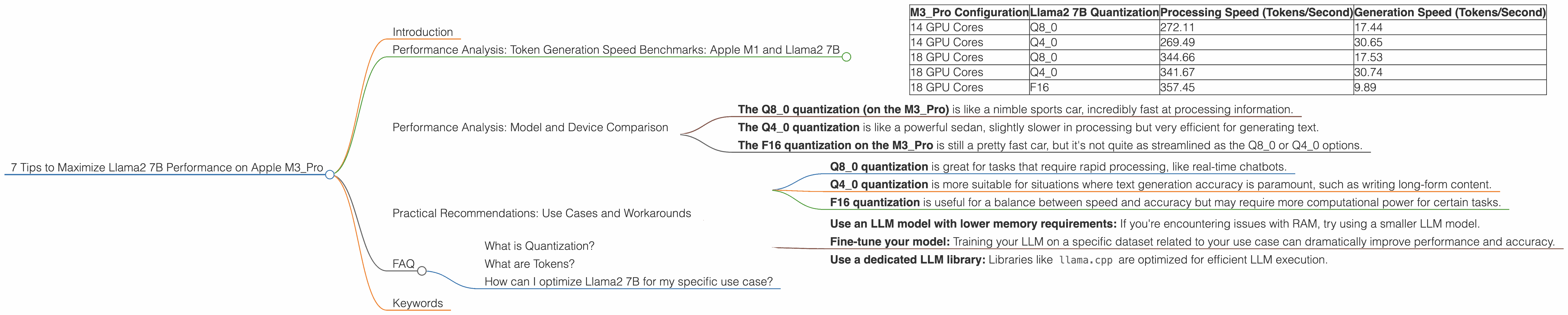
| M3_Pro Configuration | Llama2 7B Quantization | Processing Speed (Tokens/Second) | Generation Speed (Tokens/Second) |
|---|---|---|---|
| 14 GPU Cores | Q8_0 | 272.11 | 17.44 |
| 14 GPU Cores | Q4_0 | 269.49 | 30.65 |
| 18 GPU Cores | Q8_0 | 344.66 | 17.53 |
| 18 GPU Cores | Q4_0 | 341.67 | 30.74 |
| 18 GPU Cores | F16 | 357.45 | 9.89 |
Note: There is no available data for the Llama2 7B model with F16 quantization on the M3_Pro with 14 GPU cores.
The results are quite interesting! Q80 quantization appears to offer the fastest processing speeds on the M3Pro, while Q4_0 quantization shows slightly better generation speeds. Think of it like this: you can think of this as a race between two runners, one excels at starting quickly (processing), and the other shines at finishing strong (generation).
Performance Analysis: Model and Device Comparison
To further understand how the M3_Pro performs with Llama2 7B compared to other combinations, imagine these benchmarks as a race between different cars:
- The Q80 quantization (on the M3Pro) is like a nimble sports car, incredibly fast at processing information.
- The Q4_0 quantization is like a powerful sedan, slightly slower in processing but very efficient for generating text.
- The F16 quantization on the M3Pro is still a pretty fast car, but it's not quite as streamlined as the Q80 or Q4_0 options.
It's worth noting that these speeds are highly dependent on the specific LLM model, its quantization level, and the hardware used. To get a more detailed picture, consider researching other combinations and comparing them to these benchmark results.
Practical Recommendations: Use Cases and Workarounds
So, which configuration should you pick? The best choice depends on your specific needs.
Consider These Tips:
- Q8_0 quantization is great for tasks that require rapid processing, like real-time chatbots.
- Q4_0 quantization is more suitable for situations where text generation accuracy is paramount, such as writing long-form content.
- F16 quantization is useful for a balance between speed and accuracy but may require more computational power for certain tasks.
Workarounds and Optimization Strategies:
- Use an LLM model with lower memory requirements: If you're encountering issues with RAM, try using a smaller LLM model.
- Fine-tune your model: Training your LLM on a specific dataset related to your use case can dramatically improve performance and accuracy.
- Use a dedicated LLM library: Libraries like
llama.cppare optimized for efficient LLM execution.
FAQ
What is Quantization?
Quantization is a technique used to reduce the size of an LLM model without sacrificing too much accuracy. Think of it like compressing a picture – you're making the file smaller but still preserving the key details.
What are Tokens?
Tokens are the basic units of text for an LLM. Think of them as the individual words or parts of words that the model processes. So, the sentence "This is a test." would be broken down into five tokens: "This", "is", "a", "test", "."
How can I optimize Llama2 7B for my specific use case?
The best way to optimize Llama2 7B is to experiment with different configurations and quantify the results. Begin with the recommendations, focusing on the speed-accuracy trade-off. Remember, the best configuration is the one that meets your unique requirements.
Keywords
Apple M3Pro, Llama2 7B, Performance, Token Generation Speed, Quantization, Q80, Q4_0, F16, LLMs, Text Generation, Optimization, GPU Cores, Benchmark, Practical Recommendations, Use Cases, Workarounds, Model Size, Fine-tuning, Libraries, llama.cpp.