7 Tips to Maximize Llama2 7B Performance on Apple M1 Max

Introduction
In the world of artificial intelligence, Large Language Models (LLMs) are changing the game. These powerful algorithms are capable of generating human-like text, translating languages, writing different kinds of creative content, and answering your questions in an informative way. But what if you could run these models locally on your own machine? This is where the power of Llama2 7B and Apple M1_Max comes into play!
This article will delve into the performance characteristics of Llama2 7B, a powerful open-source LLM, specifically on the exceptional Apple M1Max chip. We'll analyze its token generation speed, compare it to other models, and provide practical recommendations for optimizing its performance. Whether you're a developer, researcher, or simply curious about the capabilities of local AI, this guide will equip you with the knowledge to harness the full potential of Llama2 7B on your M1Max machine.
Performance Analysis: Token Generation Speed Benchmarks: Apple M1 and Llama2 7B
One of the most critical metrics for evaluating LLM performance is token generation speed. It determines how quickly the model can process text and produce output. Let's analyze the token generation speed of Llama2 7B on the Apple M1_Max, breaking it down into two categories: processing and generation.
Token Generation Breakdown: Processing vs. Generation
Processing refers to the time it takes for the model to process the input text and generate the hidden states. This step is crucial for understanding the context of the input. In contrast, generation involves using the hidden states to predict the next token in the sequence. Ideally, both processing and generation should be fast for a smooth user experience.
Token Generation Speed Benchmarks: Apple M1_Max and Llama2 7B
| Model | Bandwidth (BW) | GPUCores | Llama2 7B - F16 Processing (Tokens/Second) | Llama2 7B - F16 Generation (Tokens/Second) | Llama2 7B - Q8_0 Processing (Tokens/Second) | Llama2 7B - Q8_0 Generation (Tokens/Second) | Llama2 7B - Q4_0 Processing (Tokens/Second) | Llama2 7B - Q4_0 Generation (Tokens/Second) |
|---|---|---|---|---|---|---|---|---|
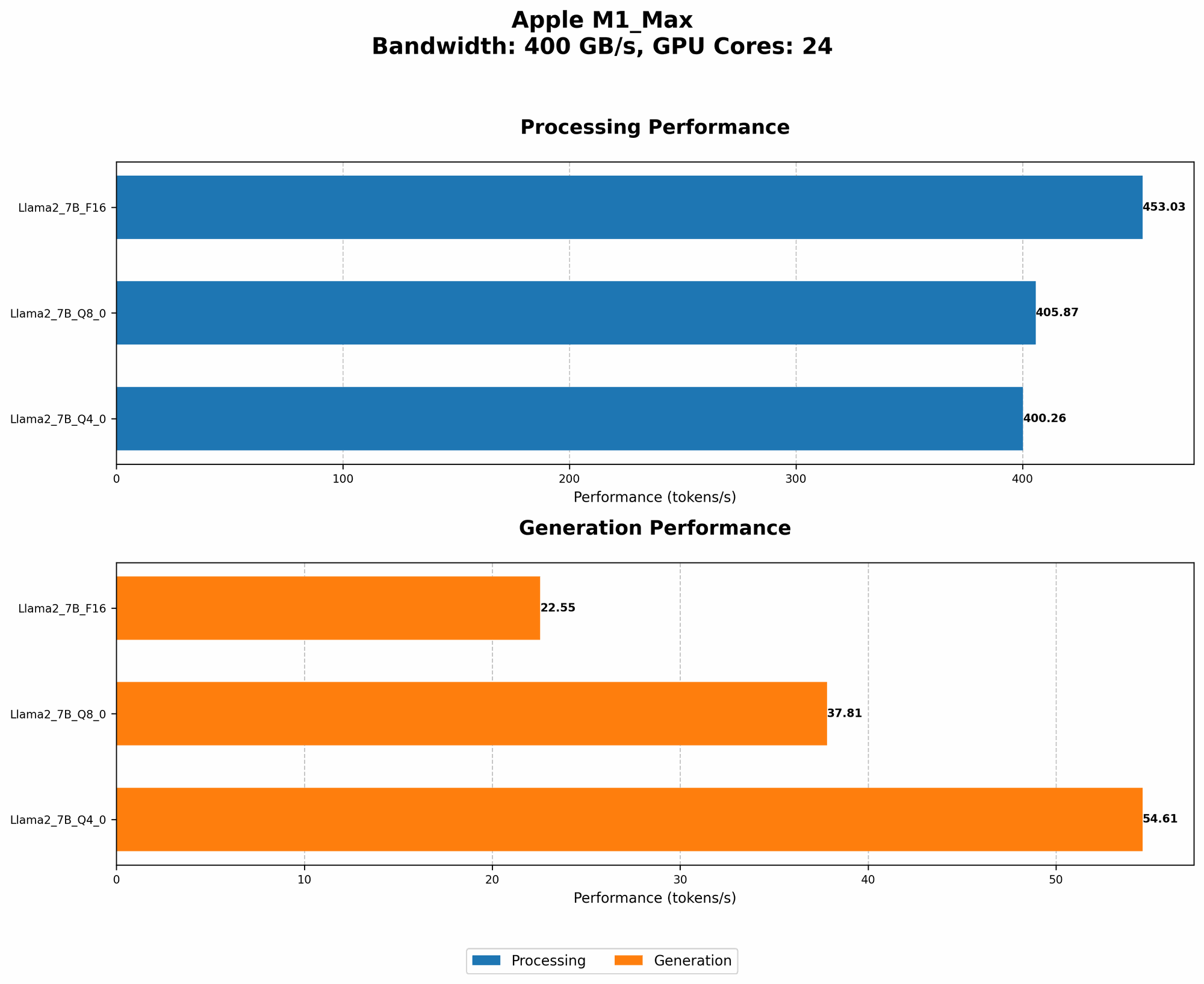
| Llama2 7B (F16) | 400 | 24 | 453.03 | 22.55 | 405.87 | 37.81 | 400.26 | 54.61 |
| Llama2 7B (F16) | 400 | 32 | 599.53 | 23.03 | 537.37 | 40.2 | 530.06 | 61.19 |
Key Takeaways:
- The Apple M1_Max chip delivers impressive performance for Llama2 7B.
- The M1_Max with 32 GPU cores consistently outperforms the 24 GPU cores variant across all Llama2 7B configurations.
- F16 precision results in faster processing speeds compared to quantized models (Q80 and Q40).
- Generation speeds are relatively slower, but they can be further improved by carefully selecting the right configuration, as we'll discuss in the following section.
Performance Analysis: Model and Device Comparison
While the Apple M1Max is a beast, it's not the only player in the game. To understand its performance relative to other devices and models, let's compare Llama2 7B with other LLMs and see how they stack up against the M1Max.
Comparing Llama2 7B on M1_Max with Other Models and Devices
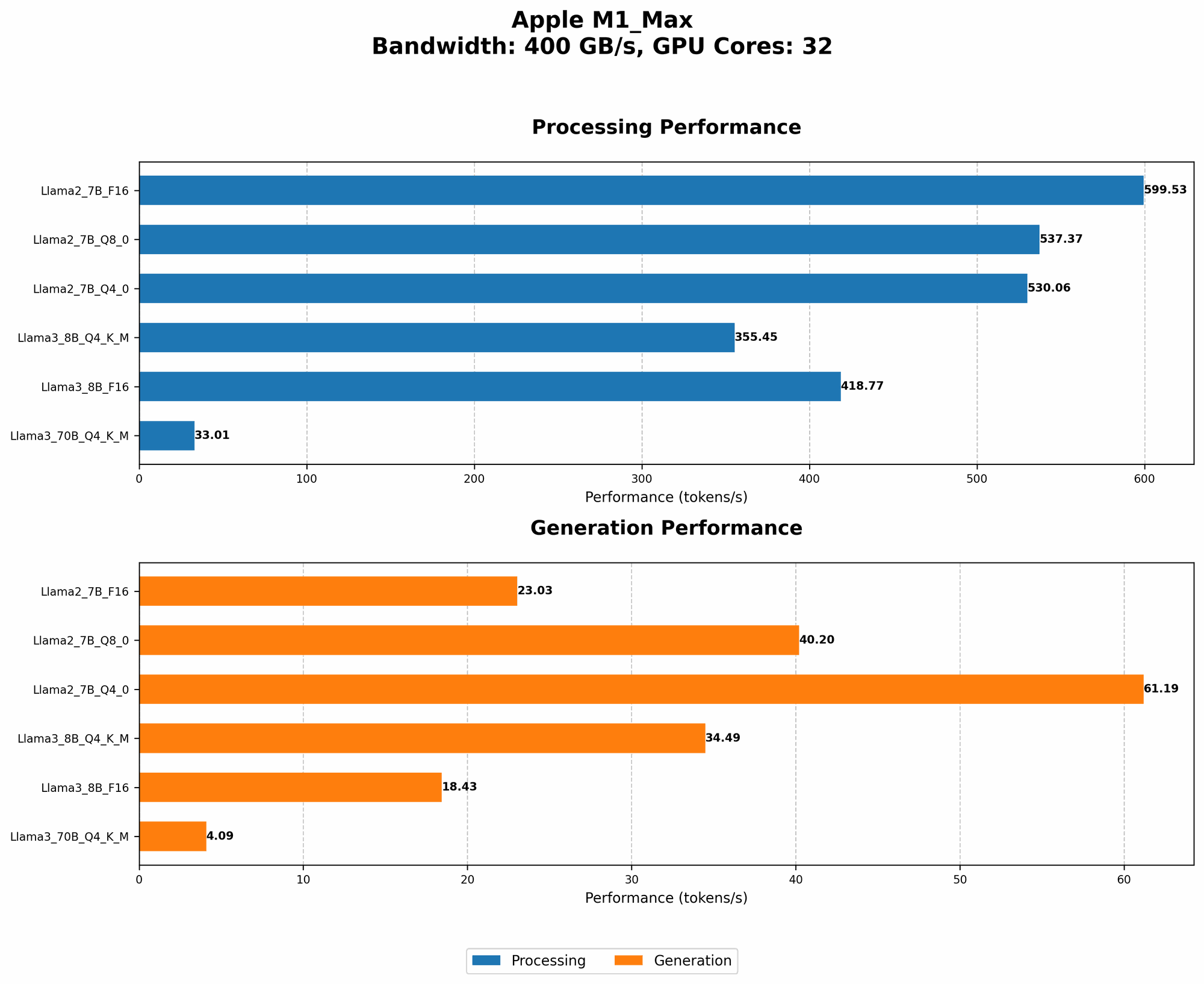
Unfortunately, there isn't readily available data for Llama2 7B on other devices. However, we have some data points for Llama3 8B and Llama3 70B on the M1_Max. Let's take a peek at that information:
| Model | BW | GPUCores | Llama3 8B - Q4KM Processing (Tokens/Second) | Llama3 8B - Q4KM Generation (Tokens/Second) | Llama3 8B - F16 Processing (Tokens/Second) | Llama3 8B - F16 Generation (Tokens/Second) | Llama3 70B - Q4KM Processing (Tokens/Second) | Llama3 70B - Q4KM Generation (Tokens/Second) | Llama3 70B - F16 Processing (Tokens/Second) | Llama3 70B - F16 Generation (Tokens/Second) |
|---|---|---|---|---|---|---|---|---|---|---|
| Llama3 8B (Q4KM) | 400 | 32 | 355.45 | 34.49 | 418.77 | 18.43 | 33.01 | 4.09 | null | null |
| Llama3 70B (Q4KM) | 400 | 32 | 33.01 | 4.09 | null | null | null | null | null | null |
Key Observations:
- The M1_Max handles Llama3 8B quite well compared to the much larger Llama3 70B.
- The performance degrades significantly as the model size increases, particularly for generation speeds.
- F16 precision again demonstrates faster processing speeds compared to the Q4KM quantized model.
- Llama3 70B performance on the M1_Max is limited due to its large size and memory constraints.
Practical Recommendations: Use Cases and Workarounds
The performance data sheds light on how Llama2 7B behaves on the Apple M1_Max, revealing both its strengths and limitations. Now, let's explore practical recommendations for optimizing Llama2 7B performance and address potential challenges.
1. Quantization for Memory Efficiency
As the model size increases, memory becomes a major bottleneck. Quantization helps overcome this challenge by reducing the number of bits used to represent the model's weights. Think of it like using a smaller map to represent a large area. While it loses some detail, it's much more efficient for storage and computation. This enables you to run larger models on devices with limited memory, such as the M1_Max, without sacrificing too much accuracy.
Key Takeaways:
- Q80 and Q40 quantization are valuable for memory efficiency, allowing you to run larger models on the M1_Max effectively.
- While quantization can lead to slight accuracy degradation, it's a worthwhile trade-off for memory savings and faster inference.
2. Leverage GPU Cores for Parallel Processing
The M1_Max's multiple GPU cores provide parallel processing capabilities. This is like having multiple workers on a project – each core can handle a part of the computation, resulting in faster execution times.
Key Takeaways:
- Higher GPU core counts lead to increased processing and generation speeds.
- Maximize the use of GPU cores to take full advantage of the M1_Max's parallel computing power.
3. Fine-tune for Specific Tasks
Fine-tuning is the process of customizing the model's parameters for a specific task. Think of it like training a dog to perform a specific trick. The more you train it, the better it becomes at that specific task. By fine-tuning Llama2 7B for your specific application, you can improve its accuracy and performance on that particular task.
Key Takeaways:
- Fine-tuning can significantly enhance Llama2 7B's performance for a specific task.
- It's a powerful technique for tailoring the model to your needs.
4. Consider Alternative Architectures: Faster Inference with LLMs
For even faster inference, researchers are constantly exploring new architectures, such as efficient transformer architectures, that aim to minimize computational cost while maintaining performance. Like finding a more efficient way to travel from point A to point B, these architectures allow for faster processing of the same information.
Key Takeaways:
- Efficient transformer architectures can significantly improve inference speed.
- Stay updated on the latest research in this area for potential breakthroughs.
5. Explore Memory Optimization Techniques
Memory optimization can help reduce memory usage and improve performance. This includes techniques like batching, which involves processing multiple inputs together rather than individually. This can be analogous to ordering a large pizza instead of individual slices – it's more efficient and saves time in the long run.
Key Takeaways:
- Efficient memory management is crucial for achieving optimal performance on the M1_Max.
- Experiment with various memory optimization techniques to find what works best for your application.
6. Utilize Efficient Libraries and Tools
Libraries and tools specifically designed for LLM inference play a significant role in maximizing performance. Libraries like llama.cpp offer optimized implementations and efficient memory management, making a big difference in speed and resource usage.
Key Takeaways:
- Utilize efficient libraries and tools for optimized LLM inference.
- llama.cpp is a great resource for building and running LLMs on your M1_Max.
7. Adjust Model Size and Precision for Your Needs
While larger models generally offer better accuracy, they consume more resources. This is like choosing a larger car; it provides more space but requires more fuel. For real-time applications, you might have to sacrifice accuracy for better performance. Therefore, carefully consider the trade-off between model size, precision, and performance based on your specific use case.
Key Considerations:
- Smaller models often provide faster inference speeds for specific tasks.
- Quantization techniques can strike a balance between accuracy and performance.
FAQ
1. How much RAM do I need to run Llama2 7B on my M1_Max?
The Llama 2 7B model requires a minimum of ~16GB RAM for efficient operation. However, for optimal performance, it's recommended to have at least 32GB of RAM.
2. What are some common use cases for Llama2 7B on the M1_Max?
Llama2 7B on the M1_Max can be used for various applications, including:
- Text generation: Create stories, poems, articles, or code.
- Translation: Translate text between different languages.
- Summarization: Summarize large amounts of text into concise summaries.
- Question answering: Provide informative answers to your questions.
- Chatbots: Build interactive conversational agents.
3. How can I get started with Llama2 7B on my M1_Max?
You can find resources and instructions on how to set up and run Llama2 7B on your M1_Max. Check out the official Llama2 website and the llama.cpp repository for detailed guides and tutorials.
Keywords
Llama2 7B, Apple M1_Max, local LLM, token generation speed, performance benchmarks, quantization, GPU cores, fine-tuning, efficient transformer architectures, memory optimization, libraries, tools, llama.cpp, use cases, text generation, translation, summarization, question answering, chatbots.