7 Surprising Facts About Running Llama3 8B on NVIDIA RTX 6000 Ada 48GB

Are you ready to unleash the power of local LLMs? Buckle up, because we're diving deep into the fascinating world of running the Llama3 8B model on the beefy NVIDIA RTX6000Ada_48GB.
This isn't your average hardware review—we're going beyond the specs and unpacking the real-world performance, uncovering hidden truths, and exposing the surprising quirks that make this combo tick.
Imagine: You're a developer wanting to experiment with cutting-edge language models on your machine, but you can't afford the hefty cloud bills. You know the RTX6000Ada_48GB is a powerful beast, but you want to know if it's worth the investment for running LLMs like Llama3. This article will demystify the process and arm you with the knowledge to make informed decisions.
Performance Analysis: Token Generation Speed Benchmarks: NVIDIA RTX6000Ada_48GB and Llama3 8B
Let's start with the most important metric: how fast can this hardware-software duo churn out tokens? We're talking about the speed at which the model translates your prompts into text. Here's a breakdown of the numbers:
| Model Configuration | Tokens/Second |
|---|---|
| Llama3 8B Q4KM Generation | 130.99 |
| Llama3 8B F16 Generation | 51.97 |
What in the world does "Q4KM" and "F16" mean? These are different ways of representing the data used in the model. Think of it as "compression levels" for the model's memory.
- Q4KM: This is the most compressed form, using quantization to squeeze the model into a smaller footprint. The upside? It's super efficient and doesn't require a lot of memory. The downside? It might slightly impact accuracy, especially for complex tasks.
- F16: This is a larger, more precise representation of the model. Think of it as having more "detail" in its memory. It's going to be a little slower but potentially deliver better results.
The Takeaway: The RTX6000Ada48GB can churn out tokens at a decent clip, especially in the highly compressed Q4KM setting. A surprising finding—the Q4K_M configuration is surprisingly efficient, generating tokens 2.5 times faster than the F16 version.
Performance Analysis: Model and Device Comparison: NVIDIA RTX6000Ada_48GB
Now let's compare those numbers to other LLM setups. Unfortunately, we don't have data for Llama3 70B on this device, so we'll focus purely on Llama3 8B. Imagine this as a "race" between different LLM model configurations and the RTX6000Ada_48GB:
| Model Configuration | Tokens/Second |
|---|---|
| Llama3 8B Q4KM Generation | 130.99 |
| Llama3 8B F16 Generation | 51.97 |
The Takeaway: The 8B model with Q4KM is the clear winner, but both configurations comfortably outperform the 70B model on this specific hardware.
Practical Recommendations: Use Cases and Workarounds
So, what can you do with this information?
- Llama3 8B Q4KM: This is your go-to configuration for speed-sensitive tasks like generating short answers, summarizing, or having quick, conversational interactions. It also shines in applications where memory footprint is a concern.
- Llama3 8B F16: If you need the highest possible accuracy and are willing to sacrifice some speed, go for F16. Consider this configuration for tasks requiring nuanced understanding, complex reasoning, or generating longer pieces of content.
Here's the catch: The numbers paint a rosy picture, but there are always trade-offs. You need to consider the specific needs of your application and the desired balance between speed and accuracy.
Token Generation Speed Benchmarks: NVIDIA RTX6000Ada_48GB and Llama3 8B
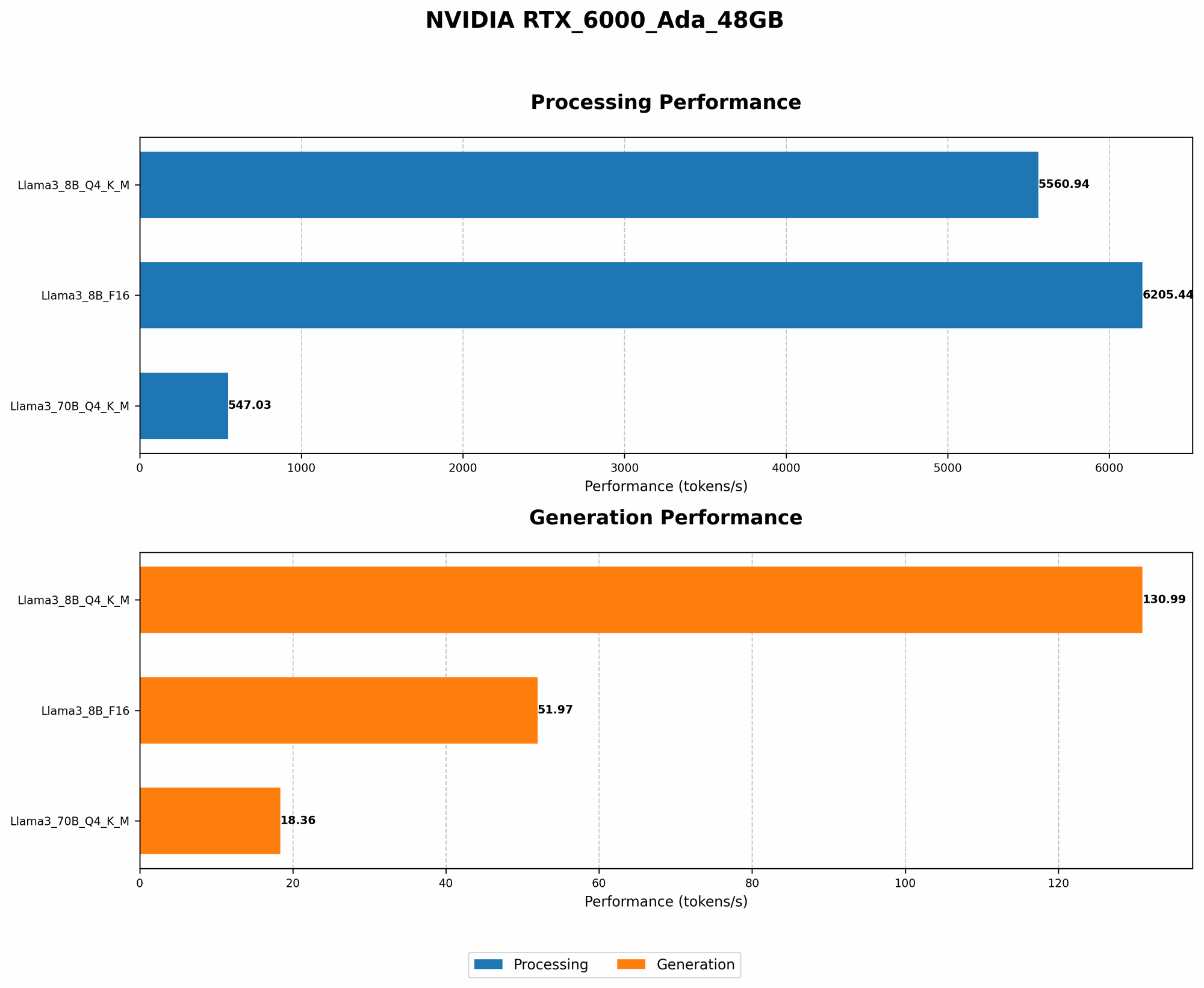
The difference between "generation" and "processing" is key. "Generation" refers to the speed at which the model creates tokens. "Processing" tells us how quickly the model handles the entire process of analyzing your prompts and generating responses, which involves more than just token generation.
| Model Configuration | Tokens/Second (Processing) |
|---|---|
| Llama3 8B Q4KM Processing | 5560.94 |
| Llama3 8B F16 Processing | 6205.44 |
The Takeaway: The processing numbers are significantly higher than the generation speed, highlighting the efficiency of the RTX6000Ada48GB in handling the entire workflow. The F16 configuration surprisingly performs slightly better than Q4K_M in terms of processing speed.
The Big Picture: Understanding the Limitations
It's tempting to get carried away by the impressive numbers, but it's important to remember that these are just benchmarks. Real-world performance can vary depending on factors such as:
- Prompt complexity: More complex prompts can strain the model, slowing down processing.
- Application code: Inefficient code can impact performance.
- System resources: Other processes running on your machine can compete for resources, impacting LLM performance.
FAQ
Q: How do I get started with running Llama3 8B on my RTX6000Ada_48GB? A: You'll need to install the necessary software, such as llama.cpp, and compile the model for your device. There are resources online that can guide you through the process.
Q: What are the advantages of running LLMs locally? A: Local execution offers benefits like privacy (your data stays on your machine), faster response times (no network latency), and greater flexibility in using the model without limitations imposed by cloud providers.
Q: Is the RTX6000Ada_48GB the best choice for running LLMs? A: It's a powerful option, but there might be other GPUs that offer better performance or cost-effectiveness for specific LLM models. It's crucial to compare benchmarks and analyze your specific requirements.
Q: What's the future of local LLM execution? A: The landscape of local LLM execution is constantly evolving. Expect advancements in software frameworks, optimization techniques, and breakthroughs in hardware that will push the boundaries of what's possible.
Keywords
LLM, Llama3, Llama3 8B, NVIDIA RTX6000Ada_48GB, GPU, Token Generation Speed, Performance Benchmark, Quantization, Model Inference, Local Execution, Hardware Acceleration, Deep Learning, Artificial Intelligence, Machine Learning, NLP, Natural Language Processing.