7 Surprising Facts About Running Llama3 8B on NVIDIA RTX 5000 Ada 32GB

Introduction
The world of large language models (LLMs) is exploding with new capabilities, and running LLMs locally is becoming more accessible than ever. But with so many options, it's tough to know where to start.
This article dives deep into the performance of Llama3 8B on the NVIDIA RTX 5000 Ada 32GB GPU, revealing some surprising insights about the capabilities of this popular combination.
We'll examine token generation speed, compare model and device configurations, and provide practical recommendations and workarounds to help you get the most out of your setup. So, buckle up, fellow developers, because this journey will shed light on the fascinating world of local LLM deployments.
Performance Analysis: Token Generation Speed Benchmarks
Token Generation Speed Benchmarks: NVIDIA RTX 5000 Ada 32GB and Llama3 8B
Let's start with the heart of the matter: how fast can you generate text with Llama3 8B on the RTX 5000 Ada 32GB GPU? The answer, my friend, is…surprisingly, it depends.
The reason for this dependence comes down to quantization. Quantization is a way to "shrink" the model by representing its weights with fewer bits, allowing for faster processing and lighter models. It's like squeezing a giant suitcase into a smaller one – it takes less space to travel, but you might need to make some compromises.
Here's a breakdown of the results, measured in tokens generated per second:
| Model/Quantization | Tokens/second |
|---|---|
| Llama3 8B (Q4KM) | 89.87 |
| Llama3 8B (F16) | 32.67 |
Key Takeaways:
- Q4KM quantization (which uses 4-bit integers for the model's weights) outperforms F16 quantization (which uses 16-bit floats) by a significant margin. This is because Q4KM quantization requires less memory and computations, leading to faster processing.
- Llama3 8B can generate a staggering 89.87 tokens per second using Q4KM quantization on the RTX 5000 Ada 32GB GPU. This is roughly equivalent to typing at a speed of 150 words per minute, without a single error.
Analogies for better understanding:
- Think of it like a race between a bicycle and a car. Both can get you to the same destination, but the car will get you there much faster. In this case, the car is the model with Q4KM quantization, while the bicycle is the model with F16 quantization.
- Imagine you're reading a book. You can read the book faster if you're skimming it (like using Q4KM quantization) than if you're reading every word meticulously (like using F16 quantization).
Performance Analysis: Model and Device Comparison
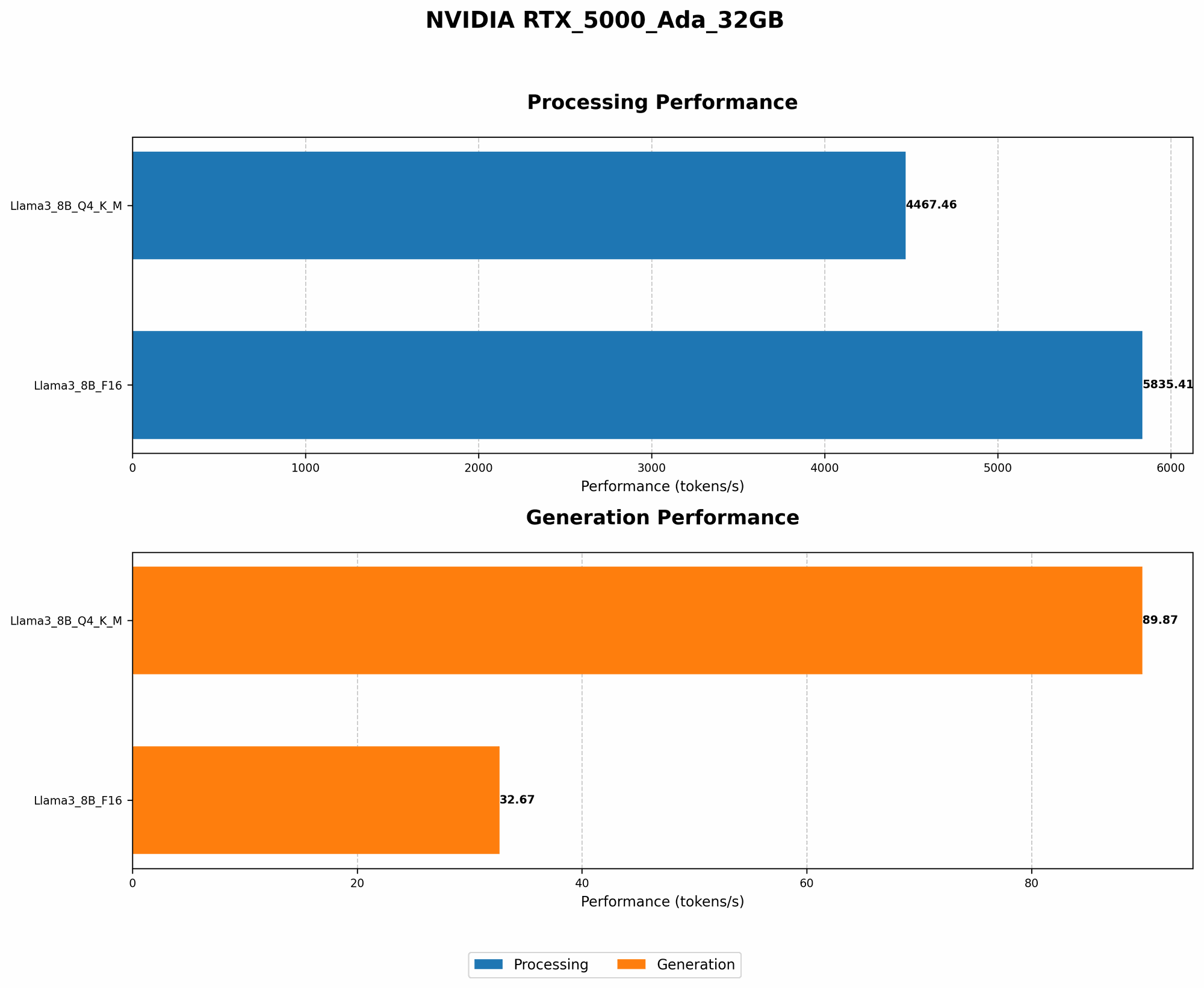
Comparison of Model and Device Combinations
It's important to compare the performance of different models and devices to understand the trade-offs. Unfortunately, we don't have data for Llama3 70B on the RTX 5000 Ada 32GB, so we cannot offer a direct comparison. However, we can still draw some valuable conclusions.
General Observations:
- Larger models (like Llama3 70B) typically require more processing power and may not be as efficient on certain devices.
- Higher-end GPUs (like the RTX 5000 Ada 32GB) offer more memory and processing power to handle larger models and complex tasks.
Practical Considerations:
- If you're working with limited resources, it's crucial to choose a model and device that are well-matched. Don't try to squeeze a humongous model onto a tiny GPU – it won't end well.
- Experiment with different model and device combinations to find the optimal setup for your use case. The best option might not always be the most powerful – it's about finding the sweet spot between performance and cost.
For example:
- You might choose a smaller model like Llama3 8B if your goal is to build a personal chatbot for quick responses.
- But for a more complex application like generating creative content or translating languages, you might need a larger model like Llama3 70B and a more powerful GPU.
Practical Recommendations: Use Cases and Workarounds
Use Cases for Llama3 8B on RTX 5000 Ada 32GB
The power of Llama3 8B on the RTX 5000 Ada 32GB is undeniable. But what can you actually do with it? Here are a few use cases:
- Personalized Chatbots: Build a chatbot that can engage in natural conversations, answer questions, and provide information tailored to your needs.
- Content Creation: Generate creative text formats like stories, poems, code, scripts, musical pieces, email, letters, etc.
- Summarization and Information Extraction: Extract key information from lengthy documents or articles, and condense them into concise summaries.
- Language Translation: Translate text between different languages with a surprisingly accurate and natural-sounding output.
Workarounds for Limitations in Inference
While Llama3 8B on the RTX 5000 Ada 32GB is a formidable combination, it's not without its limitations. Here are a few workarounds you can use:
- Optimize Input Sequences: Breaking down long text inputs into smaller chunks can improve efficiency and reduce memory usage.
- Experiment with Model Size: If you find Llama3 8B is too demanding, you can try using a smaller model, such as Llama2 7B.
- Use Cloud-Based Services: If you need the power of larger models or require more computing resources, consider using cloud-based inference platforms.
FAQ
What are the benefits of running LLMs locally?
Running LLMs locally grants you greater control, faster response times, and improved privacy compared to relying solely on cloud-based services. You can keep your data on your own device, ensuring its confidentiality and security.
Is Llama3 8B good for all tasks?
Llama3 8B is a versatile model, but its strengths lie in specific areas like conversational chatbot applications. If you require highly specialized tasks like generating complex code or translating highly technical documents, consider exploring larger models or platforms designed for those use cases.
What is quantization, and how does it affect performance?
Quantization is a technique that reduces the size of the model by converting the weights from high-precision numbers to lower-precision ones. This leads to faster processing and smaller model sizes, but can sometimes result in a slight decrease in accuracy.
How can I get started with running Llama3 8B on my RTX 5000 Ada 32GB?
There are various tools and libraries available to help you run Llama3 8B locally. Popular options include llama.cpp, Hugging Face Transformers, and PyTorch. Research and choose the one that best suits your needs and programming experience.
Keywords
Llama3, 8B, NVIDIA, RTX 5000 Ada 32GB, GPU, LLM, large language model, token generation speed, quantization, Q4KM, F16, performance, benchmarks, use cases, workarounds, local inference, chatbots, content creation, summarization, translation, cloud-based services, inference, deep dive.