7 Surprising Facts About Running Llama3 70B on NVIDIA A100 PCIe 80GB

Introduction
You've heard of the mighty Llama 3, the latest and greatest large language model (LLM) from Meta AI. You've seen the hype around the A100, NVIDIA's impressive GPU powerhouse. But have you ever wondered how these two behemoths work together in a real-world scenario? Buckle up, because we're about to dive deep into the fascinating world of local LLM model performance, specifically running Llama3 70B on an NVIDIA A100PCIe80GB.
This article is your guide to understanding the nuts and bolts of running these powerful models locally. We're going to analyze the performance of Llama3 70B on the A100PCIe80GB, revealing surprising facts and insights that unveil the intricacies of LLM performance. Get ready to unlock the secrets of how these models perform, navigate the nuances of quantization, and learn how to optimize your LLM setup.
Performance Analysis: Token Generation Speed Benchmarks
Token Generation Speed Benchmarks: Llama3 70B on A100PCIe80GB
Let's start with the core of LLM performance: generating tokens. Tokens are the building blocks of text, and their speed of generation directly translates to how quickly your model can process and generate text. We'll be focusing on two key metrics:
- Tokens per second (TPS): This metric directly measures the efficiency and speed of your model's token generation process. Think of it as the model's typing speed on steroids.
- Quantization: This is a technique to compress the model's size, making it more efficient and faster. Think of it as squeezing a giant model down to a more manageable size. For Llama3, we'll be looking at two quantization levels:
- Q4KM: This is the most aggressive quantization technique, leading to a significant size reduction. It's like compressing a movie to a smaller file size while preserving the essential details.
- F16: This is a less extreme quantization method, balancing size reduction with a potential dip in speed. This is like compressing a movie to a smaller file size, but with a slightly lower resolution.
The following table summarizes the Llama3 70B token generation speed on the A100PCIe80GB:
| Model | Quantization | Token Generation Speed (TPS) |
|---|---|---|
| Llama3 70B | Q4KM | 22.11 |
| Llama3 70B | F16 | N/A |
Key takeaway: Llama3 70B, even in its quantized form, is a heavy lifter. The Q4KM version manages a respectable 22.11 TPS, which isn't bad considering its sheer size. The F16 version, on the other hand, is a bit of a mystery. Unfortunately, there is no data available for that, so we'll need to explore other avenues to get a clearer picture.
Performance Analysis: Model and Device Comparison
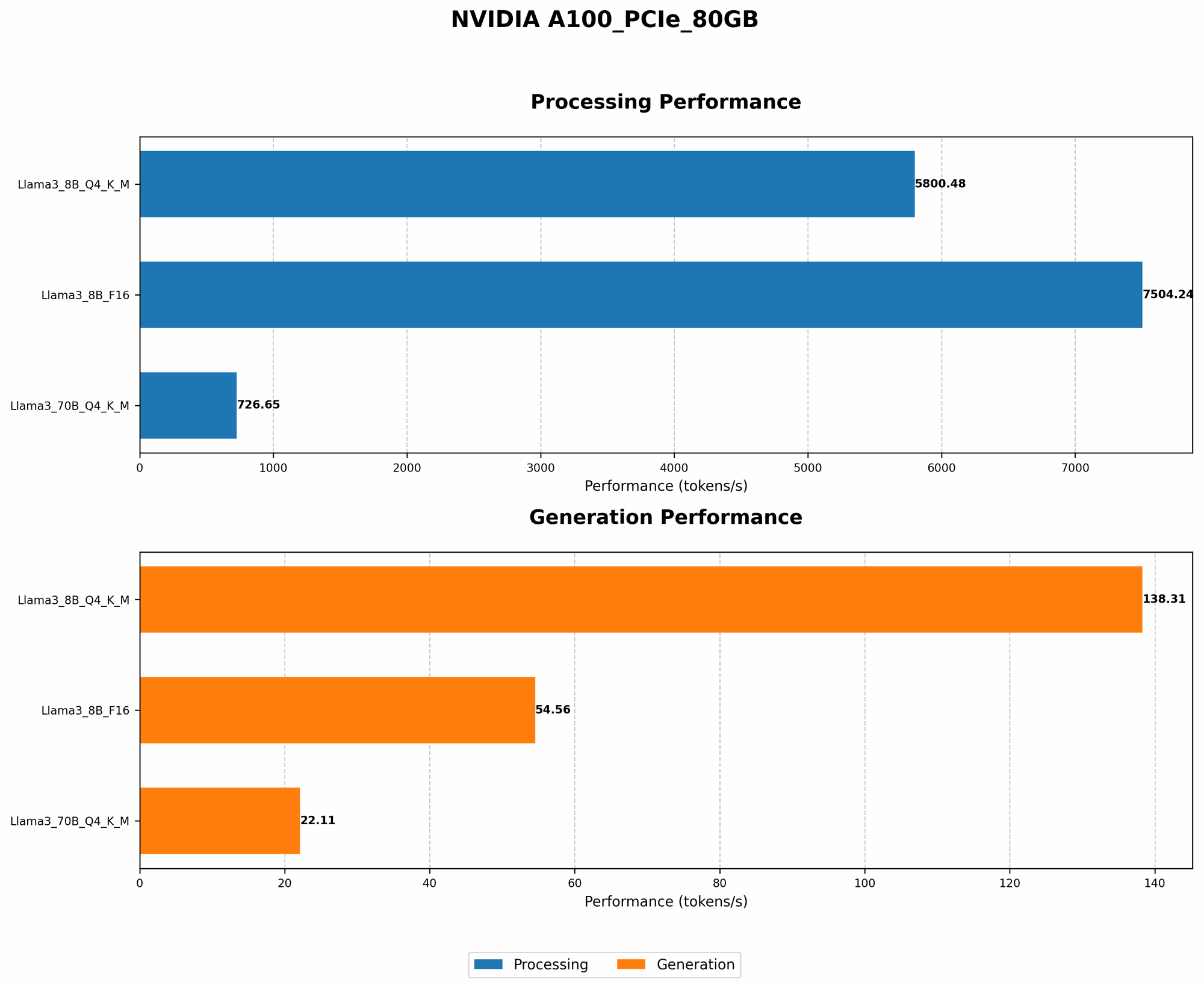
Model and Device Comparison: Llama3 70B vs Llama3 8B on A100PCIe80GB
Let's shift our focus to another important aspect: model size vs. performance. How does the performance of Llama3 70B compare to the smaller Llama3 8B on the same GPU?
| Model | Quantization | Token Generation Speed (TPS) |
|---|---|---|
| Llama3 70B | Q4KM | 22.11 |
| Llama3 8B | Q4KM | 138.31 |
Key takeaway: Llama3 8B, with its much smaller size, significantly outperforms the colossal Llama3 70B. This is a common trend in the world of LLMs: the bigger the model, the more computational resources it demands.
This is like comparing a small car to a massive truck. The small car might navigate city streets more easily, but the truck is built for hauling heavy loads. Similarly, Llama3 8B excels in speed due to its efficiency, while Llama3 70B shines in generating complex and nuanced responses due to its vast knowledge base.
Practical Recommendations: Use Cases and Workarounds
Use Cases and Workarounds: When to Use Llama3 70B on A100PCIe80GB
Now that you understand the performance metrics, let's get practical. Here are some use cases and workarounds to help decide when to leverage the power of Llama3 70B on the A100PCIe80GB:
- High-demand applications: If your application requires highly nuanced and detailed responses, Llama3 70B might be your best bet. Think of it as the ultimate language expert for complex tasks.
- Resource-intensive projects: If you have access to a powerful GPU like the A100PCIe80GB, Llama3 70B becomes more feasible. It's like having a supercomputer at your fingertips.
- Quantization for speed: Utilize Q4KM quantization to boost the performance and make Llama3 70B a faster language engine. This is like squeezing more power out of your model.
- F16 for a balance: Exploring the F16 quantization option, if data becomes available, could be a good compromise between size and speed.
FAQ
Frequently Asked Questions about LLMs and Devices:
Q: What is quantization?
A: Quantization is like a diet for LLMs. It involves reducing the number of bits used to represent the model's parameters. Think of it as using smaller file sizes to store information. This makes the model more efficient and faster, but it can sometimes reduce accuracy.
Q: How do I choose the right quantization level?
A: It's like picking the right dress for an occasion. If performance is your priority, go for Q4KM. If you want a balance between performance and accuracy, then F16 might be better. It all depends on your specific needs!
Q: Can I run Llama3 70B on a less powerful GPU?
A: It's like trying to fit a giant elephant into a tiny car. You might be able to squeeze it in, but it won't be pretty. Running Llama3 70B on a less powerful GPU will likely be slow and inefficient.
Keywords:
Llama3, A100PCIe80GB, NVIDIA, LLM, Large Language Model, Token Generation Speed, TPS, Quantization, Q4KM, F16, Performance Analysis, Model Size, Use Cases, Workarounds, Practical Recommendations, GPU, Deep Dive, Local Models, Performance Optimization