7 RAM Optimization Techniques for LLMs on Apple M3
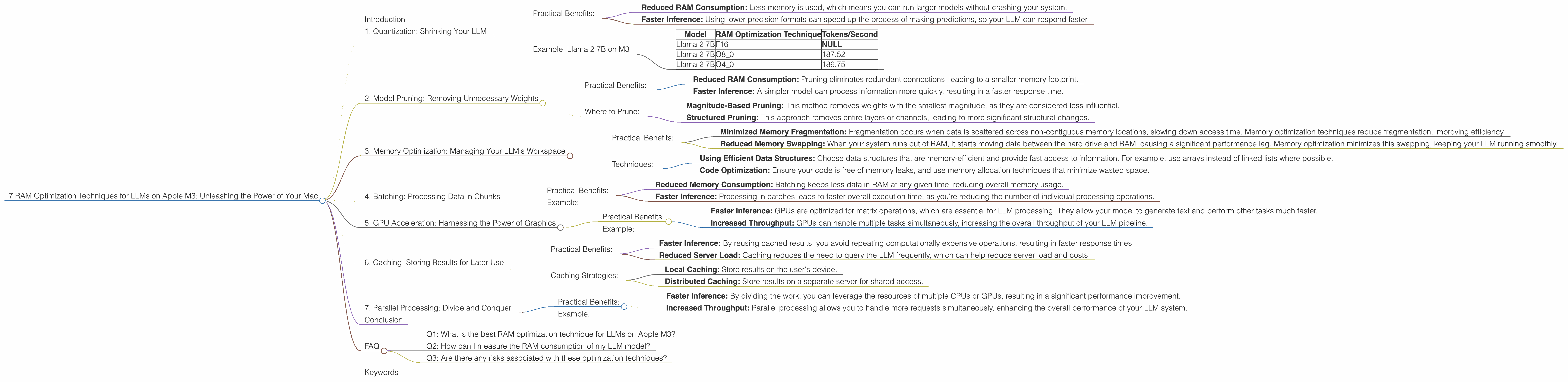
Introduction
Large language models (LLMs) are revolutionizing the way we interact with computers. These powerful AI models can generate text, translate languages, write different kinds of creative content, and answer your questions in an informative way, just like a human would. But running LLMs locally on your computer can be a challenge, especially if you're using a powerful model like Llama 2 7B. It's like trying to fit a whole library into a small suitcase - you need to pack efficiently!
This article will take you on a journey through the fascinating world of LLM optimization for Apple M3 processors. We'll explore seven ingenious techniques that can help you make the most of your Mac's RAM and unlock the full potential of your LLM. If you're a developer or just a curious mind eager to explore the wonders of LLMs, this guide will provide you with the knowledge and tools you need to optimize your LLM experience on Apple M3.
1. Quantization: Shrinking Your LLM
Have you ever tried to fit a whole wardrobe into a carry-on suitcase? It's a challenge, right? Well, quantization is like that for LLMs. This technique shrinks the size of your model without significantly impacting its performance.
Think of it like this: You're taking a big, detailed photo and compressing it into a smaller file size. You might lose some minor details, but the overall image remains recognizable. Quantization does the same thing with your LLM. It converts numbers representing your model's parameters from high-precision floating-point (F16) to lower-precision formats like Q8 or Q4. This significantly reduces the memory footprint, making your LLM more agile and efficient.
Practical Benefits:
- Reduced RAM Consumption: Less memory is used, which means you can run larger models without crashing your system.
- Faster Inference: Using lower-precision formats can speed up the process of making predictions, so your LLM can respond faster.
Example: Llama 2 7B on M3
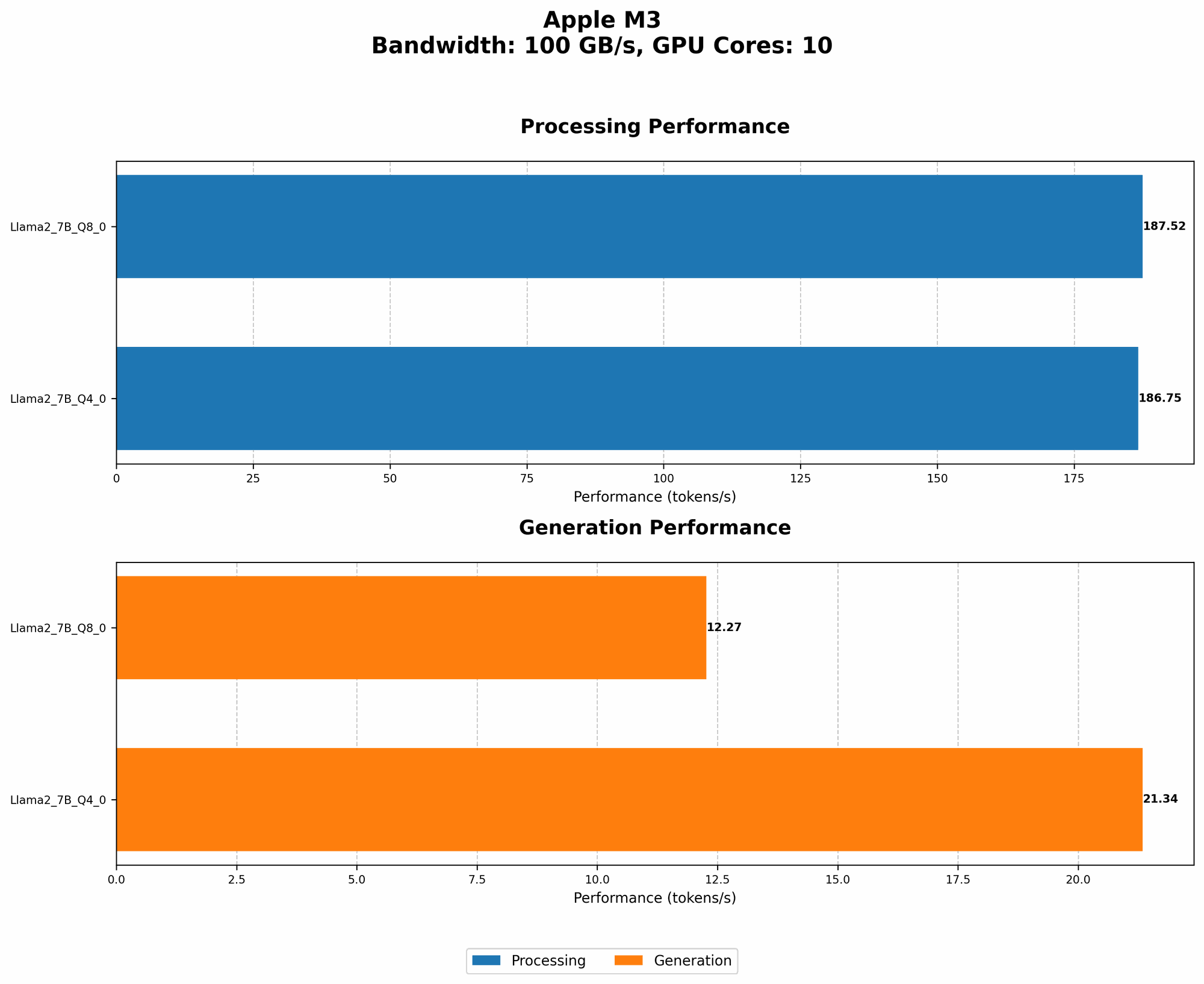
As you can see from the table below, using Q8_0 quantization on Apple M3 provides significant benefits:
| Model | RAM Optimization Technique | Tokens/Second |
|---|---|---|
| Llama 2 7B | F16 | NULL |
| Llama 2 7B | Q8_0 | 187.52 |
| Llama 2 7B | Q4_0 | 186.75 |
Table 1: Performance of different Llama 2 7B quantization techniques on Apple M3
2. Model Pruning: Removing Unnecessary Weights
Imagine a chef meticulously preparing a complex dish. While every ingredient might be important, some might be more crucial than others. Model pruning is like removing unnecessary ingredients from your LLM. It goes through the network and identifies connections (weights) that don't significantly contribute to the model's performance. These connections are then removed, reducing the model's size and complexity.
Practical Benefits:
- Reduced RAM Consumption: Pruning eliminates redundant connections, leading to a smaller memory footprint.
- Faster Inference: A simpler model can process information more quickly, resulting in a faster response time.
Where to Prune:
Pruning is a powerful technique, but it requires careful consideration. You need to make sure you're not removing essential connections that could impair the model's performance. There are various approaches to pruning, including:
- Magnitude-Based Pruning: This method removes weights with the smallest magnitude, as they are considered less influential.
- Structured Pruning: This approach removes entire layers or channels, leading to more significant structural changes.
3. Memory Optimization: Managing Your LLM's Workspace
Think of your computer's RAM as a bustling marketplace. You need to manage the flow of goods (data) effectively to avoid bottlenecks and ensure smooth operation. Memory optimization techniques help you manage the space allocated to your LLM efficiently.
Practical Benefits:
- Minimized Memory Fragmentation: Fragmentation occurs when data is scattered across non-contiguous memory locations, slowing down access time. Memory optimization techniques reduce fragmentation, improving efficiency.
- Reduced Memory Swapping: When your system runs out of RAM, it starts moving data between the hard drive and RAM, causing a significant performance lag. Memory optimization minimizes this swapping, keeping your LLM running smoothly.
Techniques:
- Using Efficient Data Structures: Choose data structures that are memory-efficient and provide fast access to information. For example, use arrays instead of linked lists where possible.
- Code Optimization: Ensure your code is free of memory leaks, and use memory allocation techniques that minimize wasted space.
4. Batching: Processing Data in Chunks
Have you ever noticed how cooking is faster when you use a large pan instead of a tiny one? Batching in LLM processing is similar. Instead of processing data one piece at a time, we group it into batches and process it together.
Think of it this way: Instead of writing a long letter one word at a time, you write paragraphs or even entire pages at once. This approach reduces the overhead associated with processing individual data points, leading to faster execution.
Practical Benefits:
- Reduced Memory Consumption: Batching keeps less data in RAM at any given time, reducing overall memory usage.
- Faster Inference: Processing in batches leads to faster overall execution time, as you're reducing the number of individual processing operations.
Example:
Processing a batch of 100 questions at once will be faster than processing them individually because the model only needs to load its weights and configuration once, reducing load times.
5. GPU Acceleration: Harnessing the Power of Graphics
Imagine you have a team of workers building a house. They could work independently, using separate tools, but wouldn't it be more efficient if they all used the same powerful tool? GPU acceleration is like that for your LLM.
Graphics processing units (GPUs) are designed to perform massively parallel computations. By leveraging the GPU, you can offload some of the heavy lifting from the CPU, significantly accelerating the processing of your LLM.
Practical Benefits:
- Faster Inference: GPUs are optimized for matrix operations, which are essential for LLM processing. They allow your model to generate text and perform other tasks much faster.
- Increased Throughput: GPUs can handle multiple tasks simultaneously, increasing the overall throughput of your LLM pipeline.
Example:
The Apple M3 chip has a powerful integrated GPU, which can be leveraged to speed up LLM inference.
6. Caching: Storing Results for Later Use
Imagine you're researching a topic online. You might visit the same websites repeatedly, but wouldn't it be faster if your browser stored the content for later use? Caching works in the same way for LLMs. It stores the results of calculations or predictions, so you don't have to redo them every time.
Think of it like a grocery list. You write down the items you need once, and you can refer to it whenever you go shopping, saving you time and effort.
Practical Benefits:
- Faster Inference: By reusing cached results, you avoid repeating computationally expensive operations, resulting in faster response times.
- Reduced Server Load: Caching reduces the need to query the LLM frequently, which can help reduce server load and costs.
Caching Strategies:
- Local Caching: Store results on the user's device.
- Distributed Caching: Store results on a separate server for shared access.
7. Parallel Processing: Divide and Conquer
Imagine you have a large project to complete. Wouldn't it be faster to divide the work among several people? Parallel processing for LLMs works in the same way. It splits the task of running the LLM into smaller subtasks that can be executed simultaneously, potentially reducing the overall processing time.
Practical Benefits:
- Faster Inference: By dividing the work, you can leverage the resources of multiple CPUs or GPUs, resulting in a significant performance improvement.
- Increased Throughput: Parallel processing allows you to handle more requests simultaneously, enhancing the overall performance of your LLM system.
Example:
You could use a parallel processing approach to run different parts of your LLM model on different cores of your CPU or on individual GPUs. This would allow you to process data more quickly and efficiently.
Conclusion
Optimizing LLMs on Apple M3 requires a multifaceted approach. By embracing techniques like quantization, model pruning, memory optimization, batching, GPU acceleration, caching, and parallel processing, you can unlock the full potential of these powerful AI models on your Mac.
Remember, these techniques are intertwined, and the best approach will depend on your specific use case and the hardware you're using.
FAQ
Q1: What is the best RAM optimization technique for LLMs on Apple M3?
A: The best technique depends on the specific LLM model you're using and your performance goals. Quantization and model pruning are generally effective for reducing memory consumption, while GPU acceleration can boost speed.
Q2: How can I measure the RAM consumption of my LLM model?
A: You can use tools like the Activity Monitor on macOS to monitor the memory usage of your LLM. You can also use profiling tools to pinpoint specific memory usage patterns in your code.
Q3: Are there any risks associated with these optimization techniques?
A: Yes, there can be trade-offs. For example, quantization might slightly reduce the accuracy of your model, and model pruning might lead to some loss of information. It's important to experiment and find the right balance for your specific needs.
Keywords
LLM, RAM, Apple M3, optimization, quantization, model pruning, memory, GPU, acceleration, batching, caching, parallel processing, performance, speed, inference, throughput, macOS, Activity Monitor, profiling tools.