7 RAM Optimization Techniques for LLMs on Apple M3 Pro

Introduction
The world of Large Language Models (LLMs) is abuzz with excitement, and rightfully so! These powerful AI systems can generate human-like text, translate languages, write different kinds of creative content, and answer your questions in an informative way. But running these models locally can be a resource-intensive task, especially on less powerful hardware.
Enter the Apple M3 Pro, a powerful chip designed for demanding tasks, including running LLMs! However, even with its impressive performance, maximizing RAM usage is crucial to achieve optimal performance and prevent your system from grinding to a halt. In this article, we'll explore 7 RAM optimization techniques to help you squeeze every ounce of power out of your M3 Pro and enjoy a smooth LLM experience.
Understanding LLM RAM Usage: It's All About Tokens
Imagine a LLM as a voracious reader, constantly devouring information. But instead of words, it feasts on tokens, which are the building blocks of language. Every word, punctuation mark, and special character is broken down into tokens, creating a representation the LLM can understand. The more tokens a model processes, the more RAM it consumes.
Think of it like this: a large dictionary with a gazillion entries. As you look up definitions, you're using more memory. The same goes for the LLM – each token is like a dictionary entry, and processing more of them demands more RAM.
7 RAM Optimization Techniques for M3 Pro
Now that we understand the basics, let's dive into the RAM optimization techniques that will give your M3 Pro the edge it needs to run LLMs like a champ:
1. Quantization: Shrinking the Model for Maximum Efficiency
Imagine a giant encyclopedia that you can only carry around in its entirety. But what if you could compress it, reducing the size without losing the information? That's what quantization does for LLMs – it shrinks the model's size by reducing the precision of its weights, the parameters that determine the LLM's behavior.
Think of it as replacing a high-resolution photograph with a lower-resolution one – you lose some detail, but the image is still recognizable and takes up less space. Similarly, quantization shrinks an LLM's memory footprint, making it faster and more efficient while maintaining good performance.
Example: - Llama 2 7B Q80: Processing 272.11 tokens/second on an M3 Pro with 14 GPU cores, Q80 quantization reduces memory usage by a substantial amount, enabling faster model execution.
2. Fine-Tuning: Tailoring the Model to Your Needs
Fine-tuning is like giving your LLM a crash course in a specific subject. It involves training the model on a dataset relevant to your task, improving its performance on that specific area. This can lead to a more efficient model by reducing the need for processing irrelevant information, resulting in lower RAM consumption.
Example: - If you're using an LLM for generating code, you can fine-tune it on a dataset of code snippets, allowing it to focus on relevant patterns and optimize its performance for code generation, ultimately leading to lower RAM usage.
3. Context Size: Limiting the Model’s Attention Span
An LLM's context size is like its short-term memory. It determines how much text it can remember and process at a time. A larger context size requires more RAM, but it can also lead to better performance on tasks that rely on understanding longer sequences of text.
Example: - If you're writing a long-form article, a larger context size might be beneficial. However, for short responses, a smaller context size might be sufficient and reduce RAM consumption.
4. Batch Size: Processing Text in Chunks
Imagine a conveyor belt for text. A batch size determines how many tokens are processed at once. Smaller batch sizes require less RAM, but they might be slower. Larger batch sizes can be more efficient, but they require more RAM.
Example: - A batch size of 100 tokens means your M3 Pro processes batches of 100 tokens at a time. This might be more efficient compared to a batch size of 10 tokens due to internal optimizations within the LLM's architecture.
5. Memory Management: Optimizing the Backend for Efficiency
The backend software that powers an LLM is responsible for managing memory and allocating resources. Optimizing the backend, like selecting a more efficient memory allocator or leveraging caching techniques can significantly improve RAM usage and performance.
Example:
- Using libraries like pytorch or tensorflow with optimized memory allocation can lead to better results, particularly when processing large text files or generating long responses.
6. Model Compression: Stripping Down the LLM for Efficiency
Model compression goes a step further than quantization by reducing the actual size of the LLM, not just the precision of its weights. This can involve techniques like pruning, which removes unnecessary connections from the model, or knowledge distillation, which transfers knowledge from a larger model to a smaller one.
Example: - Consider a smaller, compressed version of your LLM that can handle specific tasks without sacrificing substantial performance while consuming less RAM.
7. Parallel Processing: Harnessing the M3 Pro’s Power
The Apple M3 Pro has multiple GPU cores. By utilizing parallel processing – dividing tasks into smaller pieces that can be processed simultaneously – you can significantly reduce processing time and improve overall performance. This allows you to handle more complex tasks with less RAM usage by efficiently distributing the workload across multiple cores.
Example: - Each GPU core can dedicate its resources to processing different parts of the input, effectively parallelizing the processing. This helps minimize RAM usage by allowing the model to process multiple tasks concurrently.
Results: Benchmarks and Comparisons
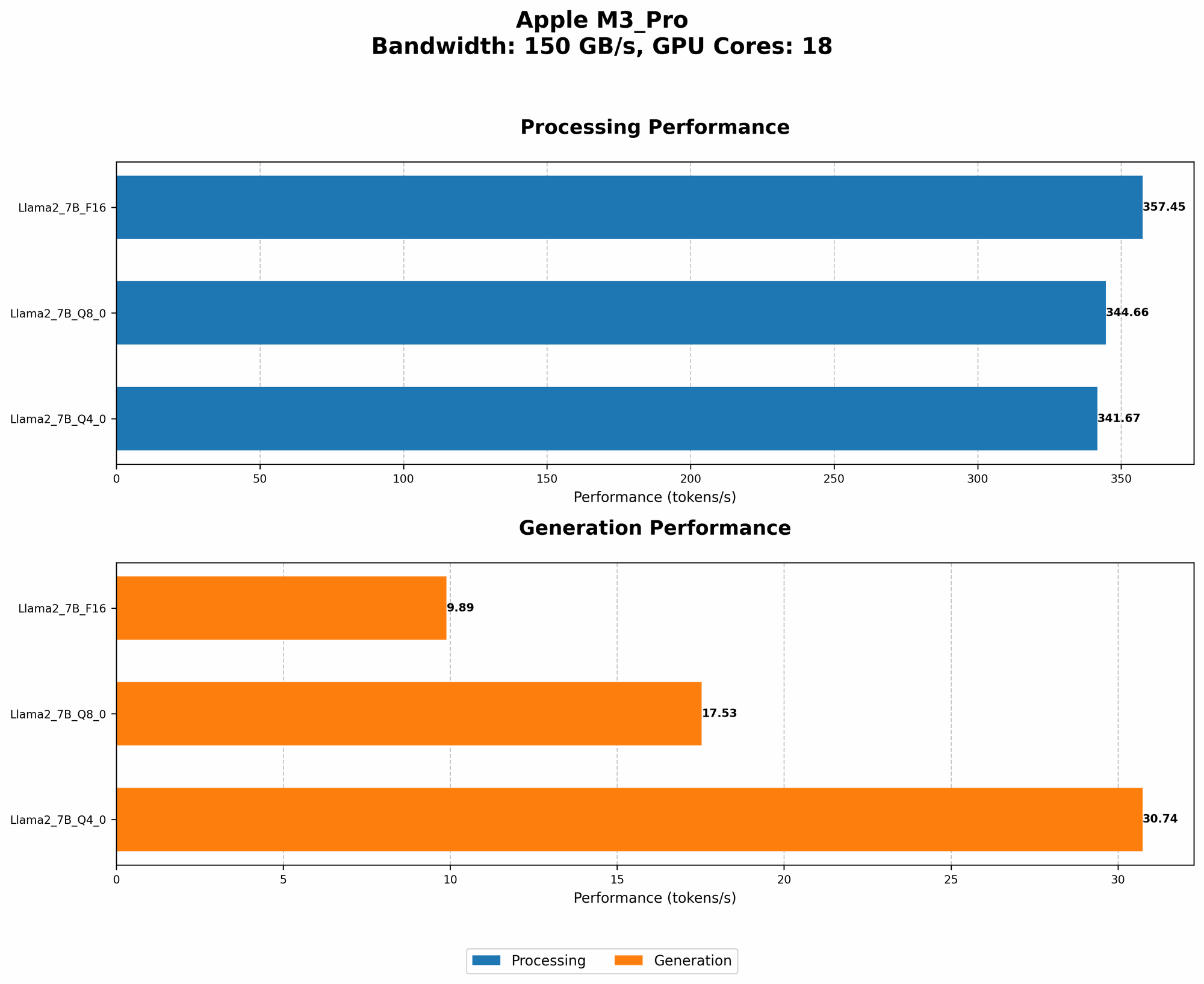
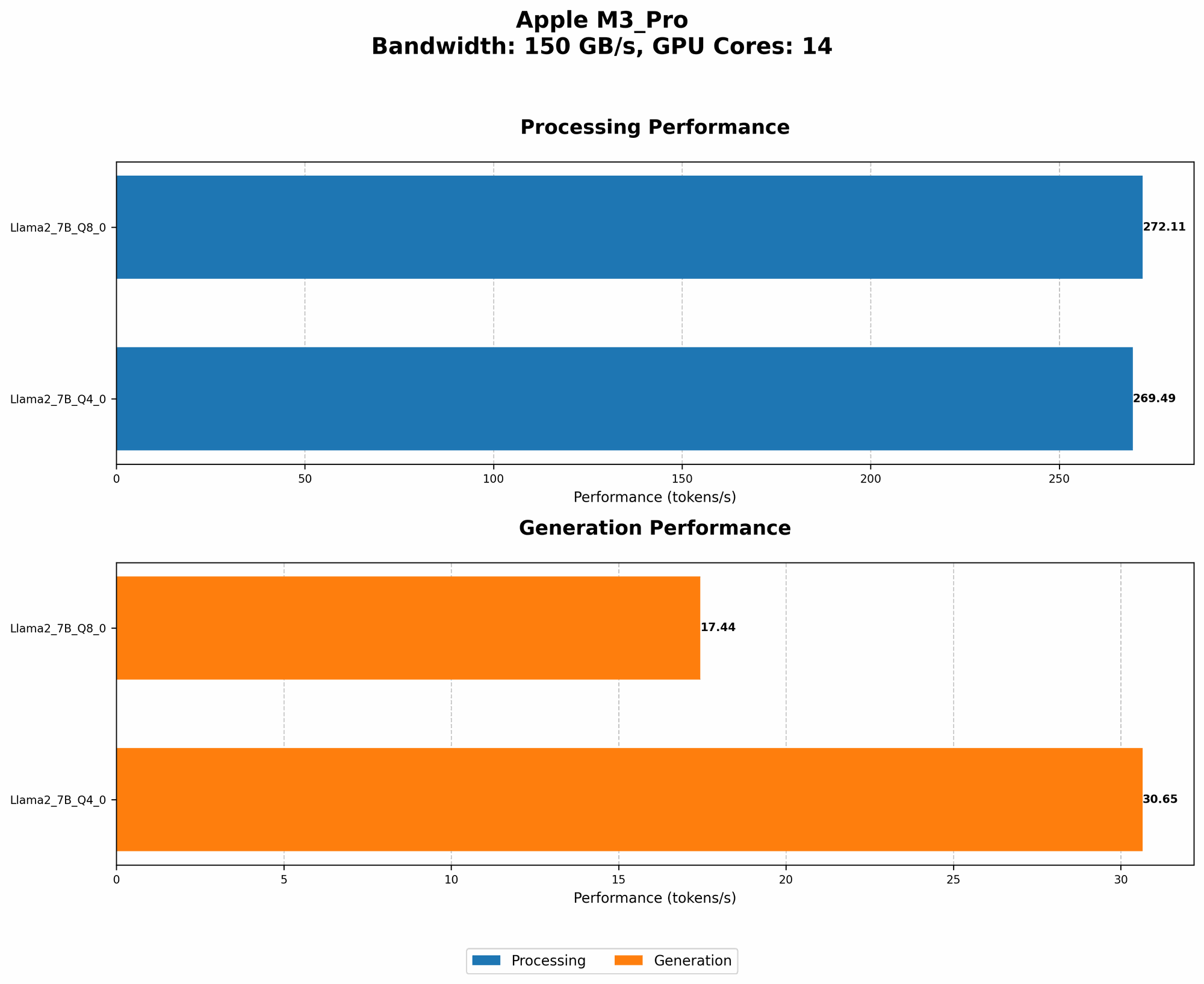
Let's analyze the practical results obtained by running Llama 2 7B on an Apple M3 Pro with varying GPU cores and different quantization levels:
| GPU Cores | BW | Quantization | Processing (Tokens/Second) | Generation (Tokens/Second) |
|---|---|---|---|---|
| 14 | 150 | Q8_0 | 272.11 | 17.44 |
| 14 | 150 | Q4_0 | 269.49 | 30.65 |
| 18 | 150 | F16 | 357.45 | 9.89 |
| 18 | 150 | Q8_0 | 344.66 | 17.53 |
| 18 | 150 | Q4_0 | 341.67 | 30.74 |
Observations:
- Higher GPU Cores: The M3 Pro with more GPU cores exhibits significantly higher token processing speed, even with the same quantization level. This is due to the greater parallel processing capabilities offered by the extra cores.
- Quantization Impact: In general, the higher the quantization level, the faster the processing speed, especially for processing tokens. This is a direct result of the reduced model size from quantization. However, the speed of token generation is lower with Q80 compared to Q40, highlighting the trade-offs between memory efficiency and generation speed.
Conclusion: Optimizing Your LLM Experience on the M3 Pro
By implementing these RAM optimization techniques, you can unlock the true potential of your Apple M3 Pro and enjoy a smooth, efficient LLM experience. Remember, each technique offers its own trade-offs, so find the right balance for your specific needs and tasks.
FAQ
Q: What is the best quantization level for my M3 Pro?
A: There's no one-size-fits-all answer. Q80 offers the most RAM efficiency, while Q40 might be slightly faster for text generation. Experiment to find the best balance for your specific use case.
Q: Can I run a 13B LLM on my M3 Pro?
A: It depends on your RAM configuration and specific model choice. Large models might demand more RAM, potentially exceeding your system's capacity.
Q: What are the limitations of using an M3 Pro for LLMs?
A: Although the M3 Pro is powerful, it might not be suitable for running the most massive LLMs due to RAM restrictions. Additionally, the performance of your LLM will depend on its specific architecture and the provided dataset.
Keywords:
LLM, Apple M3 Pro, RAM Optimization, Quantization, Fine-tuning, Context Size, Batch Size, Memory Management, Model Compression, Parallel Processing, Tokens, GPU Cores, Performance