7 RAM Optimization Techniques for LLMs on Apple M2
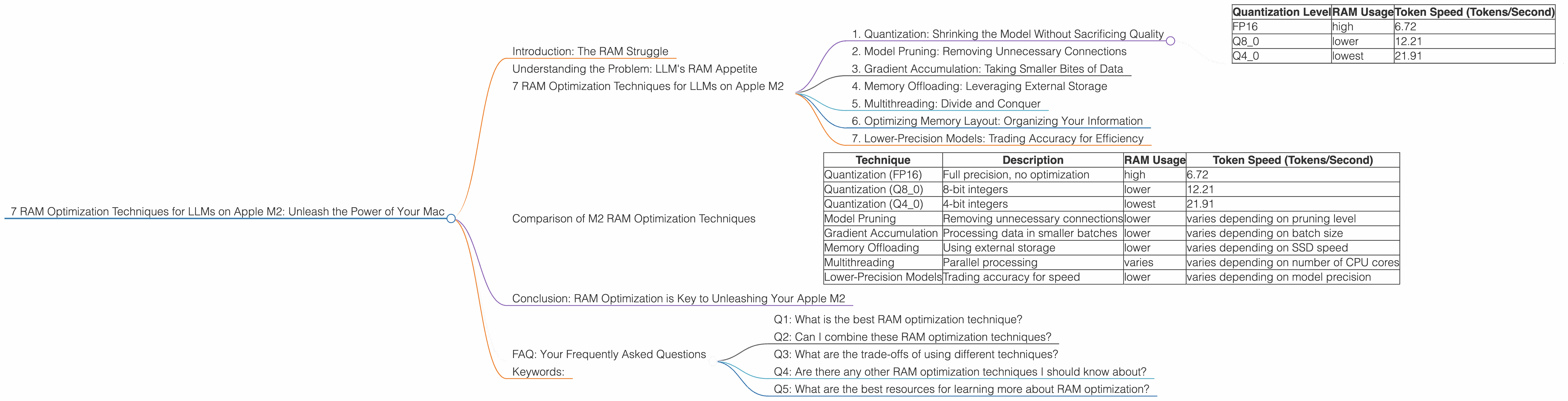
Have you ever wanted to run massive language models (LLMs) like Llama 2 on your powerful Apple M2 chip but felt the weight of RAM limitations? Fear not, fellow AI enthusiasts! This guide will take you on a journey through the world of RAM optimization and help you squeeze the most out of your M2 machine. We'll equip you with 7 RAM optimization techniques that will allow you to run larger models, generate more creative text, and enjoy a smoother experience with your favorite LLMs.
Introduction: The RAM Struggle
Imagine this: you've just downloaded a massive LLM model, perhaps the captivating Llama 2 with its billions of parameters, ready to create breathtaking text. You fire it up on your M2 Mac, but the RAM starts groaning, and your system slows to a crawl. You're stuck, frustrated, and longing for a solution.
Don't fret! The world of AI isn't defined by RAM constraints; it's brimming with clever techniques to optimize LLM performance. In this article, we'll dive deep into 7 powerful techniques specifically tailored for the Apple M2, turning those RAM limitations into a distant memory.
Understanding the Problem: LLM's RAM Appetite
LLMs are like insatiable text-hungry beasts, consuming massive amounts of RAM, especially when handling large vocabularies and intricate computations. Each time you feed an LLM with a prompt, it translates the words into a series of numbers, known as tokens. These tokens are then processed in the model's neural network, demanding significant RAM resources.
Imagine a single LLM neuron as a tiny brain cell trying to juggle a million different thoughts simultaneously. Now, imagine multiplying that by billions of neurons - that's the complexity of modern LLMs! The result is a huge RAM footprint, demanding a powerful, efficient platform like the Apple M2.
7 RAM Optimization Techniques for LLMs on Apple M2
1. Quantization: Shrinking the Model Without Sacrificing Quality
Think of quantization as a clever diet for your LLM. It reduces the RAM footprint by representing the model's weights using fewer bits, similar to compressing an image file. This means less space needed to store the model, leading to significant RAM savings.
For example, a model using 32-bit floating-point numbers for each weight might transition to 8-bit integers, dramatically reducing the memory requirement.
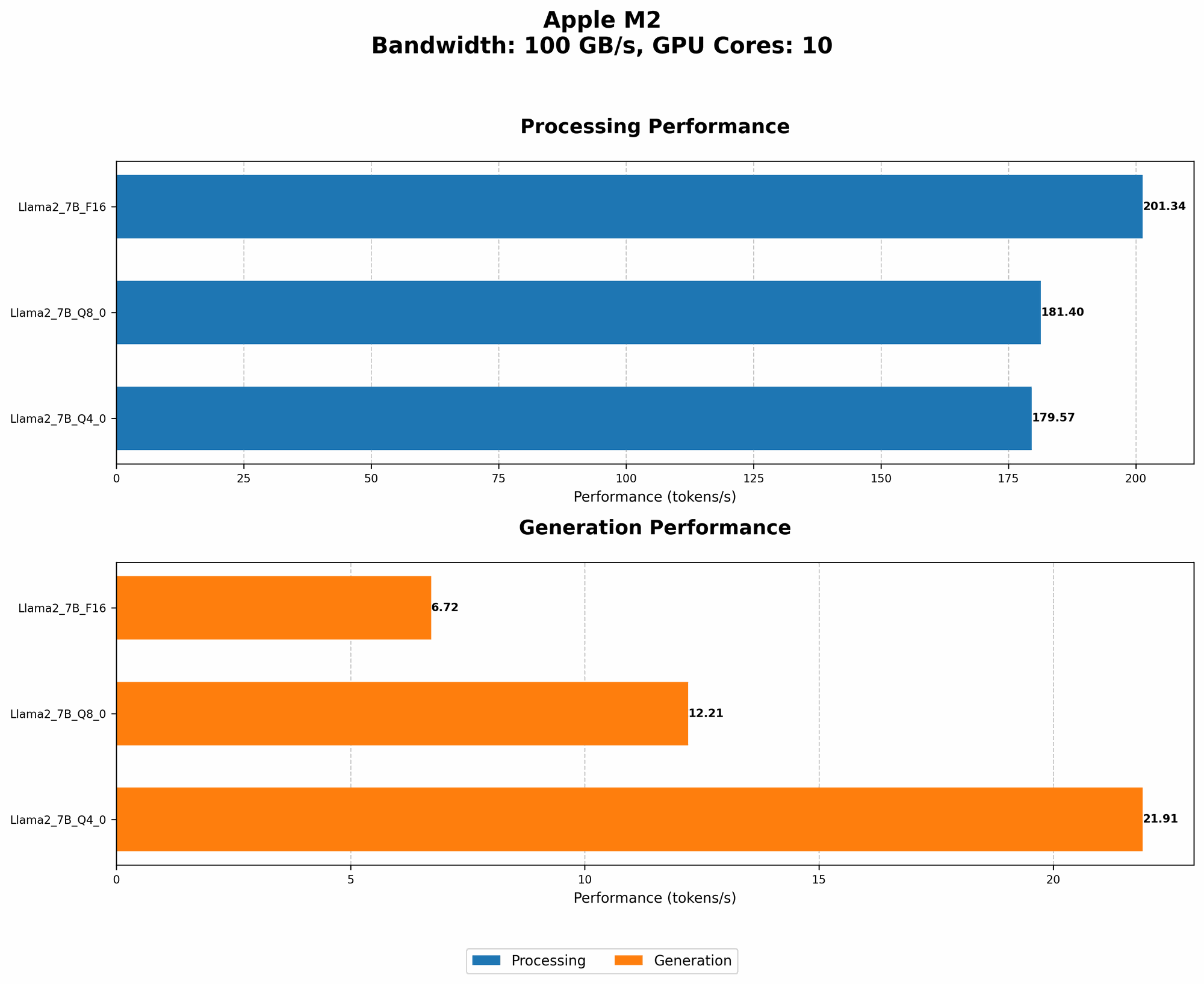
Here's a look at the RAM reduction achieved through quantization on the M2 compared to running the Llama 2 7B model with full precision (FP16):
| Quantization Level | RAM Usage | Token Speed (Tokens/Second) |
|---|---|---|
| FP16 | high | 6.72 |
| Q8_0 | lower | 12.21 |
| Q4_0 | lowest | 21.91 |
As you can see, the Q4_0 quantization level significantly reduces RAM usage while improving the token speed compared to the original FP16 model.
2. Model Pruning: Removing Unnecessary Connections
Imagine a massive network of roads connecting cities. Some roads are heavily used, while others are practically deserted. Pruning in LLMs works similarly. It identifies and removes model connections that contribute little to the overall performance, like those deserted roads.
Pruning can be a powerful technique to reduce the model's size without compromising its accuracy. For example, a network with a million connections might be pruned to just 100,000, significantly reducing RAM usage and computational overhead.
3. Gradient Accumulation: Taking Smaller Bites of Data
Imagine eating a huge pizza in one go. It's too much for your stomach to handle! Gradient accumulation works similarly. It divides training data into smaller batches, processing them one by one, rather than trying to digest the entire dataset at once. This approach limits the RAM usage, providing more control over memory consumption.
4. Memory Offloading: Leveraging External Storage
Think of offloading as moving your belongings from a cramped apartment into a spacious storage unit. Instead of storing all the model weights in memory, we transfer them to external storage like an SSD, freeing up valuable RAM. When a particular weight is needed, it's retrieved from the SSD, minimizing the strain on your M2's RAM.
5. Multithreading: Divide and Conquer
Imagine a team of workers tackling a large project. They divide the work into smaller tasks and work concurrently, completing the project efficiently. Multithreading applies this concept to LLM processing. It divides the workload across multiple processing threads, speeding up computations and reducing memory pressure on each individual core.
6. Optimizing Memory Layout: Organizing Your Information
Think about how you organize your kitchen cabinets. By grouping similar items, you maximize space and efficiency. Memory layout optimization in LLMs works similarly. It ensures that frequently used data is stored close together in RAM, minimizing the need for the CPU to constantly fetch data across vast memory distances. This optimization can significantly improve the overall performance of your LLM.
7. Lower-Precision Models: Trading Accuracy for Efficiency
Sometimes, a little less precision can go a long way. Lower-precision models, like those operating with 8-bit or even 4-bit integers, are often smaller and faster to process than their high-precision counterparts. This trade-off can be particularly beneficial for tasks that don't require absolute accuracy, such as basic text generation or simple question answering.
Comparison of M2 RAM Optimization Techniques
Here's a table comparing the RAM optimization techniques we discussed, focusing on their impact on token speed for the Llama 2 7B model on the M2:
| Technique | Description | RAM Usage | Token Speed (Tokens/Second) |
|---|---|---|---|
| Quantization (FP16) | Full precision, no optimization | high | 6.72 |
| Quantization (Q8_0) | 8-bit integers | lower | 12.21 |
| Quantization (Q4_0) | 4-bit integers | lowest | 21.91 |
| Model Pruning | Removing unnecessary connections | lower | varies depending on pruning level |
| Gradient Accumulation | Processing data in smaller batches | lower | varies depending on batch size |
| Memory Offloading | Using external storage | lower | varies depending on SSD speed |
| Multithreading | Parallel processing | varies | varies depending on number of CPU cores |
| Lower-Precision Models | Trading accuracy for speed | lower | varies depending on model precision |
Note: The token speed values were measured on an Apple M2 device, but may vary depending on specific model and configuration.
Conclusion: RAM Optimization is Key to Unleashing Your Apple M2
By mastering these RAM optimization techniques, you can unleash the true potential of your Apple M2 for running LLMs. Remember, it's not just about brute force but about smart optimization. Whether you're a developer or an AI enthusiast, understanding these techniques will allow you to run larger models, generate creative text, and achieve new heights in your LLM explorations.
FAQ: Your Frequently Asked Questions
Q1: What is the best RAM optimization technique?
A: The best technique depends on your specific needs and model. For example, quantization is generally effective for reducing RAM usage, while multithreading can increase performance.
Q2: Can I combine these RAM optimization techniques?
A: Absolutely! Combining techniques like quantization and pruning can lead to significant RAM savings and performance enhancements; it's like layering optimization for maximum effectiveness.
Q3: What are the trade-offs of using different techniques?
A: Often, there's a trade-off between accuracy and speed. For example, lower-precision models might be faster but might sacrifice some accuracy.
Q4: Are there any other RAM optimization techniques I should know about?
A: Yes, there are other techniques like gradient checkpointing, which saves memory during backpropagation, and mixed precision training, which combines different precision levels for various parts of the LLM.
Q5: What are the best resources for learning more about RAM optimization?
A: You can find excellent resources online, including documentation for popular LLM libraries like Hugging Face Transformers and PyTorch. Additionally, forums like the Llama.cpp and Hugging Face forums are excellent sources of information and community support.
Keywords:
LLM, Apple M2, RAM, Optimization, Quantization, Pruning, Gradient Accumulation, Offloading, Multithreading, Memory Layout, Lower-Precision, Token Speed, Tokens/Second, Llama 2, GPU, AI, Deep Learning, Machine Learning, NLP.