7 RAM Optimization Techniques for LLMs on Apple M2 Max

Introduction
Large Language Models (LLMs) are the hottest thing in the AI world right now, capable of generating human-like text, translating languages, writing different kinds of creative content, and answering your questions in an informative way. But running these powerful models locally on your computer can be a RAM-intensive affair. Especially on Apple's M2 Max chips, which boast impressive power, but also have their limits.
If you're a developer or just a curious geek who wants to experiment with LLMs on your M2 Max, you've come to the right place. In this article, we'll explore seven effective RAM optimization techniques that can significantly enhance your LLM experience, letting you unleash the full potential of your Mac without running into memory bottlenecks.
The Power of Your M2 Max: Understanding Your Hardware
Before we dive into RAM optimization, let's talk about the beast you're working with: the M2 Max. This silicon powerhouse packs a punch, offering a whopping 96GB of unified memory – a significant leap compared to previous generations.
Think of unified memory as a giant shared playground for your CPU and GPU. This eliminates the bottleneck of transferring data between the two, making everything run smoother and faster. Still, even with this impressive memory capacity, running LLMs can be RAM-hungry, especially when you start working with larger models.
7 RAM Optimization Techniques for Your M2 Max
1. Quantization: Shrinking the Model to Fit Your RAM
Imagine squeezing a giant elephant into a tiny shoebox – impossible, right? That's what running a massive LLM feels like on limited RAM. Quantization comes to the rescue. This process essentially "shrinks" the model by reducing the number of bits used to represent the model's parameters.
Think of it like using a smaller paintbrush to paint the same picture. You might lose a bit of detail, but the overall image remains recognizable, and crucially, the file size is much smaller.
For example, a model using 32 bits per parameter can be compressed to use only 16 bits, or even 8 bits! This significantly reduces the memory footprint, allowing you to fit larger models in your precious RAM.
The trade-off? There might be a slight drop in accuracy.
2. Model Pruning: Removing Unnecessary Weights
We all have those clothes we keep "just in case," even though they haven't seen the light of day for years. LLMs can be similar. They often have a lot of "weights" (parameters) that contribute little to the overall performance. Model pruning helps to identify and remove these unnecessary weights, resulting in a smaller, more streamlined model.
Think of it like trimming a bonsai tree. By carefully removing branches, you can enhance the tree's overall beauty while still preserving its essence.
Model pruning can significantly reduce memory usage without compromising the performance too much.
3. Gradient Accumulation: Taking Smaller Bites
Imagine trying to eat a whole pizza in one go – it's a daunting task. Gradient accumulation helps LLMs "eat" their data in smaller, more manageable bites.
Instead of processing the entire dataset in one go, gradient accumulation breaks it down into smaller batches. This reduces the memory demands of each step, making it easier for your M2 Max to handle large datasets.
4. Use Smaller Batch Sizes: Taking Smaller Bites Again
Continuing the pizza analogy, imagine cutting a giant pizza into incredibly tiny slices. That's what decreasing batch sizes is all about.
Batch size refers to the number of data samples processed together in one step. Smaller batch sizes lead to less memory consumption at each step, but it might take longer to train the model.
5. Leveraging the Power of GPU: Offloading the Work
Your M2 Max isn't just about the CPU; it also has a super-fast GPU, built for parallel processing. Utilizing the GPU for LLM computations can greatly alleviate the strain on your RAM.
Think of it like having an extra pair of hands to help with a complex project. The GPU takes on some of the workload, freeing up your RAM for other tasks.
6. Use a Memory-Efficient LLM Framework: Picking the Right Tools
Just like choosing the right tools for a DIY project, picking the right framework for running LLMs is crucial. Some frameworks are specifically designed to be memory-efficient, minimizing your RAM usage.
For example, llama.cpp is a popular framework that optimizes for smaller memory footprints, making it a good choice for users with limited RAM.
7. Swap Out the Model: Sometimes Smaller is Better
If all else fails, you can always go for a smaller model. This might seem like a compromise, but it can save you a lot of headaches, especially if you're working with limited RAM resources.
Think of it like choosing a smaller car for city driving – it's less demanding on fuel and parking space.
Comparison of Different LLM Models on Apple M2 Max
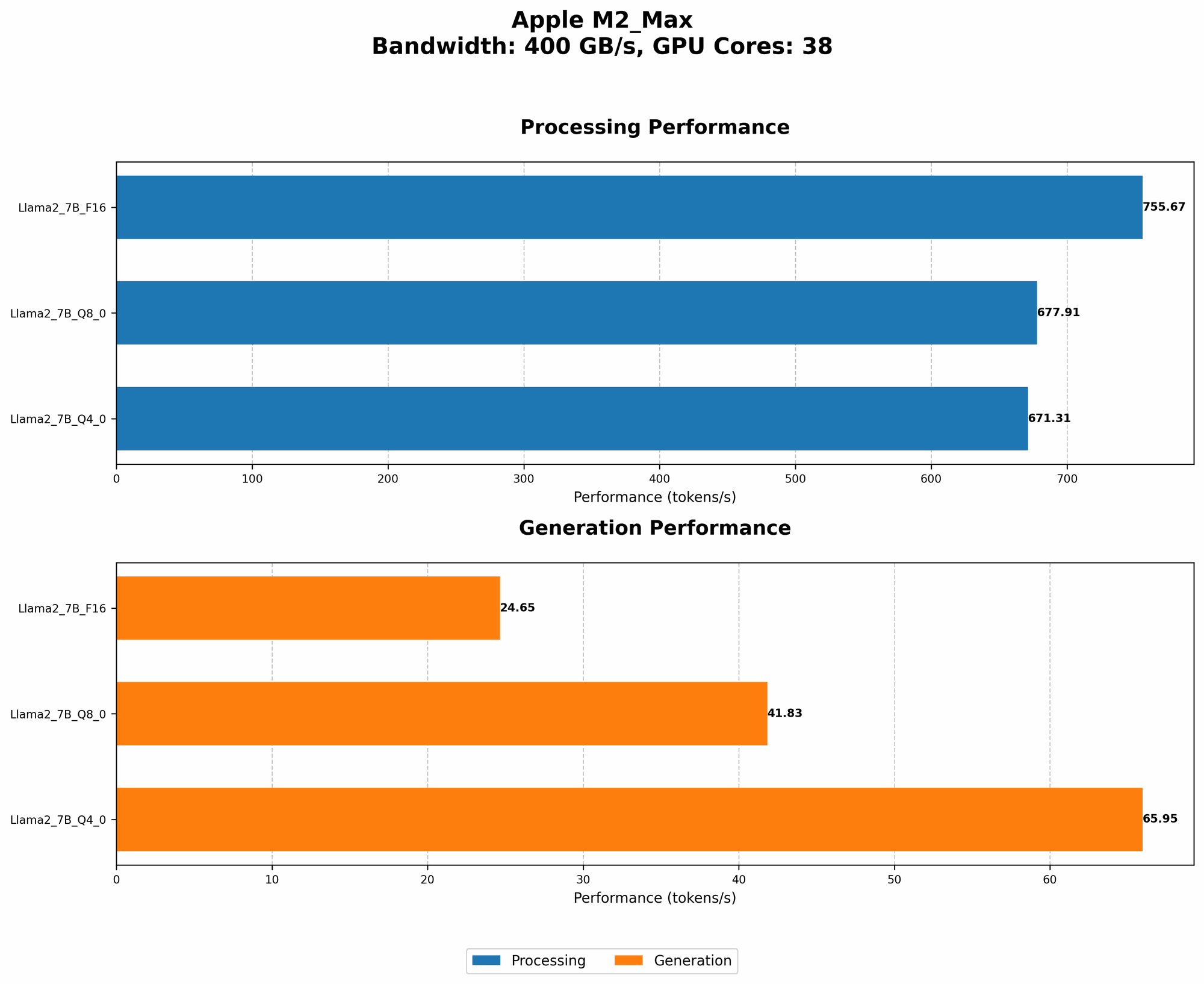
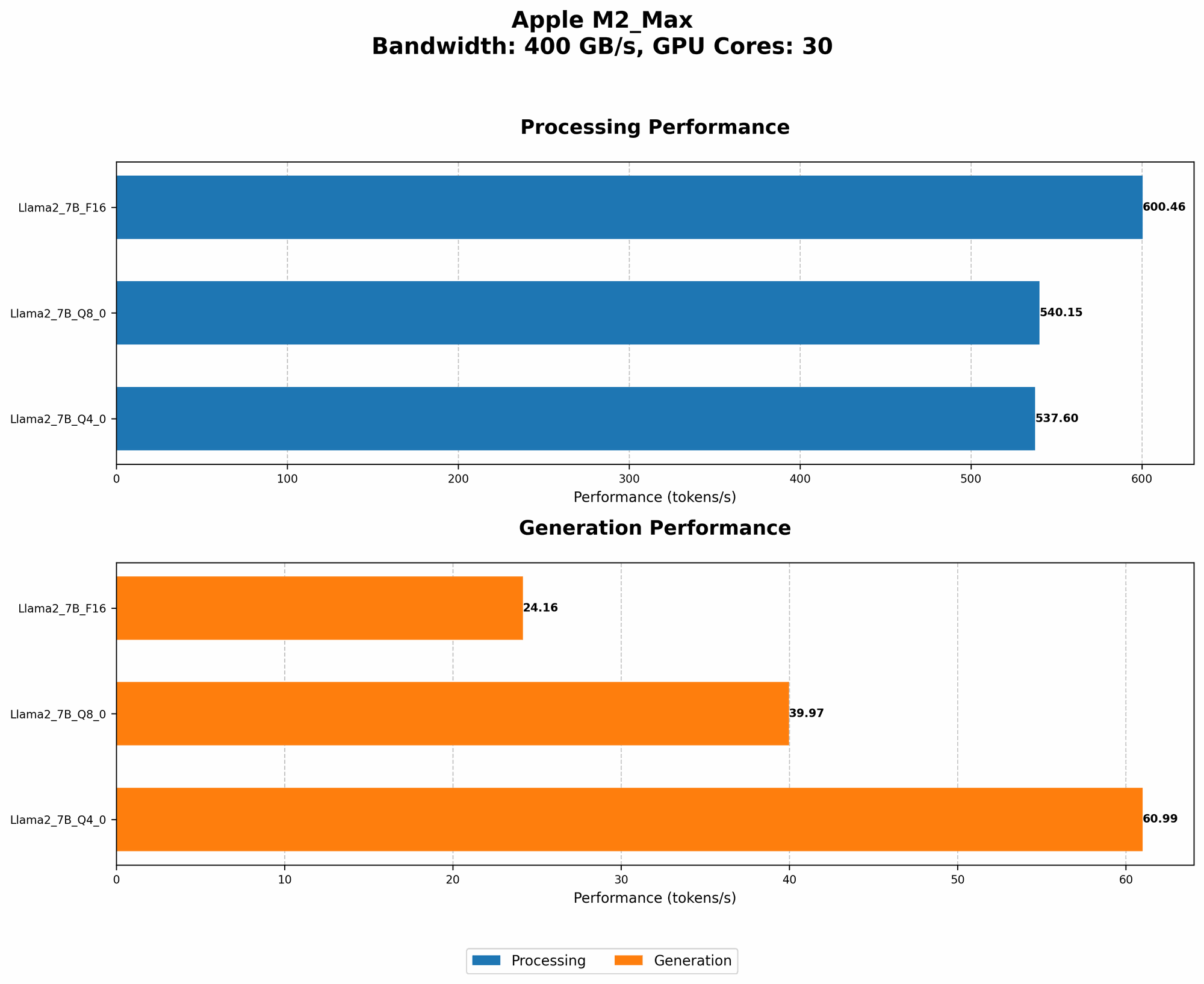
Here's a table showcasing the performance of different Llama 2 models on the Apple M2 Max, showcasing the token/second (tokens per second) generation speeds for various configurations:
| Model | Quantization | GPU Cores | Processing (tokens/second) | Generation (tokens/second) |
|---|---|---|---|---|
| Llama 2 7B | F16 | 30 | 600.46 | 24.16 |
| Llama 2 7B | Q8_0 | 30 | 540.15 | 39.97 |
| Llama 2 7B | Q4_0 | 30 | 537.6 | 60.99 |
| Llama 2 7B | F16 | 38 | 755.67 | 24.65 |
| Llama 2 7B | Q8_0 | 38 | 677.91 | 41.83 |
| Llama 2 7B | Q4_0 | 38 | 671.31 | 65.95 |
Note: Data for other models is not available.
Here’s what we can see:
- Quantization Impact: Even with a powerful GPU, the impact of quantization on performance is clear. Using Q4_0 leads to a noticeable increase in generation speed compared to F16.
- GPU Core Impact: Having more GPU cores improves both processing and generation speed, as seen in the comparison of 30 and 38 core configurations.
With this information, you can choose the best configuration for your needs and available RAM resources.
Frequently Asked Questions
Q: Can I run larger models on my M2 Max?
A: Yes, you can run larger models on your M2 Max, but you'll need to employ the RAM optimization techniques we discussed. Quantization, model pruning, and other techniques can help you squeeze more out of your machine.
Q: How do I choose the right LLM framework?
A: The best framework depends on your specific needs and preferences. Research popular frameworks like llama.cpp, Transformers, and others and understand their strengths and weaknesses regarding RAM optimization. Experiment with different frameworks to find the one that suits your workflow best.
Q: Is it possible to improve the performance of my M2 Max for LLMs?
A: Besides RAM optimization, you can also further improve performance by:
- Upgrading to the latest macOS version: Newer versions often include performance enhancements for AI workloads.
- Using SSD storage: SSDs offer much faster read/write speeds than traditional HDDs, which can significantly impact LLM performance.
- Ensuring adequate cooling: Overheating can lead to performance throttling, so ensure proper ventilation for your Mac.
Keywords
M2 Max, RAM optimization, LLM, large language models, Apple, Mac, quantization, model pruning, gradient accumulation, batch size, Llama 2, GPU, framework, performance