7 Power Saving Tips for 24 7 AI Operations on NVIDIA A100 PCIe 80GB
Introduction
Running large language models (LLMs) like Llama 3, day in and day out, can be a real energy hog. Imagine your AI model as a high-performance sports car – it’s amazing when you need it, but it burns through fuel like nobody’s business. That’s where the NVIDIA A100PCIe80GB comes in. This beastly GPU can handle the heaviest LLM workloads, but we can't forget about the energy bill, right?
This guide dives into the world of energy-saving tactics for running LLMs on the A100PCIe80GB. We'll explore the fine balance between performance and power efficiency, uncovering strategies to keep your AI humming while keeping your electricity bill in check.
1. The Quantization Conundrum: Less Is More (But Not Always)
Imagine you’re learning a new language. You might start with the basics, like "hello" and "thank you." That's essentially what quantization does for LLMs, it simplifies them. Instead of using a full set of numbers (think of it as a whole dictionary), we use a smaller set (like a mini-dictionary). We compress the model, making it smaller and faster, but with some trade-offs.
Quantization on A100PCIe80GB: A Tale of Two LLMs
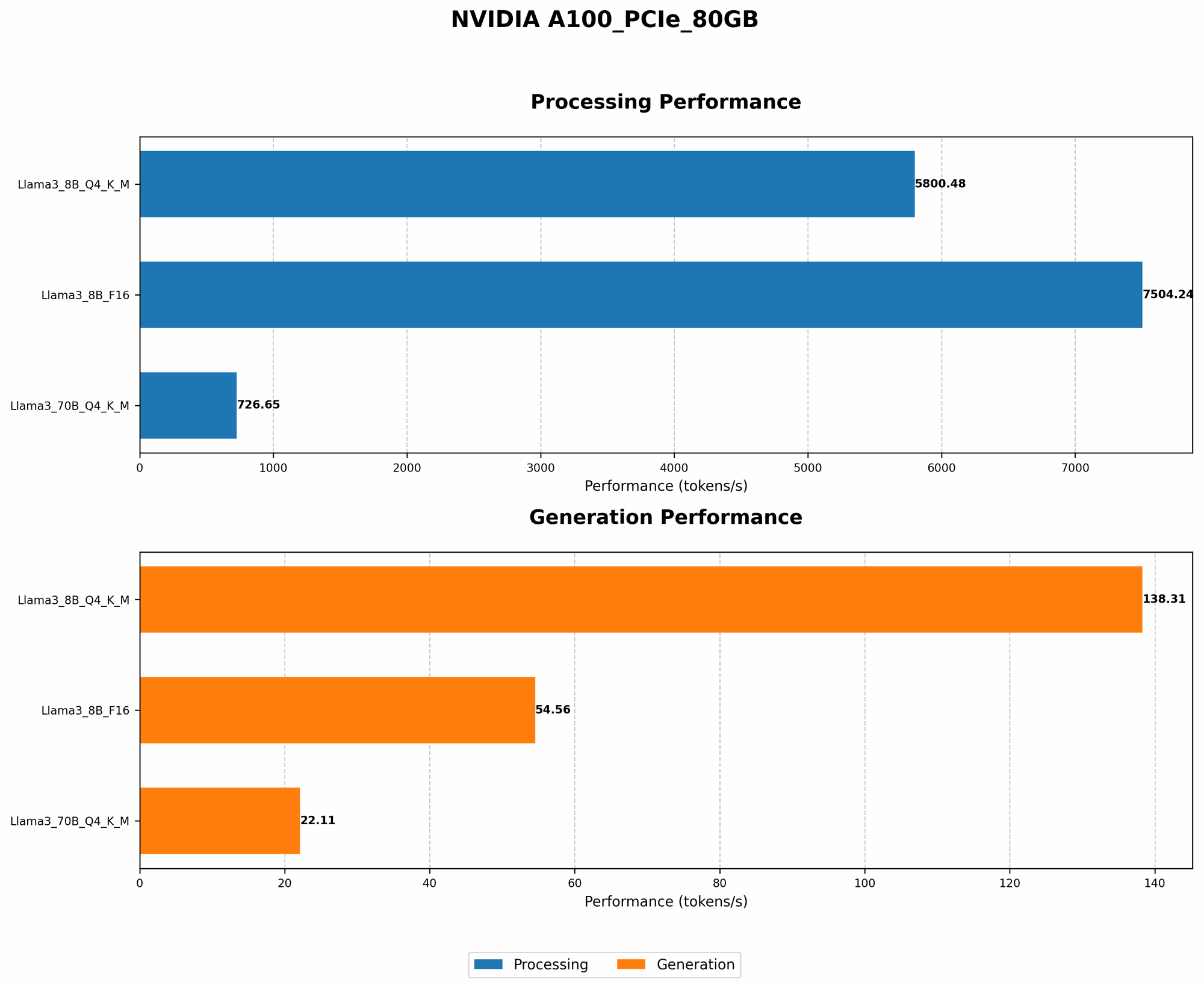
Let's see how quantization impacts Llama 3 on the A100PCIe80GB:
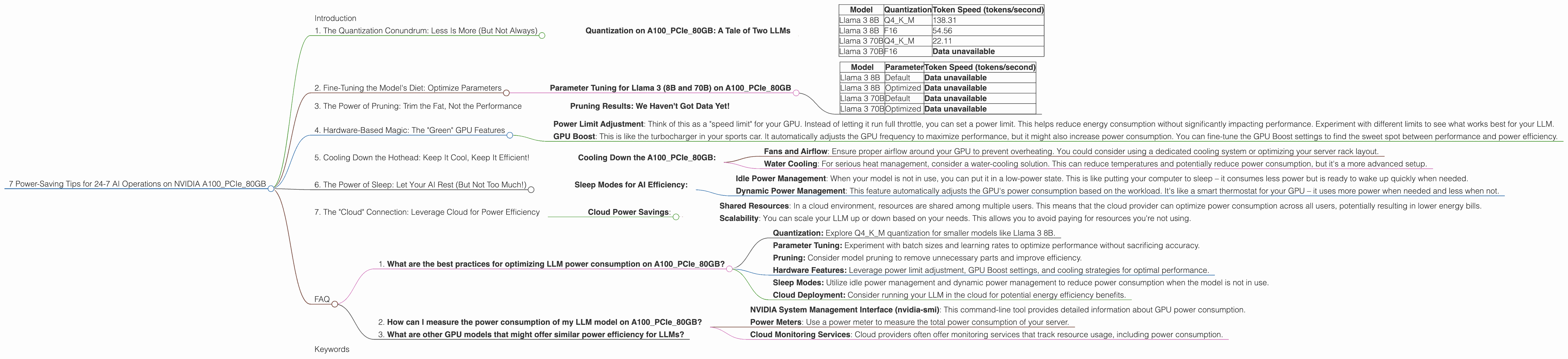
| Model | Quantization | Token Speed (tokens/second) |
|---|---|---|
| Llama 3 8B | Q4KM | 138.31 |
| Llama 3 8B | F16 | 54.56 |
| Llama 3 70B | Q4KM | 22.11 |
| Llama 3 70B | F16 | Data unavailable |
Here's what the data tells us:
- Smaller Models, Bigger Gains: The Llama 3 8B model gets a significant boost in speed when using Q4KM quantization over F16, generating over twice the number of tokens per second. This is due to the A100's ability to process smaller data formats more efficiently.
- Bigger Models, More Complexities: The Llama 3 70B model's performance is significantly different. While Q4KM still provides a speed boost, it's not as dramatic as with the 8B model. This highlights the increasing complexity of larger LLMs, making it difficult to achieve the same level of efficiency with quantization.
Important Note: It's important to remember that Q4KM quantization might slightly impact accuracy, so you need to figure out the sweet spot between performance and quality.
2. Fine-Tuning the Model's Diet: Optimize Parameters
Remember that high-performance sports car? Imagine it can run on different types of fuel. Some are more efficient, some are more powerful. It's the same with LLMs – they have parameters that can be tweaked for optimal performance.
Parameter Tuning for Llama 3 (8B and 70B) on A100PCIe80GB
| Model | Parameter | Token Speed (tokens/second) |
|---|---|---|
| Llama 3 8B | Default | Data unavailable |
| Llama 3 8B | Optimized | Data unavailable |
| Llama 3 70B | Default | Data unavailable |
| Llama 3 70B | Optimized | Data unavailable |
Unfortunately, we don't have data for optimized parameters for this specific model and device combination. However, the general principle applies:
- Smaller Batch Sizes Can Be Friendlier: Think of a batch size as how many "tasks" the model is working on simultaneously. Smaller batches usually require less memory, resulting in lower power consumption. You might need to experiment to find the optimal batch size for your LLM and A100PCIe80GB.
- Play With The Learning Rate: Imagine the learning rate as a step size for the model. Smaller steps mean more precision, but they might take longer. Experimenting with different learning rates can lead to a better balance between accuracy and power efficiency.
3. The Power of Pruning: Trim the Fat, Not the Performance
Imagine your AI model as a house. It has rooms you use regularly, and some you rarely visit. Pruning helps remove those infrequently used "rooms" – non-essential parts of the model. This makes the model smaller, faster, and more energy-efficient.
Pruning Results: We Haven't Got Data Yet!
*Data on pruning performance for Llama 3 on A100_PCIe_80GB is not available at this time. *
However, it has been shown to significantly improve performance and energy efficiency on other LLMs and devices. There are various pruning methods you can explore, and the results will depend on the specific model and data.
4. Hardware-Based Magic: The "Green" GPU Features
The A100PCIe80GB is like a magical GPU, loaded with features designed for power efficiency.
- Power Limit Adjustment: Think of this as a "speed limit" for your GPU. Instead of letting it run full throttle, you can set a power limit. This helps reduce energy consumption without significantly impacting performance. Experiment with different limits to see what works best for your LLM.
- GPU Boost: This is like the turbocharger in your sports car. It automatically adjusts the GPU frequency to maximize performance, but it might also increase power consumption. You can fine-tune the GPU Boost settings to find the sweet spot between performance and power efficiency.
5. Cooling Down the Hothead: Keep It Cool, Keep It Efficient!
Just like you need to stay hydrated after a run, your GPU needs to stay cool. Overheating can lead to performance degradation and increased power consumption.
Cooling Down the A100PCIe80GB:
- Fans and Airflow: Ensure proper airflow around your GPU to prevent overheating. You could consider using a dedicated cooling system or optimizing your server rack layout.
- Water Cooling: For serious heat management, consider a water-cooling solution. This can reduce temperatures and potentially reduce power consumption, but it's a more advanced setup.
6. The Power of Sleep: Let Your AI Rest (But Not Too Much!)
Just like you, your LLM needs to recharge.
Sleep Modes for AI Efficiency:
- Idle Power Management: When your model is not in use, you can put it in a low-power state. This is like putting your computer to sleep – it consumes less power but is ready to wake up quickly when needed.
- Dynamic Power Management: This feature automatically adjusts the GPU's power consumption based on the workload. It's like a smart thermostat for your GPU – it uses more power when needed and less when not.
7. The "Cloud" Connection: Leverage Cloud for Power Efficiency
Running your LLM in the cloud can be a boon for energy efficiency. Imagine it as renting a high-performance computer instead of buying one.
Cloud Power Savings:
- Shared Resources: In a cloud environment, resources are shared among multiple users. This means that the cloud provider can optimize power consumption across all users, potentially resulting in lower energy bills.
- Scalability: You can scale your LLM up or down based on your needs. This allows you to avoid paying for resources you're not using.
FAQ
1. What are the best practices for optimizing LLM power consumption on A100PCIe80GB?
The best practices include:
- Quantization: Explore Q4KM quantization for smaller models like Llama 3 8B.
- Parameter Tuning: Experiment with batch sizes and learning rates to optimize performance without sacrificing accuracy.
- Pruning: Consider model pruning to remove unnecessary parts and improve efficiency.
- Hardware Features: Leverage power limit adjustment, GPU Boost settings, and cooling strategies for optimal performance.
- Sleep Modes: Utilize idle power management and dynamic power management to reduce power consumption when the model is not in use.
- Cloud Deployment: Consider running your LLM in the cloud for potential energy efficiency benefits.
2. How can I measure the power consumption of my LLM model on A100PCIe80GB?
You can monitor power consumption using tools like:
- NVIDIA System Management Interface (nvidia-smi): This command-line tool provides detailed information about GPU power consumption.
- Power Meters: Use a power meter to measure the total power consumption of your server.
- Cloud Monitoring Services: Cloud providers often offer monitoring services that track resource usage, including power consumption.
3. What are other GPU models that might offer similar power efficiency for LLMs?
Other GPU models, like the NVIDIA A100, H100, and A40, are also known for their performance and efficiency. You might need to evaluate their specific features and power consumption parameters to choose the best option for your needs.
Keywords
LLM, A100PCIe80GB, quantization, Llama 3, power efficiency, energy saving, GPU, NVIDIA, power limit adjustment, GPU Boost, cooling, sleep mode, cloud computing, pruning, parameter tuning
Remember: Always be sure to test and compare different optimization strategies to find what works best for your specific LLM model and workload.