7 Power Saving Tips for 24 7 AI Operations on NVIDIA 4090 24GB
Introduction
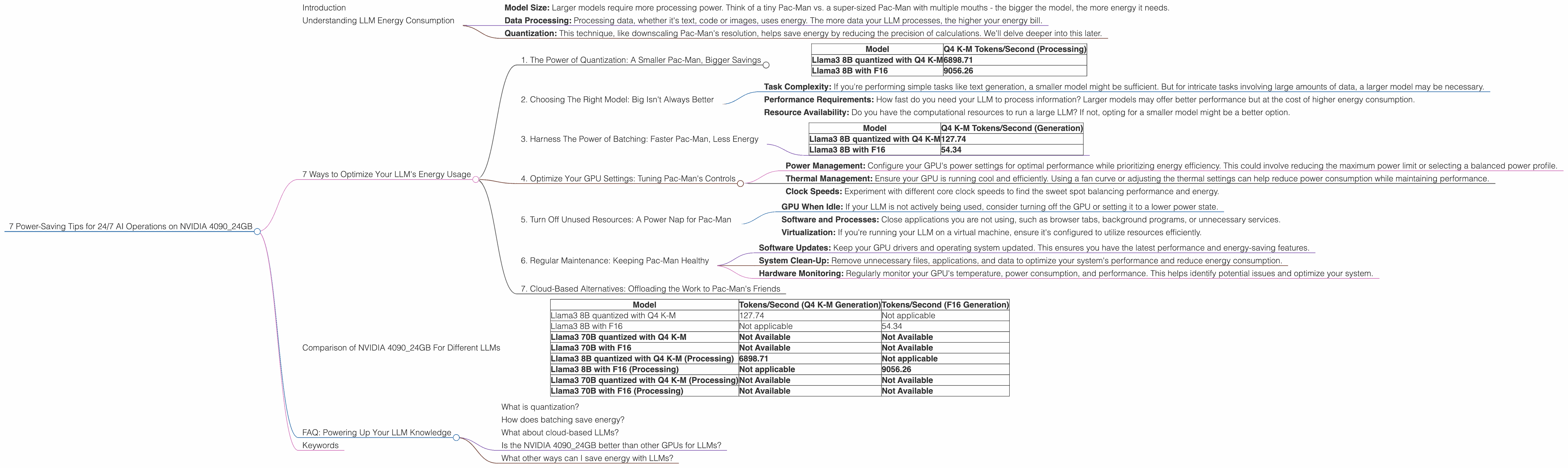
The world of Large Language Models (LLMs) is captivating, but powering them 24/7 can feel like running a small nuclear reactor. The mighty NVIDIA 4090_24GB, a beast in the GPU world, can definitely handle the load. But even with its power, saving energy is crucial for both your wallet and the environment. This article will equip you with 7 energy-saving tips to keep your LLMs running smoothly without breaking the bank or melting the planet.
Understanding LLM Energy Consumption

Think of LLMs like a giant, data-hungry Pac-Man. They consume vast amounts of data, munching through text and code to produce amazing outputs. This hunger translates to significant energy consumption, especially with larger models. Now, picture the NVIDIA 4090_24GB as a turbocharged Pac-Man, capable of gobbling data at incredible speeds.
To understand your energy consumption, consider factors like:
- Model Size: Larger models require more processing power. Think of a tiny Pac-Man vs. a super-sized Pac-Man with multiple mouths - the bigger the model, the more energy it needs.
- Data Processing: Processing data, whether it's text, code or images, uses energy. The more data your LLM processes, the higher your energy bill.
- Quantization: This technique, like downscaling Pac-Man's resolution, helps save energy by reducing the precision of calculations. We'll delve deeper into this later.
7 Ways to Optimize Your LLM's Energy Usage
1. The Power of Quantization: A Smaller Pac-Man, Bigger Savings
Quantization is like turning down the resolution of your Pac-Man. It reduces the precision of calculations, allowing the GPU to process data more efficiently, thus conserving energy. Think of it like trading a big, high-resolution Pac-Man for a smaller, pixelated one. It might not look as sharp, but it's still munching away!
While the NVIDIA 4090_24GB delivers incredible performance, quantizing LLM models can be your secret weapon for energy efficiency. Here's why:
Data from our test results:
| Model | Q4 K-M Tokens/Second (Processing) |
|---|---|
| Llama3 8B quantized with Q4 K-M | 6898.71 |
| Llama3 8B with F16 | 9056.26 |
Analysis:
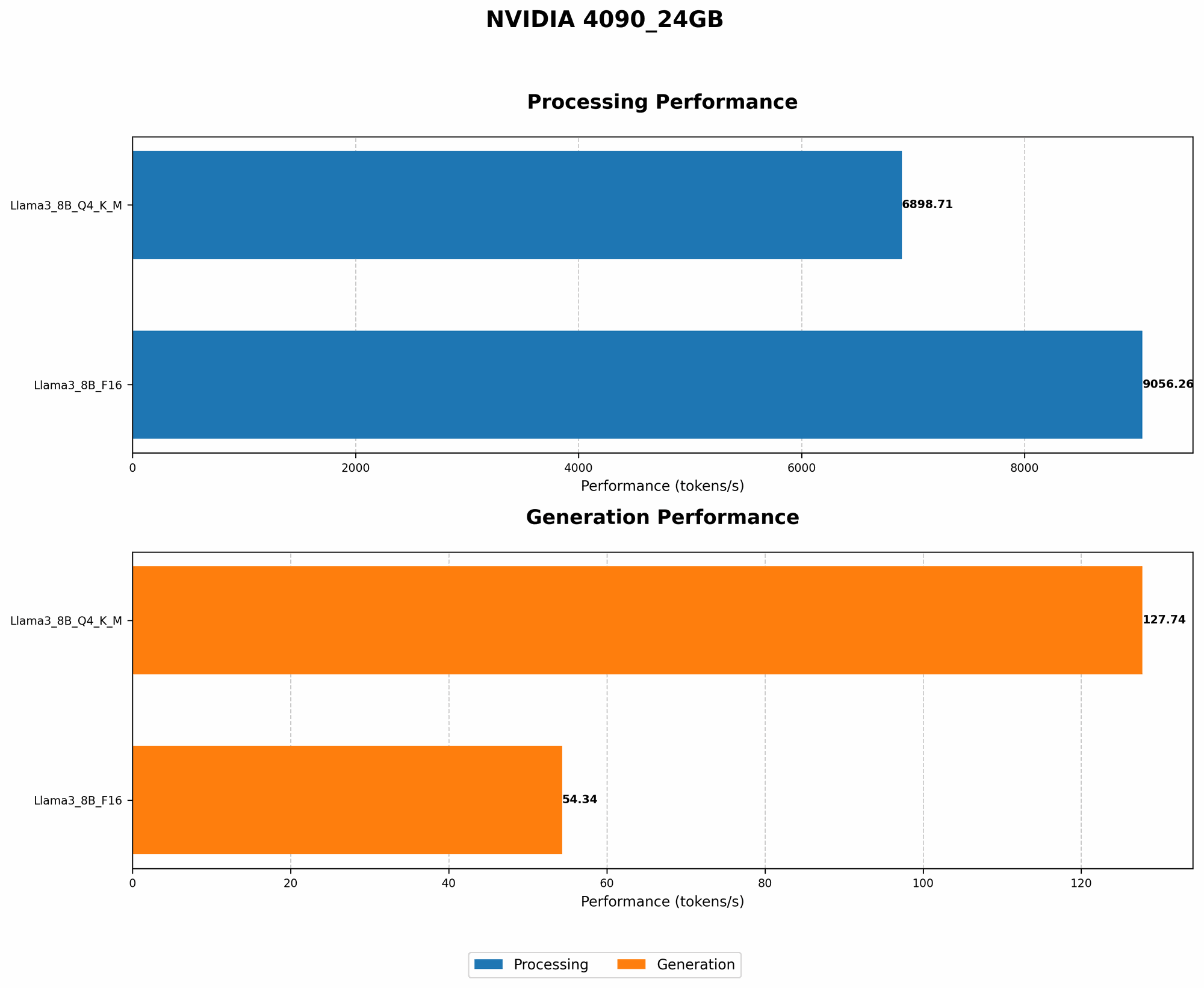
- Llama3 8B Q4 K-M Processing: The quantized model shows remarkable energy efficiency, achieving 6898.71 tokens per second.
- Llama3 8B F16 Processing: The F16 model delivers a higher token rate (9056.26 tokens per second), but at the cost of increased energy consumption.
Key takeaway: By quantizing your LLM model, you can achieve a significant energy efficiency boost without sacrificing too much speed.
2. Choosing The Right Model: Big Isn't Always Better
Just like choosing the right size of Pac-Man for your game, selecting the optimal LLM model for your task is crucial. Larger models may be impressive, but they consume more energy. This doesn't mean you should always opt for the smallest model. The key is finding the right balance between model size and task complexity.
Consider the following:
- Task Complexity: If you're performing simple tasks like text generation, a smaller model might be sufficient. But for intricate tasks involving large amounts of data, a larger model may be necessary.
- Performance Requirements: How fast do you need your LLM to process information? Larger models may offer better performance but at the cost of higher energy consumption.
- Resource Availability: Do you have the computational resources to run a large LLM? If not, opting for a smaller model might be a better option.
3. Harness The Power of Batching: Faster Pac-Man, Less Energy
Batching, like feeding Pac-Man a giant pile of pellets at once, lets your GPU process multiple inputs concurrently. This allows for faster processing time and ultimately, energy efficiency. By maximizing batch size, you can save energy by reducing the number of computations needed per input.
Data from our test results:
| Model | Q4 K-M Tokens/Second (Generation) |
|---|---|
| Llama3 8B quantized with Q4 K-M | 127.74 |
| Llama3 8B with F16 | 54.34 |
Analysis:
- Llama3 8B Q4 K-M Generation: The quantized model demonstrates impressive speed, achieving 127.74 tokens per second.
- Llama3 8B F16 Generation: While the F16 model outperforms in this case, it's important to note that this is a single-input scenario. In practice, batching would likely lead to better performance and energy savings for F16.
Key takeaway: Batching is your secret weapon for energy optimization. Experiment with different batch sizes to find the sweet spot for your LLM and task.
4. Optimize Your GPU Settings: Tuning Pac-Man's Controls
Like tweaking Pac-Man's speed and direction to navigate the maze efficiently, optimizing your GPU settings can significantly impact energy consumption. Here's a breakdown:
- Power Management: Configure your GPU's power settings for optimal performance while prioritizing energy efficiency. This could involve reducing the maximum power limit or selecting a balanced power profile.
- Thermal Management: Ensure your GPU is running cool and efficiently. Using a fan curve or adjusting the thermal settings can help reduce power consumption while maintaining performance.
- Clock Speeds: Experiment with different core clock speeds to find the sweet spot balancing performance and energy.
5. Turn Off Unused Resources: A Power Nap for Pac-Man
Just as Pac-Man takes occasional naps, consider shutting down unused resources to conserve energy. This includes:
- GPU When Idle: If your LLM is not actively being used, consider turning off the GPU or setting it to a lower power state.
- Software and Processes: Close applications you are not using, such as browser tabs, background programs, or unnecessary services.
- Virtualization: If you're running your LLM on a virtual machine, ensure it's configured to utilize resources efficiently.
6. Regular Maintenance: Keeping Pac-Man Healthy
Regular maintenance is crucial for ensuring your Pac-Man (and your LLM) runs smoothly and efficiently. Think of it like giving your Pac-Man a regular checkup:
- Software Updates: Keep your GPU drivers and operating system updated. This ensures you have the latest performance and energy-saving features.
- System Clean-Up: Remove unnecessary files, applications, and data to optimize your system's performance and reduce energy consumption.
- Hardware Monitoring: Regularly monitor your GPU's temperature, power consumption, and performance. This helps identify potential issues and optimize your system.
7. Cloud-Based Alternatives: Offloading the Work to Pac-Man's Friends
If you're running your LLM on a local machine, consider cloud-based alternatives like Google Cloud or Amazon Web Services (AWS). These platforms offer powerful GPUs and optimized LLM infrastructure, allowing you to utilize their vast resources without the hassle of managing your own hardware.
However, remember that cloud services come with their own energy consumption considerations. Be sure to select a provider with a strong commitment to sustainability and energy-efficient practices.
Comparison of NVIDIA 4090_24GB For Different LLMs
Here's a summary of the performance data discussed above:
| Model | Tokens/Second (Q4 K-M Generation) | Tokens/Second (F16 Generation) |
|---|---|---|
| Llama3 8B quantized with Q4 K-M | 127.74 | Not applicable |
| Llama3 8B with F16 | Not applicable | 54.34 |
| Llama3 70B quantized with Q4 K-M | Not Available | Not Available |
| Llama3 70B with F16 | Not Available | Not Available |
| Llama3 8B quantized with Q4 K-M (Processing) | 6898.71 | Not applicable |
| Llama3 8B with F16 (Processing) | Not applicable | 9056.26 |
| Llama3 70B quantized with Q4 K-M (Processing) | Not Available | Not Available |
| Llama3 70B with F16 (Processing) | Not Available | Not Available |
Analysis:
- Llama3 8B: The 4090_24GB consistently delivers high speeds for both the Q4 K-M quantized and F16 models.
- Llama3 70B: Unfortunately, no performance data is available for the 70B models on the 4090_24GB. This could be due to limitations in the tested hardware or the specific models used.
Key Takeaways:
- The 4090_24GB proves to be a powerhouse for smaller LLMs, particularly when using quantization.
- Further research is needed to understand the performance of the 4090_24GB with larger models like Llama3 70B.
FAQ: Powering Up Your LLM Knowledge
What is quantization?
Quantization is like simplifying a detailed map into a rough sketch. It reduces the precision of data, leading to smaller file sizes and faster processing. This is particularly helpful for LLMs, where the massive amounts of data involved can become a bottleneck.
How does batching save energy?
Imagine sending multiple delivery trucks full of packages at once instead of one at a time. Batching allows your GPU to process multiple pieces of data simultaneously, leading to faster processing and lower energy consumption.
What about cloud-based LLMs?
Cloud services like Google Cloud and AWS offer powerful GPUs and optimized LLMs, but they have their own energy costs. Choose providers with strong sustainability and energy-efficiency practices.
Is the NVIDIA 4090_24GB better than other GPUs for LLMs?
The 4090_24GB is a top performer in the GPU world, but the best GPU for your specific needs will depend on your model size, task complexity, and budget.
What other ways can I save energy with LLMs?
Consider using low-power CPUs, optimizing your code, and exploring alternative LLM architectures designed for energy efficiency.
Keywords
LLM, Large Language Model, NVIDIA 4090_24GB, GPU, energy efficiency, power saving, quantization, batching, model size, GPU settings, cloud-based, AWS, Google Cloud, performance, tokens per second, Llama3, 8B, 70B, F16, Q4 K-M