7 Power Saving Tips for 24 7 AI Operations on NVIDIA 3090 24GB

Introduction
You've got your shiny new NVIDIA 309024GB card, and you're ready to unleash the power of large language models (LLMs) on the world—but hold on! Running these AI behemoths 24/7 can turn your electricity bill into a hefty financial burden. Fear not, fellow AI enthusiast! This guide will equip you with 7 pro tips to optimize your 309024GB for energy efficiency and keep your LLMs humming without breaking the bank.
Imagine running a massive AI brain, like a digital version of the T-800 from Terminator, 24 hours a day. It's incredibly cool, but it consumes energy like a teenager on a sugar rush. Luckily, with some strategic tweaks and careful configuration, you can tame the power-hungry beast of your LLM and make it more budget-friendly, without sacrificing performance!
The Energy Efficiency Showdown: Understanding Your Options
First, let's talk about the key players in this energy efficiency game—quantization and floating-point precision. Think of them like different weight classes for your LLM.
Quantization: The Lightweight Champion
Quantization is like putting your LLM on a diet. It reduces the size of the model by converting its numbers from 32-bit floating-point to smaller data types, such as 8-bit integers. This shrinks the model's size, making it easier to load and process. Think of it as replacing a heavy, high-resolution image with a compressed version that still retains the main details.
Floating-point Precision: The Musclebound Titan
Floating-point precision, on the other hand, is the "musclebound titan" of the LLM world. It uses more bits to store each number, offering greater accuracy. While this high precision can lead to better results, it also demands more resources and energy.
7 Power-Saving Tips for Your NVIDIA 3090_24GB: A Step-by-Step Guide
Now, let's dive into the 7 key steps to optimize your 3090_24GB for energy efficiency:
1. Quantization: The Skinny-Dipping LLM
Think of quantization like a skinny-dip for your LLM—it removes unnecessary baggage and helps it move faster and consume less energy.
Let's take Llama 3 8B as an example:
| LLM Model & Precision | Tokens per Second |
|---|---|
| Llama3 8B - Quantized (Q4KM) | 111.74 |
| Llama3 8B - FP16 | 46.51 |
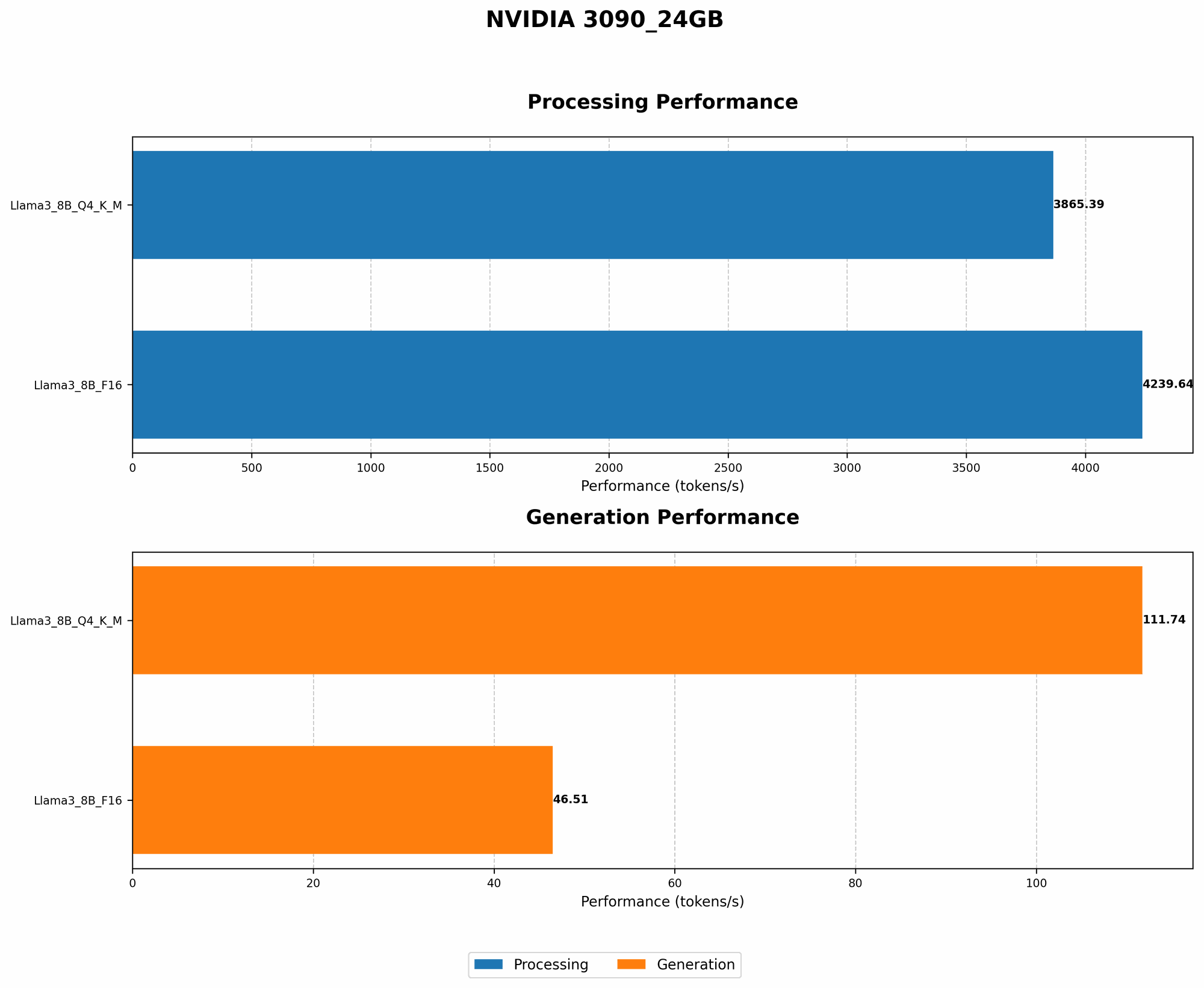
As you can see, the Q4KM quantized version of Llama 3 8B boasts a whopping 111.74 tokens per second, compared to only 46.51 tokens per second for the F16 version. This means you can process almost twice as much data in the same time, with significant energy savings.
Note: Unfortunately, data for Llama 3 70B models on the 3090_24GB is not available.
2. Processing vs. Generation: The Dance of LLMs
Just like a skilled dancer, your LLM has two distinct roles: processing and generation. Understanding this difference is key to optimizing energy consumption.
- Processing is the background work—like learning the steps of a dance routine. It involves analyzing the sequence of text and understanding its context.
- Generation is the final performance, creating new text based on the learned patterns.
Let's compare Llama 3 8B's performance in processing and generation on your 3090_24GB:
| LLM Model & Precision | Tokens per Second (Processing) | Tokens per Second (Generation) |
|---|---|---|
| Llama3 8B - Quantized (Q4KM) | 3865.39 | 111.74 |
| Llama3 8B - FP16 | 4239.64 | 46.51 |
Notice that the processing speed is significantly higher than the generation speed for both quantized and FP16 models. This means that the LLM spends significantly more time analyzing and understanding the text than generating new text.
This insight is critical for power optimization! You can prioritize processing during off-peak hours, when electricity rates are lower, and schedule generation tasks for peak times—like a professional dance company performing only at the peak of its energy.
3. Batch Size Optimization: Mastering the Group Dance
Think of batch size as the number of dancers in a synchronized dance routine. A larger batch size can improve efficiency, but comes with a higher energy consumption.
Example:
If you're training your LLM with a very large batch size (like 1000), you're essentially making the dancers practice a complex choreographed routine. While the LLM might learn faster, it requires a higher energy expenditure.
By adjusting the batch size, you can fine-tune the energy consumption based on your specific needs. Experiment with different batch sizes to find the sweet spot for efficiency and speed.
Note: The optimal batch size depends on the specific LLM and the hardware you are using. It's best to experiment and find the best combination for your setup.
4. Dynamic Batching: The Flexible Dance Crew
Dynamic batching is like having a dance crew with a fluctuating number of members. It allows adjusting the batch size on the fly, adapting to the complexity of the tasks.
Imagine a dance crew preparing for a big competition. If a complex routine demands extra practice, the crew can temporarily increase the batch size for focused learning. For simpler routines, they can reduce the batch size, saving energy.
Similarly, dynamic batching helps you optimize energy consumption by dynamically adapting the batch size based on the workload.
While dynamic batching requires more sophisticated setup, it can significantly enhance energy efficiency by ensuring that the LLM uses only the necessary resources.
5. Model Pruning: The Trimmed-Down Choreography
Model pruning is like a choreographer streamlining the dance routine by removing unnecessary moves. It eliminates redundant connections in the LLM, making it smaller and faster. It's like removing the extra flourishes in a dance routine without sacrificing the core performance.
By pruning the LLM, you can get rid of the unnecessary connections and make the LLM more energy-efficient. This is especially beneficial for larger LLMs where many connections might be redundant.
Note: Model pruning can be a complex process and might require specialized tools. It's essential to carefully evaluate the trade-offs between performance and efficiency before pruning a model.
6. Reduce Gradient Accumulation: Don't Overdo the Training
Gradient accumulation is a technique used in training to simulate larger batch sizes without increasing memory consumption. It's like breaking down a complex dance routine into smaller steps, allowing the dancers to practice each step individually before assembling the final performance.
However, overdoing gradient accumulation can be detrimental. It's like forcing the dancers to rehearse the same step repeatedly, leading to exhaustion and inefficiency.
By optimizing the gradient accumulation steps, you can achieve the same level of training accuracy with fewer iterations, saving energy and time.
7. Optimize the Optimizer: Choosing the Right Dancing Partner
Optimizers play a crucial role in training LLMs, guiding the model toward optimal performance. It's like choosing the right dance partner for your routine.
Some optimizers, like AdamW, are known for their speed and efficiency, while others, like SGD, might require more iterations but offer better long-term performance.
Experiment with different optimizers and their configurations to identify the best combination for your LLM and hardware.
Conclusion: Powering Up Your LLM with Efficiency

This guide has equipped you with 7 powerful tips to optimize your 3090_24GB for energy-efficient LLM operations. Remember, the key is to find the balance between performance and energy consumption. Just like a skilled dancer, your LLM should move gracefully and efficiently, without sacrificing its performance.
FAQ: Your LLM Questions Answered
What is quantization, and how does it save energy?
Quantization is like putting your LLM on a weight-loss program. It converts the model's numbers from 32-bit floating-point to smaller data types, reducing its size and making it easier to load and process. This significantly reduces energy consumption.
How can I find the optimal batch size for my LLM?
There's no one-size-fits-all answer. You'll need to experiment with different batch sizes to find the sweet spot for efficiency and speed. Remember, smaller batch sizes generally consume less power, but might require more training iterations.
What are the trade-offs of model pruning?
While model pruning can improve energy efficiency, it might also affect the performance and accuracy of your LLM. Carefully evaluate the trade-offs before pruning your model.
What are some of the best optimizers for LLM training?
Popular optimizers include AdamW and SGD. Each has its strengths and weaknesses. Experiment with different optimizers and their configurations to find the best fit for your needs.
Keywords
LLM, NVIDIA 3090_24GB, energy efficiency, quantization, floating-point precision, batch size, dynamic batching, model pruning, gradient accumulation, optimizer, training, performance, efficiency, power consumption, tokens per second, Llama 3 8B, Llama 3 70B.