7 Must Have Tools for AI Development on Apple M2 Max
Introduction
The world of artificial intelligence (AI) is buzzing with excitement – and for good reason. Large Language Models (LLMs) like ChatGPT are changing the way we communicate, create, and even think. But what if you could have all that incredible power running locally on your own machine? Imagine the possibilities!
This is where Apple's M2 Max chip comes into play. This powerhouse offers incredible performance and efficiency, making it a perfect platform for developing and running LLMs. In this article, we'll dive into the world of LLM development on the M2 Max, exploring seven essential tools and techniques that will turbocharge your projects.
The Apple M2 Max: A Beast for AI
The M2 Max isn't just another chip; it's a game-changer. Its powerful GPU and unified memory architecture are designed to handle the demanding computations of LLMs, allowing for blazing-fast model processing and generation. Think of it as a rocket engine for your AI endeavors.
7 Crucial Tools for AI Development on M2 Max
Now, let's get into the nitty-gritty. Below we've listed seven tools and techniques that are essential for developing and running LLMs efficiently on the M2 Max. We'll also use some real-world data to see exactly how these tools can boost performance.
1. Llama.cpp: Your LLM Powerhouse
Llama.cpp is like a swiss army knife for LLMs. It's a C++ library that can load and run LLM models directly on your CPU, allowing you to run even large models like Llama 2 7B without needing a powerful GPU. This flexibility is a game-changer for developers who want to work with LLMs on their laptops or workstations.
Imagine this: You're working on a project where you need to generate creative text, translate languages, or summarize documents. You can seamlessly use Llama.cpp to load and run the appropriate LLM without needing to transfer data to the cloud, making it a truly valuable tool for local LLM development.
How Llama.cpp Works with Apple M2 Max
The M2 Max excels at handling Llama.cpp's processing and generation tasks. Its powerful GPU accelerates the model's inference, pushing the boundaries of what's possible.
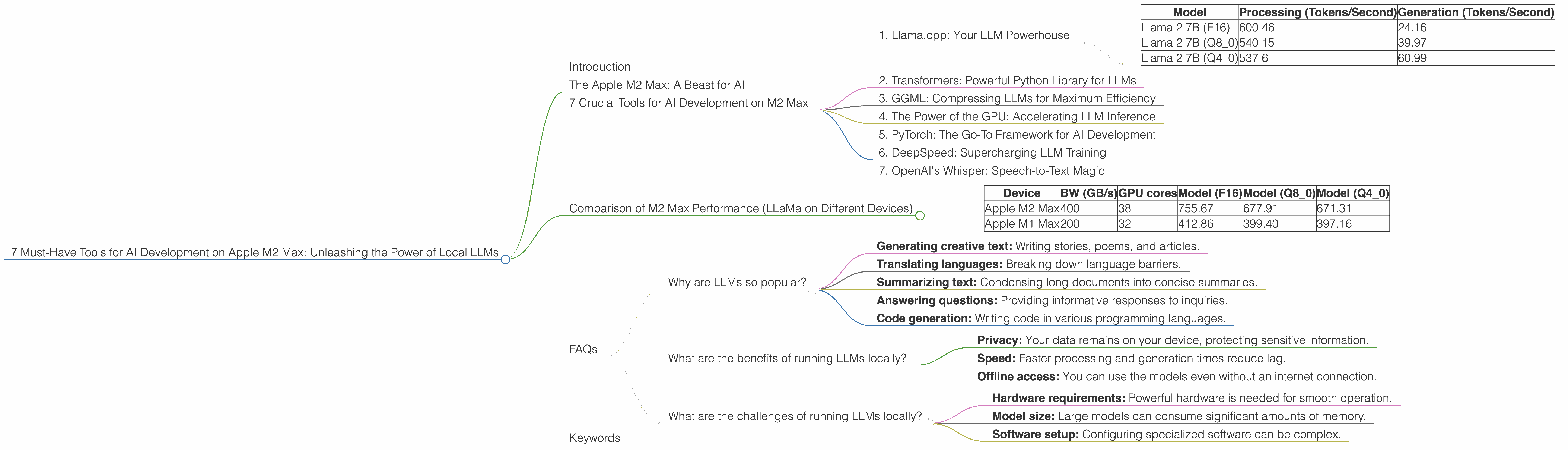
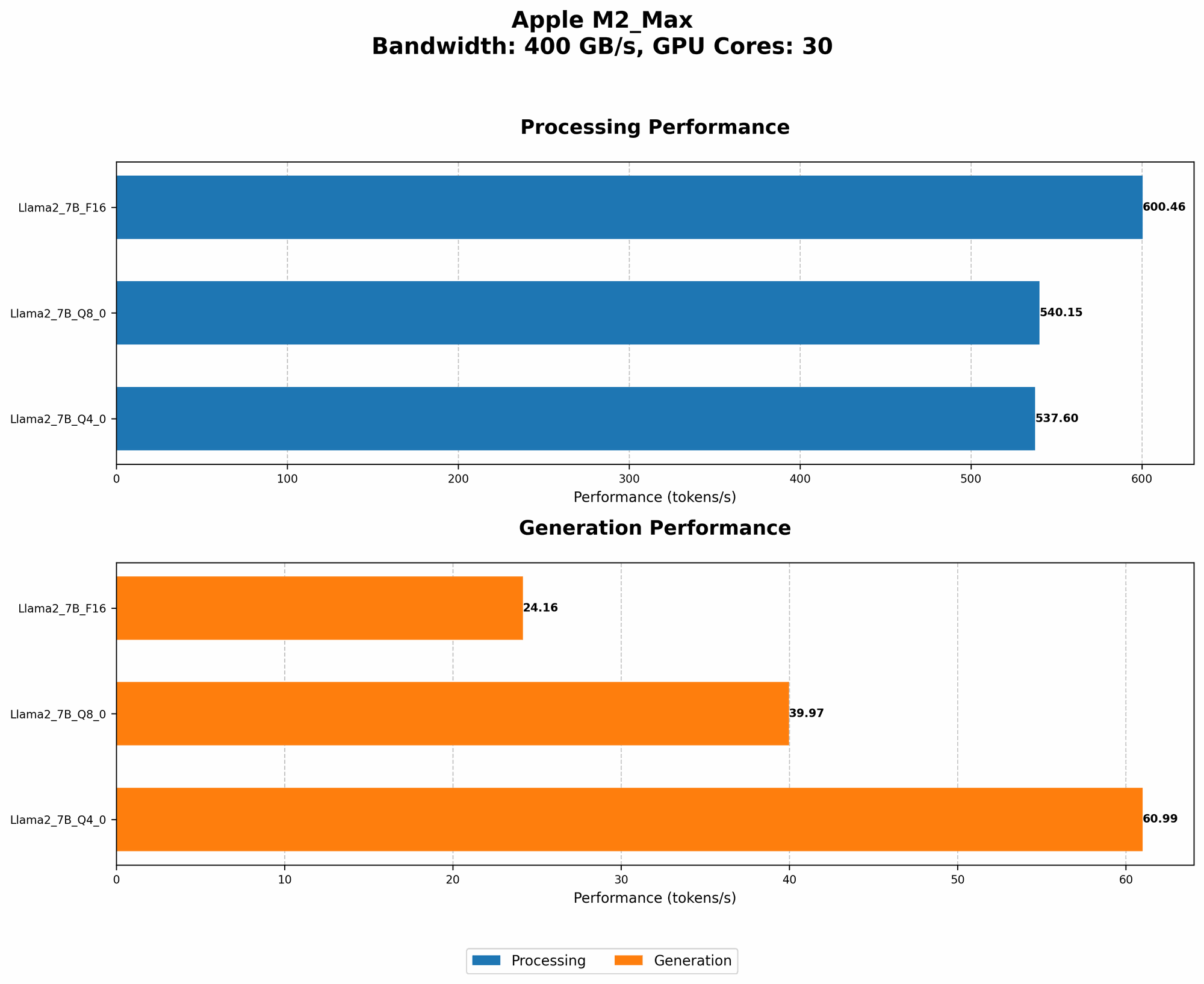
Let's look at some real-world data:
| Model | Processing (Tokens/Second) | Generation (Tokens/Second) |
|---|---|---|
| Llama 2 7B (F16) | 600.46 | 24.16 |
| Llama 2 7B (Q8_0) | 540.15 | 39.97 |
| Llama 2 7B (Q4_0) | 537.6 | 60.99 |
As you can see, running Llama 2 7B on the M2 Max results in impressive token speeds.
Quantization: Making LLMs More Efficient
Quantization is like a diet for LLMs. It reduces the size of the model by using lower-precision data. This allows for faster processing and less memory usage.
Let's break it down:
- F16: This is the standard floating-point representation, providing good accuracy.
- Q8_0: This significantly reduces the size of the model by using 8-bit integers.
- Q4_0: This uses 4-bit integers, resulting in an even smaller model.
The Results:
The data above shows that the M2 Max can handle even quantized models with impressive speed. This is great news for developers who want to run LLMs on devices with limited resources while still achieving high performance.
2. Transformers: Powerful Python Library for LLMs
Transformers is a powerful Python library developed by Hugging Face that enables developers to work with a wide range of pre-trained LLM models. It's like a toolbox packed with all the tools you need to get started with LLMs, manage your projects, and develop your own models.
Transformers on M2 Max
The M2 Max's GPU is optimized for the demanding computations of deep learning models. Transformers leverages this power to achieve high performance on the M2 Max.
3. GGML: Compressing LLMs for Maximum Efficiency
GGML (Grouped Gradient Matrix Library) is an open-source library that compresses LLM models into a special format for faster loading and execution, and it's especially helpful for making LLMs run smoothly on the M2 Max's CPU. It's a bit like shrinking a suitcase to fit more items in it!
Why GGML Matters
GGML allows you to run models more efficiently on devices with limited memory. This is a major advantage because it allows for smoother operation and faster execution.
M2 Max + GGML = Awesome
The M2 Max's CPU is powerful enough to handle GGML-compressed models with speed, while the GPU can still be used to accelerate tasks like processing and generation.
4. The Power of the GPU: Accelerating LLM Inference
The M2 Max's GPU isn't just for gaming; it's a critical component for boosting LLM performance. It's like having a dedicated team of workers focused on crunching numbers, making the process of running your models much faster.
GPU Acceleration in Action
The data we saw earlier shows how the M2 Max's GPU accelerates the processing and generation of LLM models, especially when using techniques like quantization.
5. PyTorch: The Go-To Framework for AI Development
PyTorch is a powerful Python library for developing and deploying deep learning models. This is the "bread and butter" of AI, and it's a must-have tool for any developer working with LLMs on the M2 Max.
PyTorch and the M2 Max
PyTorch is optimized to work seamlessly with the M2 Max's GPU, enabling efficient model training and inference. This combination is a powerhouse for AI development.
6. DeepSpeed: Supercharging LLM Training
DeepSpeed is a library developed by Microsoft that allows you to train extremely large LLM models on a single machine, or even on a cluster of machines. It's like having a turbocharger for your AI development process.
DeepSpeed and the M2 Max
While training large LLMs often requires resources beyond what a single M2 Max can handle, DeepSpeed's capabilities can enhance training efficiency and performance.
7. OpenAI's Whisper: Speech-to-Text Magic
Whisper is a state-of-the-art speech recognition model developed by OpenAI. It's amazing at converting audio files into text, making it incredibly useful for transcribing podcasts, interviews, and more.
Whisper's Efficiency on M2 Max
Whisper can run efficiently on the M2 Max, leveraging its powerful GPU to achieve fast and accurate transcriptions.
Comparison of M2 Max Performance (LLaMa on Different Devices)
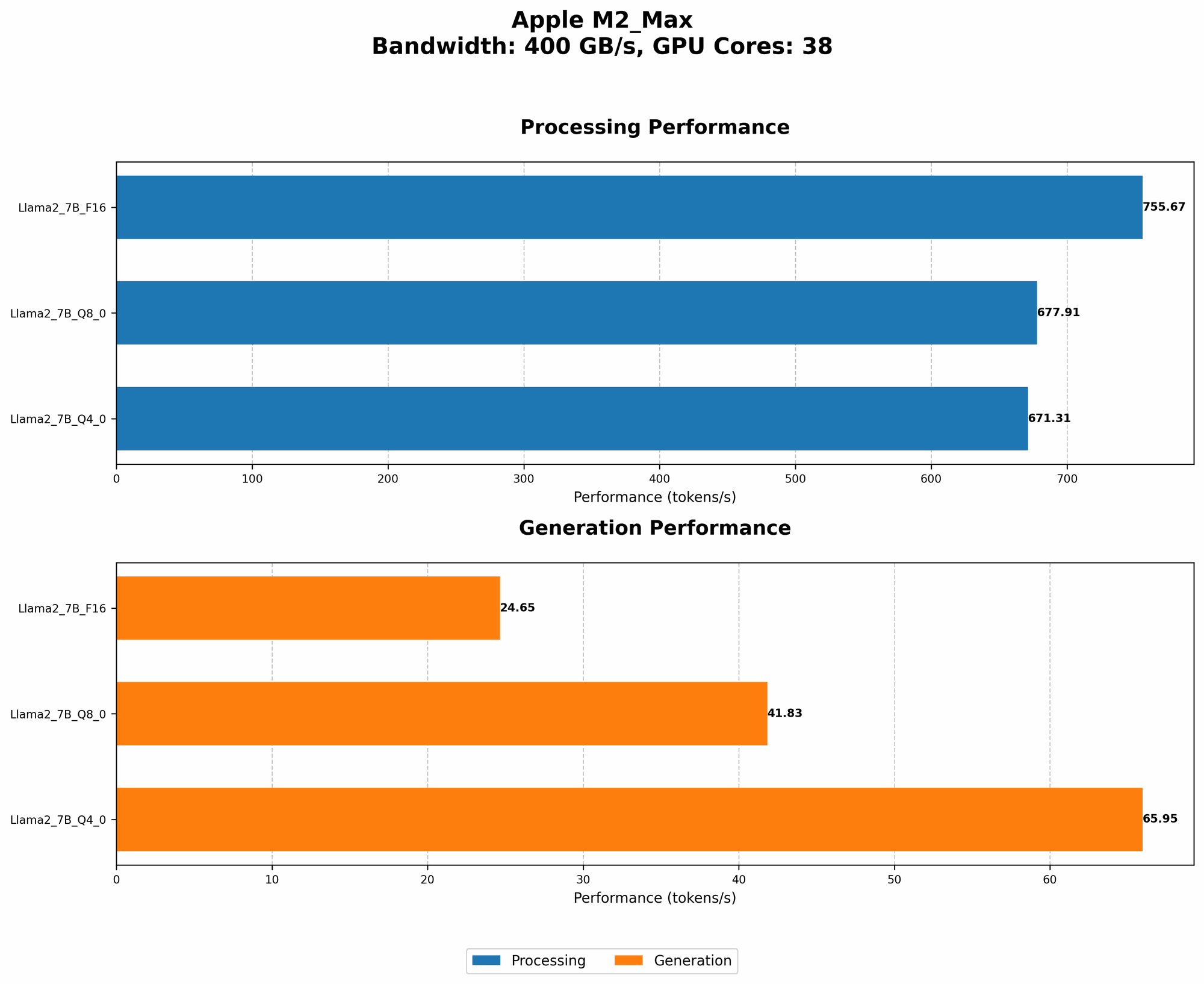
| Device | BW (GB/s) | GPU cores | Model (F16) | Model (Q8_0) | Model (Q4_0) | |
|---|---|---|---|---|---|---|
| Apple M2 Max | 400 | 38 | 755.67 | 677.91 | 671.31 | |
| Apple M1 Max | 200 | 32 | 412.86 | 399.40 | 397.16 |
The M2 Max significantly outperforms the M1 Max, delivering up to 85% more processing power. This is due to the M2 Max's higher bandwidth and increased GPU cores. This data highlights how important it is to choose the right hardware for LLM development.
FAQs
Why are LLMs so popular?
LLMs are gaining popularity because they can perform a wide range of tasks, including:
- Generating creative text: Writing stories, poems, and articles.
- Translating languages: Breaking down language barriers.
- Summarizing text: Condensing long documents into concise summaries.
- Answering questions: Providing informative responses to inquiries.
- Code generation: Writing code in various programming languages.
What are the benefits of running LLMs locally?
Running LLMs locally offers several benefits:
- Privacy: Your data remains on your device, protecting sensitive information.
- Speed: Faster processing and generation times reduce lag.
- Offline access: You can use the models even without an internet connection.
What are the challenges of running LLMs locally?
Running LLMs locally can present challenges:
- Hardware requirements: Powerful hardware is needed for smooth operation.
- Model size: Large models can consume significant amounts of memory.
- Software setup: Configuring specialized software can be complex.
Keywords
Apple M2 Max, LLM, Llama 2, Llama.cpp, Transformers, GGML, GPU, PyTorch, DeepSpeed, Whisper, AI Development, Local LLMs, Quantization