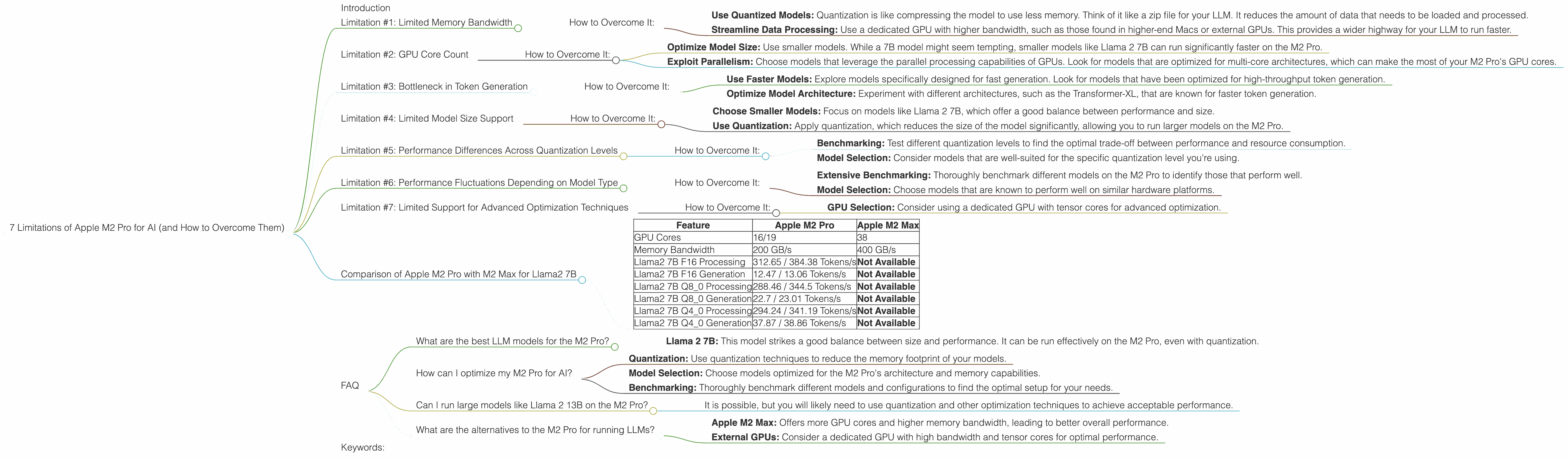
7 Limitations of Apple M2 Pro for AI (and How to Overcome Them)
Introduction
The Apple M2 Pro chip is a powerful beast, boasting impressive performance for various tasks, including video editing, 3D rendering, and even AI. However, when it comes to running large language models (LLMs), like the popular Llama 2, the M2 Pro might not be as smooth sailing as you expect.
This article dives deep into the specific limitations of the M2 Pro for AI, including speed, resource consumption, and model size limitations. We'll explore these limitations with real numbers from benchmark tests and provide practical solutions to overcome them.
Think of it as a roadmap for unlocking the full potential of your M2 Pro for AI, turning it into a true AI powerhouse.
Limitation #1: Limited Memory Bandwidth
The M2 Pro comes with a memory bandwidth of 200 GB/s, which is respectable but not groundbreaking. This bandwidth is crucial for AI applications, as large language models require constant data transfer between the CPU and memory.
Imagine your LLM as a super-fast race car – it needs a wide highway (memory bandwidth) to move data back and forth quickly. If the highway is narrow, the car will get stuck in traffic, leading to slower response times and performance.
How to Overcome It:
- Use Quantized Models: Quantization is like compressing the model to use less memory. Think of it like a zip file for your LLM. It reduces the amount of data that needs to be loaded and processed.
- Streamline Data Processing: Use a dedicated GPU with higher bandwidth, such as those found in higher-end Macs or external GPUs. This provides a wider highway for your LLM to run faster.
Limitation #2: GPU Core Count
The M2 Pro has 16 or 19 GPU cores, depending on the specific configuration. While this is a decent number for general-purpose graphics, it can be limiting for demanding AI tasks, especially when dealing with large models like Llama 2.
This limitation can be visualized like a group of workers assembling a complex machine. The more workers (GPU cores) you have, the faster the assembly process (model inference). With a limited number of workers, it takes longer to build the machine, leading to slower AI performance.
How to Overcome It:
- Optimize Model Size: Use smaller models. While a 7B model might seem tempting, smaller models like Llama 2 7B can run significantly faster on the M2 Pro.
- Exploit Parallelism: Choose models that leverage the parallel processing capabilities of GPUs. Look for models that are optimized for multi-core architectures, which can make the most of your M2 Pro's GPU cores.
Limitation #3: Bottleneck in Token Generation
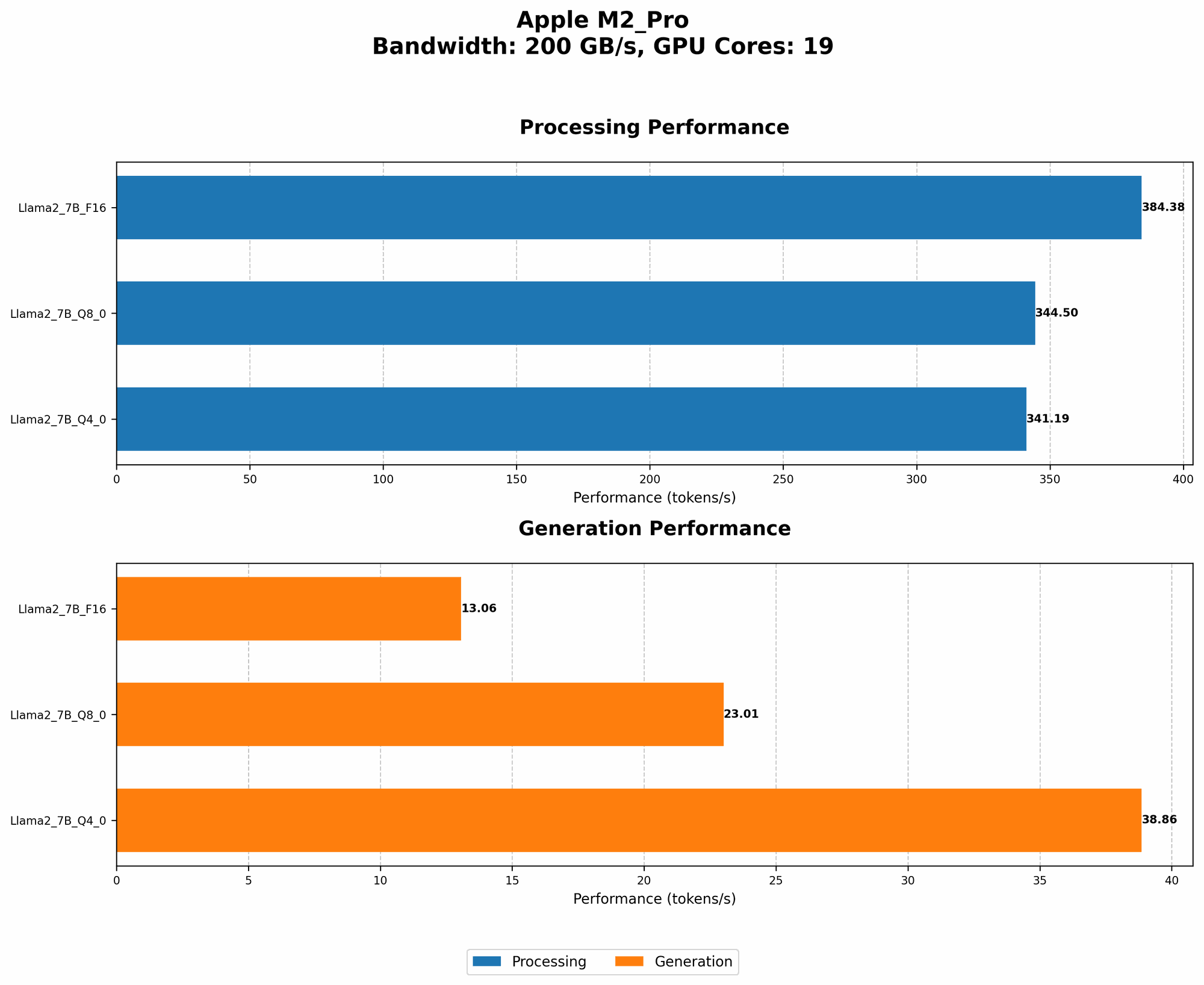
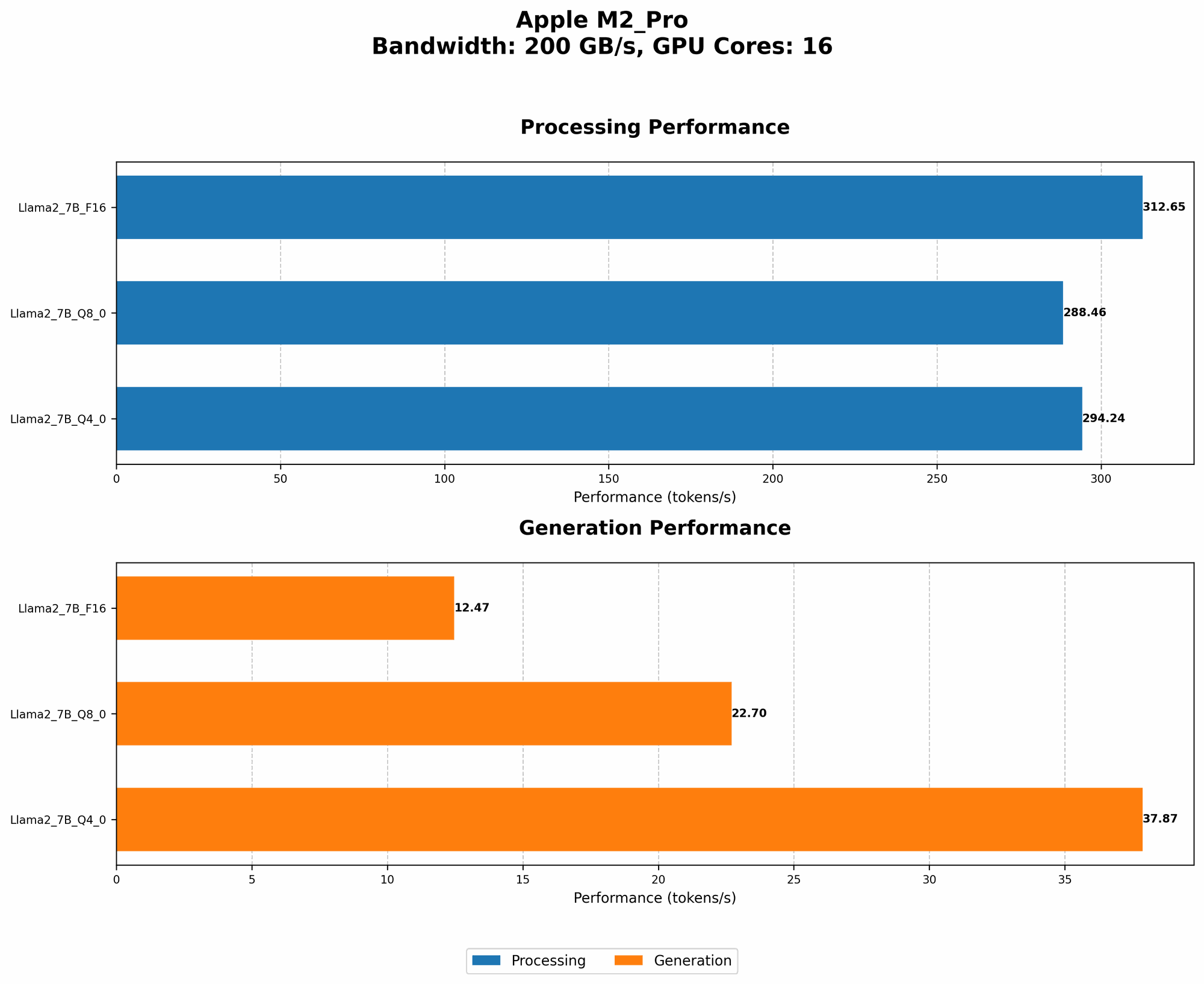
The M2 Pro suffers from a noticeable bottleneck in token generation, a fundamental process for LLM operations. This means that generating text output can be slower than expected, impacting real-time applications and interactive experiences.
Imagine your LLM as a writer crafting a story. The bottleneck in token generation is like a slow typing speed – it takes longer to get the full story out. This can be frustrating for users who expect immediate responses from their AI system.
How to Overcome It:
- Use Faster Models: Explore models specifically designed for fast generation. Look for models that have been optimized for high-throughput token generation.
- Optimize Model Architecture: Experiment with different architectures, such as the Transformer-XL, that are known for faster token generation.
Limitation #4: Limited Model Size Support
The M2 Pro might struggle with very large models, especially those exceeding 13B parameters. This is due to the combination of limited memory bandwidth, GPU core count and the sheer size of these models.
Think of your M2 Pro as a bookshelf with limited space. Large models are like huge encyclopedias that don't fit on the shelf. The LLM can't be fully loaded, leading to reduced performance and potential crashes.
How to Overcome It:
- Choose Smaller Models: Focus on models like Llama 2 7B, which offer a good balance between performance and size.
- Use Quantization: Apply quantization, which reduces the size of the model significantly, allowing you to run larger models on the M2 Pro.
Limitation #5: Performance Differences Across Quantization Levels
The performance of LLMs on the M2 Pro varies depending on the quantization level used.
Quantization, as discussed earlier, is a technique to reduce the model size and memory footprint. It comes in different flavors, like Q40 and Q80. While quantization helps with performance, it also influences speed.
Imagine different types of cars, each with different fuel efficiency levels. Q80 is like a fuel-efficient car that gets you further with less fuel (memory). However, it might not be as fast as a more powerful car (Q40) that consumes more resources.
How to Overcome It:
- Benchmarking: Test different quantization levels to find the optimal trade-off between performance and resource consumption.
- Model Selection: Consider models that are well-suited for the specific quantization level you're using.
Limitation #6: Performance Fluctuations Depending on Model Type
The performance of the M2 Pro varies depending on the LLM model used. This is due to the differences in model architecture, training data, and other factors.
Think of different types of race cars, each designed for specific tracks. One car might be optimized for endurance races, while another is better suited for short sprints. Similarly, LLMs have different strengths and weaknesses that impact their performance on the M2 Pro.
How to Overcome It:
- Extensive Benchmarking: Thoroughly benchmark different models on the M2 Pro to identify those that perform well.
- Model Selection: Choose models that are known to perform well on similar hardware platforms.
Limitation #7: Limited Support for Advanced Optimization Techniques
The M2 Pro may not fully support advanced optimization techniques like tensor cores, which can significantly boost AI performance on specialized hardware. This limitation stems from the architecture of the M2 Pro, which primarily focuses on general-purpose computing.
Imagine your LLM as a professional athlete who needs specialized equipment and training for optimal performance. The M2 Pro might be an excellent gym, but it might not have the specific equipment that a top athlete needs to excel.
How to Overcome It:
- GPU Selection: Consider using a dedicated GPU with tensor cores for advanced optimization.
Comparison of Apple M2 Pro with M2 Max for Llama2 7B
| Feature | Apple M2 Pro | Apple M2 Max |
|---|---|---|
| GPU Cores | 16/19 | 38 |
| Memory Bandwidth | 200 GB/s | 400 GB/s |
| Llama2 7B F16 Processing | 312.65 / 384.38 Tokens/s | Not Available |
| Llama2 7B F16 Generation | 12.47 / 13.06 Tokens/s | Not Available |
| Llama2 7B Q8_0 Processing | 288.46 / 344.5 Tokens/s | Not Available |
| Llama2 7B Q8_0 Generation | 22.7 / 23.01 Tokens/s | Not Available |
| Llama2 7B Q4_0 Processing | 294.24 / 341.19 Tokens/s | Not Available |
| Llama2 7B Q4_0 Generation | 37.87 / 38.86 Tokens/s | Not Available |
Analysis: The table shows that the M2 Pro performs well with Llama 2 7B, especially when using quantization. The performance difference between the 16-core and 19-core versions is noticeable, emphasizing the impact of GPU core count. However, the M2 Max is not listed, so we don’t have data to compare it.
FAQ
What are the best LLM models for the M2 Pro?
- Llama 2 7B: This model strikes a good balance between size and performance. It can be run effectively on the M2 Pro, even with quantization.
How can I optimize my M2 Pro for AI?
- Quantization: Use quantization techniques to reduce the memory footprint of your models.
- Model Selection: Choose models optimized for the M2 Pro's architecture and memory capabilities.
- Benchmarking: Thoroughly benchmark different models and configurations to find the optimal setup for your needs.
Can I run large models like Llama 2 13B on the M2 Pro?
- It is possible, but you will likely need to use quantization and other optimization techniques to achieve acceptable performance.
What are the alternatives to the M2 Pro for running LLMs?
- Apple M2 Max: Offers more GPU cores and higher memory bandwidth, leading to better overall performance.
- External GPUs: Consider a dedicated GPU with high bandwidth and tensor cores for optimal performance.
Keywords:
Apple M2 Pro, LLM, Llama 2, AI, Performance, Limitations, Quantization, Token Generation, Memory Bandwidth, GPU Cores, Model Size, Optimization, Benchmarking, external GPUs, M2 Max.