7 Limitations of Apple M2 Max for AI (and How to Overcome Them)

Introduction
The Apple M2 Max chip is a powerful processor designed for demanding tasks like video editing, 3D rendering, and even AI. But while the M2 Max boasts impressive capabilities, it's not without its limitations when it comes to running large language models (LLMs). This article dives into these limitations and explores practical solutions to help you get the most out of your M2 Max for AI tasks.
Imagine asking your AI assistant to write a detailed blog post about the latest AI trends, and instead of getting a comprehensive piece, it struggles to generate even a few sentences. This is just one example of how limitations in processing power can affect the performance of AI models.
This article is specifically for developers and tech enthusiasts interested in exploring ways to enhance their AI development experience on the Apple M2 Max. We'll delve into data and explore how these numbers translate into real-world performance.
Comparison of Apple M2 Max Performance for Llama 2 7B Model
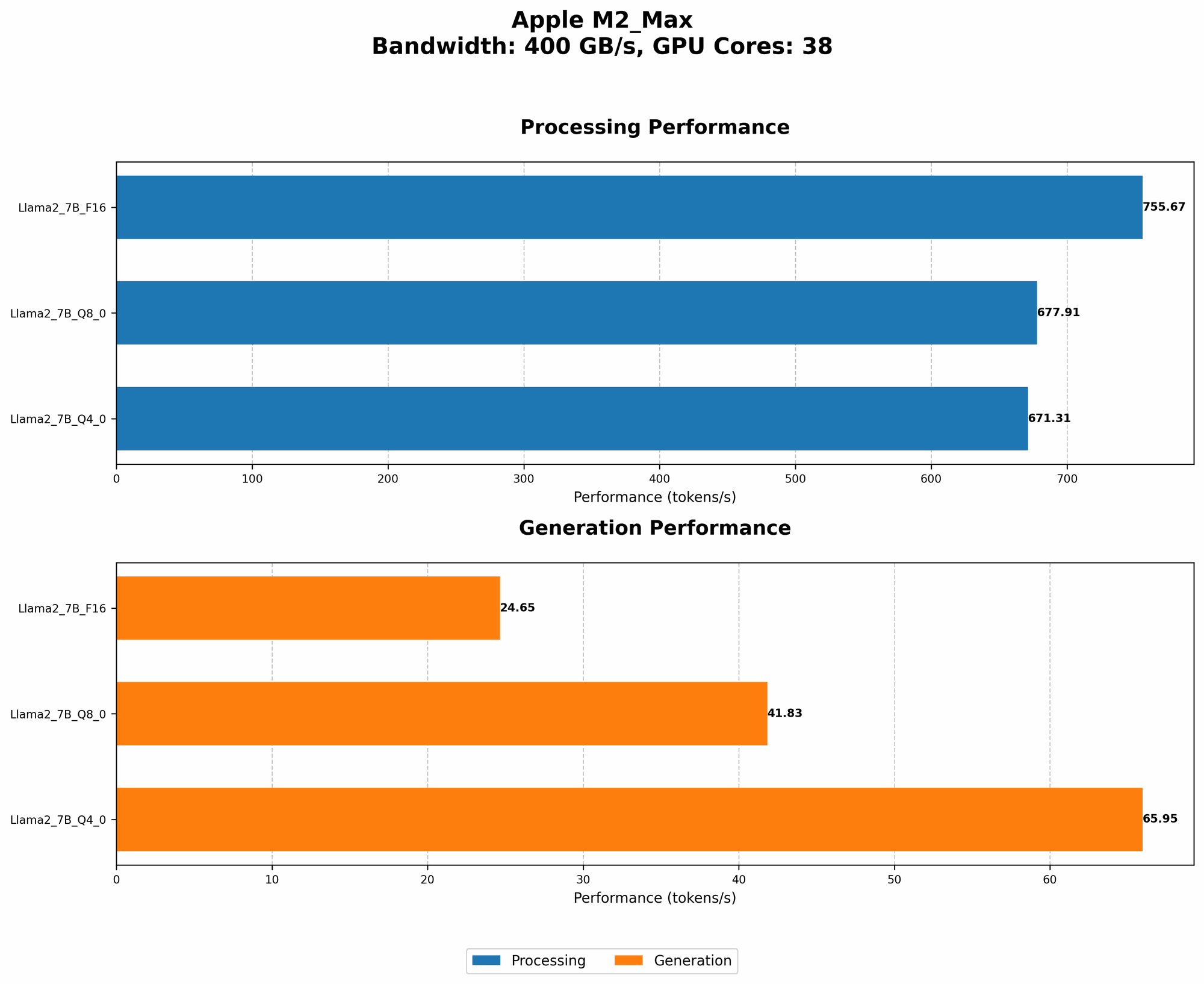
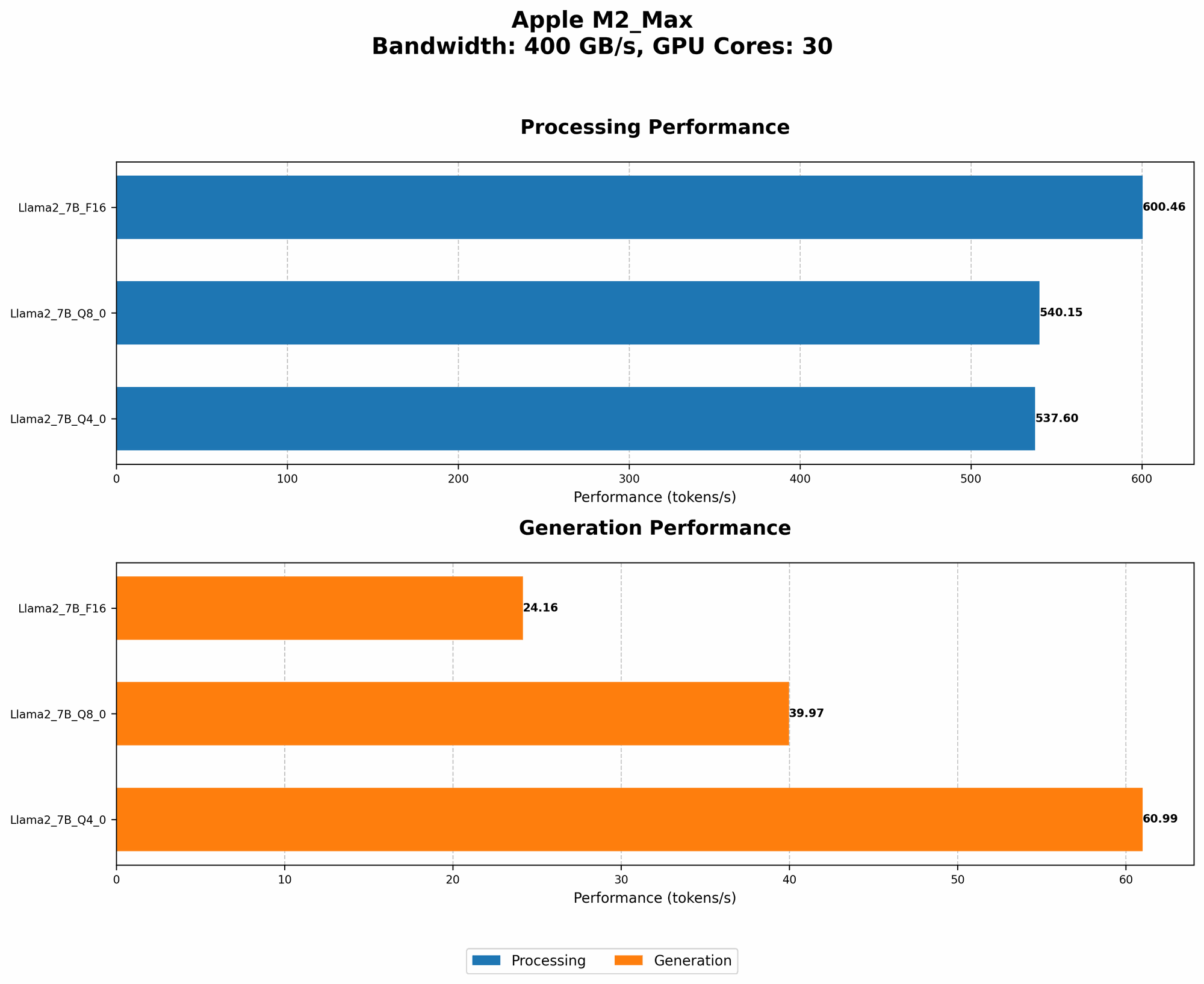
Apple M2 Max Token Speed Generation: A Deceptively High Number
The M2 Max chip boasts a high token speed generation, which is the number of tokens processed per second. However, it's important to remember that this speed is heavily influenced by the quantization level used for the LLM model.
Quantization is like compressing the model's information, making it smaller and faster to process. It's similar to how a JPEG photo is compressed but loses some detail. The lower the quantization level, the faster the processing, but the less accurate the model becomes. This is a crucial point to understand when we talk about the M2 Max's performance.
| Model | BW | GPUCores | Llama27BF16_Processing | Llama27BF16_Generation | Llama27BQ80Processing | Llama27BQ80Generation | Llama27BQ40Processing | Llama27BQ40Generation |
|---|---|---|---|---|---|---|---|---|
| M2 Max | 400 | 30 | 600.46 | 24.16 | 540.15 | 39.97 | 537.6 | 60.99 |
| M2 Max | 400 | 38 | 755.67 | 24.65 | 677.91 | 41.83 | 671.31 | 65.95 |
Looking at these numbers, we see that the M2 Max can achieve impressive token generation speeds with the F16 (half-precision) model. However, this high speed comes at the cost of lower accuracy compared to the Q80 and Q40 models.
The Accuracy vs. Speed Dilemma: Finding the Right Balance
Let's delve into the trade-offs involved in quantization:
- F16 (Half-Precision): The M2 Max performs well with F16, but the trade-off is a noticeable reduction in accuracy. Think of it like a blurry picture; the image is smaller and faster to download, but you lose some details.
- Q8_0 (Quantized 8-bit): This provides a good balance between speed and accuracy. It's like a lightly compressed picture - still good quality, but some details are lost.
- Q40 (Quantized 4-bit): While Q40 offers the fastest processing speeds, the accuracy is the lowest. Imagine a heavily compressed picture - the file is tiny, but the image feels pixelated and lacks detail.
Ultimately, the optimal quantization level depends on your specific use case. If you need the highest accuracy for a demanding task, like writing intricate code, then F16 might not be suitable. However, if you're running a chatbot for casual conversation, Q8_0 might be a good compromise.
7 Limitations of Apple M2 Max for AI and Solutions
Now let's explore the specific limitations of the M2 Max for AI and how to overcome them:
1. Limited GPU Memory: A Bottleneck for Large Models
The M2 Max has 96 GB of unified memory, which is impressive for a laptop. However, this memory can still become a bottleneck when running large LLMs that require substantial memory for storing model weights and context information.
Solution: Model Quantization
- Use Quantized Models: By using quantized models, we can significantly reduce the memory footprint. For example, a Q4_0 model might use only 1/4th of the memory of an F16 model. This allows us to load larger models into the available memory.
- Consider Offloading: If your model is still too large for the available memory, you can explore techniques like model offloading, where parts of the model are temporarily moved to external storage or a remote server during processing.
2. GPU Limitations: A Trade-off Between Speed and Processing Power
The M2 Max's GPU, while powerful, is designed primarily for general-purpose computing. This means it might not be ideally suited for the specialized nature of AI workloads.
Solution: Leveraging Existing GPU Technology
- Dedicated AI Accelerators: Consider using dedicated AI accelerators, like Google's TPU or NVIDIA's Tensor Cores, for more significant performance gains in handling large models. These accelerators are specifically designed to handle AI workloads efficiently.
3. Limited Model Size: Hitting The Wall with Large LLMs
The M2 Max's memory capacity restricts the size of LLMs that can be run locally. Trying to load a large, intricate model like GPT-3 on the M2 Max might lead to memory errors.
Solution: Utilize Cloud Platforms
- Cloud Platforms: Utilize cloud platforms like Google Colab or Amazon AWS where massive computing resources are available to handle even the largest models. These platforms offer a pay-as-you-go system, making it cost-effective for experimenting with various models.
4. Slow Token Speed Generation with Quantized Models: Fine-Tuning Performance
While the M2 Max offers fast token speed generation with F16 models, the speed significantly decreases with quantized versions like Q80 and Q40. This could affect real-time applications requiring quick responses from your AI models.
Solution: Fine-Tuning Model Parameters
- Fine-Tuning Parameters: Experiment with different model parameters, including the number of layers, attention heads, and embedding dimensions, to find a balance between speed and accuracy. This will help you optimize your model for the M2 Max's capabilities.
5. Limited Support for AI Frameworks: Exploring Compatible Solutions
The M2 Max's support for AI frameworks might be less mature compared to dedicated NVIDIA GPUs. This can limit the range of pre-trained models and custom frameworks available for your AI projects.
Solution: Compatibility Research
- Frameworks Compatibility: Thoroughly research the compatibility of your chosen AI frameworks with Apple's Metal API and explore the available frameworks and libraries for optimizing your M2 Max's performance.
6. No Dedicated AI Libraries: Adapting Existing Libraries
The M2 Max doesn't have its dedicated AI libraries like NVIDIA's CUDA libraries. This means you might need to adapt existing libraries or rely on cross-platform frameworks that support the M2 Max architecture.
Solution: Utilize Cross-Platform Frameworks
- Cross-Platform Frameworks: Explore cross-platform frameworks like TensorFlow, PyTorch, and ONNX Runtime, which offer support for various hardware architectures, including Apple's M2 Max. This allows you to run your models without worrying about platform-specific limitations.
7. Lack of Community Support: Finding Resources and Guidance
The M2 Max, while powerful, is still a relatively new platform for AI development. As a result, you might encounter limited community support and resources compared to popular platforms like NVIDIA's GPUs.
Solution: Explore Community Resources
- Community Engagement: Actively participate in online forums, communities, and open-source projects related to M2 Max AI development to connect with others and share knowledge. Consider contributing to the community by sharing your findings and experiences.
FAQ: Answering Your Questions
What is an LLM?
An LLM, or Large Language Model, is a type of artificial intelligence (AI) that has been trained on a massive dataset of text and code. This training allows them to understand and generate human-like text in response to prompts and questions.
Why is quantization important for LLMs?
Quantization reduces the number of bits used to represent the weights and activations in an LLM. This makes the model smaller and faster to process on devices with limited memory or processing power.
Are there any alternatives to using the Apple M2 Max for AI?
Yes! Other options include:
- NVIDIA GPUs: NVIDIA GPUs are known for their excellent performance and extensive support for AI frameworks.
- Google TPUs: Google's Tensor Processing Units are specifically designed for AI tasks and offer impressive performance for large models.
- Cloud Platforms: Cloud platforms like AWS, Google Cloud, and Azure provide powerful computing resources for running AI models in the cloud.
Keywords
Apple M2 Max, AI, LLM, Llama 2, Token Speed Generation, Quantization, GPU Memory, GPU Limitations, Model Size, Offloading, Cloud Platform, Community Support, AI Frameworks, CUDA, Metal, TensorFlow, PyTorch, ONNX Runtime, AI Accelerators, TPU, Tensor Cores