7 Key Factors to Consider When Choosing Between NVIDIA RTX A6000 48GB and NVIDIA RTX 4000 Ada 20GB x4 for AI
Introduction
Running large language models (LLMs) locally can be a game changer for developers and enthusiasts. These models can be used to power applications like chatbots, text generation, and even code completion, but they require powerful hardware to function efficiently.
This article compares two popular choices for local LLM development: the NVIDIA RTX A6000 48GB and the NVIDIA RTX 4000 Ada 20GB x4. We'll dive into the key performance metrics, analyze their strengths and weaknesses, and provide practical recommendations for different use cases. So, buckle up, let's dive into the world of high-powered AI hardware and see which beast comes out on top!
Performance Analysis: Unveiling the Powerhouses
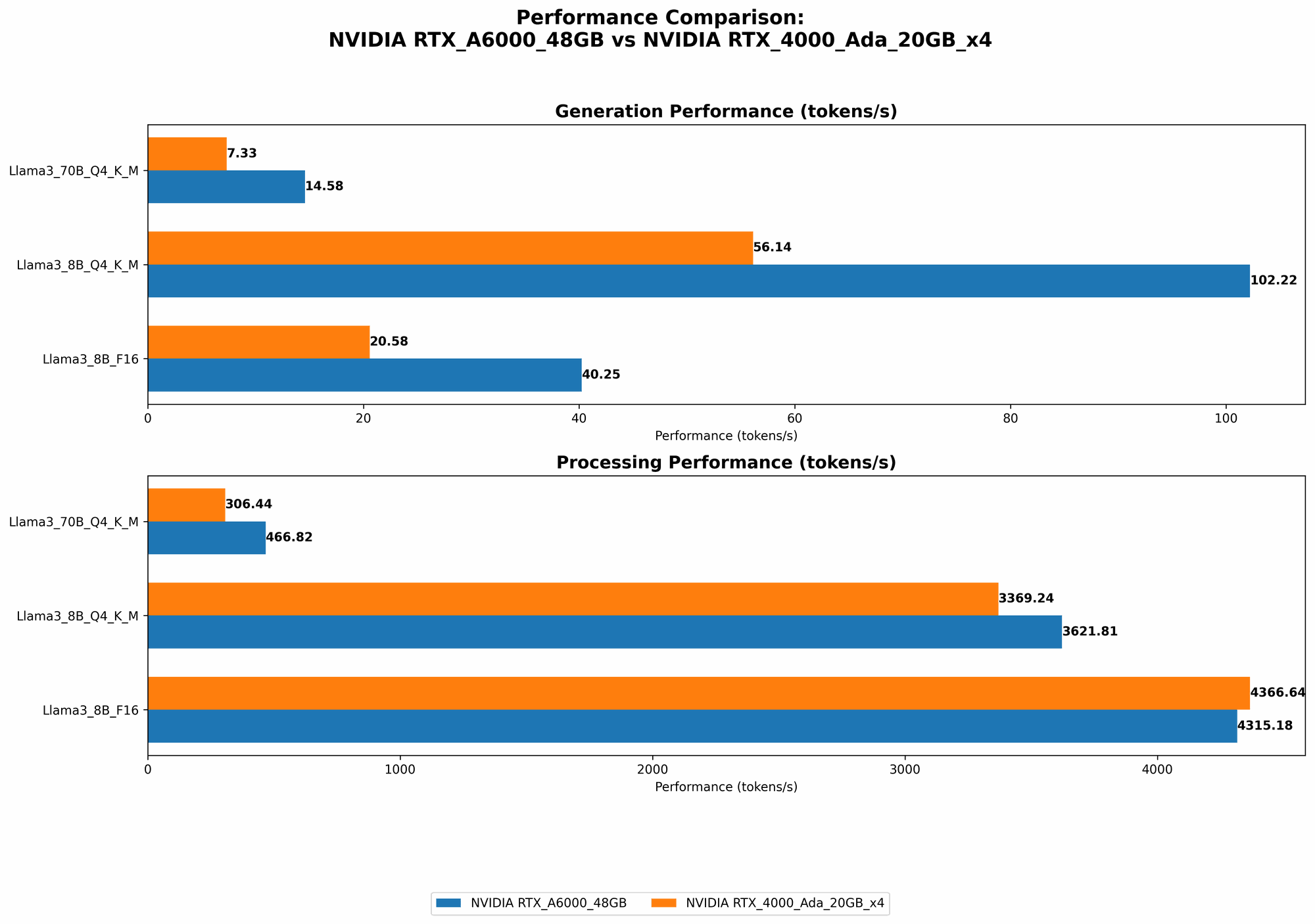
To understand the performance differences between the RTX A6000 and the RTX 4000 Ada 20GB x4, we'll analyze their performance on different Llama 3 models using the benchmark results provided in the JSON data.
Generation Speed: Tokens Per Second
Let's start with the generation speed, which refers to how quickly the GPUs can generate tokens (words, punctuation, etc.) for a specific LLM model. We'll look at the tokens per second (TPS) for different Llama 3 models running with different quantization levels.
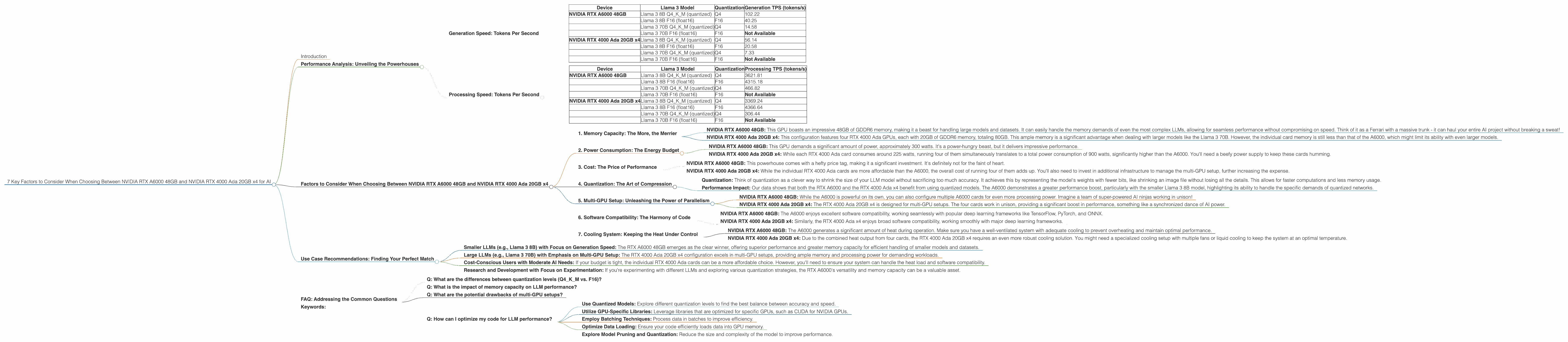
| Device | Llama 3 Model | Quantization | Generation TPS (tokens/s) |
|---|---|---|---|
| NVIDIA RTX A6000 48GB | Llama 3 8B Q4KM (quantized) | Q4 | 102.22 |
| Llama 3 8B F16 (float16) | F16 | 40.25 | |
| Llama 3 70B Q4KM (quantized) | Q4 | 14.58 | |
| Llama 3 70B F16 (float16) | F16 | Not Available | |
| NVIDIA RTX 4000 Ada 20GB x4 | Llama 3 8B Q4KM (quantized) | Q4 | 56.14 |
| Llama 3 8B F16 (float16) | F16 | 20.58 | |
| Llama 3 70B Q4KM (quantized) | Q4 | 7.33 | |
| Llama 3 70B F16 (float16) | F16 | Not Available |
Observations:
- The RTX A6000 consistently outperforms the RTX 4000 Ada 20GB x4 in terms of generation speed, particularly for the smaller Llama 3 8B model. For instance, with Q4KM quantization, the A6000 is nearly double the speed of the RTX 4000 Ada x4 (102.22 TPS vs. 56.14 TPS).
- While both GPUs are capable of running the larger Llama 3 70B model, the generation speed drops significantly, especially for the RTX 4000 Ada 20GB x4. This is likely due to the increased memory requirements of the larger model.
- The A6000 also shows a significant performance advantage when using quantized models, especially with the smaller Llama 3 8B model. This indicates that the A6000 is better equipped to handle the specific computation needs of quantized networks.
Processing Speed: Tokens Per Second
Another crucial performance metric is processing speed, which measures how fast the GPUs can process the input tokens provided to the LLM. We'll again look at the tokens per second (TPS) for different Llama 3 models with different quantization levels.
| Device | Llama 3 Model | Quantization | Processing TPS (tokens/s) |
|---|---|---|---|
| NVIDIA RTX A6000 48GB | Llama 3 8B Q4KM (quantized) | Q4 | 3621.81 |
| Llama 3 8B F16 (float16) | F16 | 4315.18 | |
| Llama 3 70B Q4KM (quantized) | Q4 | 466.82 | |
| Llama 3 70B F16 (float16) | F16 | Not Available | |
| NVIDIA RTX 4000 Ada 20GB x4 | Llama 3 8B Q4KM (quantized) | Q4 | 3369.24 |
| Llama 3 8B F16 (float16) | F16 | 4366.64 | |
| Llama 3 70B Q4KM (quantized) | Q4 | 306.44 | |
| Llama 3 70B F16 (float16) | F16 | Not Available |
Observations:
- The A6000 demonstrates slightly higher processing speed compared to the RTX 4000 Ada 20GB x4 for both Llama 3 8B models, both with Q4KM and F16 quantization.
- While the A6000 still outperforms the RTX 4000 Ada x4 for the larger Llama 3 70B model with Q4KM quantization, the difference is smaller compared to the generation speed.
- The results suggest that both devices are efficient at processing input tokens, with the A6000 showing a slight edge in most scenarios.
Factors to Consider When Choosing Between NVIDIA RTX A6000 48GB and NVIDIA RTX 4000 Ada 20GB x4
Now that we've examined the performance aspects, let's delve into the key factors you should consider when choosing between these two GPU powerhouses for your AI needs.
1. Memory Capacity: The More, the Merrier
NVIDIA RTX A6000 48GB: This GPU boasts an impressive 48GB of GDDR6 memory, making it a beast for handling large models and datasets. It can easily handle the memory demands of even the most complex LLMs, allowing for seamless performance without compromising on speed. Think of it as a Ferrari with a massive trunk - it can haul your entire AI project without breaking a sweat!
NVIDIA RTX 4000 Ada 20GB x4: This configuration features four RTX 4000 Ada GPUs, each with 20GB of GDDR6 memory, totaling 80GB. This ample memory is a significant advantage when dealing with larger models like the Llama 3 70B. However, the individual card memory is still less than that of the A6000, which might limit its ability with even larger models.
Recommendation: If you're working with massive models or datasets, the RTX A6000's 48GB of memory offers superior capacity and smoother operation. However, if you're running smaller models or focusing on multi-GPU setups, the RTX 4000 Ada 20GB x4's combined 80GB can be a viable alternative.
2. Power Consumption: The Energy Budget
NVIDIA RTX A6000 48GB: This GPU demands a significant amount of power, approximately 300 watts. It's a power-hungry beast, but it delivers impressive performance.
NVIDIA RTX 4000 Ada 20GB x4: While each RTX 4000 Ada card consumes around 225 watts, running four of them simultaneously translates to a total power consumption of 900 watts, significantly higher than the A6000. You'll need a beefy power supply to keep these cards humming.
Recommendation: If power consumption is a major concern, the RTX A6000 is a more power-efficient option, especially when considering its performance per watt. However, if you're willing to pay for the extra electricity and have a robust power supply, the RTX 4000 Ada 20GB x4 offers higher performance and more memory.
3. Cost: The Price of Performance
NVIDIA RTX A6000 48GB: This powerhouse comes with a hefty price tag, making it a significant investment. It's definitely not for the faint of heart.
NVIDIA RTX 4000 Ada 20GB x4: While the individual RTX 4000 Ada cards are more affordable than the A6000, the overall cost of running four of them adds up. You'll also need to invest in additional infrastructure to manage the multi-GPU setup, further increasing the expense.
Recommendation: Cost is a major factor when choosing between these GPUs. The A6000 is a significant investment, but its superior performance might justify the expense for many users. The RTX 4000 Ada 20GB x4, while more affordable on a card-by-card basis, becomes expensive when considering the multi-GPU setup. Ultimately, the decision boils down to your budget and the specific requirements of your AI projects.
4. Quantization: The Art of Compression
Quantization: Think of quantization as a clever way to shrink the size of your LLM model without sacrificing too much accuracy. It achieves this by representing the model's weights with fewer bits, like shrinking an image file without losing all the details. This allows for faster computations and less memory usage.
Performance Impact: Our data shows that both the RTX A6000 and the RTX 4000 Ada x4 benefit from using quantized models. The A6000 demonstrates a greater performance boost, particularly with the smaller Llama 3 8B model, highlighting its ability to handle the specific demands of quantized networks.
Recommendation: Embrace quantization! Quantized models can offer significant performance gains, particularly on GPUs like the RTX A6000. Experiment with different quantization levels to find the sweet spot that balances accuracy and speed for your LLM.
5. Multi-GPU Setup: Unleashing the Power of Parallelism
NVIDIA RTX A6000 48GB: While the A6000 is powerful on its own, you can also configure multiple A6000 cards for even more processing power. Imagine a team of super-powered AI ninjas working in unison!
NVIDIA RTX 4000 Ada 20GB x4: The RTX 4000 Ada 20GB x4 is designed for multi-GPU setups. The four cards work in unison, providing a significant boost in performance, something like a synchronized dance of AI power.
Recommendation: If you require extreme processing power and are willing to handle the complexities of multi-GPU setups, the RTX 4000 Ada 20GB x4 offers a powerful advantage, especially for large models that require a lot of resources.
Important Note: While multi-GPU setups can provide a considerable performance boost, they come with unique challenges. You'll need to ensure proper compatibility, optimize your code for parallel processing, and handle the complexities of distributed training or inference.
6. Software Compatibility: The Harmony of Code
NVIDIA RTX A6000 48GB: The A6000 enjoys excellent software compatibility, working seamlessly with popular deep learning frameworks like TensorFlow, PyTorch, and ONNX.
NVIDIA RTX 4000 Ada 20GB x4: Similarly, the RTX 4000 Ada x4 enjoys broad software compatibility, working smoothly with major deep learning frameworks.
Recommendation: Both GPUs are well-supported by mainstream AI software. Ensure that your chosen framework and libraries are compatible before making your decision.
7. Cooling System: Keeping the Heat Under Control
NVIDIA RTX A6000 48GB: The A6000 generates a significant amount of heat during operation. Make sure you have a well-ventilated system with adequate cooling to prevent overheating and maintain optimal performance.
NVIDIA RTX 4000 Ada 20GB x4: Due to the combined heat output from four cards, the RTX 4000 Ada 20GB x4 requires an even more robust cooling solution. You might need a specialized cooling setup with multiple fans or liquid cooling to keep the system at an optimal temperature.
Recommendation: Prioritize cooling! A properly cooled system is crucial to prevent performance throttling and ensure the longevity of your GPUs. Invest in a robust cooling solution that can handle the heat load generated by these powerful devices.
Use Case Recommendations: Finding Your Perfect Match
Based on our analysis, here are some use case recommendations to help you choose the right GPU for your needs:
- Smaller LLMs (e.g., Llama 3 8B) with Focus on Generation Speed: The RTX A6000 48GB emerges as the clear winner, offering superior performance and greater memory capacity for efficient handling of smaller models and datasets.
- Large LLMs (e.g., Llama 3 70B) with Emphasis on Multi-GPU Setup: The RTX 4000 Ada 20GB x4 configuration excels in multi-GPU setups, providing ample memory and processing power for demanding workloads.
- Cost-Conscious Users with Moderate AI Needs: If your budget is tight, the individual RTX 4000 Ada cards can be a more affordable choice. However, you'll need to ensure your system can handle the heat load and software compatibility.
- Research and Development with Focus on Experimentation: If you're experimenting with different LLMs and exploring various quantization strategies, the RTX A6000's versatility and memory capacity can be a valuable asset.
FAQ: Addressing the Common Questions
Q: What are the differences between quantization levels (Q4KM vs. F16)?
A: Quantization levels determine the precision with which the LLM's weights are stored. Q4KM, which uses 4 bits to represent each weight, achieves higher compression but potentially sacrifices some accuracy. F16, which uses 16 bits per weight, offers higher precision but requires more memory and computational resources. Choose the quantization level based on the trade-off between accuracy and performance.
Q: What is the impact of memory capacity on LLM performance?
A: Insufficient memory capacity can lead to performance bottlenecks, particularly with larger LLMs. The GPU might struggle to load the entire model into memory, forcing it to access data from slower storage devices, resulting in reduced performance.
Q: What are the potential drawbacks of multi-GPU setups?
A: Multi-GPU setups can be challenging to configure and manage. You'll need to ensure compatibility, optimize your code for parallel processing, and handle the intricacies of distributed training or inference. Additionally, the increased heat output requires robust cooling solutions.
Q: How can I optimize my code for LLM performance?
A: Several optimization strategies can improve LLM performance. These include:
- Use Quantized Models: Explore different quantization levels to find the best balance between accuracy and speed.
- Utilize GPU-Specific Libraries: Leverage libraries that are optimized for specific GPUs, such as CUDA for NVIDIA GPUs.
- Employ Batching Techniques: Process data in batches to improve efficiency.
- Optimize Data Loading: Ensure your code efficiently loads data into GPU memory.
- Explore Model Pruning and Quantization: Reduce the size and complexity of the model to improve performance.
Keywords:
NVIDIA RTX A6000, NVIDIA RTX 4000 Ada, NVIDIA RTX 4000 Ada x4, GPU, LLM, Llama 3, Generation Speed, Processing Speed, Tokens Per Second, TPS, Quantization, Q4KM, F16, Memory Capacity, Power Consumption, Multi-GPU, Software Compatibility, Cooling System, AI, Deep Learning, Use Cases, Recommendations, FAQs, Optimization