7 Key Factors to Consider When Choosing Between NVIDIA A40 48GB and NVIDIA A100 SXM 80GB for AI

Introduction
The world of large language models (LLMs) is exploding, and with it comes the need for powerful hardware to run these models efficiently. Two of the most popular GPUs for running LLMs are the NVIDIA A4048GB and NVIDIA A100SXM_80GB. These GPUs are both designed for high-performance computing, but they have different strengths and weaknesses.
This article will guide you through the key factors you need to consider when making a decision between the NVIDIA A4048GB and A100SXM_80GB. We'll break down the performance, analyze the strengths and weaknesses, and provide practical recommendations for different use cases.
So, buckle up, grab your favorite caffeinated beverage, and let's dive into the fascinating world of GPUs and LLMs.
Key Factors To Consider When Choosing Between NVIDIA A4048GB and NVIDIA A100SXM_80GB
Here are seven key factors to consider when deciding between the NVIDIA A4048GB and NVIDIA A100SXM_80GB for running your LLMs:
1. GPU Memory (VRAM)
The first and foremost factor to consider is GPU memory, often referred to as VRAM. Think of it as the workspace where your LLM lives and operates.
- NVIDIA A40_48GB: Boasts a generous 48GB of GDDR6 memory, making it a solid choice for running larger LLMs like the Llama 70B model.
- NVIDIA A100SXM80GB: Offers an even more impressive 80GB of HBM2e memory, making it a champion for handling the memory-intensive giants of the LLM world. It can easily accommodate larger models like the Llama 70B, even with additional buffer space for smooth operation.
Recommendation: If you work with larger LLMs, the A100SXM80GB offers a significant advantage due to its large memory capacity. However, if you're dealing with smaller models (like Llama 8B), the A40_48GB provides a good balance of performance and cost efficiency.
2. Performance: Token Speed Generation
Let's talk about the speed at which these GPUs can generate tokens, which are the building blocks of natural language. Think of it like words per minute for a writer, but for an AI!
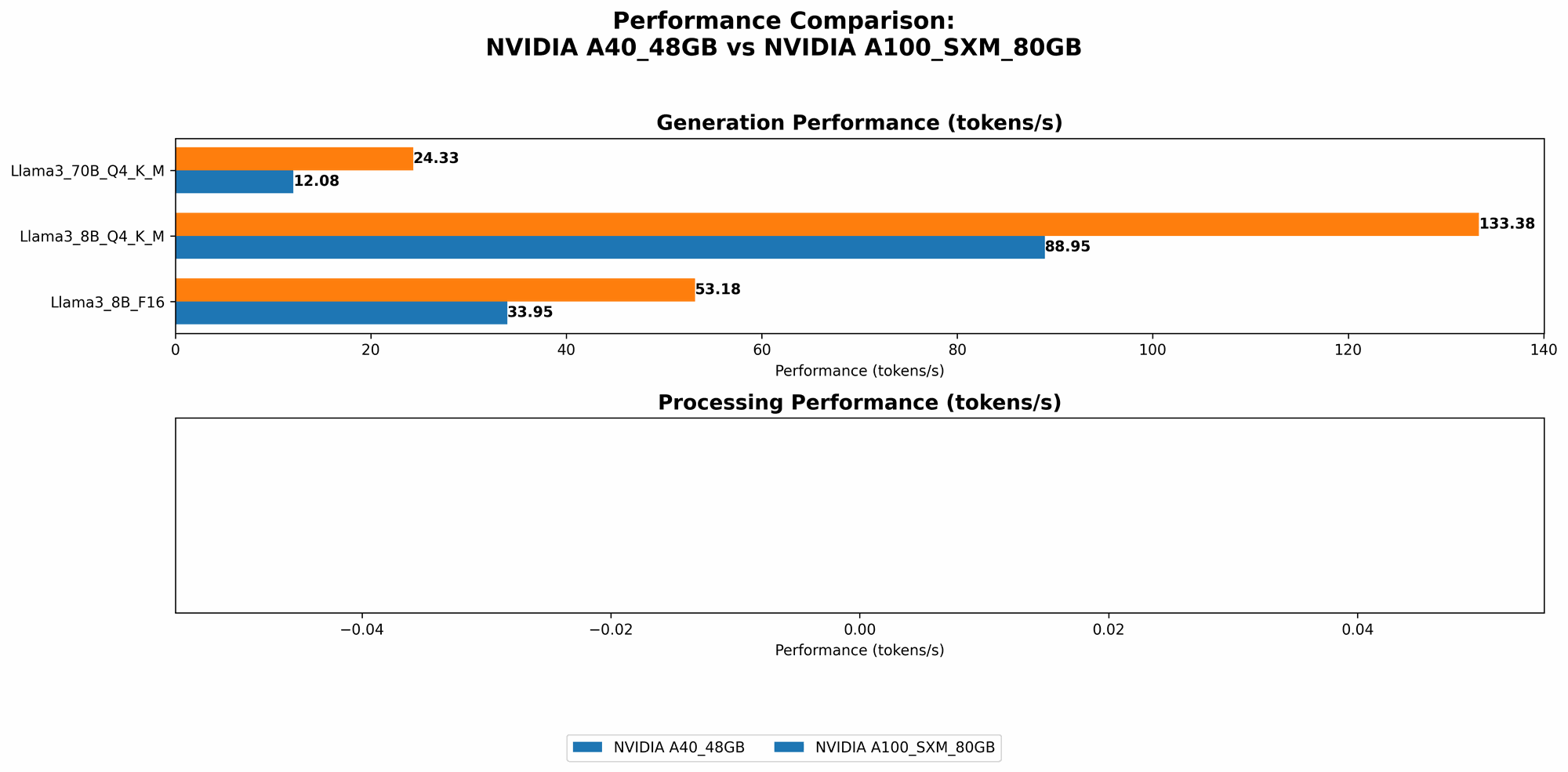
- NVIDIA A4048GB: For the Llama 3 8B model with Q4 quantization and K and M optimizations, the A4048GB achieves a token generation speed of 88.95 tokens per second. When using F16 precision, the speed drops to 33.95 tokens per second. For the Llama 3 70B model with Q4 quantization and K and M optimizations, the A40_48GB provides a token generation speed of 12.08 tokens per second.
- NVIDIA A100SXM80GB: The A100SXM80GB outperforms the A4048GB with a token generation speed of 133.38 tokens per second for the Llama 3 8B model with Q4 quantization and K and M optimizations. In F16 precision, it achieves 53.18 tokens per second. For the Llama 3 70B model with Q4 quantization and K and M optimizations, the A100SXM_80GB delivers a speed of 24.33 tokens per second.
Recommendation: The A100SXM80GB consistently provides faster token generation for both the Llama 3 8B and 70B models. However, the difference in speed between the two GPUs is more pronounced with the smaller Llama 8B model. For the Llama 70B model, the difference is less dramatic.
Comparison of A4048GB and A100SXM_80GB Token Speed Generation:
| Model | A40_48GB (tokens/second) | A100SXM80GB (tokens/second) |
|---|---|---|
| Llama 3 8B Q4 K&M | 88.95 | 133.38 |
| Llama 3 8B F16 | 33.95 | 53.18 |
| Llama 3 70B Q4 K&M | 12.08 | 24.33 |
3. Performance: Token Processing Speed
While token generation speed focuses on how quickly a model can generate new text, token processing speed measures how quickly a model can process existing text, like understanding the meaning of a sentence or answering a question.
- NVIDIA A4048GB: For the Llama 3 8B model with Q4 quantization and K and M optimizations, the A4048GB processes 3240.95 tokens per second. When using F16 precision, it processes 4043.05 tokens per second. For the Llama 3 70B model with Q4 quantization and K and M optimizations, the A40_48GB processes 239.92 tokens per second.
- NVIDIA A100SXM80GB: We don't have data for token processing speed with the A100SXM80GB for the Llama 3 70B model in F16 precision or for the Llama 3 8B model in F16 precision.
Recommendation: The A4048GB shows a clear advantage in token processing speed for the Llama 3 8B model with Q4 quantization and K and M optimizations. But, the A100SXM_80GB might perform better in cases where we lack data.
Comparison of A4048GB and A100SXM_80GB Token Processing Speed:
| Model | A40_48GB (tokens/second) | A100SXM80GB (tokens/second) |
|---|---|---|
| Llama 3 8B Q4 K&M | 3240.95 | Data Unavailable |
| Llama 3 8B F16 | 4043.05 | Data Unavailable |
| Llama 3 70B Q4 K&M | 239.92 | Data Unavailable |
4. Quantization: How To Squeeze More Model Into The GPU
Quantization is a technique that reduces the size of an LLM by making it smaller. Think of it like compressing a large image file to make it easier to share online.
- NVIDIA A40_48GB: Supports both Q4 and F16 quantization, allowing you to fine-tune the trade-off between model size and performance.
- NVIDIA A100SXM80GB: Also supports Q4 and F16 quantization, offering similar flexibility in model optimization.
Recommendation: Both GPUs are well-equipped for quantization. Your choice between Q4 and F16 will depend on your specific needs. Q4 will provide a smaller model footprint, while F16 may offer slightly better performance.
5. Cost: Budget-Friendly Or Premium Performance?
The cost of a GPU is a crucial factor, especially for individual developers or small teams.
- NVIDIA A40_48GB: Offers a good balance between performance and affordability.
- NVIDIA A100SXM80GB: Pricier than the A40_48GB, but its premium performance and larger memory make it a worthwhile investment for those who need the extra power and capability.
Recommendation: Assess your budget and the scale of your AI projects. If you're working on smaller LLMs or have a tight budget, the A4048GB is a smart choice. But, if you're pushing the boundaries with large LLMs or require top-tier performance, the A100SXM_80GB is worth considering.
6. Power Consumption: Energy Efficiency Matters
Power consumption is a critical factor for both environmental and financial reasons.
- NVIDIA A4048GB: Offers relatively lower power consumption compared to the A100SXM_80GB. Imagine running your LLM on a budget-friendly energy plan!
- NVIDIA A100SXM80GB: Consumes more power due to its advanced features and higher performance capabilities. Think of it as a high-performance sports car: it needs more fuel!
Recommendation: If you are concerned about minimizing your carbon footprint or operating within a limited energy budget, the A4048GB might be a better option. If you have access to ample power and prioritize performance, the A100SXM_80GB is a solid choice.
7. Availability: Check That You Can Actually Buy It
Lastly, availability is a key factor. Make sure you can actually get your hands on the GPU you need.
- NVIDIA A4048GB: Generally more readily available compared to the A100SXM_80GB.
- NVIDIA A100SXM80GB: Might be harder to find due to high demand and potential supply chain constraints. Think of it like a limited-edition collectible: it might take some time to track down!
Recommendation: Prioritize your timeline and budget when considering availability. If you need a GPU quickly, the A4048GB might be the more reliable option. However, if you're willing to wait for the A100SXM_80GB, it might be worth the extra effort.
Conclusion: Choose The Right GPU For Your LLM Journey!
Choosing the right GPU for your LLM projects is essential for achieving optimal results and staying within your budget. The NVIDIA A4048GB and NVIDIA A100SXM_80GB offer distinct advantages and cater to different needs.
Here's a quick recap of our recommendations:
- For smaller LLMs and budget-conscious developers: The NVIDIA A40_48GB provides a good balance of performance and cost efficiency.
- For larger LLMs and those who need the ultimate performance: The NVIDIA A100SXM80GB is a powerful choice, though it comes at a higher price.
Remember, the perfect GPU is the one that best aligns with your specific requirements and use cases. So, take your time, weigh your options, and choose the GPU that will power your LLM journey to success!
FAQ: Get Your LLM-Powered Questions Answered
Q1: What is the difference between Q4 and F16 quantization?
A: Quantization is a technique for reducing the size of an LLM by making it smaller without sacrificing too much accuracy. Q4 quantization uses 4 bits to represent each number, while F16 uses 16 bits. Q4 results in a smaller model footprint, but it may lead to slightly lower accuracy. F16 offers a balance between model size and accuracy.
Q2: How do I know which LLM will work best for my project?
A: The choice of LLM depends on your specific needs and the nature of your project. Consider factors like the size of your dataset, the complexity of the tasks you want to perform, and the level of accuracy required. Research different LLMs and experiment to find the best fit.
Q3: What are the benefits of using a GPU to run an LLM?
A: GPUs are designed for parallel processing, which makes them ideal for running LLMs that require significant computational power. GPUs can accelerate training and inference, enabling you to work with larger models and perform more complex tasks.
Q4: What are some other factors to consider besides GPU performance?
A: Besides GPU performance, consider factors like:
- Software Compatibility: Make sure your chosen GPU is compatible with the software you plan to use for LLM development.
- Power Supply: Ensure your system has a sufficient power supply to handle the GPU's power consumption.
- Cooling: Invest in a good cooling solution to prevent overheating and maintain optimal performance.
Keywords:
NVIDIA A40, NVIDIA A100, GPU, LLM, Large Language Model, AI, Machine Learning, Deep Learning, Token Generation, Token Processing, Quantization, Q4, F16, Memory, VRAM, Performance, Cost, Power Consumption, Availability