7 Key Factors to Consider When Choosing Between NVIDIA 4090 24GB and NVIDIA 4090 24GB x2 for AI
Introduction
The world of large language models (LLMs) is rapidly evolving, with new models and applications popping up seemingly every day. One of the biggest challenges for developers and enthusiasts working with these models is finding the right hardware to keep up with the demands of training and inference.
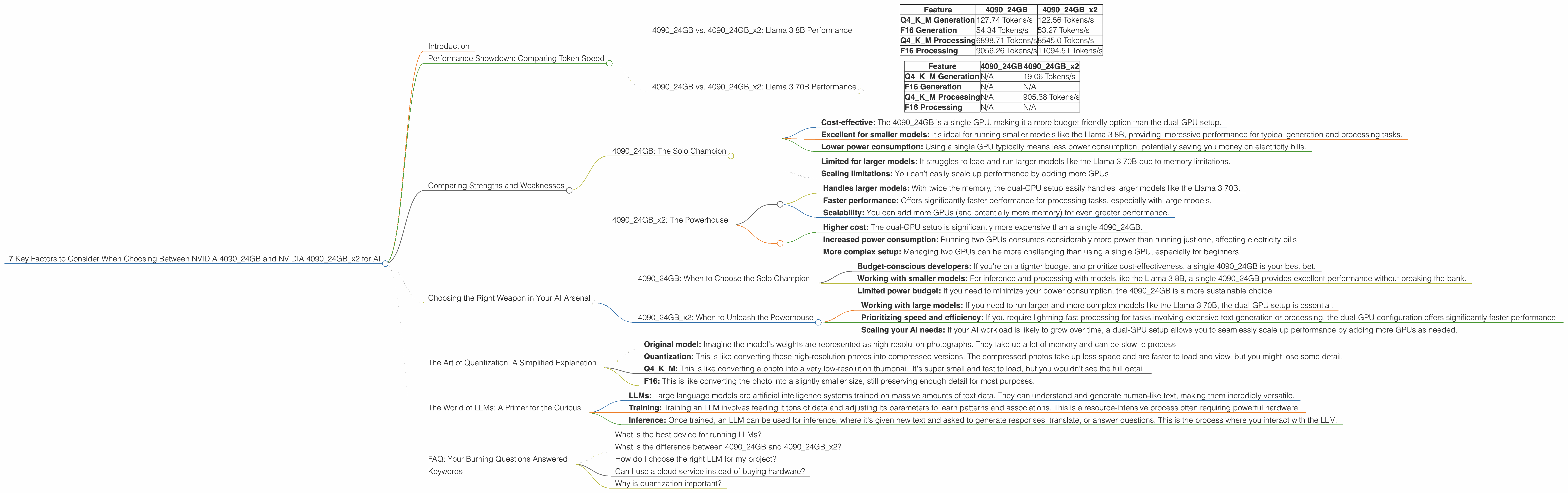
Two popular choices for running LLMs are the NVIDIA GeForce RTX 4090 with 24GB of memory (409024GB) and a configuration with two of these GPUs (409024GB_x2). This article will delve into the key factors you should consider when choosing between these two powerful options, providing insights to help you make the best decision for your specific needs.
Performance Showdown: Comparing Token Speed
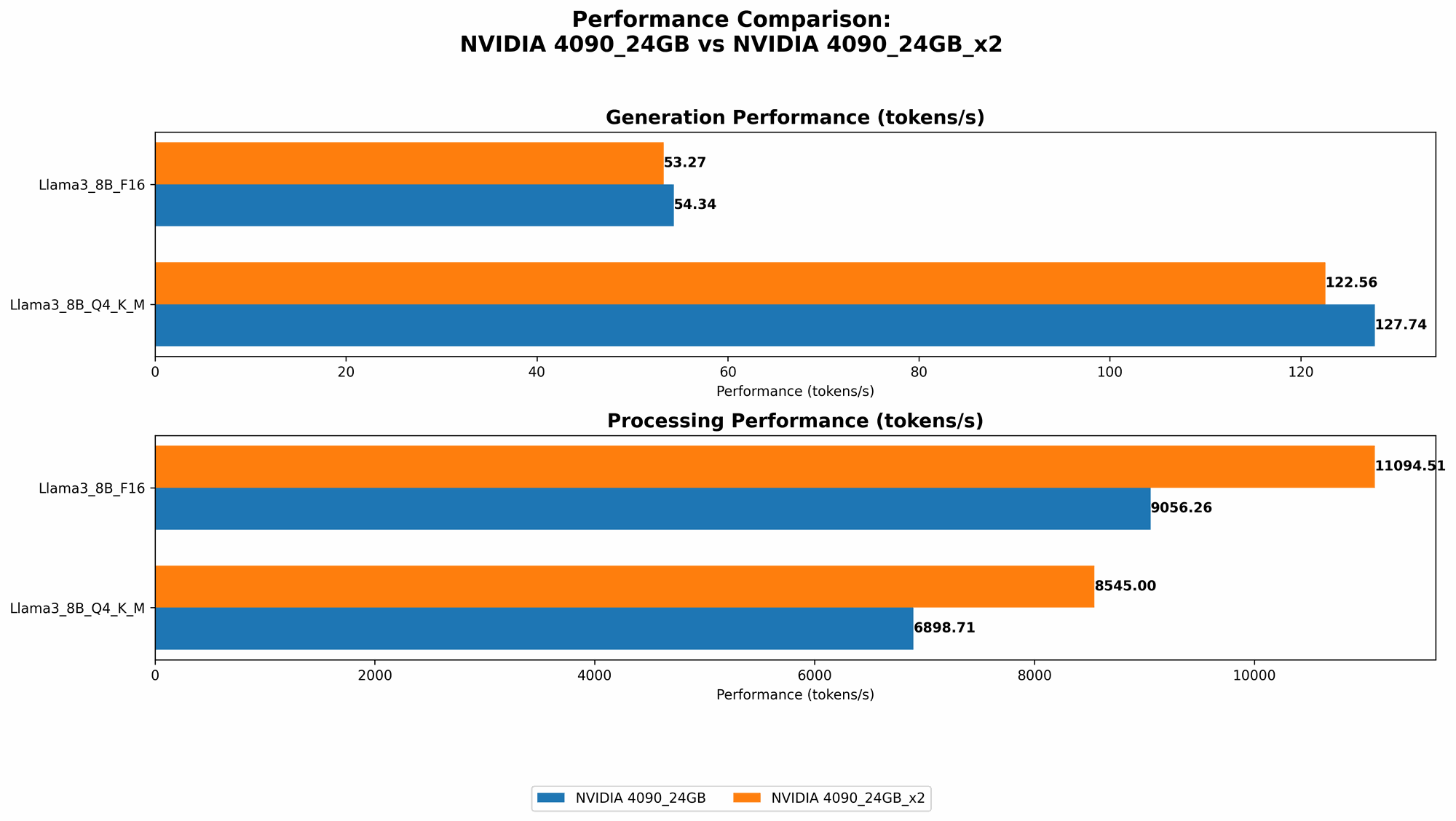
To understand the real-world performance of these GPUs, let's look at some actual numbers. We'll be focusing on the Llama 3 family of LLMs, specifically the 8B and 70B models.
Our performance metrics focus on:
- Tokens per second (Tokens/s): A measure of how quickly a GPU can process text during inference. Higher numbers are better.
- Quantization levels: Quantization allows us to represent model weights using less memory, which can improve performance.
- Q4KM: A type of quantization where model weights are stored using 4 bits.
- F16: A floating-point format that offers less precision than usual but can be faster.
409024GB vs. 409024GB_x2: Llama 3 8B Performance
Let's start with the Llama 3 8B models, which are relatively more lightweight and often favored for their balance between performance and resource demand.
| Feature | 4090_24GB | 409024GBx2 |
|---|---|---|
| Q4KM Generation | 127.74 Tokens/s | 122.56 Tokens/s |
| F16 Generation | 54.34 Tokens/s | 53.27 Tokens/s |
| Q4KM Processing | 6898.71 Tokens/s | 8545.0 Tokens/s |
| F16 Processing | 9056.26 Tokens/s | 11094.51 Tokens/s |
Key Findings:
- Generation: The 409024GB performs slightly better with Q4K_M quantization, achieving a few more tokens per second. This difference is pretty minor, making either option reasonable for generation tasks with the 8B model.
- Processing: The 409024GBx2 configuration significantly outperforms the single 4090_24GB in processing speed, especially with F16 quantization. This means you can get your text processed faster with the dual-GPU setup.
409024GB vs. 409024GB_x2: Llama 3 70B Performance
Now, let's move to the heavier Llama 3 70B models. These models require significantly more memory and processing power.
| Feature | 4090_24GB | 409024GBx2 |
|---|---|---|
| Q4KM Generation | N/A | 19.06 Tokens/s |
| F16 Generation | N/A | N/A |
| Q4KM Processing | N/A | 905.38 Tokens/s |
| F16 Processing | N/A | N/A |
Key Findings:
- The single 4090_24GB doesn't have enough memory to handle the 70B model. You'll need the dual-GPU setup to run it.
- The 409024GBx2 offers reasonable performance with the 70B model. You can achieve decent generation and processing speeds, especially with Q4KM quantization.
Comparing Strengths and Weaknesses
4090_24GB: The Solo Champion
Strengths:
- Cost-effective: The 4090_24GB is a single GPU, making it a more budget-friendly option than the dual-GPU setup.
- Excellent for smaller models: It's ideal for running smaller models like the Llama 3 8B, providing impressive performance for typical generation and processing tasks.
- Lower power consumption: Using a single GPU typically means less power consumption, potentially saving you money on electricity bills.
Weaknesses:
- Limited for larger models: It struggles to load and run larger models like the Llama 3 70B due to memory limitations.
- Scaling limitations: You can't easily scale up performance by adding more GPUs.
409024GBx2: The Powerhouse
Strengths:
- Handles larger models: With twice the memory, the dual-GPU setup easily handles larger models like the Llama 3 70B.
- Faster performance: Offers significantly faster performance for processing tasks, especially with large models.
- Scalability: You can add more GPUs (and potentially more memory) for even greater performance.
Weaknesses:
- Higher cost: The dual-GPU setup is significantly more expensive than a single 4090_24GB.
- Increased power consumption: Running two GPUs consumes considerably more power than running just one, affecting electricity bills.
- More complex setup: Managing two GPUs can be more challenging than using a single GPU, especially for beginners.
Choosing the Right Weapon in Your AI Arsenal
Now that we've explored the strengths and weaknesses of each setup, let's break down which is best for your specific use cases:
4090_24GB: When to Choose the Solo Champion
- Budget-conscious developers: If you're on a tighter budget and prioritize cost-effectiveness, a single 4090_24GB is your best bet.
- Working with smaller models: For inference and processing with models like the Llama 3 8B, a single 4090_24GB provides excellent performance without breaking the bank.
- Limited power budget: If you need to minimize your power consumption, the 4090_24GB is a more sustainable choice.
409024GBx2: When to Unleash the Powerhouse
- Working with large models: If you need to run larger and more complex models like the Llama 3 70B, the dual-GPU setup is essential.
- Prioritizing speed and efficiency: If you require lightning-fast processing for tasks involving extensive text generation or processing, the dual-GPU configuration offers significantly faster performance.
- Scaling your AI needs: If your AI workload is likely to grow over time, a dual-GPU setup allows you to seamlessly scale up performance by adding more GPUs as needed.
The Art of Quantization: A Simplified Explanation
Quantization can be a bit of a technical concept. Let's try to explain it in a way that even non-technical folks can understand.
Think of it like this:
- Original model: Imagine the model's weights are represented as high-resolution photographs. They take up a lot of memory and can be slow to process.
- Quantization: This is like converting those high-resolution photos into compressed versions. The compressed photos take up less space and are faster to load and view, but you might lose some detail.
- Q4KM: This is like converting a photo into a very low-resolution thumbnail. It's super small and fast to load, but you wouldn't see the full detail.
- F16: This is like converting the photo into a slightly smaller size, still preserving enough detail for most purposes.
The tradeoff with quantization is between accuracy (detail) and speed (efficiency). Q4KM is generally the fastest but sacrifices some accuracy. F16 offers a balance between accuracy and speed.
The World of LLMs: A Primer for the Curious
For those new to the world of LLMs, here's a quick rundown:
- LLMs: Large language models are artificial intelligence systems trained on massive amounts of text data. They can understand and generate human-like text, making them incredibly versatile.
- Training: Training an LLM involves feeding it tons of data and adjusting its parameters to learn patterns and associations. This is a resource-intensive process often requiring powerful hardware.
- Inference: Once trained, an LLM can be used for inference, where it's given new text and asked to generate responses, translate, or answer questions. This is the process where you interact with the LLM.
FAQ: Your Burning Questions Answered
What is the best device for running LLMs?
The best device depends on your specific needs. For smaller models and budget-conscious developers, a single NVIDIA 4090_24GB is a great option. For larger models and those prioritizing speed, the dual-GPU setup is the way to go.
What is the difference between 409024GB and 409024GB_x2?
The 409024GBx2 is essentially two 4090_24GB GPUs working together. This gives it twice the memory and significantly faster speeds, especially for large models.
How do I choose the right LLM for my project?
Consider the size and complexity of the model, your project's specific requirements (e.g., language generation, translation, question answering), and your available resources.
Can I use a cloud service instead of buying hardware?
Yes, cloud services like Google Colab and AWS offer access to powerful GPUs for running LLMs. This can be cost-effective for smaller projects or occasional use, but it might not offer the same level of control or flexibility as local hardware.
Why is quantization important?
Quantization reduces the memory footprint of LLMs, allowing models to run faster and more efficiently on hardware with limited memory, like a single 4090_24GB.
Keywords
NVIDIA 409024GB, NVIDIA 409024GBx2, AI, LLM, Llama 3, Llama 3 8B, Llama 3 70B, token speed, generation, processing, quantization, Q4K_M, F16, performance comparison, GPU, hardware, inference, training, cost-effectiveness, power consumption, scalability, developer, geeks, cloud services, Google Colab, AWS, accuracy, efficiency.