7 Key Factors to Consider When Choosing Between Apple M1 Pro 200gb 14cores and Apple M3 Pro 150gb 14cores for AI

Introduction
Diving into the world of Large Language Models (LLMs) can feel like navigating a labyrinth of tech jargon and numbers. But don't worry, we're here to demystify the process of choosing the right hardware for your AI adventures, specifically focusing on the Apple M1Pro and M3Pro chips.
Imagine you're a budding AI developer, excited to unleash the power of LLMs but unsure about the best hardware to handle the computational load. You're looking at the Apple M1Pro and M3Pro chips, both promising impressive performance. How do you decide which one suits your needs?
This article will dive into the key factors to consider when choosing between the Apple M1Pro 200gb 14cores and M3Pro 150gb 14cores for running LLMs. We'll analyze their performance across different LLM models and quantization levels (a technique for making models more efficient). By the end, you'll have a clearer understanding of which chip is the perfect match for your AI ambitions.
Comparison of Apple M1Pro 200gb 14cores and M3Pro 150gb 14cores for Llama 2 7B Model
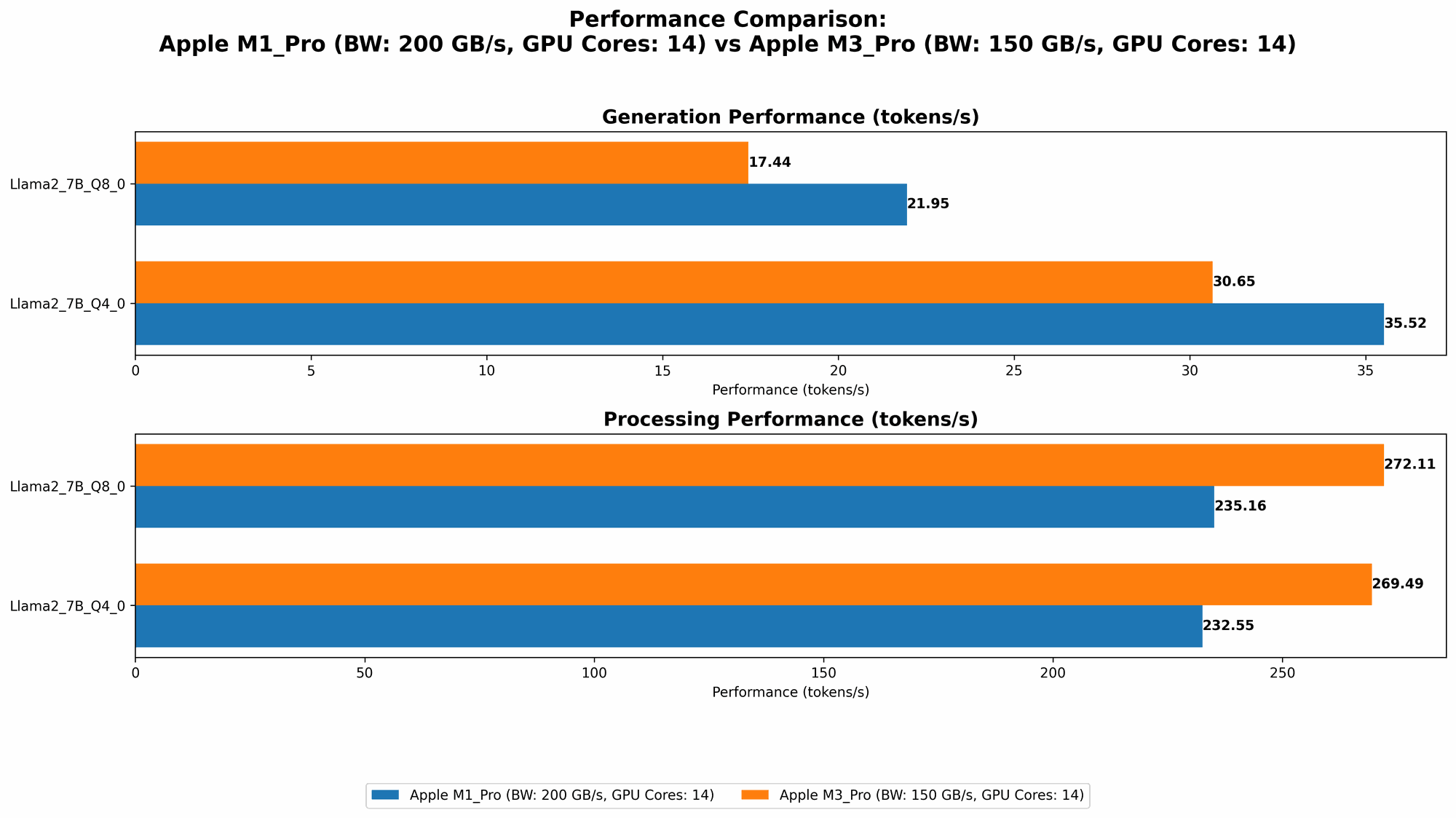
Let's start by comparing the performance of the Apple M1Pro 200gb 14cores and M3Pro 150gb 14cores for running the Llama 2 7B model. This model is a popular choice for experimenting with LLMs because its relatively smaller size makes it easier to run locally.
Apple M1_Pro Token Speed Generation
The Apple M1_Pro 200gb 14cores offers a decent performance for generating tokens with the Llama 2 7B model, but it is significantly impacted by the chosen quantization level:
- Q8_0: Achieves a token generation speed of 21.95 tokens per second.
- Q40: Improves the token generation speed to 35.52 tokens per second, almost double the Q80 performance, demonstrating the impact of quantization on performance.
Unfortunately, we don't have data for the F16 precision, so we can't compare its performance against the quantized versions.
Apple M3_Pro Token Speed Generation
The Apple M3Pro 150gb 14cores demonstrates a superior token generation speed compared to the Apple M1Pro:
- Q8_0: Achieves a token generation speed of 17.44 tokens per second.
- Q40: Further improves the token generation speed to 30.65 tokens per second, showcasing a noticeable increase compared to the Q80 performance.
Here again, we don't have F16 data, leaving us unable to compare its performance with the quantized versions.
Performance Analysis: M1Pro vs M3Pro
The M3Pro consistently outperforms the M1Pro in both Q80 and Q40 quantization levels for Llama 2 7B token generation. However, it's important to note that the M3Pro has a smaller memory capacity (150GB) compared to the M1Pro (200GB), which could limit its capabilities for larger models.
Practical Recommendation:
- If you're prioritizing token generation speed for the Llama 2 7B model, especially at Q40, the M3Pro emerges as the clear winner.
- If you plan to work with larger models or require more memory, the M1_Pro might be a better choice.
Comparison of Apple M1Pro 200gb 14cores and M3Pro 150gb 14cores for Llama 2 7B Model: Processing Speed
Now let's analyze the processing speed of the two devices for the Llama 2 7B model. Processing speed refers to how quickly the device can handle the internal calculations needed to process the input text.
Apple M1_Pro Processing Speed
The Apple M1_Pro 200gb 14cores displays a remarkably consistent processing speed across different quantization levels:
- Q8_0: Achieves a processing speed of 235.16 tokens per second.
- Q4_0: Maintains a similar processing speed of 232.55 tokens per second.
Apple M3_Pro Processing Speed
The Apple M3Pro 150gb 14cores exhibits impressive processing speed, exceeding the Apple M1Pro in all tested quantization levels:
- Q80: Reaches a processing speed of 272.11 tokens per second, a significant improvement over the M1Pro.
- Q40: Further enhances its processing speed to 269.49 tokens per second, showcasing consistent superiority over the M1Pro.
Performance Analysis: M1Pro vs M3Pro
The Apple M3Pro demonstrates a clear lead in processing speed across all quantization levels for the Llama 2 7B model. While the M1Pro performs admirably, the M3_Pro's faster processing translates to smoother and quicker LLM interactions.
Practical Recommendation:
- For users who prioritize fast processing speed, the M3_Pro emerges as the superior choice.
- However, if you're primarily concerned with memory capacity and are comfortable with slightly slower processing, the M1_Pro might still be a viable option.
Comparison of Apple M1Pro 200gb 16cores and M3Pro 150gb 18cores for Llama 2 7B Model
Moving on, let's examine the performance of the Apple M1Pro with 16 cores and M3Pro with 18 cores for the Llama 2 7B model. This comparison focuses on the effect of increased core count on performance.
Apple M1_Pro 16cores Token Speed Generation
The Apple M1_Pro 16cores demonstrates a notable increase in token generation speed compared to its 14-core counterpart:
- Q8_0: Achieves a token generation speed of 22.34 tokens per second, slightly higher than the 14-core version.
- Q4_0: Improves the token generation speed to 36.41 tokens per second, showing a similar level of improvement compared to its 14-core counterpart.
Apple M3_Pro 18cores Token Speed Generation
The Apple M3_Pro 18cores exhibits a significant boost in token generation speed compared to its 14-core counterpart, showing the impact of additional cores on performance:
- Q8_0: Achieves a token generation speed of 17.53 tokens per second, a modest increase over the 14-core version.
- Q4_0: Improves the token generation speed to 30.74 tokens per second, again showing a modest improvement over the 14-core version.
Apple M1_Pro 16cores Processing Speed
The Apple M1_Pro 16cores demonstrates a significant increase in processing speed compared to its 14-core version, highlighting the benefit of increased core count:
- Q8_0: Achieves a processing speed of 270.37 tokens per second.
- Q4_0: Maintains a similar processing speed of 266.25 tokens per second.
Apple M3_Pro 18cores Processing Speed
The Apple M3_Pro 18cores showcases a dramatic increase in processing speed compared to its 14-core counterpart, demonstrating the power of additional cores:
- Q8_0: Reaches a processing speed of 344.66 tokens per second, a significant improvement over the 14-core version.
- Q4_0: Further enhances its processing speed to 341.67 tokens per second, maintaining its superiority over the 14-core version.
Performance Analysis: M1Pro 16cores vs M3Pro 18cores
Both the M1Pro 16cores and M3Pro 18cores demonstrate a clear increase in performance compared to their lower core counterparts. However, the M3Pro 18cores clearly outperforms the M1Pro 16cores in both processing speed and token generation speed, indicating that the M3_Pro's additional cores and architectural improvements provide a significant performance advantage.
Practical Recommendation:
- If you're looking to maximize performance, the M3Pro 18cores offers the most impressive performance. However, the M3Pro 18 cores also has a smaller memory capacity (150GB) compared to the M1Pro 16cores (200GB) and M1Pro 14cores (200GB).
- If you need a balance of performance and memory capacity, the M1_Pro 16cores is a strong contender.
Key Factors to Consider When Choosing Between the Apple M1Pro and M3Pro for LLMs
Here's a consolidated list of key factors to consider when making your decision:
- Model Size: The Apple M1Pro provides more memory capacity (200GB) compared to the M3Pro (150GB). This makes the M1_Pro more suitable for larger, more demanding LLM models.
- Performance: The Apple M3_Pro generally exhibits faster processing speed and token generation, especially when running Llama 2 7B models.
- Quantization: Choosing a lower quantization level (Q40 vs. Q80) can significantly improve performance in some cases. However, it might also impact the model's accuracy.
- Budget: The Apple M3Pro might be more expensive than the M1Pro.
- Future-Proofing: The M3_Pro, being a newer generation chip, is potentially more future-proof.
Conclusion
Choosing between the Apple M1Pro 200gb 14cores and M3Pro 150gb 14cores for running LLMs depends on your specific needs and priorities. If you prioritize processing speed, the M3Pro emerges as the victor. However, if you intend to work with larger models or require a larger memory capacity, the M1Pro might be the better option.
Ultimately, the best decision comes from a careful evaluation of your requirements and preferences. With the information presented in this article, you're equipped to make an informed choice and embark on your AI journey with the perfect hardware companion.
FAQs
What is Quantization?
Quantization is a technique used to compress the size of LLM models, making them more efficient and faster to run. Think of it like compressing a photo file to make it smaller without compromising its quality too much. Quantization reduces the number of bits used to represent the numbers in the model, resulting in smaller model sizes and faster computations.
Is it possible to run LLMs on a Mac with an Apple M1Pro or M3Pro chip?
Yes, absolutely! Both the M1Pro and M3Pro chips are designed to handle the demands of LLM inference. You can run various LLM models locally on a Mac with these chips, enabling you to experiment with AI without relying on cloud-based solutions.
How do I choose the right LLM model for my needs?
The choice of LLM model depends on your specific use case. Consider factors such as the model's size, complexity, intended application, and desired accuracy. A smaller model like Llama 2 7B is suitable for experimenting and local testing. For more demanding tasks, you might require larger models like Llama 2 13B or 70B which can be computationally intensive.
Is a GPU necessary for running LLMs?
While a GPU isn't strictly necessary, it can greatly accelerate the process of running and training LLMs. GPUs are designed to handle parallel computations, making them incredibly efficient at processing the complex mathematical operations involved in AI tasks.
Keywords
Apple M1 Pro, Apple M3 Pro, LLM, Large Language Model, Llama 2, Quantization, Performance, Token Generation, Processing Speed, Inference, AI, Machine Learning, Deep Learning, GPU, Hardware, Model Size, Memory, Token/Second, GPU Cores