7 Key Factors to Consider When Choosing Between Apple M1 Pro 200gb 14cores and Apple M2 100gb 10cores for AI

Introduction
The world of large language models (LLMs) is exploding, and with it, the need for powerful devices capable of handling the demands of both training and inference. The Apple M1 Pro and M2 chips, with their impressive performance and energy efficiency, have become popular choices for developers and enthusiasts alike. But which one is the right fit for your AI projects?
This article aims to provide a comprehensive comparison of the Apple M1 Pro 200gb 14cores and Apple M2 100gb 10cores, focusing on their ability to run LLMs. We'll delve into key factors like token speed generation, memory bandwidth, and quantization, providing you with the insights and data you need to make an informed decision.
Performance Analysis: Apple M1 Pro vs. Apple M2 for LLM Inference
Let's dive into the nitty-gritty of how these two chips perform when running LLMs. We'll discuss key performance metrics and highlight their strengths and weaknesses.
Comparison of Apple M1 Pro 200gb 14cores and Apple M2 100gb 10cores for Llama2 7B
To simplify our analysis, we'll focus on the popular Llama2 7B model, a versatile and widely used LLM. Let's see how the M1 Pro and M2 measure up in terms of token speed generation, taking into account different quantization levels.
| Metric | Apple M1 Pro 200gb 14cores | Apple M2 100gb 10cores |
|---|---|---|
| Llama2 7B F16 Processing | N/A | 201.34 tokens/second |
| Llama2 7B F16 Generation | N/A | 6.72 tokens/second |
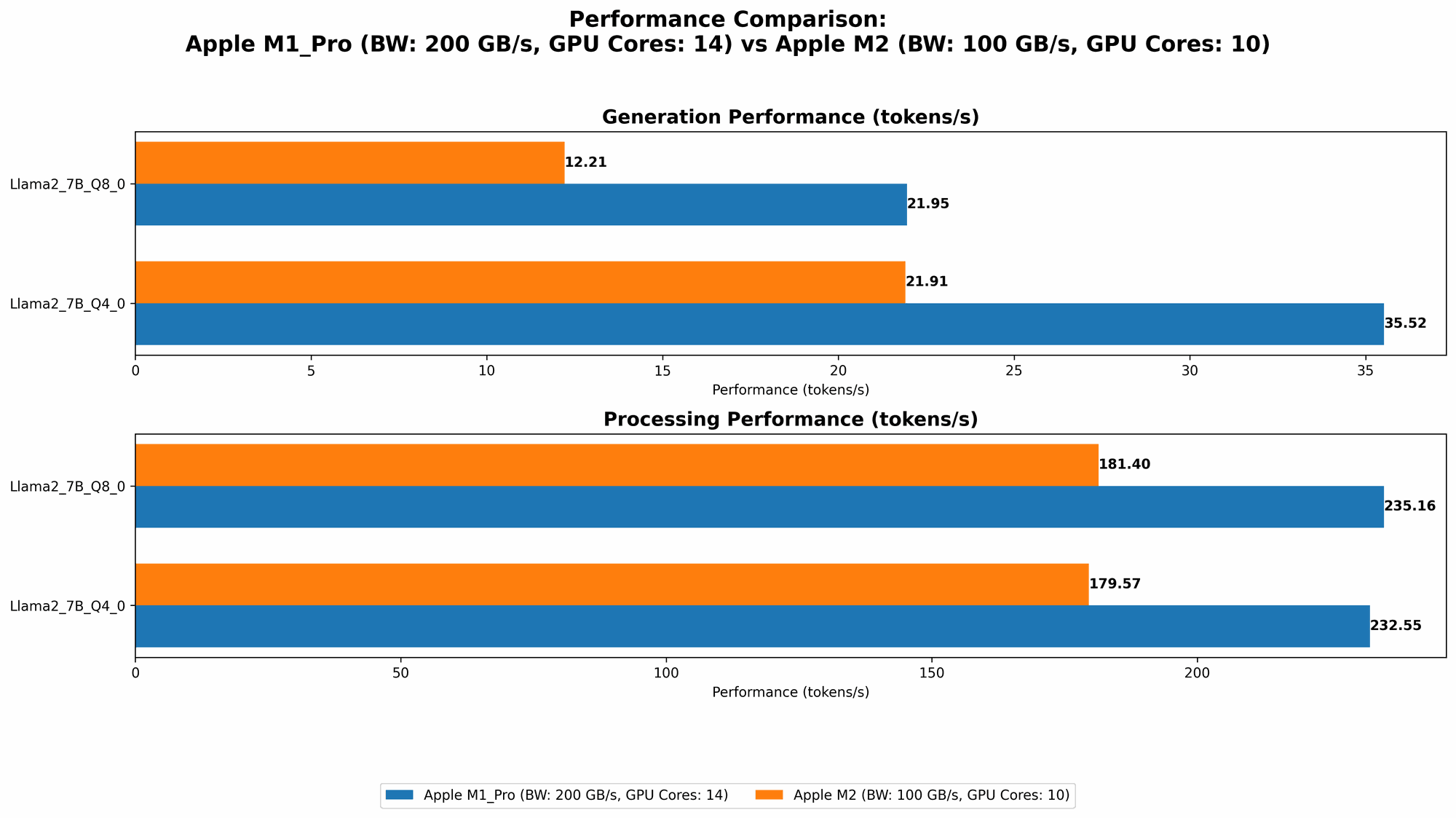
| Llama2 7B Q8_0 Processing | 235.16 tokens/second | 181.4 tokens/second |
| Llama2 7B Q8_0 Generation | 21.95 tokens/second | 12.21 tokens/second |
| Llama2 7B Q4_0 Processing | 232.55 tokens/second | 179.57 tokens/second |
| Llama2 7B Q4_0 Generation | 35.52 tokens/second | 21.91 tokens/second |
Analysis:
- M1 Pro vs. M2: The M1 Pro consistently outperforms the M2 across all quantization levels in terms of token speed generation.
- Quantization: The data clearly shows that using lower precision quantization (like Q80 and Q40) significantly improves processing speed compared to F16. This is because lower precision requires less memory bandwidth and processing power.
- Generation vs. Processing: Processing speeds are significantly higher than generation speeds. This is because processing involves the core LLM operations (like matrix multiplications), while generation involves additional tasks like token decoding and output formatting.
Token Speed Generation: Apple M1 Pro vs. Apple M2
Let's dive into the nuances of token speed generation across both devices.
Apple M1 Pro Token Speed Generation
- The M1 Pro demonstrates impressive token speed generation, especially when using Q80 and Q40 quantization levels. This can be attributed to its larger memory bandwidth (200GB/s) compared to the M2 (100GB/s).
Apple M2 Token Speed Generation
- The M2, while having a smaller memory bandwidth, still performs well in terms of token generation. However, the data suggests that for the same model size (Llama2 7B), the M1 Pro can significantly outperform the M2. It's important to note that the M2 benefits from its more recent architecture, which was optimized for AI tasks.
Memory Bandwidth: A Key Factor in LLM Inference
Memory bandwidth plays a critical role in LLM inference. It determines how fast the CPU or GPU can access data from the RAM.
- M1 Pro: The M1 Pro offers a substantial 200GB/s of memory bandwidth, making it ideal for handling large LLMs.
- M2: The M2's 100GB/s memory bandwidth is still impressive, but it falls short compared to the M1 Pro, potentially impacting the performance with larger models.
- Real-world Impact: The difference in memory bandwidth can manifest in the speed of token generation, model loading time, and overall efficiency.
Quantization: A Trade-off Between Speed and Accuracy
Quantization is a crucial technique for compressing LLMs and improving their performance. The idea is to reduce the number of bits required to represent each number in the model's weights, leading to faster processing and less memory usage.
- F16: The standard 16-bit floating-point precision (F16) provides a good balance between accuracy and performance.
- Q80 and Q40: Using 8-bit or 4-bit quantization (Q80 and Q40) can significantly boost speed but may introduce some accuracy loss. This loss is usually minimal and acceptable for most applications.
Key Takeaway: For speed-critical LLM inference, experimenting with different quantization levels is essential.
Practical Recommendations for Use Cases
Let's tailor our recommendations based on typical AI use cases.
- Large-Scale LLM Inference: If you're working with larger LLMs (like Llama2 13B or GPT-3) that require significant memory bandwidth, the Apple M1 Pro (200GB/s) is the clear choice. The additional memory bandwidth will make a significant difference in performance.
- Smaller LLM Inference: For smaller LLMs (like Llama2 7B) and applications where memory bandwidth is less critical, the Apple M2 (100GB/s) is an excellent option. It provides a good compromise between performance and cost.
- Time-Sensitive Applications: If your application requires near real-time inferencing, using quantization techniques (Q80 or Q40) with the M1 Pro or M2 can greatly improve token generation speeds.
Considerations Beyond Token Speed
While token speed is a crucial metric, it's not the only factor to consider when selecting the right device for your AI project.
Model Sizes and Memory Constraints
The choice between the M1 Pro and M2 might also depend on the model size you're working with.
- For larger LLMs, the M1 Pro's additional memory bandwidth and cores could be advantageous.
- Smaller LLMs might run perfectly fine on the M2, especially those using quantization techniques.
Power Consumption and Thermal Performance
The M2 is known for its energy efficiency and thermal performance, making it an excellent option for applications requiring portability or extended battery life.
- M1 Pro The M1 Pro, with its higher core count and larger memory bandwidth, may consume more power and generate more heat.
FAQ: Frequently Asked Questions
What is the best Apple device for running LLMs?
The best Apple device for running LLMs depends on your specific needs, model size, and budget. The M1 Pro excels in handling larger models due to its impressive memory bandwidth, while the M2 offers a compelling balance of performance and energy efficiency.
What is quantization, and how does it affect LLM performance?
Quantization is a process of reducing the number of bits used to store the weights of a model. It leads to smaller model sizes, faster processing, and lower memory requirements. While it can introduce some accuracy loss, the trade-off is often worth it for speed and efficiency gains.
Are there any alternatives to Apple M1 Pro and M2 for running LLMs?
Yes, there are other powerful devices available for running LLMs, including high-end PCs with dedicated GPUs (like Nvidia GeForce RTX 4090), specialized AI accelerators (like Google Tensor Processing Units), and cloud-based platforms (like Google Colab and Amazon SageMaker).
How can I get started with running LLMs on my Apple device?
You can use frameworks like llama.cpp (https://github.com/ggerganov/llama.cpp) or libraries like Transformers (https://huggingface.co/docs/transformers/index) to run LLMs on your M1 Pro or M2. Check out resources like the Llama 2 documentation (https://ai.google.com/static/models/llama2/llama2technical_overview.pdf) for more information.
Keywords
LLM, large language model, Apple M1 Pro, Apple M2, token speed generation, memory bandwidth, quantization, F16, Q80, Q40, Llama2 7B, inference, AI, machine learning, deep learning, developer, geek, performance, comparison, recommendation, use case, model size, power consumption, thermal performance, FAQ, resource, framework, library, documentation.