7 Key Factors to Consider When Choosing Between Apple M1 Max 400gb 24cores and NVIDIA RTX 4000 Ada 20GB x4 for AI
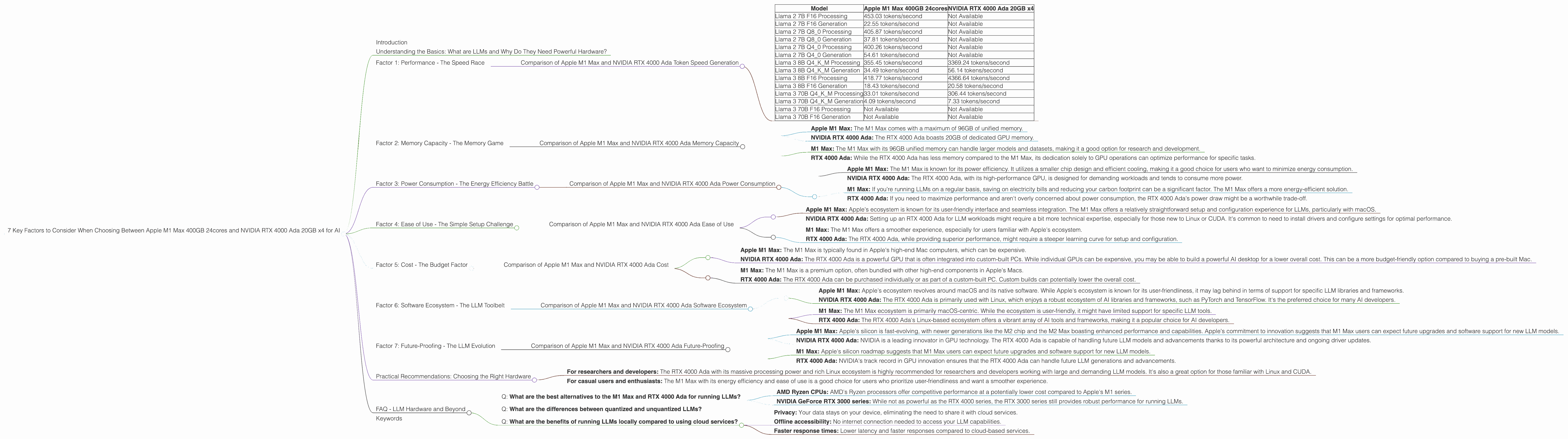
Introduction
The world of large language models (LLMs) is rapidly evolving, with new models and applications emerging every day. These models are becoming increasingly powerful, allowing us to perform tasks like text generation, translation, and summarization with unprecedented accuracy. However, running these models locally requires powerful hardware.
This article will delve into the comparison between two popular choices for running LLMs - the Apple M1 Max 400GB 24cores and the NVIDIA RTX 4000 Ada 20GB x4. We'll explore key factors such as performance, cost, power consumption, and ease of use, to help you determine which hardware is the best fit for your needs.
Understanding the Basics: What are LLMs and Why Do They Need Powerful Hardware?
Let's break down LLMs and their hardware requirements in a way that both developers and non-technical folks can understand.
Imagine LLMs as incredibly complex formulas, trained on massive datasets of text and code. These "formulas" are used to analyze text and generate responses, translations, or summaries.
The bigger and more complex the "formula" (LLM), the more processing power and memory it needs. That's where powerful hardware like the M1 Max and RTX 4000 Ada come in.
Factor 1: Performance - The Speed Race
When choosing hardware for LLMs, performance is the king. We'll compare the M1 Max and RTX 4000 Ada based on their token generation speeds, a key metric for LLM performance.
Comparison of Apple M1 Max and NVIDIA RTX 4000 Ada Token Speed Generation
Table 1: Token Generation Speed Comparison
| Model | Apple M1 Max 400GB 24cores | NVIDIA RTX 4000 Ada 20GB x4 |
|---|---|---|
| Llama 2 7B F16 Processing | 453.03 tokens/second | Not Available |
| Llama 2 7B F16 Generation | 22.55 tokens/second | Not Available |
| Llama 2 7B Q8_0 Processing | 405.87 tokens/second | Not Available |
| Llama 2 7B Q8_0 Generation | 37.81 tokens/second | Not Available |
| Llama 2 7B Q4_0 Processing | 400.26 tokens/second | Not Available |
| Llama 2 7B Q4_0 Generation | 54.61 tokens/second | Not Available |
| Llama 3 8B Q4KM Processing | 355.45 tokens/second | 3369.24 tokens/second |
| Llama 3 8B Q4KM Generation | 34.49 tokens/second | 56.14 tokens/second |
| Llama 3 8B F16 Processing | 418.77 tokens/second | 4366.64 tokens/second |
| Llama 3 8B F16 Generation | 18.43 tokens/second | 20.58 tokens/second |
| Llama 3 70B Q4KM Processing | 33.01 tokens/second | 306.44 tokens/second |
| Llama 3 70B Q4KM Generation | 4.09 tokens/second | 7.33 tokens/second |
| Llama 3 70B F16 Processing | Not Available | Not Available |
| Llama 3 70B F16 Generation | Not Available | Not Available |
Analysis
- NVIDIA RTX 4000 Ada: The RTX 4000 Ada shines in processing speed, particularly with larger LLMs like Llama 3 70B and 8B. It's a beast when it comes to crunching through large amounts of data.
- Apple M1 Max: While the M1 Max falls behind in processing speed compared to the RTX 4000 Ada, it holds its own in token generation. It's worth noting that the M1 Max is more efficient in terms of power consumption.
In a nutshell: If you're working with larger LLMs and need blazing-fast processing speeds, the RTX 4000 Ada is the clear winner. If you value efficiency and prioritize token generation speed, the M1 Max is a formidable contender.
Factor 2: Memory Capacity - The Memory Game
LLMs are memory hogs. You need ample RAM to hold the model and the data it processes. Let's compare the memory capacity of the M1 Max and RTX 4000 Ada.
Comparison of Apple M1 Max and NVIDIA RTX 4000 Ada Memory Capacity
- Apple M1 Max: The M1 Max comes with a maximum of 96GB of unified memory.
- NVIDIA RTX 4000 Ada: The RTX 4000 Ada boasts 20GB of dedicated GPU memory.
Analysis
- M1 Max: The M1 Max with its 96GB unified memory can handle larger models and datasets, making it a good option for research and development.
- RTX 4000 Ada: While the RTX 4000 Ada has less memory compared to the M1 Max, its dedication solely to GPU operations can optimize performance for specific tasks.
In a nutshell: The choice between the M1 Max and RTX 4000 Ada depends on your memory needs. The M1 Max offers greater capacity, while the RTX 4000 Ada provides dedicated memory for GPU-intensive workloads.
Factor 3: Power Consumption - The Energy Efficiency Battle
Power consumption is a critical factor, especially for those concerned about energy costs and environmental impact.
Comparison of Apple M1 Max and NVIDIA RTX 4000 Ada Power Consumption
- Apple M1 Max: The M1 Max is known for its power efficiency. It utilizes a smaller chip design and efficient cooling, making it a good choice for users who want to minimize energy consumption.
- NVIDIA RTX 4000 Ada: The RTX 4000 Ada, with its high-performance GPU, is designed for demanding workloads and tends to consume more power.
Analysis
- M1 Max: If you're running LLMs on a regular basis, saving on electricity bills and reducing your carbon footprint can be a significant factor. The M1 Max offers a more energy-efficient solution.
- RTX 4000 Ada: If you need to maximize performance and aren't overly concerned about power consumption, the RTX 4000 Ada's power draw might be a worthwhile trade-off.
In a nutshell: The M1 Max excels in energy efficiency, while the RTX 4000 Ada is a power-hungry performance beast.
Factor 4: Ease of Use - The Simple Setup Challenge
Setting up and running LLMs can be a hurdle for some. Let's see how the M1 Max and RTX 4000 Ada compare in terms of usability.
Comparison of Apple M1 Max and NVIDIA RTX 4000 Ada Ease of Use
- Apple M1 Max: Apple's ecosystem is known for its user-friendly interface and seamless integration. The M1 Max offers a relatively straightforward setup and configuration experience for LLMs, particularly with macOS.
- NVIDIA RTX 4000 Ada: Setting up an RTX 4000 Ada for LLM workloads might require a bit more technical expertise, especially for those new to Linux or CUDA. It's common to need to install drivers and configure settings for optimal performance.
Analysis
- M1 Max: The M1 Max offers a smoother experience, especially for users familiar with Apple's ecosystem.
- RTX 4000 Ada: The RTX 4000 Ada, while providing superior performance, might require a steeper learning curve for setup and configuration.
In a nutshell: The M1 Max is "plug and play" for many users, while setting up the RTX 4000 Ada might involve a bit more technical tinkering.
Factor 5: Cost - The Budget Factor
Budget plays a crucial role in deciding which hardware fits your needs.
Comparison of Apple M1 Max and NVIDIA RTX 4000 Ada Cost
- Apple M1 Max: The M1 Max is typically found in Apple's high-end Mac computers, which can be expensive.
- NVIDIA RTX 4000 Ada: The RTX 4000 Ada is a powerful GPU that is often integrated into custom-built PCs. While individual GPUs can be expensive, you may be able to build a powerful AI desktop for a lower overall cost. This can be a more budget-friendly option compared to buying a pre-built Mac.
Analysis
- M1 Max: The M1 Max is a premium option, often bundled with other high-end components in Apple's Macs.
- RTX 4000 Ada: The RTX 4000 Ada can be purchased individually or as part of a custom-built PC. Custom builds can potentially lower the overall cost.
In a nutshell: The M1 Max is typically more expensive, while the RTX 4000 Ada might offer a more budget-friendly approach with custom-built PCs.
Factor 6: Software Ecosystem - The LLM Toolbelt
Choosing the right software ecosystem is crucial for running LLMs.
Comparison of Apple M1 Max and NVIDIA RTX 4000 Ada Software Ecosystem
- Apple M1 Max: Apple's ecosystem revolves around macOS and its native software. While Apple's ecosystem is known for its user-friendliness, it may lag behind in terms of support for specific LLM libraries and frameworks.
- NVIDIA RTX 4000 Ada: The RTX 4000 Ada is primarily used with Linux, which enjoys a robust ecosystem of AI libraries and frameworks, such as PyTorch and TensorFlow. It's the preferred choice for many AI developers.
Analysis
- M1 Max: The M1 Max ecosystem is primarily macOS-centric. While the ecosystem is user-friendly, it might have limited support for specific LLM tools.
- RTX 4000 Ada: The RTX 4000 Ada's Linux-based ecosystem offers a vibrant array of AI tools and frameworks, making it a popular choice for AI developers.
In a nutshell: The M1 Max is more suited for users who prefer Apple's ecosystem, while the RTX 4000 Ada offers a wider selection of AI tools and frameworks.
Factor 7: Future-Proofing - The LLM Evolution
LLMs are constantly evolving with new models and advancements. Is your hardware prepared for the future?
Comparison of Apple M1 Max and NVIDIA RTX 4000 Ada Future-Proofing
- Apple M1 Max: Apple's silicon is fast-evolving, with newer generations like the M2 chip and the M2 Max boasting enhanced performance and capabilities. Apple's commitment to innovation suggests that M1 Max users can expect future upgrades and software support for new LLM models.
- NVIDIA RTX 4000 Ada: NVIDIA is a leading innovator in GPU technology. The RTX 4000 Ada is capable of handling future LLM models and advancements thanks to its powerful architecture and ongoing driver updates.
Analysis
- M1 Max: Apple's silicon roadmap suggests that M1 Max users can expect future upgrades and software support for new LLM models.
- RTX 4000 Ada: NVIDIA's track record in GPU innovation ensures that the RTX 4000 Ada can handle future LLM generations and advancements.
In a nutshell: Both the M1 Max and RTX 4000 Ada are likely to stay relevant in the LLM landscape, with their manufacturers' ongoing commitment to innovation.
Practical Recommendations: Choosing the Right Hardware
Now that we've examined the key factors, let's provide some practical recommendations:
- For researchers and developers: The RTX 4000 Ada with its massive processing power and rich Linux ecosystem is highly recommended for researchers and developers working with large and demanding LLM models. It's also a great option for those familiar with Linux and CUDA.
- For casual users and enthusiasts: The M1 Max with its energy efficiency and ease of use is a good choice for users who prioritize user-friendliness and want a smoother experience.
Ultimately, the best device for you depends on your specific needs, budget, and familiarity with the respective ecosystems.
FAQ - LLM Hardware and Beyond
Q: What are the best alternatives to the M1 Max and RTX 4000 Ada for running LLMs?
A: Other popular choices include:
- AMD Ryzen CPUs: AMD's Ryzen processors offer competitive performance at a potentially lower cost compared to Apple's M1 series.
- NVIDIA GeForce RTX 3000 series: While not as powerful as the RTX 4000 series, the RTX 3000 series still provides robust performance for running LLMs.
Q: What are the differences between quantized and unquantized LLMs?
A: Think of quantization like compressing a file. It reduces the size of the LLM by representing numbers with fewer bits, making it faster and more efficient. Although it can slightly affect model accuracy, it offers significant gains in performance and memory usage.
Q: What are the benefits of running LLMs locally compared to using cloud services?
A: Running LLMs locally offers:
- Privacy: Your data stays on your device, eliminating the need to share it with cloud services.
- Offline accessibility: No internet connection needed to access your LLM capabilities.
- Faster response times: Lower latency and faster responses compared to cloud-based services.
Keywords
Apple M1 Max, NVIDIA RTX 4000 Ada, LLM, Large Language Model, token generation speed, memory capacity, power consumption, ease of use, cost, software ecosystem, future-proofing, quantization, AI, machine learning, deep learning, natural language processing, NLP.