7 Cost Saving Strategies When Building an AI Lab with NVIDIA RTX 6000 Ada 48GB
Introduction
Building an AI lab can be an exciting but expensive venture. With the recent explosion in popularity of large language models (LLMs), the need for powerful hardware has skyrocketed. But fear not, dear AI aficionado! This article will explore seven cost-saving strategies you can employ while leveraging the incredible power of the NVIDIA RTX 6000 Ada 48GB for running your own local AI lab.
Think of LLMs as the super-smart AI brains that can generate text, translate languages, write code, and answer your questions in a way that feels almost human. But these brainy giants require a lot of processing power to function, and that's where the RTX 6000 Ada 48GB steps in. This graphics card, affectionately nicknamed "Ada" by many (imagine a friendly, highly intelligent AI assistant, ready to crunch your datasets), is a powerhouse, capable of handling the intense computations needed for LLM execution.
Strategy #1: Embrace Quantization
Imagine shrinking a massive cake into a smaller, more manageable version without sacrificing its deliciousness. That's exactly what quantization does for LLMs. It reduces the size of an LLM without significantly impacting its performance. This magical feat is achieved by lowering the precision of the numbers used to represent the model's weights, essentially making them "smaller" and reducing storage and computation demands.
Think of it this way: Instead of using a full cup of flour for each ingredient, you can use a smaller measuring spoon. The cake won't be exactly the same, but it will still be delicious and far more manageable.
How to Quantize with RTX 6000 Ada 48GB
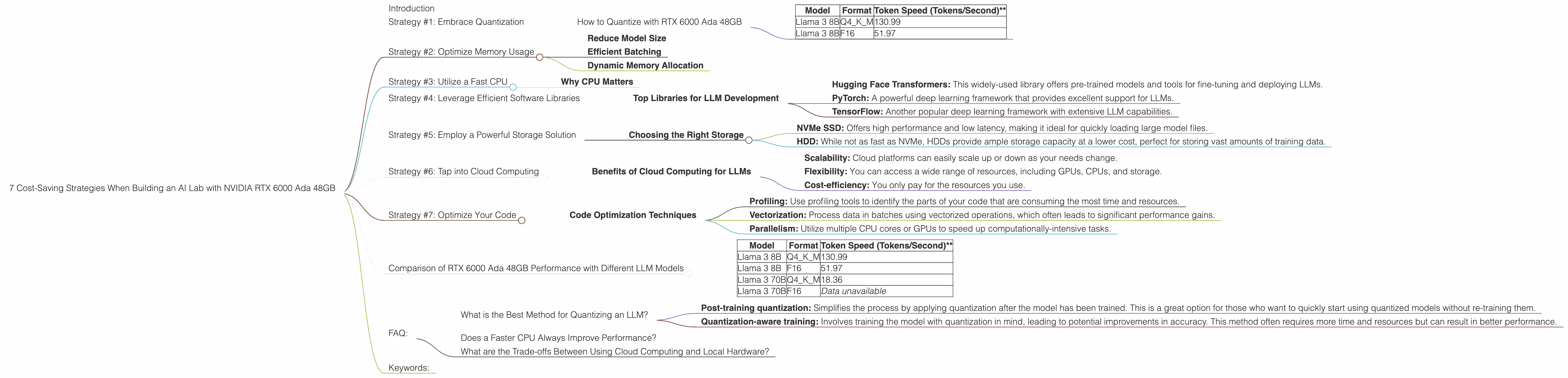
The RTX 6000 Ada 48GB is a champion of quantization. Let's focus on the Llama 3 family of LLMs (a favorite among AI enthusiasts). The table below showcases how much faster the RTX 6000 Ada 48GB is when running the 8B Llama 3 model in Q4 (quantized) mode compared to F16 (full precision).
| Model | Format | Token Speed (Tokens/Second)** |
|---|---|---|
| Llama 3 8B | Q4KM | 130.99 |
| Llama 3 8B | F16 | 51.97 |
This is a massive difference! The RTX 6000 Ada 48GB can generate nearly 2.5 times more tokens per second with the quantized Llama 3 8B model, significantly boosting your productivity and lowering your energy bills.
Strategy #2: Optimize Memory Usage
LLMs are like hungry students - they need to access a lot of information to perform well. The RTX 6000 Ada 48GB's 48GB of GDDR6 memory is a generous helping, but we can still optimize how we use it to keep things running smoothly.
Reduce Model Size
Remember quantization? It's not just about speed, but also about saving precious memory. By storing the model in a smaller, more compact form, we can free up memory for other tasks, like storing the context of a conversation or generating more complex outputs.
Efficient Batching
Like a well-organized kitchen, efficient batching can streamline the processing of LLMs. Instead of handling a single token at a time, we can process them in batches. This allows the RTX 6000 Ada 48GB to work efficiently, saving time and energy.
Dynamic Memory Allocation
Just like a good cook adjusts the amount of ingredients based on the number of guests, dynamic memory allocation allows us to allocate only the necessary memory for each task. This ensures that we don't waste precious resources by hoarding more memory than needed.
Strategy #3: Utilize a Fast CPU
Imagine trying to build a house with a single hammer - it would be a slow and painful process. The same holds true for LLMs - a fast CPU is like a toolbox full of powerful tools, helping the RTX 6000 Ada 48GB complete tasks much faster.
Why CPU Matters
The RTX 6000 Ada 48GB excels at parallel processing, but it relies on the CPU for certain tasks, such as loading data and preprocessing text. A fast CPU can significantly reduce the time it takes to complete these tasks, leading to faster overall processing times.
Strategy #4: Leverage Efficient Software Libraries
Think of software libraries as pre-made building blocks for your AI lab. They provide optimized functions and algorithms specifically designed for working with LLMs, significantly speeding up the development and deployment process.
Top Libraries for LLM Development
- Hugging Face Transformers: This widely-used library offers pre-trained models and tools for fine-tuning and deploying LLMs.
- PyTorch: A powerful deep learning framework that provides excellent support for LLMs.
- TensorFlow: Another popular deep learning framework with extensive LLM capabilities.
Strategy #5: Employ a Powerful Storage Solution
Imagine trying to build a house with a single tool shed - you'd quickly run out of space for all your building materials. Similarly, LLMs require a robust storage solution to store their massive model files and training data.
Choosing the Right Storage
- NVMe SSD: Offers high performance and low latency, making it ideal for quickly loading large model files.
- HDD: While not as fast as NVMe, HDDs provide ample storage capacity at a lower cost, perfect for storing vast amounts of training data.
Strategy #6: Tap into Cloud Computing
Like calling a delivery service for groceries, cloud computing allows you to access powerful computing resources without having to invest in expensive hardware. This can be especially beneficial when you need to process large amounts of data or run computationally intensive tasks.
Benefits of Cloud Computing for LLMs
- Scalability: Cloud platforms can easily scale up or down as your needs change.
- Flexibility: You can access a wide range of resources, including GPUs, CPUs, and storage.
- Cost-efficiency: You only pay for the resources you use.
Strategy #7: Optimize Your Code
Like refining a recipe, optimizing your code can make a huge difference in the efficiency of your AI lab. This involves analyzing your code for bottlenecks and finding ways to improve its performance.
Code Optimization Techniques
- Profiling: Use profiling tools to identify the parts of your code that are consuming the most time and resources.
- Vectorization: Process data in batches using vectorized operations, which often leads to significant performance gains.
- Parallelism: Utilize multiple CPU cores or GPUs to speed up computationally-intensive tasks.
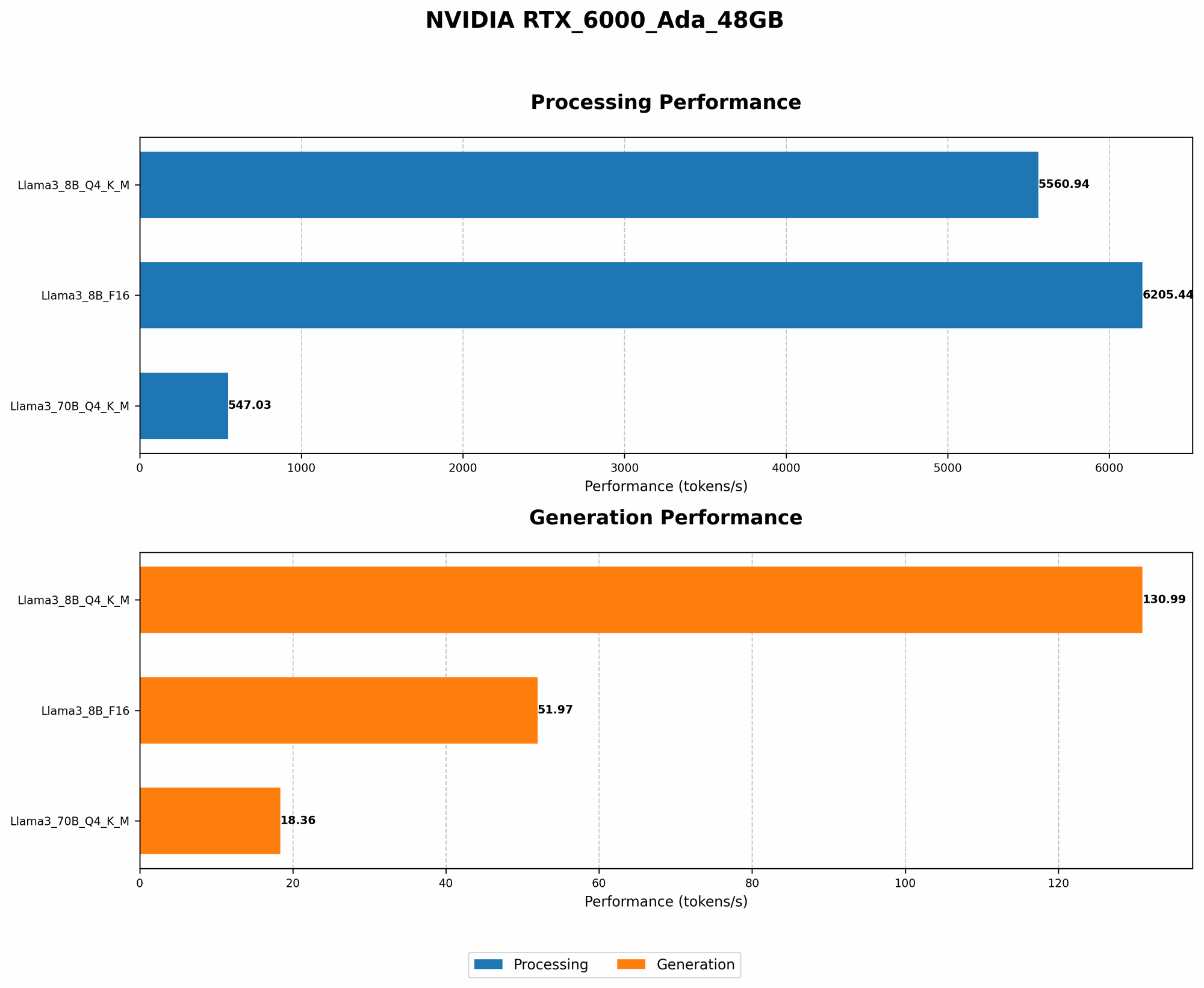
Comparison of RTX 6000 Ada 48GB Performance with Different LLM Models
| Model | Format | Token Speed (Tokens/Second)** |
|---|---|---|
| Llama 3 8B | Q4KM | 130.99 |
| Llama 3 8B | F16 | 51.97 |
| Llama 3 70B | Q4KM | 18.36 |
| Llama 3 70B | F16 | Data unavailable |
As you can see from the table, the RTX 6000 Ada 48GB handles the smaller Llama 3 8B model with ease. But, when it comes to the larger, more complex Llama 3 70B model, the performance drops, especially in Q4KM mode.
The good news is that even with this decrease in speed, the Ada 48GB still performs incredibly well, proving its worth for experimenting with large and complex models.
FAQ:
What is the Best Method for Quantizing an LLM?
There are a few popular quantization methods commonly used, each with its own set of pros and cons.
- Post-training quantization: Simplifies the process by applying quantization after the model has been trained. This is a great option for those who want to quickly start using quantized models without re-training them.
- Quantization-aware training: Involves training the model with quantization in mind, leading to potential improvements in accuracy. This method often requires more time and resources but can result in better performance.
The best choice for you will depend on your specific needs and resources. For example, if you're working with a large and complex LLM like Llama 3 70B, using the Ada 48GB, you might want to explore quantization aware training to achieve the best possible results. But if you mainly work with smaller models and are looking for a quicker solution, post-training quantization will be a great starting point.
Does a Faster CPU Always Improve Performance?
Although a fast CPU can significantly speed up the overall process, it's important to note that there are diminishing returns. The RTX 6000 Ada 48GB is designed for heavy computation, so while a very slow CPU could create a bottleneck, once the CPU is fast enough to keep up with the GPU, further improvements will have little impact. Think of it like building a house with a team of skilled laborers - having a super-fast forklift to bring materials will speed things up, but once the supplies are flowing smoothly, adding another forklift might not make a huge difference.
What are the Trade-offs Between Using Cloud Computing and Local Hardware?
Cloud computing provides great flexibility and scalability, but it can sometimes be more expensive in the long run, especially if you consistently run large, complex models. Local hardware, like the RTX 6000 Ada 48GB, offers greater control and potentially lower costs over time, but requires a significant upfront investment and can be more challenging to manage.
The best choice for you depends on your specific needs and budget. For example, if you're a researcher working on a large-scale LLM project with a limited budget, cloud computing might be a better option. However, if you're an independent AI developer with a small team and a consistent workload, investing in local hardware like the Ada 48GB could provide a more economical long-term solution.
Keywords:
NVIDIA RTX 6000 Ada 48GB, LLM, Large Language Models, AI Lab, Quantization, Llama 3, Token Speed, GPU, Memory Optimization, CPU, Software Libraries, Storage, Cloud Computing, Code Optimization, Cost-Saving Strategies, AI Development, Generative AI, AI Research, Machine Learning, Deep Learning