7 Cost Saving Strategies When Building an AI Lab with NVIDIA L40S 48GB
Introduction
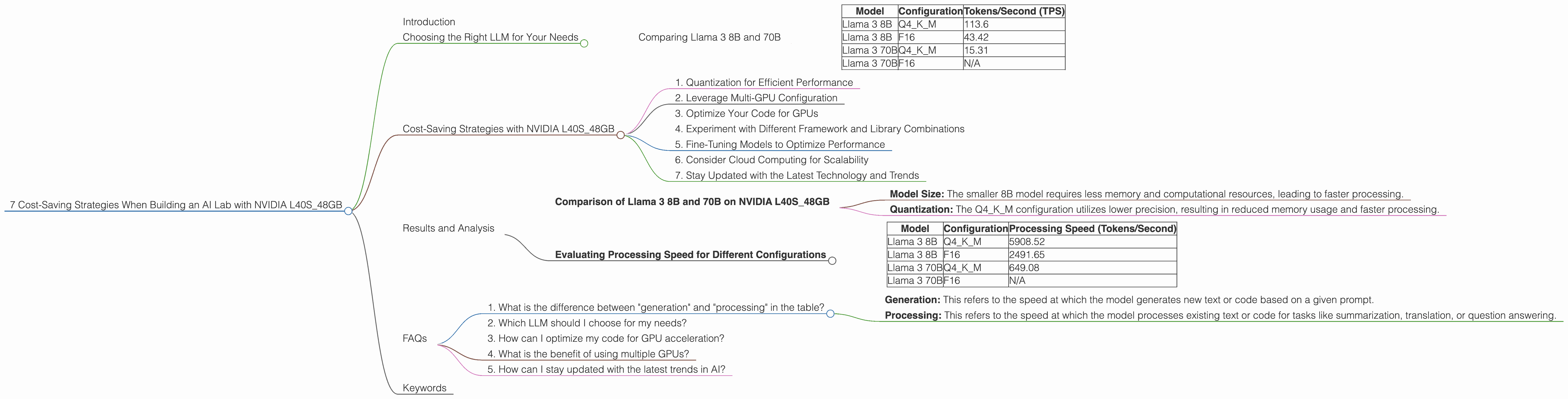
Building an AI lab can be an exciting but expensive endeavor. The heart of any AI lab, of course, is the hardware, and choosing the right setup can make a significant difference in both your budget and performance. This article focuses on the NVIDIA L40S_48GB, a powerful GPU designed for high-performance computing, and explores strategies to optimize your AI lab setup for cost-effectiveness.
For those not familiar with the world of AI, imagine this: giant models, like brains, are trained to understand and generate text, code, images, and even music. They are like super-smart assistants, but they need powerful computers to function. The NVIDIA L40S_48GB, in this case, is like a super-fast processor in a sports car, allowing these models to work at breakneck speeds. We'll explore how to harness the power of this GPU efficiently and save money.
Choosing the Right LLM for Your Needs
Let's dive into the world of Large Language Models (LLMs). Imagine LLMs are like encyclopedias on steroids – they're trained on massive amounts of data and can generate human-like text, translate languages, write different kinds of creative content, and answer your questions in an informative way. Choosing the right LLM for your needs is crucial for optimization.
Think of LLMs as different-sized engines. Smaller models are easier to work with but may not be as powerful, while larger models are more complex and require more resources. The NVIDIA L40S_48GB can handle both, but understanding the trade-offs is key.
Comparing Llama 3 8B and 70B
Let's compare two popular models, Llama 3 8B and Llama 3 70B. The 8B model is relatively small, representing the “smaller engine,” while the 70B model is a larger “monster engine.”
Here's a table displaying the token generation speed in tokens per second (TPS) for both models on the NVIDIA L40S_48GB:
| Model | Configuration | Tokens/Second (TPS) |
|---|---|---|
| Llama 3 8B | Q4KM | 113.6 |
| Llama 3 8B | F16 | 43.42 |
| Llama 3 70B | Q4KM | 15.31 |
| Llama 3 70B | F16 | N/A |
As you can see, the smaller Llama 3 8B model can process significantly more tokens per second than the larger 70B model, especially when using the Q4KM configuration. This is because the smaller model requires less memory and computation, resulting in faster processing.
Cost-Saving Strategies with NVIDIA L40S_48GB
Now, let's explore the key strategies for maximizing your investment in the NVIDIA L40S_48GB:
1. Quantization for Efficient Performance
Imagine shrinking a large image to fit on a smaller screen without losing too much detail. Quantization is like that, but with models! Instead of storing each number in a model with high precision, we use fewer bits (like reducing the number of pixels in an image). It's like trading a bit of accuracy for significantly faster processing speed and less memory usage.
The table above shows the performance difference between the F16 configuration and the Q4KM configuration. The Q4KM configuration offers a substantial performance boost, particularly for the Llama 3 8B model.
2. Leverage Multi-GPU Configuration
Think of it like having multiple brains working together. You can use multiple GPUs in a single machine (multi-GPU) or across multiple machines (distributed) to further accelerate your model training and inference. This allows you to handle larger and more complex models without sacrificing speed.
Example: If you have two L40S_48GB GPUs, you could potentially double the processing power for your models.
3. Optimize Your Code for GPUs
Writing your code with GPUs in mind can significantly improve efficiency. This involves utilizing libraries specifically designed for GPU acceleration, like CUDA and cuDNN, and structuring your code to take advantage of parallel processing.
4. Experiment with Different Framework and Library Combinations
The world of AI is ever-evolving, meaning there's more than one way to skin a cat. New frameworks and libraries constantly pop up, promising better performance and efficiency. Experimenting and choosing the right combination for your specific needs can be a cost-effective way to find the sweet spot.
5. Fine-Tuning Models to Optimize Performance
Imagine training your model to do a specific task, like analyzing data for your company. Fine-tuning allows you to adapt a pre-trained LLM to your specific use case, resulting in better performance and potentially reducing the need for a larger, more resource-intensive model.
6. Consider Cloud Computing for Scalability
If your needs grow, consider using cloud computing platforms like AWS, Google Cloud, or Azure. These platforms offer on-demand access to powerful GPUs, allowing you to scale up your compute resources as your project demands. This provides flexibility and avoids the upfront cost of purchasing expensive hardware.
7. Stay Updated with the Latest Technology and Trends
The AI landscape is constantly changing, with new GPUs, frameworks, and libraries being released regularly. Keeping up with the latest advancements can help you identify opportunities to improve your setup and save money over time.
Results and Analysis
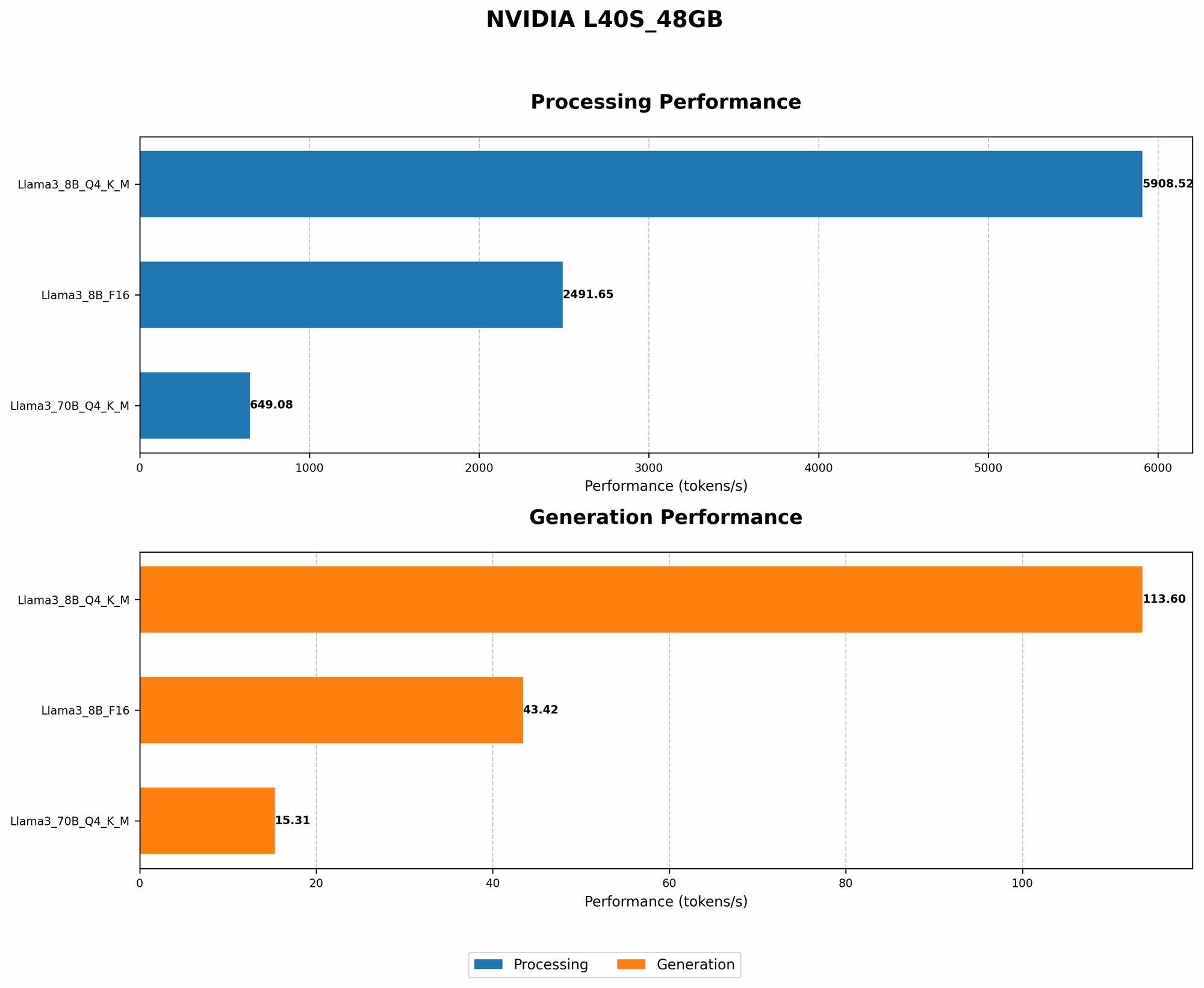
Let's delve deeper into the results of the NVIDIA L40S_48GB with different LLM configurations.
Comparison of Llama 3 8B and 70B on NVIDIA L40S_48GB
The table shows that the Llama 3 8B model with the Q4KM configuration achieves a significantly higher token generation speed (113.6 TPS) compared to the Llama 3 70B model (15.31 TPS).
This difference can be attributed to a combination of factors:
- Model Size: The smaller 8B model requires less memory and computational resources, leading to faster processing.
- Quantization: The Q4KM configuration utilizes lower precision, resulting in reduced memory usage and faster processing.
Evaluating Processing Speed for Different Configurations
The processing speed of the NVIDIA L40S_48GB can vary depending on the LLM configuration and task.
| Model | Configuration | Processing Speed (Tokens/Second) |
|---|---|---|
| Llama 3 8B | Q4KM | 5908.52 |
| Llama 3 8B | F16 | 2491.65 |
| Llama 3 70B | Q4KM | 649.08 |
| Llama 3 70B | F16 | N/A |
Key Observations:
- Llama 3 8B vs. 70B: The Llama 3 8B model with Q4KM configuration exhibits significantly faster processing speed than the Llama 3 70B, highlighting the performance benefits of a smaller model with efficient quantization.
- Performance Impact of Quantization: The difference in processing speed between the F16 and Q4KM configurations for the Llama 3 8B model demonstrates the substantial impact of using lower precision for faster processing.
FAQs
1. What is the difference between "generation" and "processing" in the table?
- Generation: This refers to the speed at which the model generates new text or code based on a given prompt.
- Processing: This refers to the speed at which the model processes existing text or code for tasks like summarization, translation, or question answering.
2. Which LLM should I choose for my needs?
The choice depends on your specific use case. If you need a high-performance model for tasks requiring massive amounts of text or code generation, the Llama 3 8B model with Q4KM configuration can be a cost-effective choice. However, if you require a model with greater accuracy and knowledge, a larger model like Llama 3 70B may be necessary, even though it may require more resources.
3. How can I optimize my code for GPU acceleration?
You can leverage libraries like CUDA (Compute Unified Device Architecture) and cuDNN (CUDA Deep Neural Network library) to optimize your code for GPU acceleration. These libraries provide specialized functions for performing matrix operations, convolutions, and other computations on GPUs.
4. What is the benefit of using multiple GPUs?
Using multiple GPUs allows you to distribute the workload across multiple processing units, significantly increasing the overall processing power. This can be particularly beneficial for handling large models and datasets.
5. How can I stay updated with the latest trends in AI?
You can follow industry blogs and research papers, attend conferences and workshops, and engage with online communities to stay informed about the latest advancements. Additionally, exploring popular AI frameworks and libraries can provide insights into emerging trends and best practices.
Keywords
NVIDIA L40S48GB, AI lab, cost-saving strategies, LLM, Large Language Models, Llama 3 8B, Llama 3 70B, quantization, Q4K_M, F16, multi-GPU, GPU acceleration, CUDA, cuDNN, fine-tuning, cloud computing, AWS, Google Cloud, Azure, performance optimization, token generation speed, processing speed, framework, library, AI trends, AI community.