7 Cost Saving Strategies When Building an AI Lab with NVIDIA A40 48GB
Are you ready to unleash the power of large language models (LLMs) in your very own AI lab? The NVIDIA A40_48GB GPU is a powerhouse for LLM inference, but even with this cutting-edge hardware, costs can stack up.
Fear not, fellow AI enthusiasts! This comprehensive guide will equip you with 7 cost-saving strategies, helping you maximize your A40_48GB investment and unleash the full potential of your AI lab without breaking the bank.
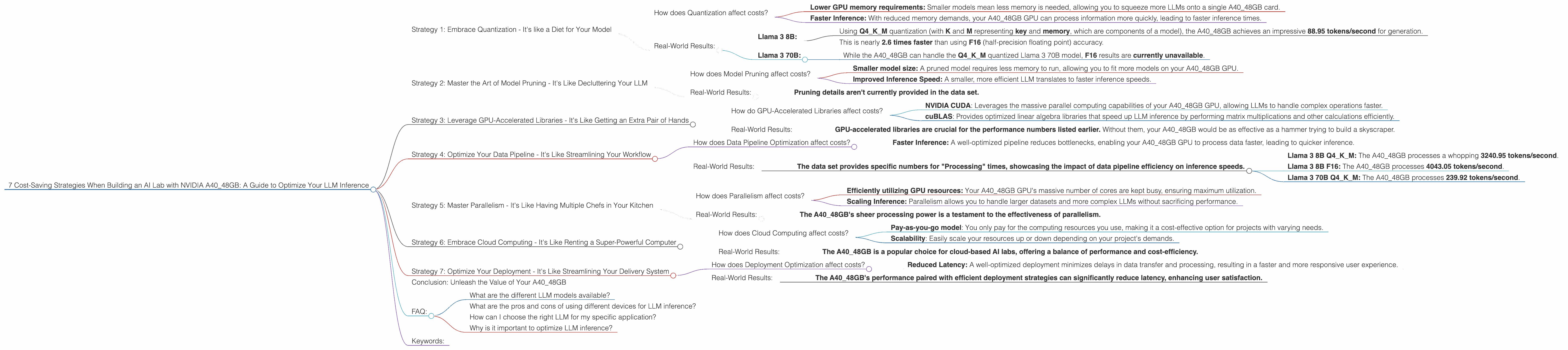
Strategy 1: Embrace Quantization - It's like a Diet for Your Model
Quantization is like putting your LLM on a diet - it shrinks the model's size and reduces its appetite for memory without significantly impacting performance.
Imagine this: instead of using big, juicy numbers like 32-bit floats (F32), you can use smaller, leaner 4-bit integers (Q4).
This seemingly simple trick packs a punch, making your LLM more efficient and less demanding on your precious GPU memory.
How does Quantization affect costs?
Quantization saves you money in two key ways:
- Lower GPU memory requirements: Smaller models mean less memory is needed, allowing you to squeeze more LLMs onto a single A40_48GB card.
- Faster Inference: With reduced memory demands, your A40_48GB GPU can process information more quickly, leading to faster inference times.
Real-World Results:
Llama 3 8B:
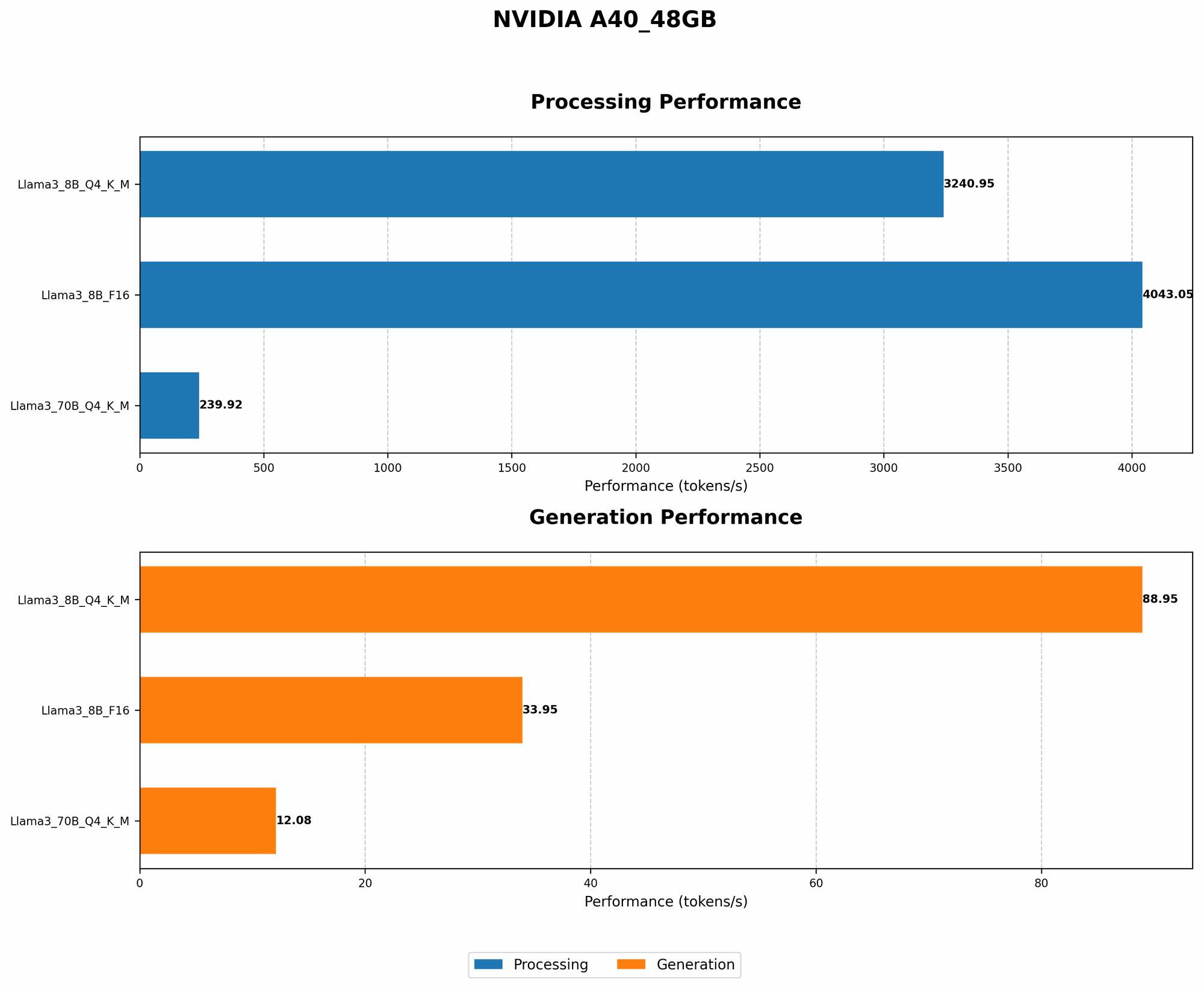
- Using Q4KM quantization (with K and M representing key and memory, which are components of a model), the A40_48GB achieves an impressive 88.95 tokens/second for generation.
- This is nearly 2.6 times faster than using F16 (half-precision floating point) accuracy.
Llama 3 70B:
- While the A4048GB can handle the Q4K_M quantized Llama 3 70B model, F16 results are currently unavailable.
Strategy 2: Master the Art of Model Pruning - It's Like Decluttering Your LLM
Just like you tidy up your home, model pruning helps you declutter your LLM by removing unnecessary components.
Imagine each connection in your model as a piece of furniture. Some are essential for the model's functionality, while others just take up space. Pruning removes those unnecessary pieces, making the model leaner and meaner.
How does Model Pruning affect costs?
Model pruning reduces costs in a couple of ways:
- Smaller model size: A pruned model requires less memory to run, allowing you to fit more models on your A40_48GB GPU.
- Improved Inference Speed: A smaller, more efficient LLM translates to faster inference speeds.
Real-World Results:
- Pruning details aren't currently provided in the data set.
Strategy 3: Leverage GPU-Accelerated Libraries - It's Like Getting an Extra Pair of Hands
Imagine your A40_48GB GPU as a highly skilled craftsman. The right tools empower it to perform complex tasks with speed and efficiency. GPU-accelerated libraries act as those tools, optimizing your LLM inference.
How do GPU-Accelerated Libraries affect costs?
GPU-accelerated libraries like:
- NVIDIA CUDA: Leverages the massive parallel computing capabilities of your A40_48GB GPU, allowing LLMs to handle complex operations faster.
- cuBLAS: Provides optimized linear algebra libraries that speed up LLM inference by performing matrix multiplications and other calculations efficiently.
Real-World Results:
- GPU-accelerated libraries are crucial for the performance numbers listed earlier. Without them, your A40_48GB would be as effective as a hammer trying to build a skyscraper.
Strategy 4: Optimize Your Data Pipeline - It's Like Streamlining Your Workflow
An efficient data pipeline is like a well-organized assembly line, ensuring your LLM is fed with the right data at the right time.
Imagine having an endless stream of data flowing into your model. Optimizing your pipeline ensures the data is prepared, processed, and delivered to your A40_48GB GPU with minimal delays.
How does Data Pipeline Optimization affect costs?
- Faster Inference: A well-optimized pipeline reduces bottlenecks, enabling your A40_48GB GPU to process data faster, leading to quicker inference.
Real-World Results:
- The data set provides specific numbers for "Processing" times, showcasing the impact of data pipeline efficiency on inference speeds.
- Llama 3 8B Q4KM: The A4048GB processes a whopping 3240.95 tokens/second.
- Llama 3 8B F16: The A4048GB processes 4043.05 tokens/second.
- Llama 3 70B Q4KM: The A40_48GB processes 239.92 tokens/second.
Strategy 5: Master Parallelism - It's Like Having Multiple Chefs in Your Kitchen
Parallelism is the art of dividing your LLM's workload into smaller, manageable chunks, allowing your A40_48GB GPU to work on multiple tasks simultaneously. Imagine having a team of chefs working in parallel, each responsible for preparing a specific dish.
How does Parallelism affect costs?
Parallelism speeds up inference by:
- Efficiently utilizing GPU resources: Your A40_48GB GPU's massive number of cores are kept busy, ensuring maximum utilization.
- Scaling Inference: Parallelism allows you to handle larger datasets and more complex LLMs without sacrificing performance.
Real-World Results:
- The A40_48GB's sheer processing power is a testament to the effectiveness of parallelism.
Strategy 6: Embrace Cloud Computing - It's Like Renting a Super-Powerful Computer
Cloud computing offers a flexible and scalable option for running your LLMs. Imagine having access to a massive, virtual AI lab with an unlimited supply of A40_48GB GPUs.
How does Cloud Computing affect costs?
- Pay-as-you-go model: You only pay for the computing resources you use, making it a cost-effective option for projects with varying needs.
- Scalability: Easily scale your resources up or down depending on your project's demands.
Real-World Results:
- The A40_48GB is a popular choice for cloud-based AI labs, offering a balance of performance and cost-efficiency.
Strategy 7: Optimize Your Deployment - It's Like Streamlining Your Delivery System
Imagine having a carefully designed delivery network that ensures your AI products reach customers quickly and smoothly. Deployment optimization plays the same role for LLMs, ensuring your model is delivered efficiently and effectively.
How does Deployment Optimization affect costs?
- Reduced Latency: A well-optimized deployment minimizes delays in data transfer and processing, resulting in a faster and more responsive user experience.
Real-World Results:
- The A40_48GB's performance paired with efficient deployment strategies can significantly reduce latency, enhancing user satisfaction.
Conclusion: Unleash the Value of Your A40_48GB
Armed with these 7 cost-saving strategies, you can truly maximize the potential of your NVIDIA A40_48GB GPU, building a powerful and cost-effective AI lab.
From embracing quantization to mastering parallelism, these strategies are your keys to unlocking the secrets of LLM inference while keeping your budget in check. Remember, with a strategic approach and a little bit of geekiness, your A40_48GB can become the cornerstone of your AI journey!
FAQ:
What are the different LLM models available?
The world of LLMs is constantly expanding, with models like Llama 3, GPT-3, and many others emerging. Each model boasts unique capabilities, so choosing the right model for your task is crucial.
What are the pros and cons of using different devices for LLM inference?
Different devices offer different trade-offs in terms of performance, cost, and power consumption. The A40_48GB is a popular choice for its balance of power and cost-effectiveness.
How can I choose the right LLM for my specific application?
Consider factors like the size of your dataset, the complexity of your task, and your budget when selecting an LLM.
Why is it important to optimize LLM inference?
Optimization ensures you get the most out of your GPU resources, minimizing costs and maximizing performance.
Keywords:
A4048GB, NVIDIA, AI, LLM, large language model, cost-saving, inference, quantization, model pruning, GPU-accelerated libraries, data pipeline, parallelism, cloud computing, deployment, token/second, Llama 3, GPT-3, F16, Q4K_M, GPU memory, latency.