7 Advanced Techniques to Squeeze Every Ounce of Performance from NVIDIA RTX 5000 Ada 32GB

Introduction
The world of large language models (LLMs) is exploding! These powerful AI models can do everything from generating human-quality text to translating languages and summarizing complex information. And with the rise of local LLM inference, you can experience the magic of these models without relying on cloud services.
But to run these models locally, you need a powerful GPU. Enter the NVIDIA RTX 5000 Ada 32GB - a powerhouse designed to handle the demanding workloads of deep learning and AI. This article dives into seven advanced techniques that can help you maximize the performance of this beast of a GPU for local LLM inference, allowing you to squeeze every ounce of its capabilities.
Quantization: Shrinking the Size of LLMs
Imagine trying to fit a whole library into a small suitcase! That's essentially what happens with LLMs - they're huge! Quantization is the key to solving this problem. It's like compressing your library into a smaller, more manageable format.
What is Quantization?
Quantization, in the context of LLMs, means reducing the precision of the numbers used to represent the model's weights. Think of it as turning a very detailed map into a simpler version with fewer colors. This simplification allows the model to use less memory and run faster.
The Power of Q4KM Quantization
For the RTX 5000 Ada 32GB, Q4KM quantization is the magic trick. This approach sacrifices precision for a significant reduction in memory footprint and a huge boost in speed.
Here's the evidence:
| Model | RTX 5000 Ada 32GB - Tokens/second |
|---|---|
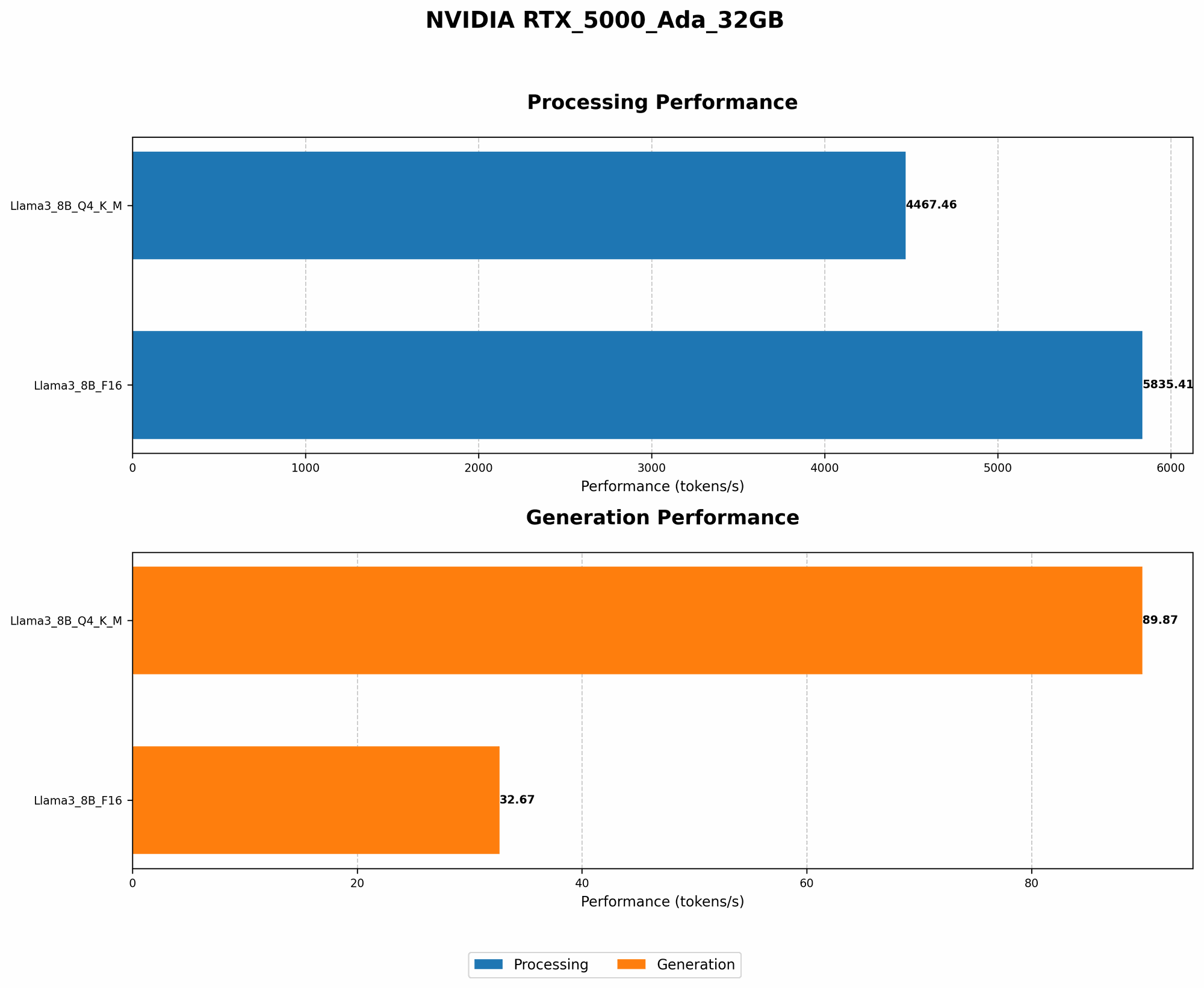
| Llama 3 8B - Q4KM | 89.87 |
| Llama 3 8B - F16 | 32.67 |
As you can see, Q4KM quantization makes our RTX 5000 Ada 32GB sing! It's a simple yet powerful technique that significantly improves performance. Think of it as a turbocharger for your LLM engine.
Optimizing for Generation Speed
LLMs are like creative writers, constantly generating new content. But we don't want them typing slowly, right? The goal here is to make our LLM generate text as fast as possible.
Optimizing for Token Generation
Token generation is the heart of any LLM's operation. Every word, punctuation mark, and even spaces are represented as tokens. The faster the token generation, the quicker your LLM churns out text.
Here's how our RTX 5000 Ada 32GB performs:
| Model | RTX 5000 Ada 32GB - Tokens/second |
|---|---|
| Llama 3 8B - Q4KM | 89.87 |
| Llama 3 8B - F16 | 32.67 |
The speed of Q4KM quantization is incredible. Imagine typing that fast! It's like comparing a sloth to a cheetah in the LLM world.
Unlocking the Processing Power of the RTX 5000 Ada 32GB
The RTX 5000 Ada 32GB isn't just for generating text; it's a powerhouse for processing large amounts of data. Let's dive into how you can leverage its processing power to optimize your LLM workflows.
Analyzing LLM Performance with Token Processing Speed
Token processing is about the speed at which an LLM handles tokens. Think of it as the LLM's brain working through all the words and punctuation. The faster the processing, the more efficient the LLM becomes.
Here's how our RTX 5000 Ada 32GB performs on token processing:
| Model | RTX 5000 Ada 32GB - Tokens/second |
|---|---|
| Llama 3 8B - Q4KM | 4,467.46 |
| Llama 3 8B - F16 | 5,835.41 |
The RTX 5000 Ada 32GB is a processing beast, churning through tokens at an impressive rate. This is crucial for tasks like text analysis, where you need to quickly process large amounts of content.
Fine-tuning and Optimization: Tailoring the LLM for Your Needs
Think of fine-tuning as giving your LLM a personal training session. You're customizing it for specific tasks, making it even stronger and better at what it does.
The Fine-tuning Process
Fine-tuning involves training your LLM on a specialized dataset relevant to your task. It's like teaching your LLM a new language or skill. The result is a more accurate and efficient model for your specific needs.
Experimenting with Different Optimization Techniques
There are several optimization techniques you can explore. Experimenting with parameters like learning rate, batch size, and epochs can fine-tune your LLM's training for better performance.
Leveraging the Power of Multiple GPUs
You know how you can lift more weight when you have more friends to help? The same logic applies to LLMs. With multiple GPUs, you can distribute the workload, significantly speeding up the training and inference process.
The Power of Distributed Training
Distributed training allows you to split the training data and spread it across multiple GPUs. Think of it as a team effort, with each GPU working on a part of the problem. This parallel processing can drastically reduce the time it takes to train your LLM.
NVIDIA's Multi-GPU Technologies
NVIDIA offers powerful technologies like NVIDIA NVLink and NVSwitch , which enable high-speed communication between multiple GPUs. This fast connection ensures that the GPUs work seamlessly together, maximizing efficiency.
The Importance of Efficient Memory Management
Memory is like a workspace for your LLM. You need enough to keep everything running smoothly. Efficient memory management is crucial to avoid bottlenecks and maximize performance.
Understanding Memory Allocation
Memory allocation is about how much memory your LLM is using. Optimizing memory allocation can prevent your LLM from crashing or slowing down due to insufficient resources.
Using Tools to Analyze and Optimize Memory Usage
Tools like NVIDIA's Nsight Systems can help you analyze your LLM's memory usage. They'll show you where memory bottlenecks are occurring and give you insights to optimize memory allocation.
Harnessing the Power of CUDA
CUDA, or Compute Unified Device Architecture, is NVIDIA's platform for parallel computing on GPUs. It's the secret sauce that unlocks the incredible performance of your RTX 5000 Ada 32GB.
Understanding CUDA and its Benefits
CUDA allows you to run your LLM's calculations on the GPU's massive number of cores. This parallel processing is many times faster than using traditional CPUs.
Utilizing CUDA Libraries for Enhanced Performance
CUDA provides libraries and tools specifically designed for LLM inference. Using these resources can further optimize your LLM's performance, leveraging the power of the RTX 5000 Ada 32GB's GPU.
Frequently Asked Questions
What kind of LLM models can I run on the RTX 5000 Ada 32GB? You can run various LLMs on the RTX 5000 Ada 32GB, including models like Llama 3, GPT-Neo, and others. The specific model you can run depends on the available memory and the model's size and complexity.
What are the differences between Q4KM and F16 quantization? Q4KM quantization offers a significant reduction in model size and a boost in speed, but at the cost of some precision. F16 quantization offers higher precision but with less of a reduction in model size and speed.
How can I learn more about fine-tuning LLMs? There are many resources available online, including tutorials and documentation from popular LLM frameworks like Hugging Face and TensorFlow.
What are the advantages of using multiple GPUs? Using multiple GPUs allows you to train your LLM faster due to parallel processing and can also improve inference speed for massive models.
Can I run LLMs locally without a specialized GPU? While a powerful GPU is recommended for optimal performance, you can run some smaller LLMs on a CPU, but it will be significantly slower.
Keywords
NVIDIA RTX 5000 Ada 32GB, LLM, large language model, local LLM inference, quantization, Q4KM quantization, F16 quantization, token generation, token processing, fine-tuning, distributed training, CUDA, memory management, GPU, AI, deep learning, performance optimization,