6 Ways to Prevent Overheating on Apple M1 Ultra During AI Workloads

Introduction
The Apple M1 Ultra chip is a powerhouse, capable of tackling even the most demanding tasks, including running large language models (LLMs). However, when it comes to AI workloads, you might find yourself wrestling with an overheating monster. This article delves into the intricacies of LLM performance and provides practical tips to keep your M1 Ultra cool and running smoothly.
The Heat is On: Why LLMs Can Make Your M1 Ultra Sweat
Picture this: you're in the midst of training a massive language model, and suddenly your M1 Ultra starts feeling the burn. This isn't just a metaphor – it's a real problem! The intensive calculations required for LLM processing can push your CPU and GPU to the brink.
Think of your M1 Ultra as a powerful sports car; it can handle high speeds for a short period, but sustained high performance requires proper cooling.
How LLMs Use Up Your Machine's Resources
LLMs are like tiny, hungry brains that constantly process information, trying to make sense of the world. This process involves a lot of calculations and data movement, especially when generating text or translating languages. The more complex the LLM, the more resources it demands.
How to Avoid Hitting the CPU and GPU Limits
While LLMs are computationally intensive, there are ways to manage the heat and keep your M1 Ultra running smoothly. This article will explore six key steps to prevent your device from turning into a hot potato:
6 Ways to Prevent Overheating on Apple M1 Ultra During AI Workloads
1. Quantization: The Art of Making LLMs Smaller and Cooler
Imagine you're trying to fit a big, bulky sofa into a small room. You might need to disassemble it and use smaller parts. Quantization is like taking a large LLM and breaking it down into smaller, more manageable chunks.
Instead of using 32-bit floating point numbers (F16) to store information, quantization uses smaller formats like 8-bit (Q80) or 4-bit (Q40). This reduces the memory footprint and computational demands, reducing the load on your M1 Ultra and lowering the heat generated.
Performance Boost with Quantization:
Let's look at the numbers:
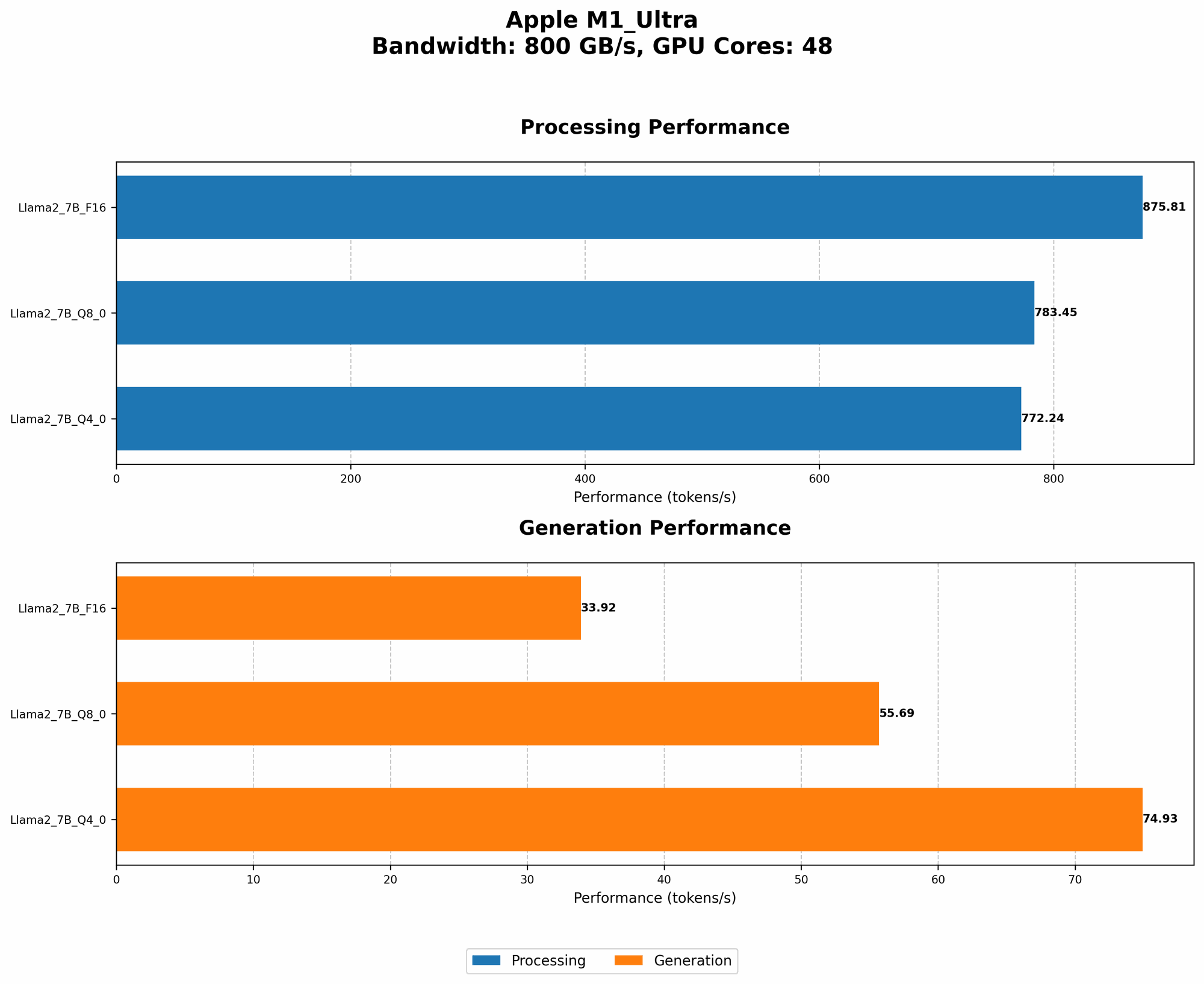
| Model | Format | Tokens/Second |
|---|---|---|
| Llama 2 7B | F16 Processing | 875.81 |
| Llama 2 7B | Q8_0 Processing | 783.45 |
| Llama 2 7B | Q4_0 Processing | 772.24 |
This data shows that while quantization reduces the token speed, it significantly decreases the load on your M1 Ultra, leading to less heat generation.
2. Streamlining the Workload: Breaking Down Large Tasks
Training a large language model resembles baking a cake. You wouldn't try to bake an entire cake in one go; it would likely burn. Similarly, for your M1 Ultra, it's best to split large tasks into smaller, manageable chunks.
Instead of running a massive model for continuous hours, break down the training process into smaller sessions. This gives your M1 Ultra a chance to cool down and prevents it from reaching critical temperatures.
3. Cooling is Key: Keeping Your M1 Ultra Fresh
Your M1 Ultra needs some breathing room! Just like a human body needs to sweat to stay cool, electronic devices require proper ventilation. Make sure your M1 Ultra has enough space around it for air circulation. Avoid placing it in enclosed spaces or under heavy objects.
4. Embrace the Cloud: Leveraging Remote Power
Sometimes, using your own hardware is like trying to carry a mountain on your shoulders. Cloud computing offers a way to offload the heavy lifting to powerful servers that are specifically designed for AI workloads. Cloud providers like Google Cloud, AWS, and Azure have specialized infrastructure for AI workloads, allowing you to train larger models without stressing your M1 Ultra.
5. Software Optimization: Choosing the Right Tools
Just like a skilled chef uses the right tools for different dishes, choosing the right software can significantly impact your M1 Ultra's performance and heat generation.
For example, llama.cpp is an open-source framework specifically designed for running LLMs on local devices like your M1 Ultra. It includes optimizations for efficient memory management and CPU utilization, which helps keep your device cool.
6. Keep It Clean: Dusting Off Your M1 Ultra
Dust can accumulate on your M1 Ultra, hindering air circulation and causing increased heat. Regularly clean the dust from your device's vents and fan to ensure optimal cooling.
FAQs
Q: Can I use my M1 Ultra for LLMs without overheating?
Yes, you can! With proper planning and a little bit of care, you can run LLMs on your M1 Ultra without turning it into a molten furnace.
Q: What if I'm not a developer? What options do I have?
Don't worry! Cloud-based solutions like Google's AI Platform or Amazon SageMaker offer user-friendly interfaces for running LLMs without the technical headaches.
Q: Is it better to use the CPU or GPU for LLMs?
Both CPUs and GPUs have their strengths and weaknesses. Generally, GPUs are more efficient for the parallel computations involved in LLMs, but it depends on the specific model and task.
Keywords
M1 Ultra, LLMs, AI, Overheating, Quantization, Llama 2 7B, GPU, CPU, Cooling, Cloud Computing, llama.cpp, Software Optimization, Dust, Performance, Efficiency, Tokens/Second, F16, Q80, Q40