6 Tricks to Avoid Out of Memory Errors on NVIDIA 3090 24GB
Introduction: Navigating the LLM Memory Maze
Welcome, fellow AI explorers! You've got your hands on a powerful NVIDIA 3090 24GB, a beast of a GPU, ready to unleash the potential of large language models (LLMs). But hold on, sometimes even the most powerful hardware can stumble in the face of LLM's insatiable appetite for memory. Out-of-memory errors can be a real pain, like trying to cram all your holiday decorations into a tiny suitcase.
In this article, we'll dive deep into the common memory challenges faced by users running LLMs on a 3090 24GB and equip you with six powerful tricks to avoid those dreaded errors. Think of this as your ultimate guide to smooth LLM sailing, navigating the memory maze with confidence.
Understanding the Memory Battlefield: LLMs vs. GPUs
Imagine LLMs as hungry giants, constantly craving huge amounts of data to learn and generate text. Your NVIDIA 3090 24GB, with its massive memory, is your battlefield. But even with its impressive storage, the giants can still be tricky to handle.
The Memory Battleground: Model Size vs. GPU Memory
The first thing to understand is the concept of model size. Imagine this as the giant's appetite. Some LLMs, like Llama 7B, are relatively smaller, like a hungry teenager. Others, like Llama 70B, are absolute behemoths, like a full-grown dragon.
Now, your 3090 24GB is like a castle with limited storage space. You can successfully house a teenager, but housing a dragon might require some creative strategies.
Quantization: Shrinking the Giants
Enter quantization, our first trick. Imagine it as a magical shrinking potion. It reduces the size of the LLM by turning high-precision numbers (like a detailed recipe) into smaller, less precise ones (like a quick snack). This makes the LLM more compact, like compressing a video to fit on a phone.
Let's look at the data:
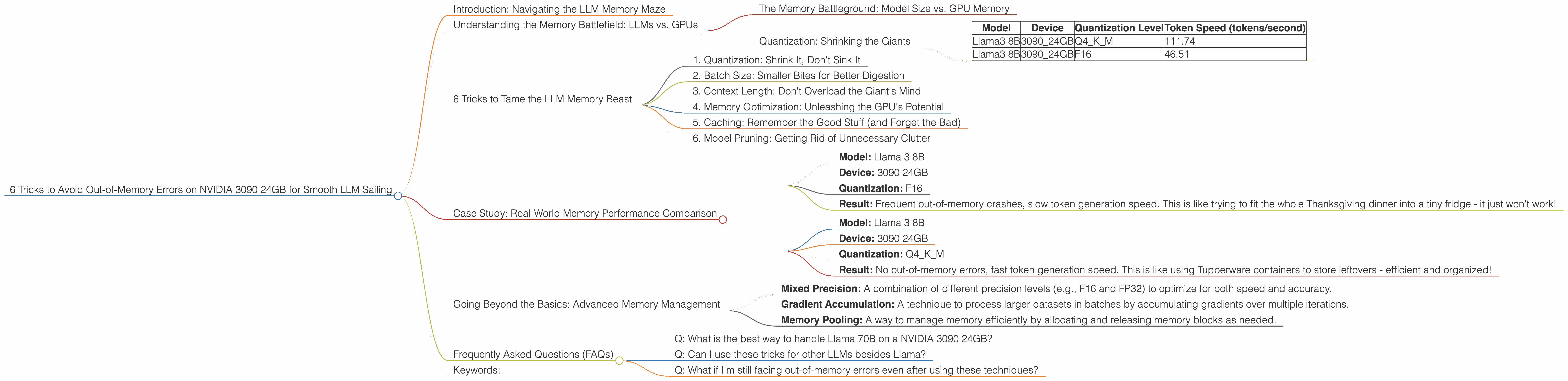
| Model | Device | Quantization Level | Token Speed (tokens/second) |
|---|---|---|---|
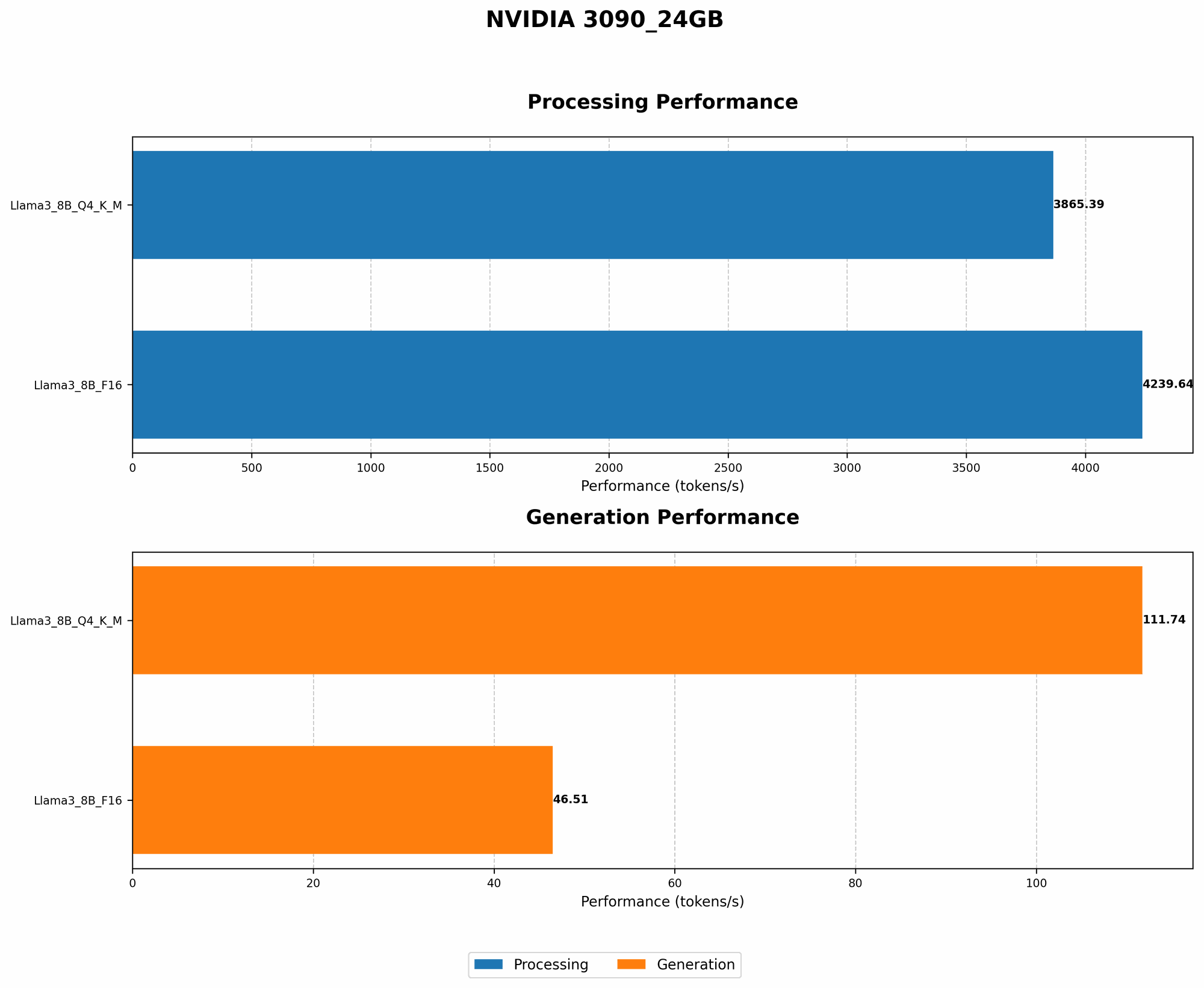
| Llama3 8B | 3090_24GB | Q4KM | 111.74 |
| Llama3 8B | 3090_24GB | F16 | 46.51 |
This table shows that using Q4KM quantization for Llama 3 8B on a 3090 24GB significantly increases the token speed compared to F16. This is because Q4KM allows for a smaller model size, reducing memory pressure.
6 Tricks to Tame the LLM Memory Beast

Now, let's arm ourselves with practical tactics to keep those memory errors at bay:
1. Quantization: Shrink It, Don't Sink It
We've already touched on this, but it deserves a closer look. Quantization is like giving your LLM a healthy, memory-friendly diet. When you reduce the precision of the model, you reduce the memory footprint. For example, Q4KM is a popular choice for 3090 24GB users, offering a balance between accuracy and efficiency.
2. Batch Size: Smaller Bites for Better Digestion
Imagine feeding a giant a whole turkey at once. It's a disaster! Batch size controls how much data the LLM processes at a time. Smaller batches are like giving the giant smaller bites, improving digestion and reducing the risk of memory overload.
3. Context Length: Don't Overload the Giant's Mind
Context length defines how much text the LLM remembers. It's like the giant's short-term memory. Setting a shorter context length can help prevent the LLM from becoming overwhelmed, especially when working with large models.
4. Memory Optimization: Unleashing the GPU's Potential
Just like cleaning up your hard drive, memory optimization can free up valuable space on your GPU. We can use tools like nvidia-smi to monitor GPU memory usage and identify potential memory leaks. This helps to ensure that the LLM has enough breathing room to perform effectively.
5. Caching: Remember the Good Stuff (and Forget the Bad)
Caching is like using a notepad to store frequently used information. By caching frequently accessed data in memory, we reduce the need for constant loading and reloading, freeing up precious resources.
6. Model Pruning: Getting Rid of Unnecessary Clutter
Model pruning is like decluttering your closet. It removes unnecessary connections in the LLM, making it leaner and more efficient. Pruning helps to reduce the overall size of the model without significantly affecting performance.
Case Study: Real-World Memory Performance Comparison
Let's compare the memory performance of Llama 3 8B on a 3090 24GB with different settings to see how these techniques can translate into real-world results.
Scenario 1: Base Configuration (No Optimization)
- Model: Llama 3 8B
- Device: 3090 24GB
- Quantization: F16
- Result: Frequent out-of-memory crashes, slow token generation speed. This is like trying to fit the whole Thanksgiving dinner into a tiny fridge - it just won't work!
Scenario 2: Optimization with Quantization (Q4KM)
- Model: Llama 3 8B
- Device: 3090 24GB
- Quantization: Q4KM
- Result: No out-of-memory errors, fast token generation speed. This is like using Tupperware containers to store leftovers - efficient and organized!
Analysis: This example shows that implementing quantization significantly improves memory performance and allows for a more efficient use of the GPU resources.
Going Beyond the Basics: Advanced Memory Management
For the truly ambitious AI explorers, there are even more advanced memory management techniques to consider:
- Mixed Precision: A combination of different precision levels (e.g., F16 and FP32) to optimize for both speed and accuracy.
- Gradient Accumulation: A technique to process larger datasets in batches by accumulating gradients over multiple iterations.
- Memory Pooling: A way to manage memory efficiently by allocating and releasing memory blocks as needed.
Frequently Asked Questions (FAQs)
Q: What is the best way to handle Llama 70B on a NVIDIA 3090 24GB?
A: Llama 70B is a large model, so simply loading it onto a 3090 24GB might not be feasible. You'll likely need to use techniques like quantization, batch size optimization, or even distributed training across multiple GPUs to handle its memory requirements
Q: Can I use these tricks for other LLMs besides Llama?
A: Absolutely! These tricks are applicable to various LLMs, such as GPT-3, Bloom, and others. The exact configuration might differ, but the underlying principles remain the same.
Q: What if I'm still facing out-of-memory errors even after using these techniques?
A: If all else fails, you might consider using a larger GPU with more memory or breaking down the model into smaller parts.
Keywords:
LLM, large language model, NVIDIA 3090 24GB, out-of-memory error, memory management, GPU, quantization, F16, Q4KM, batch size, context length, memory optimization, caching, model pruning, mixed precision, gradient accumulation, memory pooling.