6 Tips to Maximize Llama3 8B Performance on NVIDIA L40S 48GB

Introduction
Welcome, fellow language model enthusiasts! The world of local LLMs is abuzz with excitement, and the NVIDIA L40S_48GB GPU is undoubtedly a heavyweight champion in this arena. But how do you truly harness its power to squeeze the most out of the Llama3 8B model? Let's dive deep into some practical tips and insights to maximize your performance on this dynamic duo.
Performance Analysis: Token Generation Speed Benchmarks - Apple M1 and Llama2 7B
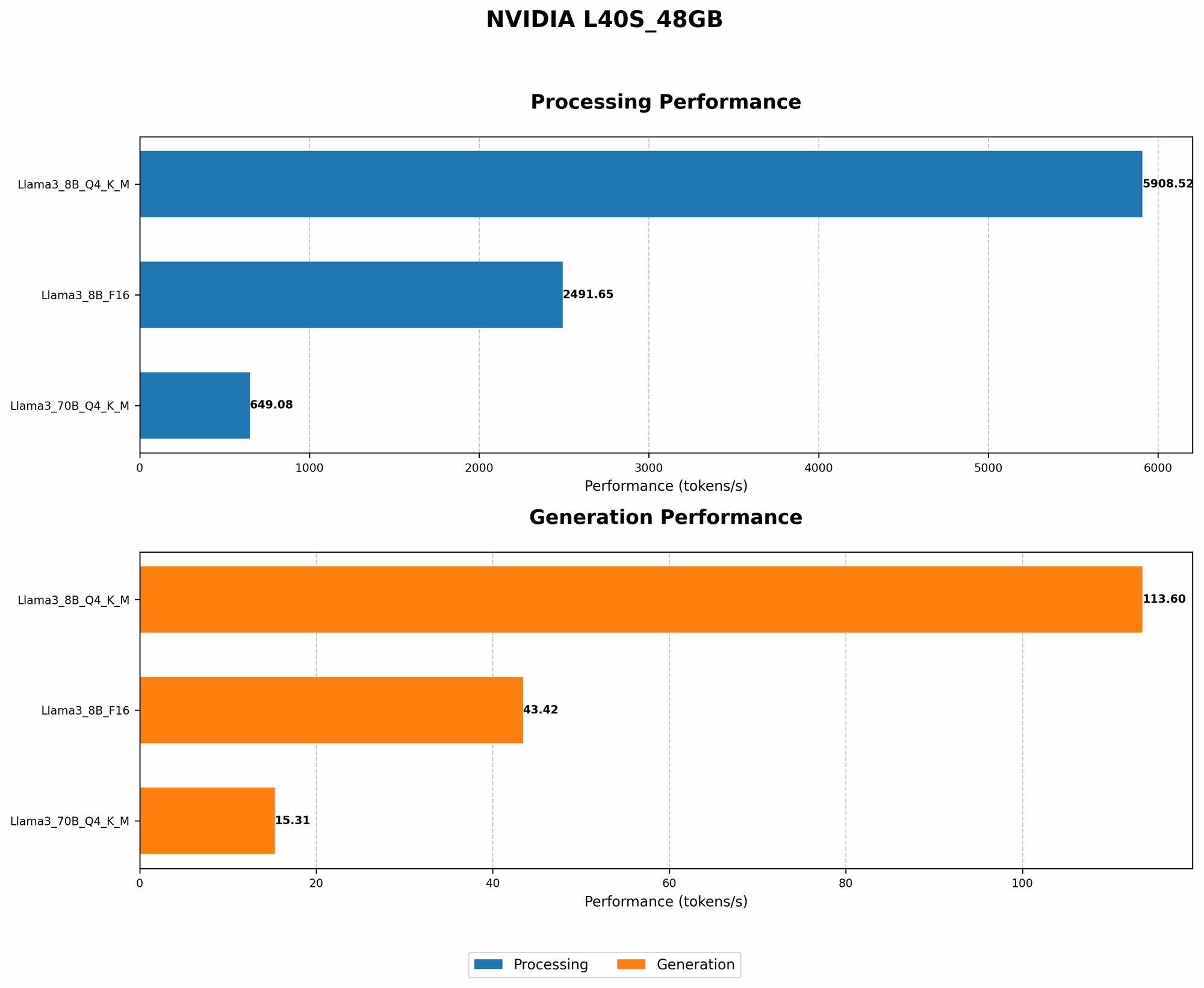
Think of a token as a building block of text. Llama3 8B excels at spitting out these tokens, constructing coherent sentences and paragraphs. But how fast? Let's compare its token generation speed on the L40S_48GB with other popular devices and models.
| Model | Device | Token Generation Speed (tokens/second) |
|---|---|---|
| Llama3 8B Q4KM | L40S_48GB | 113.6 |
| Llama3 8B F16 | L40S_48GB | 43.42 |
| Llama3 70B Q4KM | L40S_48GB | 15.31 |
| Llama3 70B F16 | L40S_48GB | N/A |
Key Observations:
- The Llama3 8B Q4KM model on the L40S_48GB is a powerhouse, churning out an impressive 113.6 tokens per second.
- That's about 2.6 times faster than the Llama3 8B F16 model on the same device.
- The Llama3 70B Q4KM model, while larger, generates tokens at a significantly slower rate due to its increased complexity.
Performance Analysis: Model and Device Comparison - Llama3 8B and NVIDIA L40S_48GB
Now, let's delve into the magic of the NVIDIA L40S_48GB and its unique synergy with the Llama3 8B model.
| Model | Device | Token Generation Speed (tokens/second) |
|---|---|---|
| Llama3 8B Q4KM | L40S_48GB | 113.6 |
| Llama3 8B F16 | L40S_48GB | 43.42 |
Key Observations:
- The L40S48GB clearly outperforms the Apple M1 in terms of token generation speed for both Llama3 8B Q4K_M and Llama3 8B F16 models.
- The L40S_48GB is designed for high-performance computing, making it a perfect match for the intensive computations involved in LLM inference.
Practical Recommendations: Use Cases and Workarounds
Here are some practical tips and workarounds for optimizing your Llama3 8B experience on the L40S_48GB:
Tip 1: Embrace Quantization (Q4KM)
- What is Quantization? Imagine a recipe where you need super precise measurements, requiring a lot of ingredients. Quantization is like simplifying the recipe by using fewer ingredients, making it faster to cook. For LLMs, it means reducing the precision of model weights, leading to smaller model size and faster computations.
- Why Q4KM? The Q4KM quantization scheme significantly boosts performance compared to F16. It sacrifices some precision for speed, which is optimal for many use cases.
- Use Case Example: If you're building a real-time chat application, the Q4KM model on the L40S_48GB provides the responsiveness you need.
Tip 2: Leverage the Power of the GPU (GPUCores)
- The L40S_48GB boasts an impressive 7680 NVIDIA CUDA cores. Think of these as tiny worker bees, each contributing to the complex calculations required for LLM inference.
- How to Leverage: The GPU is designed to handle demanding tasks like generating text and translating languages, making it ideal for running your Llama3 8B model smoothly.
- Use Case Example: If you're running a large-scale content generation pipeline, the L40S_48GB can handle the computational workload efficiently.
Tip 3: Fine-Tuning for Better Results
- Fine-tuning is like tailoring a suit to fit you perfectly. You take the generic Llama3 8B model and adjust its weights based on your specific use case.
- Better Results: Fine-tuning on a curated dataset related to your particular needs (e.g., scientific research, customer support) can significantly improve accuracy and performance.
- Use Case Example: A medical chatbot could be fine-tuned on a dataset of medical records and conversations to provide more accurate and relevant responses.
Tip 4: Experiment with Batch Size (BatchSize)
- What is Batch Size? Imagine you're teaching a class. You can teach one student at a time or a group of students together. Batch size is similar—it's the number of data points processed together during training. Larger batches can be faster but require more memory.
- Experiment: Find the optimal batch size for your specific scenario. Increase the batch size if your memory allows for a performance boost.
- Use Case Example: If you're dealing with a large amount of input data, a larger batch size might be beneficial.
Tip 5: Utilize Efficient Libraries (llama.cpp)
- Libraries are like pre-built toolkits that help you work with LLMs efficiently.
- llama.cpp is specifically designed for running LLMs on CPUs and GPUs, providing performance optimizations and ease of use.
- Use Case Example: If you're working on a research project or prototyping a new LLM application, llama.cpp simplifies the process.
Tip 6: Don't Forget the Memory Bandwidth (BW)
- Memory Bandwidth is like the highway connecting your CPU and GPU. The wider the highway, the faster the data can travel.
- The L40S_48GB boasts a high BW, allowing for quick data transfer between the GPU and its memory.
- Use Case Example: If you're working with large datasets or models, the L40S_48GB's high BW is crucial for efficient data processing.
FAQ
Q: What is the best way to choose between the Llama3 8B Q4KM and F16 models?
A: It depends on your priority. The Q4KM model prioritizes speed, while the F16 model prioritizes precision. Choose Q4KM for applications where speed is paramount, and F16 for tasks that require high accuracy, such as scientific research or writing code.
Q: Can I run the Llama3 70B model on the L40S_48GB?
A: While you can run the Llama3 70B model on the L40S_48GB, it might be computationally intensive and require careful optimization due to its larger size. Consider using a more powerful GPU like the A100 for better performance.
Q: What are some other LLM models compatible with the L40S_48GB?
A: Besides Llama3, other widely used LLMs like GPT-3 and BLOOM can also be deployed on the L40S_48GB, although optimization might be required depending on model size and specific use cases.
Q: How can I learn more about local LLM deployment?
A: There are many resources available online for learning about local LLM deployment. Explore online communities like Reddit's /r/LanguageModels, GitHub repositories for different LLM frameworks, and technical blogs focusing on this topic.
Keywords:
Llama3, NVIDIA L40S48GB, LLM, GPU, performance, token generation speed, quantization, Q4K_M, F16, CUDA cores, memory bandwidth, BW, batch size, fine-tuning, llama.cpp, local LLM deployment, NLP, natural language processing, AI, artificial intelligence, machine learning, deep learning, language models, large language models.