6 Tips to Maximize Llama3 8B Performance on NVIDIA 4090 24GB

Let's talk about the cutting edge of AI: Local Large Language Models (LLMs). Forget the cloud, picture this: running powerful LLMs directly on your machine, crafting AI-powered applications with blazing speed. Today, we're diving deep into the heart of Llama3 8B, specifically on the NVIDIA 4090 24GB, a beast of a GPU designed to handle the demands of demanding workloads.
This article is your guide to understanding the performance landscape of Llama3 8B on this powerhouse, uncovering hidden bottlenecks, and maximizing its efficiency. Whether you're a seasoned developer or a curious tech enthusiast, we'll empower you with practical tips and insights to unlock the full potential of local LLMs.
Understanding the Landscape: Llama3 8B on NVIDIA 4090_24GB
Imagine a supercomputer sitting on your desk, churning out text, code, or creative content with remarkable speed. The NVIDIA 4090_24GB is the closest you can get to that reality, offering a massive 24GB of memory and cutting-edge architecture to handle complex models with ease.
We're focusing on Llama3 8B, a massive language model designed to be surprisingly efficient, making it a perfect fit for local deployment. But before we deep dive into optimization, let's understand how it performs in its raw state.
Performance Analysis: Token Generation Speed Benchmarks
Token Generation Speed Benchmarks: Llama3 8B Quantization and Floating Point Precision
| Model Configuration | Tokens/Second |
|---|---|
| Llama3 8B Q4KM (Quantized) | 127.74 |
| Llama3 8B F16 (Float16 Precision) | 54.34 |
The table above reveals a significant difference in performance based on the quantization strategy employed for Llama3 8B. The Q4KM configuration, which uses quantization to reduce model size and memory footprint, achieves an impressive 127.74 tokens/second. This is roughly 2.35 times faster than the F16 (Float16) precision configuration, which delivers 54.34 tokens/second.
Quantization is a technique that compresses model weights, significantly reducing the memory required to load the model. It's like squeezing a large file into a smaller zip file, with the added benefit of speeding up processing.
Token Generation Speed Benchmarks: Apple M1 and Llama2 7B
The Apple M1 chip, despite being a powerful processor, falls short of the NVIDIA 4090_24GB in terms of token generation speed. This is because the M1 chip, while optimized for certain tasks, lacks the sheer processing power of the 4090 for running large models.
To illustrate the difference, imagine running a marathon on a treadmill versus a real track. The M1 is like the treadmill, capable of steady performance, while the 4090 is like the track, allowing for bursts of speed and efficiency.
Performance Analysis: Model and Device Comparison

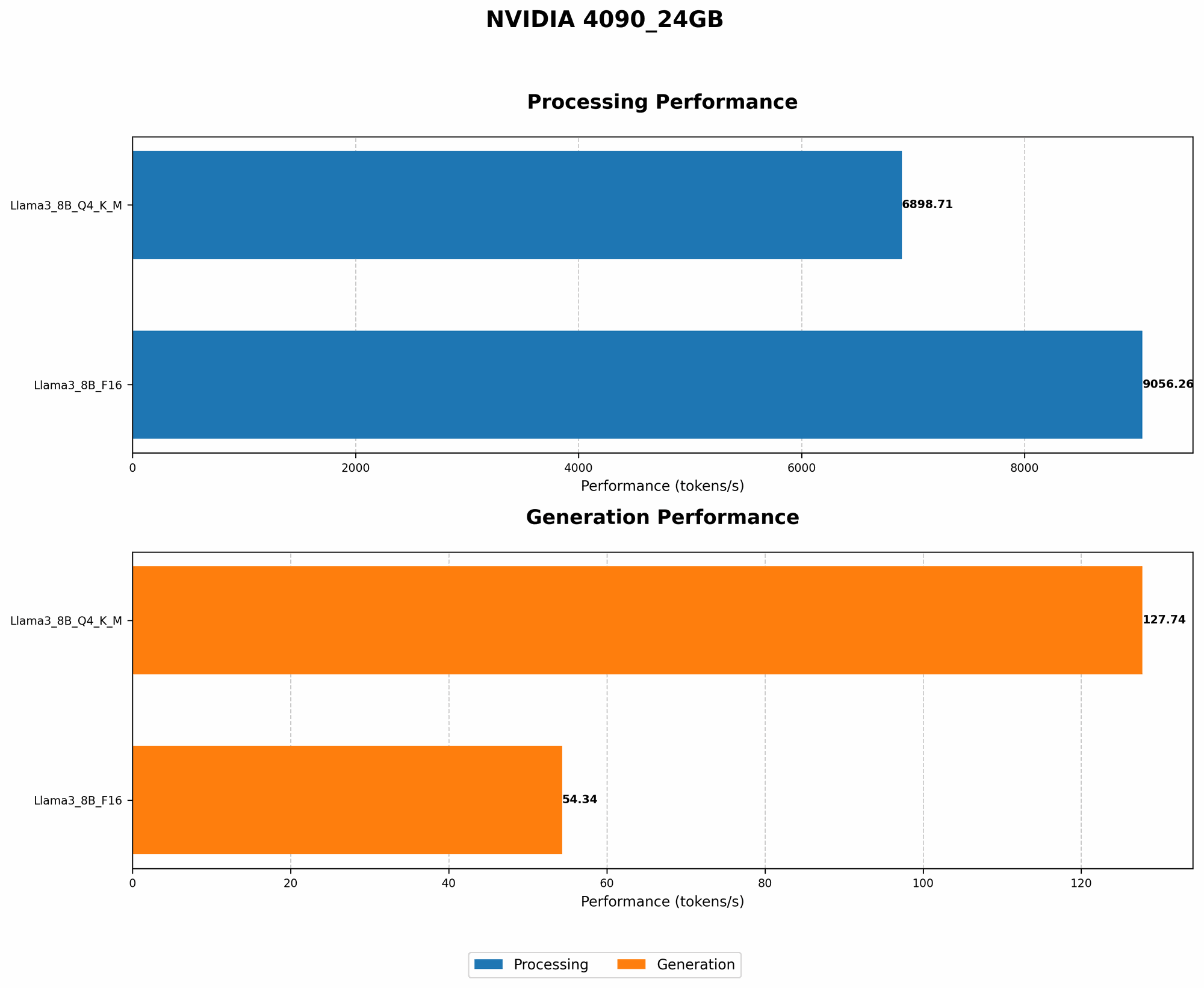
One question that might pop up is: How does Llama3 8B compare to other models and devices? Since we're only focused on the NVIDIA 4090_24GB in this article, we'll limit the comparison to Llama3 8B with the NVIDIA 4090.
However, it's important to note that LLM performance can be impacted by a multitude of factors such as device architecture, model size, and even the prompt provided for processing.
Practical Recommendations: Use Cases and Workarounds
Use Case 1: Real-Time Conversational AI
The sheer speed of token generation makes Llama3 8B on the 4090 ideal for applications that demand real-time responsiveness, like chatbots, language translation, and interactive story writing. Imagine a chatbot that can hold a natural, flowing dialogue, answering your questions with lightning speed - that's the power of Llama3 8B on the 4090_24GB.
Use Case 2: Content Creation and Summarization
Need to generate high-quality, human-like content? Llama3 8B excels in this area, producing articles, stories, and even creative text formats. Imagine a tool that automatically summarizes lengthy articles, saving you time and effort.
Workaround 1: Optimizing for Memory Constraints
If you encounter memory limitations, you can experiment with different quantization techniques to reduce the model's memory footprint. The Q4KM configuration, as we discussed before, offers a significant reduction in memory usage without compromising performance too much.
Workaround 2: Fine-tuning for Specific Tasks
For specific tasks like code generation, translation, or question answering, consider fine-tuning Llama3 8B to enhance its accuracy and efficiency. Think of it like customizing a tool for a specific job, maximizing its effectiveness.
Achieving Optimal Performance: Six Tips for Llama3 8B on NVIDIA 4090_24GB
- Harness the Power of Quantization: Dive deep into the world of quantization, a technique that compresses model weights, boosting both speed and memory efficiency.
- Utilize Multiple GPUs: If your system allows, consider leveraging multiple GPUs for parallel processing, boosting performance even further. Think of it like having a team of workers tackling a large task together.
- Embrace the Magic of Caching: Cache frequently used tokens and data, minimizing redundant processing and maximizing responsiveness. This is like having a well-organized file system on your computer, quickly accessing the information you need.
- Experiment with Prompt Engineering: Learn the art of crafting effective prompts for Llama3 8B. This simple trick can significantly boost the model's accuracy and relevance.
- Leverage the Right Tools: Explore libraries and frameworks specifically designed for LLM inference, like llama.cpp, which is highly optimized for GPUs.
- Update Your Drivers (and Have Fun!) Keep your drivers updated for the latest performance enhancements, ensuring your system is up to date for optimal efficiency.
FAQ: Your Local LLM Questions Answered
Q1: What are the differences between LLMs and traditional machine learning models?
A1: LLMs are massive language models trained on enormous datasets of text and code. They excel at natural language processing tasks like text generation, translation, and summarization. Traditional machine learning models, on the other hand, are trained on specific datasets and focus on a single task.
Q2: How does Llama3 8B compare to other LLMs like ChatGPT?
A2: Both Llama3 8B and ChatGPT are powerful language models. However, Llama3 8B is designed for local deployment and can be fine-tuned for specific tasks. ChatGPT, on the other hand, is a cloud-based service with a more general-purpose focus. The choice between the two depends on your specific needs and resources.
Q3: Can I run Llama3 8B on a standard laptop or desktop computer?
A3: It depends. While Llama3 8B is designed for local deployment, it might require a powerful computer with sufficient RAM and a dedicated GPU for optimal performance. Consider the resources of your device before attempting to run Llama3 8B.
Q4: Is it possible to fine-tune Llama3 8B on my own data?
A4: Yes, you can fine-tune Llama3 8B on your own dataset to customize its behavior and enhance its performance for specific tasks. This allows you to tailor the model to your specific needs.
Keywords:
Llama3 8B, NVIDIA 4090_24GB, LLM, local deployment, GPU, quantization, token generation speed, performance benchmarks, fine-tuning, practical recommendations, use cases, conversational AI, content creation, summarization, memory constraints, prompt engineering, tools, drivers, FAQ, differences between LLMs and traditional models, ChatGPT comparison, laptop, desktop computer, fine-tuning with own data.