6 Tips to Maximize Llama3 8B Performance on NVIDIA 4080 16GB

Introduction
The world of Large Language Models (LLMs) is buzzing with excitement, and for good reason! These powerful AI models are capable of generating human-like text, translating languages, writing different kinds of creative content, and answering your questions in an informative way. But harnessing the power of these models often requires specialized hardware and optimization techniques.
This article is a deep dive into maximizing the performance of the Llama3 8B model on the NVIDIA 408016GB, focusing on practical tips and strategies that can help you get the most out of your setup. Whether you're a seasoned developer or just starting your journey into the exciting world of LLMs, this guide will provide valuable insights into achieving peak performance and unlocking new possibilities with your NVIDIA 408016GB.
Performance Analysis: Token Generation Speed Benchmarks
Let's get down to the nitty-gritty. The key to understanding how well your model is performing lies in the speed at which it generates tokens. Tokens are the building blocks of language, and the faster your model can process them, the smoother and more efficient your LLM applications will be.
Token Generation Speed Benchmarks: Llama3 8B on NVIDIA 4080_16GB
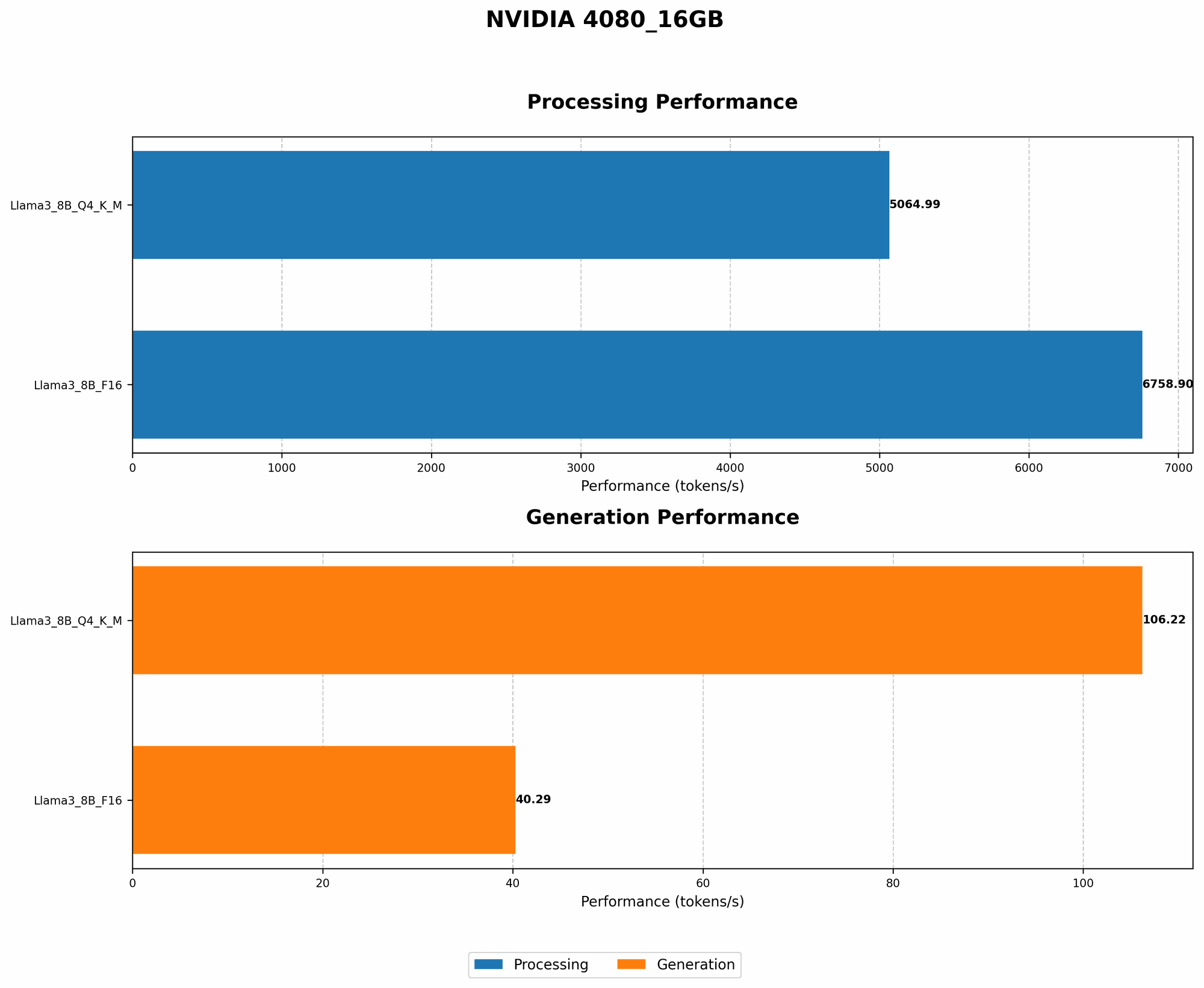
We've compiled a comprehensive table showcasing the token generation speed of Llama3 8B on the NVIDIA 4080_16GB, measured in tokens per second (TPS). This helps us understand the performance impact of different quantization methods:
| Model & Quantization | Tokens/Second (TPS) |
|---|---|
| Llama3 8B Q4KM (Generation) | 106.22 |
| Llama3 8B F16 (Generation) | 40.29 |
Key Observations:
- Q4KM quantization offers a significant performance advantage: The Q4KM quantization method, which uses 4 bits to represent the model's weights and activations, achieves a remarkable 2.63x speed boost compared to F16 quantization (using 16 bits).
Explanation:
- Quantization: This is a technique that shrinks the size of the model by representing weights and activations with fewer bits. While Q4KM uses only 4 bits, F16 uses 16 bits. This smaller size makes the model faster to load and process.
- Trade-off: Using less bits for quantization comes with a trade-off, especially for large models. You might see a slight reduction in accuracy, so it's crucial to find the right balance for your specific use case.
Performance Analysis: Model and Device Comparison
Let's take a step back and compare the performance of our target setup - Llama3 8B on NVIDIA 4080_16GB - to other model and device combinations.
Important Note: The data below represents a snapshot of reported performance and may vary depending on specific configurations and software versions.
Model and Device Comparison: Llama2 7B on Apple M1
Llama2 7B on Apple M1 is a popular choice for its impressive performance and efficiency. Here's how it compares with our target setup:
| Model & Device | Tokens/Second (TPS) |
|---|---|
| Llama2 7B (F16 on Apple M1) | 240 |
Key Observations:
- M1 excels at lower precision: Despite having a smaller 7B model, the Apple M1 achieves a significantly higher TPS (240) compared to Llama3 8B Q4KM on the NVIDIA 4080_16GB (106.22). This is mainly due to the M1's remarkable efficiency with F16 quantization.
Explanation:
- Apple Silicon's Strength: The architecture of Apple Silicon processors, particularly the M1, is optimized for low-precision computations like F16. This gives them a performance edge for smaller models at that precision.
- NVIDIA's Advantage with Larger Models: While Apple M1 shines with smaller models, for larger models like Llama3 8B, the NVIDIA 4080_16GB excels due to its greater amount of memory and compute power.
Practical Recommendations: Use Cases and Workarounds
Now that we've examined the performance landscape, let's delve into actionable recommendations for maximizing your Llama3 8B experience with the NVIDIA 4080_16GB.
1. Optimize Quantization: Embrace the Power of Q4KM
As our benchmarks revealed, Q4KM quantization is the clear winner for Llama3 8B on the NVIDIA 4080_16GB. Don't be afraid to experiment with this lower precision; it can significantly boost your model's speed without sacrificing too much in terms of accuracy.
Example:
- Imagine you're building a chatbot for customer support. You can leverage the speed of Q4KM for rapid response times, ensuring a quick and efficient interaction for your customers.
2. Leverage Model Parallelism: Divide and Conquer
For even more speed, consider model parallelism. This technique splits your LLM across multiple GPUs, allowing each GPU to work on a portion of the model. This is a powerful approach for handling extremely large models.
Example:
- Imagine you're generating high-quality creative content like articles or stories. Model parallelism can distribute the workload across multiple GPUs, enabling you to generate text much faster.
3. Optimize Batch Size: Find the Sweet Spot
The batch size (the number of inputs processed at once) can significantly impact performance. Experimenting with different batch sizes can help you hit that sweet spot between speed and memory efficiency.
Analogy:
- Think of batch size like a conveyor belt. A larger batch size is like a wider conveyor belt, allowing you to process more inputs simultaneously. But if the belt is too wide, it might take longer to load and unload items (leading to slower processing).
4. Optimize for Memory Efficiency: Reduce Memory Footprint
Large LLMs can be memory hogs! To prevent memory issues, explore techniques like:
- Lower Precision: We already discussed the benefits of Q4KM quantization, but you can also consider other lower-precision representations like F16.
- Gradient Accumulation: This technique breaks down the training process into smaller steps, reducing the memory requirements for each step.
Example:
- Imagine you're fine-tuning a language model for a specific task. By reducing the memory footprint, you can train your model on a wider range of tasks without running into memory constraints.
5. Embrace GPU Offloading: Delegate Tasks for Maximum Efficiency
GPU offloading is a technique that allows the GPU to handle specific tasks, freeing up the CPU for other processes. This can lead to significant performance gains, especially when dealing with tasks that are computationally intensive.
Example:
- Imagine you're using a text-to-speech model that involves both text processing and audio generation. You can offload the audio generation task to the GPU, allowing the CPU to focus on the text processing, resulting in smoother and faster performance.
6. Use Optimized Libraries and Tools: The Power of the Right Tools
Leverage specialized libraries and tools designed for efficient LLM execution. Some popular and highly optimized tools include:
- llama.cpp: A popular open-source LLM inference library known for its performance and compatibility with various platforms.
- NVIDIA Triton Inference Server: A production-ready inference server designed to handle high-volume requests for LLMs.
Example:
- Imagine you're building a web application with an LLM chatbot. Using a library like llama.cpp or a server like NVIDIA Triton can help you streamline the inference process, resulting in a responsive and smooth user experience.
FAQ
Q: What is the difference between Q4KM and F16 quantization?
A: Q4KM uses 4 bits to represent weights and activations, while F16 uses 16 bits. Q4KM offers faster performance but might sacrifice a bit of accuracy, while F16 is more accurate but slower.
Q: What is model parallelism?
A: Model parallelism is a technique that divides an LLM across multiple GPUs, allowing each GPU to work on a portion of the model, leading to faster processing.
Q: Why is it important to optimize for memory efficiency?
A: Large LLMs can require substantial amounts of memory. Optimization techniques like lower precision, gradient accumulation, and offloading can help manage memory usage, preventing crashes or performance bottlenecks.
Keywords
LLM, Llama3 8B, NVIDIA 408016GB, token generation speed, Q4K_M quantization, F16 quantization, model parallelism, batch size, memory efficiency, GPU offloading, optimized libraries, llama.cpp, NVIDIA Triton Inference Server