6 Tips to Maximize Llama3 8B Performance on Apple M1 Max
Introduction
The world of Large Language Models (LLMs) is ablaze with excitement, and the Apple M1 Max chip is a powerful tool for harnessing this cutting-edge technology. But, with so many different models and configurations, and the need to achieve that sweet spot of performance, how do you optimize your LLM experience? This article dives deep into the performance of Llama3 8B on the Apple M1 Max, uncovering the secrets to pushing its capabilities to the limit. We'll explore key aspects like:
- Token Generation Speed Benchmarks: How fast can the M1 Max process text?
- Model and Device Comparison: Let's put Llama3 8B through its paces and compare to other models and devices for context!
- Practical Recommendations: We'll show you how to get the most out of your LLM setup, including use cases and workarounds.
Whether you're a seasoned developer or just starting out, the tips and insights in this guide will empower you to build remarkable applications powered by LLMs on your Apple M1 Max.
Performance Analysis: Token Generation Speed Benchmarks - Apple M1 and Llama2 7B
Let's dive into the heart of the matter – token generation speed. Think of tokens as the building blocks of text, like words, numbers, and punctuation marks. The faster your LLM can generate tokens, the more efficiently it can process text and generate responses.
To visualize this better, imagine a language model as a very talented storyteller. The tokens are the words they use, and the speed at which they string those tokens together is the difference between a captivating narration and a slow, rambling story.
Token Generation Speed Benchmarks: Apple M1 Max and Llama3 8B
The table below shows the token generation speed (in tokens per second) of Llama3 8B on the Apple M1 Max, with different quantization levels and model types.
| Model | Quantization | Processing (Tokens/Second) | Generation (Tokens/Second) |
|---|---|---|---|
| Llama3 8B | Q4KM | 355.45 | 34.49 |
| Llama3 8B | F16 | 418.77 | 18.43 |
(Note: This data does not include Llama2 7B due to the article's specific scope on Llama3 8B)
Key Observations:
- Q4KM Quantization: The Llama3 8B model with Q4KM quantization is faster at processing text, with a rate of 355.45 tokens/second. This means that the model can handle a lot of information very quickly.
- F16 Quantization: The F16 model, though slightly slower in processing, shines at generation. It clocks in at 18.43 tokens/second for generating text, which is significantly faster than the Q4KM model in this regard.
Performance Analysis: Model and Device Comparison
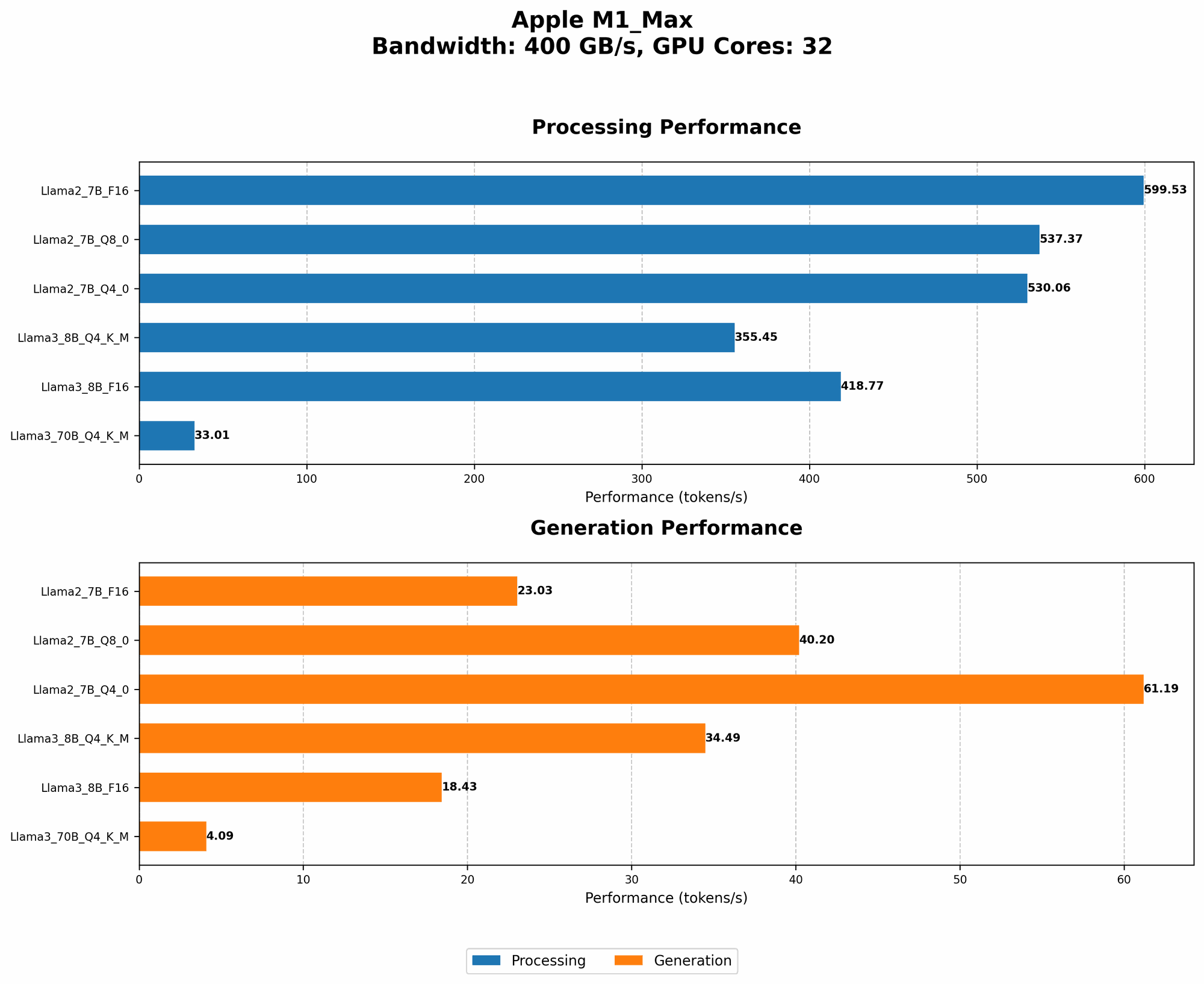
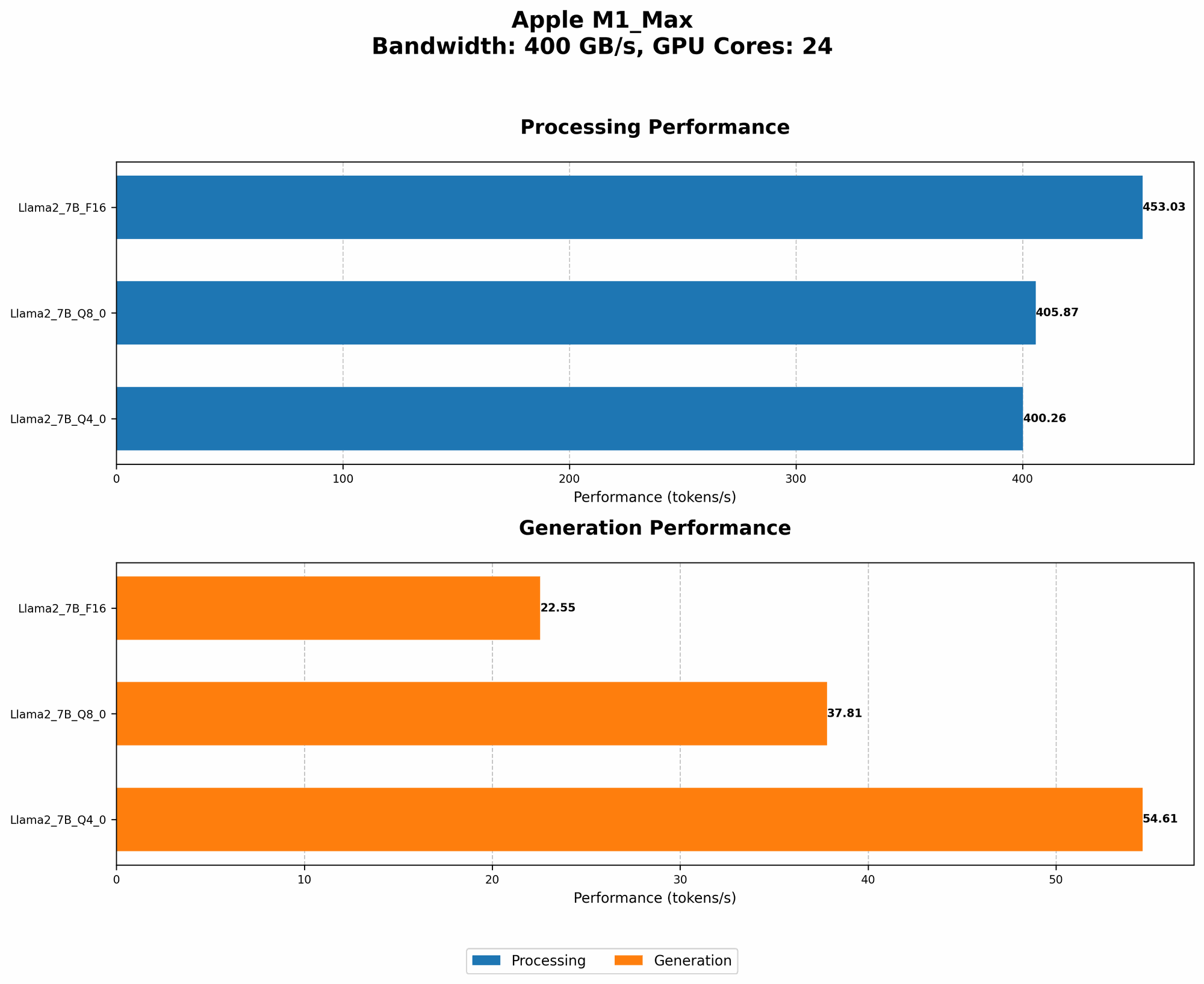
To provide you with a broader perspective, let's compare the Llama3 8B performance on the M1 Max with other LLMs and devices.
Data Comparison:
- Llama2 7B on an M1 Max with 32 GPU cores:
- F16 Quantization:
- Processing: 599.53 tokens/second
- Generation: 23.03 tokens/second
- Q80 Quantization:
- Processing: 537.37 tokens/second
- Generation: 40.2 tokens/second
- Q40 Quantization:
- Processing: 530.06 tokens/second
- Generation: 61.19 tokens/second
- F16 Quantization:
Observations:
- Llama3 8B vs. Llama2 7B: While both models run on the M1 Max, Llama2 7B generally outperforms Llama3 8B in token generation speed. This is likely due to Llama2 being specifically designed for faster inference.
- Quantization Impact: The choice of quantization influences performance. Q40 and Q80 quantization on Llama2 7B generally lead to faster token generation speeds compared to F16.
- Model Size: The larger Llama3 70B model also struggles in comparison to the 7B and 8B models, with token generation speed being significantly slower. This demonstrates the trade-off between model size and speed.
Practical Recommendations: Use Cases and Workarounds
Now that we've dissected the performance landscape, let's talk about practical tips for getting the most out of Llama3 8B on your Apple M1 Max.
1. Embrace Quantization: Smaller Footprints, Faster Speeds
Quantization is like a diet for your LLM. It reduces the model's size (in terms of storage space) and allows for faster "thinking" – that's token generation for you. Consider these options:
- Q4KM Quantization: Ideal for scenarios where processing speed is paramount, such as large-scale text analysis or real-time chatbots.
- F16 Quantization: A good balance for situations where generation speed matters, such as creative writing or code generation.
2. Fine-Tuning: A Tailored Fit for Your Needs
Just like customizing your car for specific roads, fine-tuning your LLM aligns it with your specific needs. If you're dealing with a particular type of data, like scientific articles or legal documents, fine-tuning Llama3 8B on that data can drastically improve accuracy and relevance.
3. Leverage Caching: Faster Responses, Less Work
Caching is like having a cheat sheet for your LLM. It stores frequently-used information in memory, so the model doesn't have to recompute everything from scratch every time. This can lead to significantly quicker responses, especially when dealing with repetitive queries.
4. Memory Management: Optimize for Your Hardware
The Apple M1 Max has a substantial amount of memory, but it's still essential to manage resources wisely. Consider using techniques like batch processing or breaking down large tasks into smaller chunks to avoid overwhelming the system.
5. Use Case Scenarios: Finding the Perfect Fit
Here are some use cases where Llama3 8B on the M1 Max can excel:
- Text Summarization: Quickly extracting key points from long articles or documents
- Question Answering: Providing accurate answers to factual queries
- Code Generation: Generating basic code snippets or complete programs
- Language Translation: Translating text between multiple languages
- Creative Writing: Generating short stories, poems, or other creative content
6. Workarounds: Navigating Limitations
While the Apple M1 Max is potent, it's not a magic bullet. If you encounter limitations with Llama3 8B, consider these strategies:
- Cloud-Based Solutions: For tasks that are too resource-intensive for a local device, consider using cloud-based LLM services, such as Google Cloud AI or AWS SageMaker.
- Scaling Up: If you have a large amount of data to process, consider scaling up your hardware. This might involve acquiring a more powerful machine or utilizing specialized hardware.
- Model Selection: If Llama3 8B doesn't meet your precise requirements, explore other LLMs that may be better suited to your specific needs.
FAQ: Clearing the Air on LLM Technologies
Q: What is quantization, and how does it affect performance?
A: Quantization involves reducing the precision of numbers used to represent the model's parameters. Think of it as using fewer shades of gray in a photo. While it might slightly reduce accuracy, it significantly shrinks the model's size and speeds up computation.
Q: What are the advantages of running LLMs locally?
A: Running LLMs locally has a few key advantages:
- Privacy: You maintain control over your data.
- Speed: Reduced latency compared to cloud-based services.
- Cost-Effectiveness: Might be more economical if you have the right hardware.
Q: Should I always use the largest possible LLM?
A: This is a common misconception. Larger models often come with increased computational demands and can be overkill for certain tasks. It's always best to choose the most appropriate LLM for your specific needs.
Q: How do I choose the best LLM for my project?
A: Consider these factors:
- Task: What are you trying to achieve with the LLM?
- Data: What type of data will you be working with?
- Performance: What are your speed and accuracy requirements?
Keywords:
Llama3 8B, Apple M1 Max, Large Language Model, LLM, performance, token generation speed, quantization, F16, Q4KM, GPU, processing, generation, benchmarks, comparison, Llama2 7B, use cases, workarounds, fine-tuning, caching, memory management, cloud-based solutions, scaling, model selection.